背景知识
Scroll组件是容器组件,支持垂直和水平方向的滚动,可以实现组件内元素的前后滚动,让页面展示更多更丰富的内容。由于Scroll组件内仅支持一个子组件,一般搭配Column、Row、List、Grid等组件使用。
要实现Scroll组件的某个元素的吸顶效果,可以使用nestedScroll属性,对父子组件的向前、向后滑动设置嵌套滚动模式,实现组件与父组件的滚动联动。
解决方案
吸顶效果可以通过对组件设置nestedScroll属性实现。通过改变参数的值,使父组件在向前滚动到边缘时触发边缘效果(固定在边缘)。需要注意的是,nestedScroll是将组件与父组件进行嵌套,所以在实际开发中,要明确父组件的范围和实际效果。
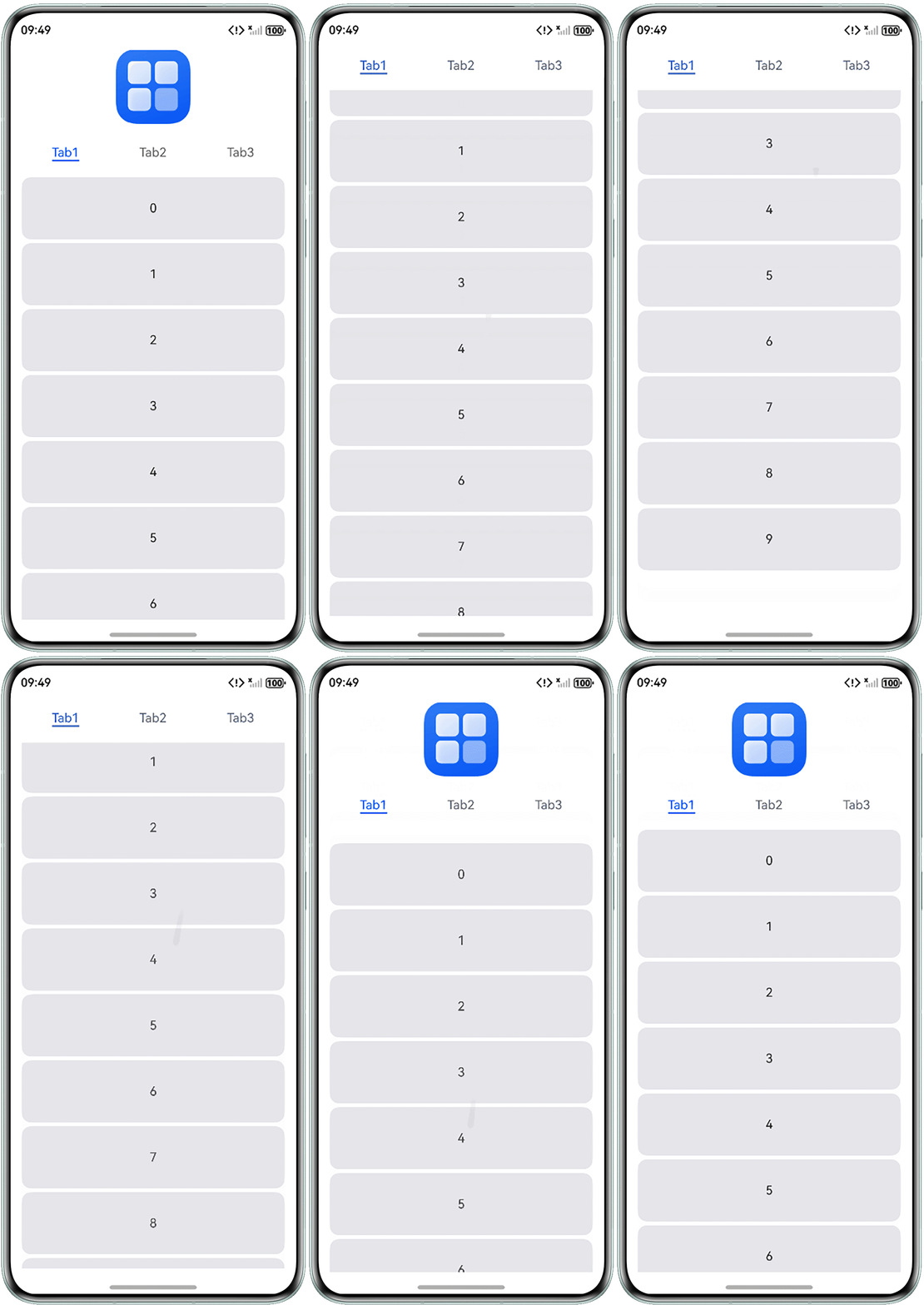
- 实现Tabs组件的TabBar吸顶的效果。
@Entry
@Component
struct ScrollCeilingSolution1 {
  scroller: Scroller = new Scroller();
  itemData: Array<number> = [0, 1, 2, 3, 4, 5, 6, 7, 8, 9];
  tabTitles: Array<string> = ['Tab1', 'Tab2', 'Tab3'];

  // 创建Tabs组件单个tab下的内容组件,并设置TabContent组件内的List组件的nestedScroll属性,List组件的父组件为TabContent组件
  @Builder
  tabContentData(tabTitle: string) {
    TabContent() {
      List() {
        ForEach(this.itemData, (item: number) => {
          ListItem() {
            Text(`${item}`)
              .height(80)
              .width('100%')
              .textAlign(TextAlign.Center)
              .backgroundColor('#E5E5EA')
              .margin({ bottom: 5 })
              .borderRadius(12);
          };
        });
      }
      .width('100%')
      .scrollBar(BarState.Off)
      .nestedScroll({
        scrollForward: NestedScrollMode.PARENT_FIRST,
        scrollBackward: NestedScrollMode.SELF_FIRST
      });
    }
    .width('100%')
    .tabBar(tabTitle)
    .padding({ top: 5, bottom: 5 });
  }

  /*
  设置scrollForward的滚动模式为NestedScrollMode.PARENT_FIRST:
  当控制List内元素向前滚动时,其父组件TabContent先滚动,覆盖Scroll组件嵌套的Column组件内的Image组件,随后Tabs组件触碰顶部边缘,触发边缘效果,从而固定在顶部
  设置scrollBackward的滚动模式为NestedScrollMode.SELF_FIRST:
  当控制List内元素向后滚动时,List的内容先滚动,直至滚动到List最顶部后,父组件TabContent开始滚动
  */

  build() {
    Scroll(this.scroller) {
      Column() {
        // 顶部图片,资源替换为实际图片
        Image($r('app.media.startIcon'))
          .height(96)
          .margin({ top: 8, bottom: 8 });

        // 分类数据
        Tabs() {
          ForEach(this.tabTitles, (title: string) => {
            this.tabContentData(title);
          });
        };
      }
      .width('90%')
      .alignItems(HorizontalAlign.Center);
    }
    .width('100%')
    .align(Alignment.Center)
    .scrollBar(BarState.Off);
  }
}
效果预览:
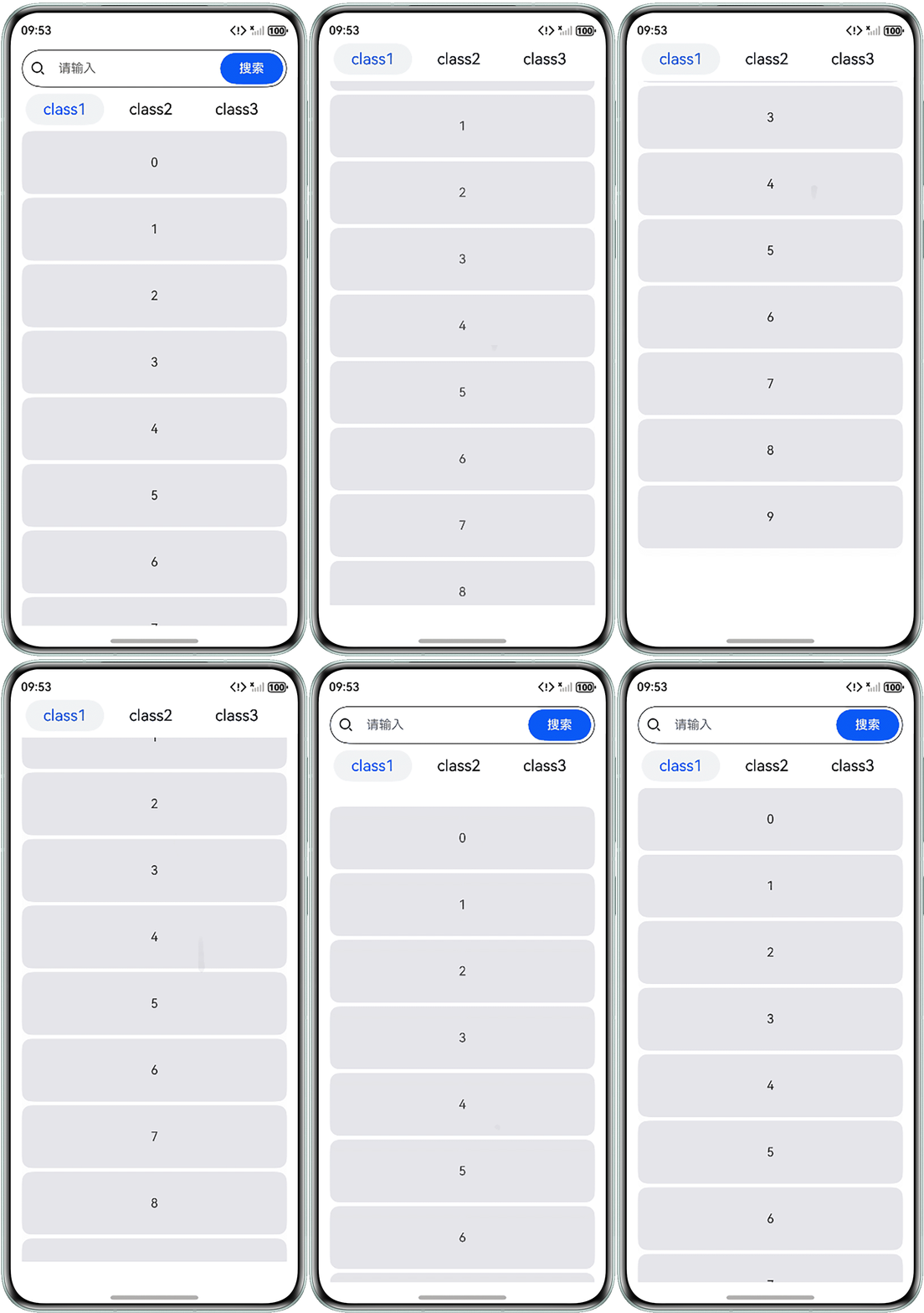
- 实现List组件吸顶的效果。
@Entry
@Component
struct ScrollCeiling2 {
  scroller: Scroller = new Scroller();
  itemData: Array<number> = [0, 1, 2, 3, 4, 5, 6, 7, 8, 9];
  classList: Array<string> = ['class1', 'class2', 'class3'];

  build() {
    Scroll(this.scroller) {
      Column() {
        // 搜索框
        Stack({ alignContent: Alignment.End }) {
          Row() {
            Image($r('sys.media.ohos_ic_public_search_filled')) // 资源替换为实际图片
              .height(20)
              .margin({ left: 5 });

            TextInput({ placeholder: '请输入' })
              .type(InputType.Normal)
              .fontSize('10fp')
              .backgroundColor(Color.Transparent);
          }
          .height(48)
          .width('100%')
          .borderWidth('1')
          .borderRadius(24)
          .padding({
            left: 5,
            right: 5,
            top: 5,
            bottom: 5
          });

          Button('搜索')
            .type(ButtonType.Capsule)
            .width(80)
            .margin({ right: 5 });
        }
        .width('90%')
        .margin({ top: 8, bottom: 8 });

        Column() {
          // 自定义分类列表
          List() {
            ForEach(this.classList, (cls: string) => {
              ListItem() {
                Text(cls)
                  .fontSize('20fp')
                  .fontColor(cls === 'class1' ? '#0A59F7' : '#000000')
                  .height(40)
                  .width(100)
                  .textAlign(TextAlign.Center)
                  .borderRadius(20)
                  .backgroundColor(cls === 'class1' ? '#F1F3F5' : '#FFFFFF')
                  .margin({ left: 5, right: 5 });
              };
            });
          }
          .height(48)
          .width('100%')
          .listDirection(Axis.Horizontal);

          /*
          设置scrollForward的滚动模式为NestedScrollMode.PARENT_FIRST:
          当控制Data_List内元素向前滚动时,其父组件Column先滚动,覆盖Scroll组件嵌套的Column组件内的Stack组件(搜索框),随后Column组件触碰顶部边缘,触发边缘效果,从而将Class_List固定在顶部
          设置scrollBackward的滚动模式为NestedScrollMode.SELF_FIRST:
          当控制Data_List内元素向后滚动时,Data_List的内容先滚动,直至滚动到Data_List最顶部后,父组件Column开始滚动
           */

          // 分类数据
          List() {
            ForEach(this.itemData, (item: number) => {
              ListItem() {
                Text(`${item}`)
                  .height(80)
                  .width('100%')
                  .textAlign(TextAlign.Center)
                  .backgroundColor('#E5E5EA')
                  .margin({ bottom: 5 })
                  .borderRadius(12);
              };
            });
          }
          .height('90%')
          .width('100%')
          .scrollBar(BarState.Off)
          .nestedScroll({
            scrollForward: NestedScrollMode.PARENT_FIRST,
            scrollBackward: NestedScrollMode.SELF_FIRST
          });
        }
        .width('90%')
        .height('100%');
      }
      .alignItems(HorizontalAlign.Center);
    }
    .width('100%')
    .scrollBar(BarState.Off);
  }
}
效果预览: