问题现象
- 场景一:页面间参数传递和接收如何实现?
- 场景二:如何获取pop、popToName、popToIndex传入的result参数?
- 场景三:如何判断参数来源自哪个页面,使用的什么方法传递过来的?
- 场景四:POP_TO_SINGLETON模式下,如何传参和接收参数?
背景知识
- Navigation:路由导航的根视图容器。
- NavDestination:子页面的根容器,用于显示Navigation的内容区。
- getParamByIndex:获取index指定的NavDestination页面的参数信息。
- getParamByName:获取所有名为name的NavDestination页面的参数信息,按页面索引从小到大排序。
- NavPathInfo:路由页面信息。
- onResult:NavDestination返回时触发该回调。
- LaunchMode:路由栈操作模式。
- onNewParam:当之前存在于栈中的NavDestination页面通过launchMode.MOVE_TO_TOP_SINGLETON或launchMode.POP_TO_SINGLETON移动到栈顶时,触发该回调。
- 开发者可参考系统路由表实现对系统路由表的文件配置。
解决方案
实现场景 | 实现方案 | 方案对比 | |
|---|---|---|---|
场景一:页面间参数传递和接收的实现。 | 参数传递 | 通过pushPath、pushPathByName、pushDestination、pushDestinationByName等方法实现。 | / |
参数接收 | 方案一:通过onReady获取参数。 | 页面首次加载完成时触发,并获取参数。 | |
方案二:使用getParamByIndex获取参数。 | 任意时机主动调用。 | ||
场景二:获取pop、popToName、popToIndex传入的result参数。 | 方案一:使用onPop回调获取参数。 | 若使用popToName()跨级返回,中间页面的onPop不会触发。 | |
方案二:使用onResult回调获取参数。 | 只要页面返回到当前页面即触发,无论通过逐级返回还是跨级跳转。 | ||
场景三:判断参数的来源页面和传递方式。 | 方法:自定义参数标记。 | / | |
场景四:在POP_TO_SINGLETON模式下实现传参和接收。 | 方案一:使用onNewParam更新参数。 | 仅单向传递(发送页→目标页)。 | |
方案二:使用事件通信机制(Emitter)实现参数传递和接收。 | 支持双向通信(任意线程/组件间互发)。 | ||
- 场景一:页面间参数传递和接收的实现。
- 参数传递:可通过pushPath、pushPathByName、pushDestination、pushDestinationByName等方法实现。以pushPath为例,通过NavPathInfo对象中的params属性,实现从发起页到目标页的数据传递:
this.params = new NavParams('HomePage的数据', 'HomePage', 'pushPath'); let info: NavPathInfo = new NavPathInfo('PageA', this.params); this.pageInfo.pushPath(info); - 参数接收:
- 方案一:通过onReady获取参数。
onReady可获取NavDestinationContext上下文信息,其中pathInfo包含页面传递的数据。
.onReady((context: NavDestinationContext) => { this.pageInfo = context.pathStack; this.params1 = context.pathInfo.param as NavParams; }) - 方案二:使用getParamByIndex获取参数。
getParamByIndex通过页面在路由栈中的索引位置获取参数(索引从栈底开始计算)。getParamByName通过页面名称获取所有同名页面的参数,返回一个参数数组。若页面栈中目标页面唯一或已知位置,直接通过索引获取更高效。
this.params2 = this.pageInfo.getParamByIndex(this.pageInfo.getAllPathName().length - 1) as NavParams;
- 方案一:通过onReady获取参数。
- 参数传递:可通过pushPath、pushPathByName、pushDestination、pushDestinationByName等方法实现。以pushPath为例,通过NavPathInfo对象中的params属性,实现从发起页到目标页的数据传递:
- 场景二:获取pop、popToName、popToIndex传入的result参数。
- 方案一:使用onPop回调获取参数。
- 在发送页面添加onPop回调接收结果:
this.pageInfo.pushPathByName('PageC', null, (popInfo: PopInfo) => { this.params = popInfo.result as NavParams; }, false); - 在目标页面通过pop()设置result参数:
this.params = new NavParams('PageC的数据', 'PageC', 'pop');
this.pageInfo.pop(this.params, false);
- 在发送页面添加onPop回调接收结果:
- 方案二:使用onResult回调获取参数。
onResult是NavDestination组件用于接收页面返回数据的回调方法,在NavDestination中声明onResult回调并接收数据:
.onResult((result: ESObject) => {
  this.params = result as NavParams;
});
- 方案一:使用onPop回调获取参数。
- 场景三:判断参数的来源页面和传递方式。
方法:自定义参数标记。
在传参时添加标识字段,用于识别页面来源和传递方式。
// 自定义参数标记 export class NavParams { data: string; // 传递数据 sourcePage: string; // 页面来源标记 sourceMethod: string; // 页面传递方式 constructor(data: string, sourcePage: string, sourceMethod: string) { this.data = data; this.sourcePage = sourcePage; this.sourceMethod = sourceMethod; } } - 场景四:在POP_TO_SINGLETON模式下实现传参和接收。
onReady仅在页面首次创建并完成初始化时触发一次。当使用POP_TO_SINGLETON模式时,如果目标页面已在路由栈中存在,则不会触发onReady。
- 方案一:使用onNewParam更新参数。
从API19开始NavDestination新增onNewParam,用于处理单实例页面被重新激活时的参数更新。
.onNewParam((param: string) => { this.param1 = param; }); - 方案二:使用事件通信机制(Emitter)实现参数传递和接收。
- 发送页面传递参数:
this.pageInfo.pushPath({ name: 'ReceivePageA', param: this.data }, { launchMode: LaunchMode.POP_TO_SINGLETON, animated: true }); let eventData: emitter.EventData = { data: { 'param': this.data } }; emitter.emit('params', eventData); - 接收页面获取参数:
aboutToAppear(): void {
  emitter.on('params', (eventData: emitter.EventData) => {
    if (eventData.data && eventData.data['param']) {
      this.param2 = eventData.data!['param'] as string;
    }
  });
}

aboutToDisappear(): void {
  emitter.off('params');
}
- 发送页面传递参数:
- 方案一:使用onNewParam更新参数。
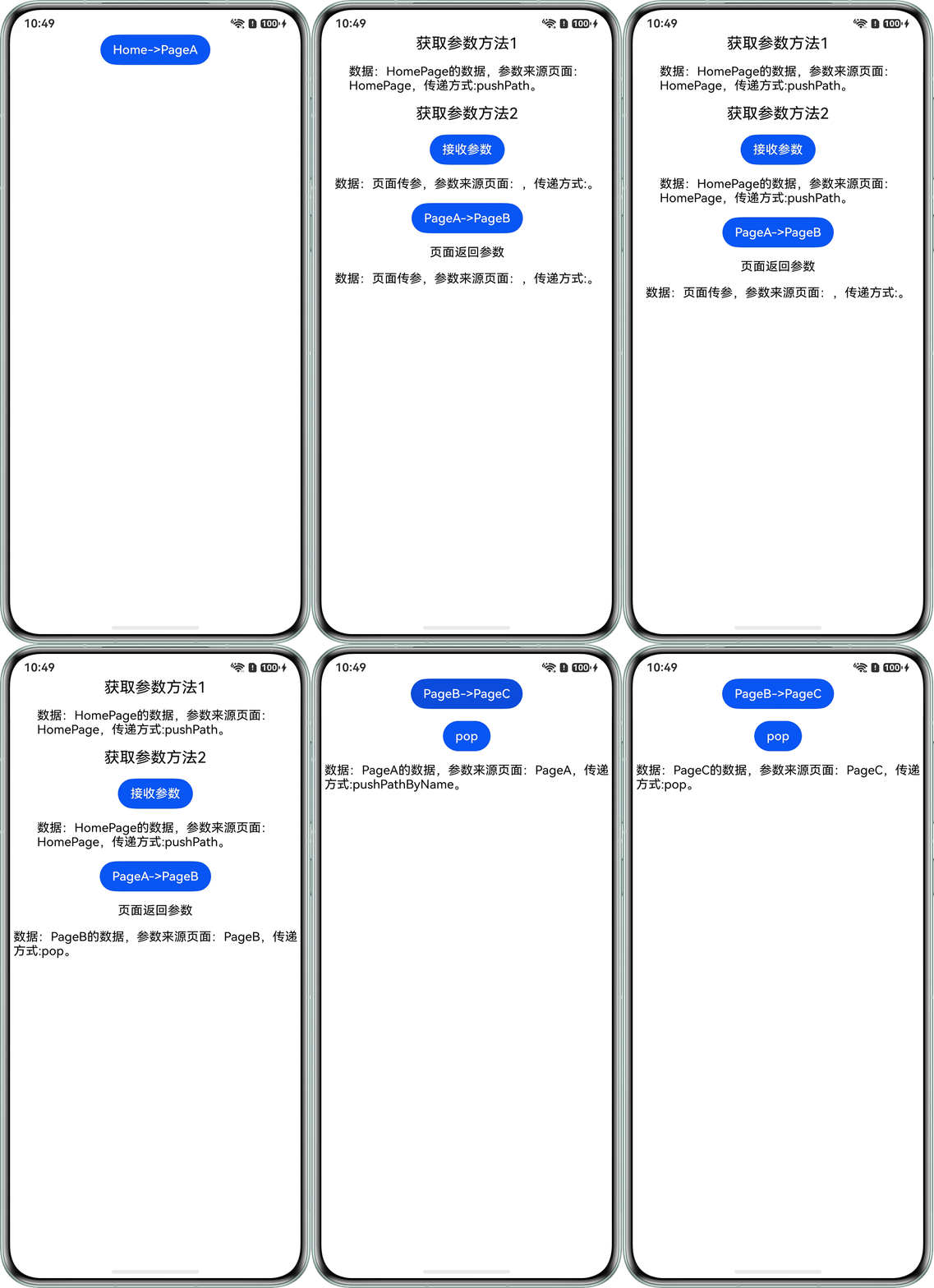
场景一、二、三完整示例参考如下:
// 自定义参数标记
export class NavParams {
  data: string; // 传递数据
  sourcePage: string; // 页面来源标记
  sourceMethod: string; // 页面传递方式
  constructor(data: string, sourcePage: string, sourceMethod: string) {
    this.data = data;
    this.sourcePage = sourcePage;
    this.sourceMethod = sourceMethod;
  }
}

@Entry
@Component
struct HomePage {
  pageInfo: NavPathStack = new NavPathStack();
  params: NavParams = new NavParams('页面传参', '', '');

  build() {
    Navigation(this.pageInfo) {
      Column({ space: 16 }) {
        Button('Home->PageA')
          .onClick(() => {
            this.params = new NavParams('HomePage的数据', 'HomePage', 'pushPath');
            let info: NavPathInfo = new NavPathInfo('PageA', this.params);
            this.pageInfo.pushPath(info);
          });
      }
      .width('100%')
      .height('100%');
    }
    .height('100%')
    .width('100%');
  }
}

@Builder
export function PageABuilder() {
  PageA();
}

@Component
struct PageA {
  pageInfo: NavPathStack = new NavPathStack();
  params1: NavParams = new NavParams('页面传参', '', '');
  @State params: NavParams = new NavParams('页面传参', '', '');
  @State params2: NavParams = new NavParams('页面传参', '', '');

  build() {
    NavDestination() {
      Column({ space: 16 }) {
        Text('获取参数方法1')
          .fontSize(20)
          .fontColor('#000000');
        Text(`数据:${this.params1.data},参数来源页面:${this.params1.sourcePage},传递方式:${this.params1.sourceMethod}。`)
          .fontSize(16)
          .fontColor('#000000');
        Text('获取参数方法2')
          .fontSize(20)
          .fontColor('#000000');
        Button('接收参数')
          .onClick(() => {
            this.params2 = this.pageInfo.getParamByIndex(this.pageInfo.getAllPathName().length - 1) as NavParams;
          });
        Text(`数据:${this.params2.data},参数来源页面:${this.params2.sourcePage},传递方式:${this.params2.sourceMethod}。`)
          .fontSize(16)
          .fontColor('#000000');
        Button('PageA->PageB')
          .onClick(() => {
            this.params = new NavParams('PageA的数据', 'PageA', 'pushPathByName');
            this.pageInfo.pushPathByName('PageB', this.params, false);
          });
        Text('页面返回参数')
          .fontSize(16)
          .fontColor('#000000');
        Text(`数据:${this.params.data},参数来源页面:${this.params.sourcePage},传递方式:${this.params.sourceMethod}。`)
          .fontSize(16)
          .fontColor('#000000');
      }
      .width('100%')
      .height('100%');
    }
    .hideBackButton(true)
    .onReady((context: NavDestinationContext) => {
      this.pageInfo = context.pathStack;
      this.params1 = context.pathInfo.param as NavParams;
    })
    .onResult((result: ESObject) => {
      this.params = result as NavParams;
    });
  }
}

@Builder
export function PageBBuilder() {
  PageB();
}

@Component
struct PageB {
  pageInfo: NavPathStack = new NavPathStack();
  @State params: NavParams = new NavParams('页面传参', '', '');

  build() {
    NavDestination() {
      Column({ space: 16 }) {
        Button('PageB->PageC')
          .onClick(() => {
            this.pageInfo.pushPathByName('PageC', null, (popInfo: PopInfo) => {
              this.params = popInfo.result as NavParams;
            }, false);
          });
        Button('pop')
          .onClick(() => {
            this.params = new NavParams('PageB的数据', 'PageB', 'pop');
            this.pageInfo.pop(this.params, false);
          });
        Text(`数据:${this.params.data},参数来源页面:${this.params.sourcePage},传递方式:${this.params.sourceMethod}。`)
          .fontSize(16)
          .fontColor('#000000');
      }
      .width('100%')
      .height('100%');
    }
    .hideBackButton(true)
    .onReady((context: NavDestinationContext) => {
      this.pageInfo = context.pathStack;
      this.params = context.pathInfo.param as NavParams;
    })
    .onBackPressed(() => {
      this.params = new NavParams('PageB的数据', 'PageB', 'pop');
      this.pageInfo.pop(this.params, false);
      return true;
    });
  }
}

@Builder
export function PageCBuilder() {
  PageC();
}

@Component
struct PageC {
  pageInfo: NavPathStack = new NavPathStack();
  params: NavParams = new NavParams('页面传参', '', '');

  build() {
    NavDestination() {
      Column({ space: 16 }) {
        Button('pop')
          .onClick(() => {
            this.params = new NavParams('PageC的数据', 'PageC', 'pop');
            this.pageInfo.pop(this.params, false);
          });
      }
      .width('100%')
      .height('100%');
    }
    .hideBackButton(true)
    .onReady((context: NavDestinationContext) => {
      this.pageInfo = context.pathStack;
      this.params = context.pathInfo.param as NavParams;
    });
  }
} “src/main/resources/base/profile/router_map.json”配置如下所示:
{
  "routerMap": [
    {
      "name": "PageA",
      "pageSourceFile": "src/main/ets/pages/HomePage.ets",
      "buildFunction": "PageABuilder",
      "data": {
        "description": "this is pageA."
      }
    },
    {
      "name": "PageB",
      "pageSourceFile": "src/main/ets/pages/HomePage.ets",
      "buildFunction": "PageBBuilder",
      "data": {
        "description": "this is pageB."
      }
    },
    {
      "name": "PageC",
      "pageSourceFile": "src/main/ets/pages/HomePage.ets",
      "buildFunction": "PageCBuilder",
      "data": {
        "description": "this is pageC."
      }
    }
  ]
}
效果预览:
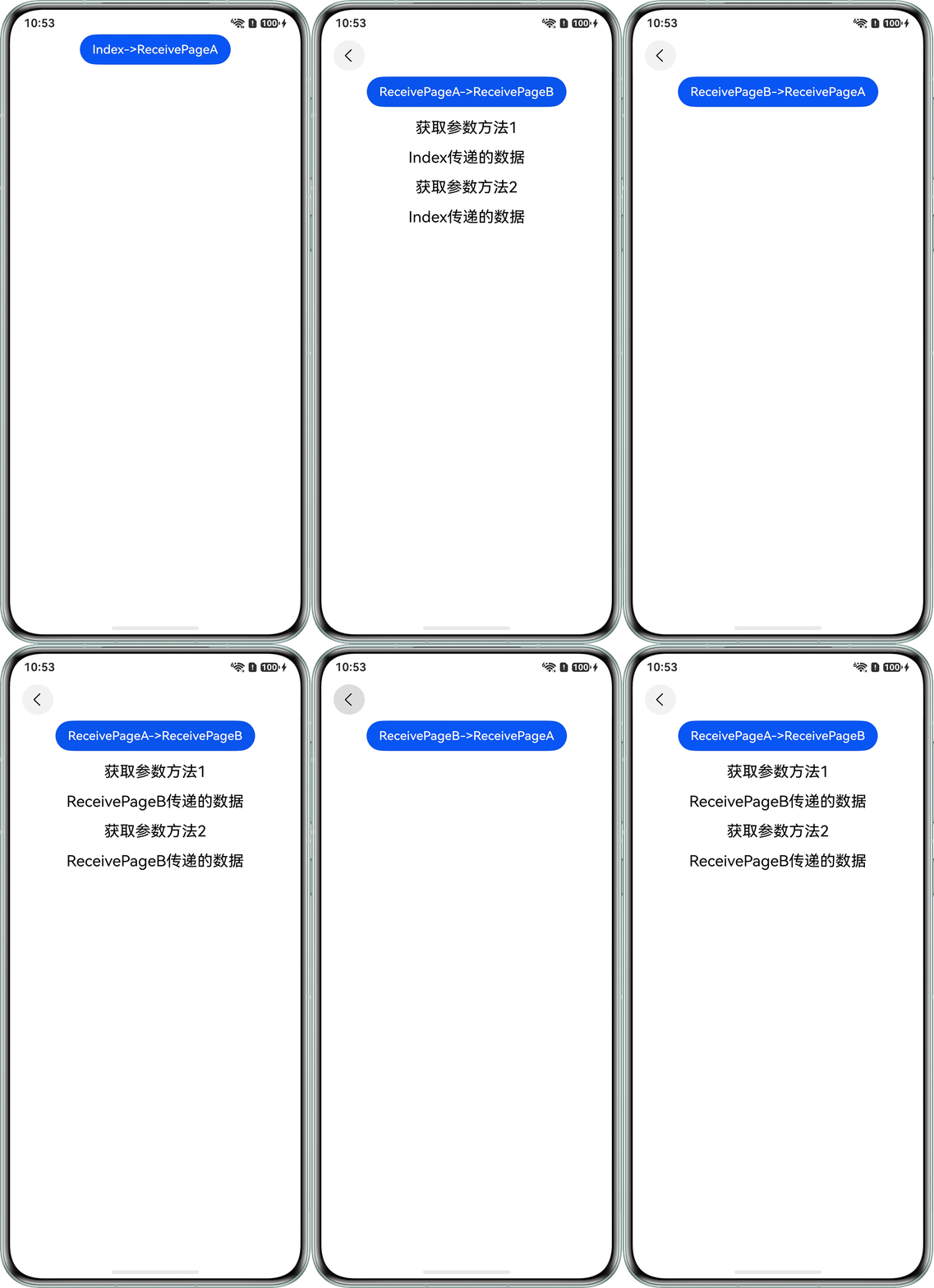
场景四完整示例参考如下:
import { emitter } from '@kit.BasicServicesKit';

@Entry
@Component
struct Index {
  pageInfo: NavPathStack = new NavPathStack();
  data: string = 'Index传递的数据';

  @Builder
  pageMap(name: string) {
    if (name === 'ReceivePageA') {
      ReceivePageA();
    } else if (name === 'ReceivePageB') {
      ReceivePageB();
    }
  }

  build() {
    Navigation(this.pageInfo) {
      Column({ space: 16 }) {
        Button('Index->ReceivePageA')
          .onClick(() => {
            this.pageInfo.pushPath({ name: 'ReceivePageA', param: this.data },
              { launchMode: LaunchMode.POP_TO_SINGLETON, animated: true });
          });
      };
    }
    .height('100%')
    .width('100%')
    .navDestination(this.pageMap);
  }
}

@Component
struct ReceivePageA {
  pageInfo: NavPathStack = new NavPathStack();
  @State param1: string = '';
  @State param2: string = '';

  aboutToAppear(): void {
    emitter.on('params', (eventData: emitter.EventData) => {
      if (eventData.data && eventData.data['param']) {
        this.param2 = eventData.data!['param'] as string;
      }
    });
  }

  aboutToDisappear(): void {
    emitter.off('params');
  }

  build() {
    NavDestination() {
      Column({ space: 16 }) {
        Button('ReceivePageA->ReceivePageB')
          .onClick(() => {
            this.pageInfo.pushPath({ name: 'ReceivePageB', param: null },
              { launchMode: LaunchMode.POP_TO_SINGLETON, animated: true });
          });
        Text('获取参数方法1')
          .fontSize(20)
          .fontColor('#000000');
        Text(this.param1)
          .fontSize(20)
          .fontColor('#000000');
        Text('获取参数方法2')
          .fontSize(20)
          .fontColor('#000000');
        Text(this.param2)
          .fontSize(20)
          .fontColor('#000000');
      }
      .width('100%')
      .height('100%');
    }
    .onReady((context: NavDestinationContext) => {
      this.pageInfo = context.pathStack;
      this.param1 = context.pathInfo.param as string;
      this.param2 = context.pathInfo.param as string;
    })
    .onNewParam((param: string) => {
      this.param1 = param;
    });
  }
}

@Component
struct ReceivePageB {
  pageInfo: NavPathStack = new NavPathStack();
  data: string = 'ReceivePageB传递的数据';

  build() {
    NavDestination() {
      Column() {
        Button('ReceivePageB->ReceivePageA')
          .onClick(() => {
            this.pageInfo.pushPath({ name: 'ReceivePageA', param: this.data },
              { launchMode: LaunchMode.POP_TO_SINGLETON, animated: true });
            let eventData: emitter.EventData = { data: { 'param': this.data } };
            emitter.emit('params', eventData);
          });
      }
      .width('100%')
      .height('100%');
    }
    .onReady((context: NavDestinationContext) => {
      this.pageInfo = context.pathStack;
    });
  }
}
效果预览:
常见FAQ
Q:Navigation获取页面参数的getParamByName方法为什么返回值是数组?
A:由于页面路由栈中可能存在多个相同name的页面(如多次push相同name的页面,且未对栈内页面清理),getParamByName会获取全部名为name的NavDestination页面的参数信息,所以getParamByName返回结果为数组。
Q:路由传参时,使用instanceof做类型判断存在安全隐患,有哪些更安全的类型判断方法?
A:使用泛型方式判断:
// 定义参数类型
export class NavParam {
  data: string;
  constructor(data: string) {
    this.data = data;
  }
}
// 使用泛型来构建buildFunction
@Builder
export function PageBuilder<T extends NavParam>(name: string, param: T) {
  Page();
}
// ...
// 路由参数处理
const param = this.pageInfo.getParamByIndex(this.pageInfo.getAllPathName().length - 1) as NavParam;
// ...