背景知识
- linearGradient:颜色线性渐变。可设置线性渐变的起始角度、线性渐变的方向、多种颜色渐变。
- BlendMode:混合模式枚举。混合模式会将两种颜色(源色、目标色)以特定的方式混合生成一种新的颜色,通常用于叠加、滤镜和遮罩等图形操作场景。
- setInterval:重复调用一个函数,在每次调用之间具有固定的时间延迟。
- 显式动画 (animateTo):提供全局animateTo显式动画接口来指定由于闭包代码导致的状态变化插入过渡动效。同属性动画,布局类改变宽高的动画,内容都是直接到终点状态,例如文字、Canvas的内容等,如果要内容跟随宽高变化,可以使用renderFit属性配置。
解决方案
- 方案逻辑:通过渐变色模拟光线,Text组件本身不支持渐变色,需要在父组件添加渐变色后,与Text组件混合来实现文字渐变色,然后通过移动渐变色所在位置,实现光线移动效果。
- 创建初始文字,设置字体颜色。
Text(this.message) .onClick(() => { this.message = this.message + '1'; }) .maxLines(1) .fontSize(40) .fontWeight(800) .fontColor(Color.White) - 在父组件添加渐变色,设置三个颜色起始点,中间点为光线颜色,两边点为字体颜色。
.linearGradient({ angle: 110, colors: [[Color.White, this.leftlocation], [Color.Orange, this.location], [Color.White, this.rightlocation]] // 设置渐变色起始点位 }) - 设置融合模式为DST_IN,仅保留目标像素与源不透明部分的交集。
.blendMode(BlendMode.DST_IN, BlendApplyType.OFFSCREEN) // 设置混合模式
- 通过setInterval设置三个渐变色点位的周期性运动,实现光线移动效果。
aboutToAppear(): void {
  setInterval(() => {
    this.location += 0.01;
    this.leftlocation += 0.01;
    this.rightlocation += 0.01;
    if (this.location >= 1) {
      this.location = 0.0;
      this.leftlocation = -0.1;
      this.rightlocation = 0.1;
    }
  }, 50);
}
效果预览:

完整示例参考如下:
@Entry @Component struct LightWord { @State message: string = 'Hello World'; @State location: number = 0.0; @State leftlocation: number = -0.1; @State rightlocation: number = 0.1; // 配置渐变色起始点位周期性移动 aboutToAppear(): void { setInterval(() => { this.location += 0.01; this.leftlocation += 0.01; this.rightlocation += 0.01; if (this.location >= 1) { this.location = 0.0; this.leftlocation = -0.1; this.rightlocation = 0.1; } }, 50); } build() { Column({ space: 5 }) { Row() { Text(this.message) .onClick(() => { this.message = this.message + '1'; }) .maxLines(1) .fontSize(40) .fontWeight(800) .fontColor(Color.White) .padding(10) .blendMode(BlendMode.DST_IN, BlendApplyType.OFFSCREEN) // 设置混合模式 } .linearGradient({ angle: 110, colors: [[Color.White, this.leftlocation], [Color.Orange, this.location], [Color.White, this.rightlocation]] // 设置渐变色起始点位 }) .blendMode(BlendMode.SRC_OVER, BlendApplyType.OFFSCREEN) } .width('100%') .height('100%') .backgroundColor(Color.Black) .justifyContent(FlexAlign.Center) .expandSafeArea([SafeAreaType.SYSTEM], [SafeAreaEdge.TOP, SafeAreaEdge.BOTTOM]) } } - 创建初始文字,设置字体颜色。
- 若需实现类似跑马灯的循环颜色流动效果,可以通过结合animateTo,先重置渐变位置的状态,然后将渐变的起始颜色与终止颜色进行互换,最后使用递归实现循环。
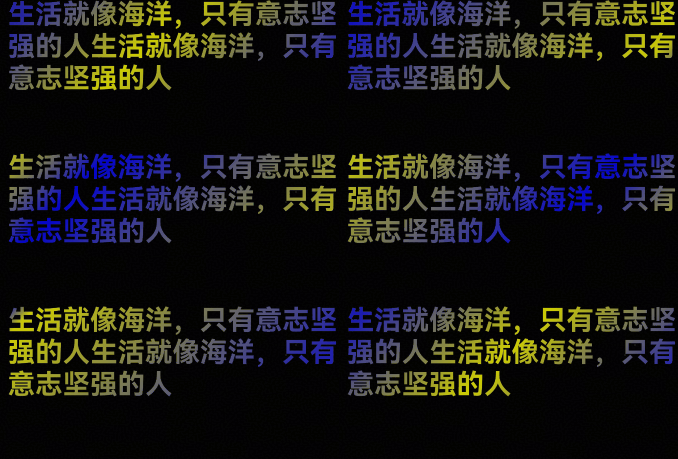
完整示例参考如下:
@Entry
@Component
struct Index {
  @State gradientPosition: number = 0;
  textContent: string = '生活就像海洋,只有意志坚强的人';
  COLOR_START: Color = Color.Yellow;
  COLOR_END: Color = Color.Blue;

  build() {
    Column() {
      Stack() {
        Text(this.textContent + this.textContent)
          .blendMode(BlendMode.DST_IN, BlendApplyType.OFFSCREEN)
          .fontSize(30)
          .fontWeight(FontWeight.Bold)
      }
      .blendMode(BlendMode.SCREEN, BlendApplyType.OFFSCREEN)
      .linearGradient({
        angle: 135,
        colors: [
          [this.COLOR_START, 0],
          [this.COLOR_END, this.gradientPosition],
          [this.COLOR_START, 1],
        ]
      })
    }
    .width('100%')
    .height('100%')
    .backgroundColor(Color.Black)
    .expandSafeArea([SafeAreaType.SYSTEM], [SafeAreaEdge.TOP, SafeAreaEdge.BOTTOM])
    .onAppear(() => {
      this.animateStart();
    })
  }

  private animateStart() {
    this.getUIContext().animateTo({
      duration: 3000,
      curve: Curve.Linear,
      iterations: 1,
      onFinish: () => {
        this.gradientPosition = 0;
        const COLOR_START = this.COLOR_START;
        const COLOR_END = this.COLOR_END;
        // 互换起始与终点的颜色
        this.COLOR_START = COLOR_END;
        this.COLOR_END = COLOR_START;
        this.animateStart();
      }
    }, () => {
      // 启动动画:修改gradientPosition触发渐变移动
      this.gradientPosition = 1;
    });
  }
}