Q:应用通过ThemeControl.setDefaultTheme方法设置应用当前的默认主题,应用界面中包含Scroll滚动容器,滚动条滑块仍然是组件默认的颜色,如何设置应用内滚动条滑块的颜色与主题色保持一致?
A:应用首先通过ThemeControl.setDefaultTheme方法设置应用当前的默认主题,接着在onWillApplyTheme生命周期回调中动态获取默认主题颜色值。最后,利用ScrollBar组件构建自定义滚动条,并通过scrollBarColor函数设置应用内滚动条滑块的颜色与主题色保持一致。
- 动态获取当前主题的指定的颜色,并赋值后续设置滑动属性:
@State scrollBarColor: ColorMetrics = ColorMetrics.rgba(0, 255, 255, 0.4); @State brandColor: ResourceColor = ''; // 加载主题时的回调 // 动态获取当前主题的指定的颜色,并赋值后续设置滑动属性 onWillApplyTheme(theme: Theme) { // 获取当前主题的指定的颜色 this.brandColor = theme.colors.brand; this.scrollBarColor = ColorMetrics.resourceColor(this.brandColor); } - 创建Scroll组件,禁用自带默认的滚动条:
Scroll(this.scroller) { Row({ space: 10 }) { ForEach(this.arr, (item: number) => { Row() { Text(item.toString()) .backgroundColor(this.brandColor) .textAlign(TextAlign.Center) .width('100%') .height('100%'); } .width(60) .height(60); }, (item: number) => item.toString()); }; } .height(200) .width('100%') // 关闭默认的滚动条 .scrollBar(BarState.Off) // 设置水平滚动方向 .scrollable(ScrollDirection.Horizontal); - 自定义滚动条组件ScrollBar,配置scrollBarColor,设置滚动条滑块的颜色:
// 配置scrollBarColor,设置滚动条滑块的颜色
          ScrollBar({ scroller: this.scroller, direction: ScrollBarDirection.Horizontal, state: BarState.Auto })
            .scrollBarColor(this.scrollBarColor);
完整代码如下:
import { ColorMetrics, CustomColors, ThemeControl } from '@kit.ArkUI';

// 自定义主题颜色
class BlueColors implements CustomColors {
  fontPrimary = Color.Blue;
  backgroundPrimary = Color.Blue;
  brand = "#ffaad7ff"; // 品牌色
}

class PageCustomTheme implements CustomTheme {
  colors?: CustomColors;

  constructor(colors: CustomColors) {
    this.colors = colors;
  }
}

// 创建实例
const BlueColorsTheme = new PageCustomTheme(new BlueColors());
// 在页面build之前执行ThemeControl.setDefaultTheme,设置App默认样式风格为BlueColorsTheme。
ThemeControl.setDefaultTheme(BlueColorsTheme);

@Entry
@Component
struct MyTheme {
  private scroller: Scroller = new Scroller();
  private arr: number[] = [0, 1, 2, 3, 4, 5, 6, 7, 8, 9, 10, 11, 12, 13, 14, 15];

  @State scrollBarColor: ColorMetrics = ColorMetrics.rgba(0, 255, 255, 0.4);
  @State brandColor: ResourceColor = '';

  // 加载主题时的回调
  // 动态获取当前主题的指定的颜色,并赋值后续设置滑动属性
  onWillApplyTheme(theme: Theme) {
    // 获取当前主题的指定的颜色
    this.brandColor = theme.colors.brand;
    this.scrollBarColor = ColorMetrics.resourceColor(this.brandColor);
  }

  build() {
    Column({ space: 10 }) {
      Text("自定义主题的brand颜色")
        .width('100%')
        .fontSize(32)
        .backgroundColor(this.brandColor);

      Column() {
        Stack({ alignContent: Alignment.Bottom }) {

          Scroll(this.scroller) {
            Row({ space: 10 }) {
              ForEach(this.arr, (item: number) => {
                Row() {
                  Text(item.toString())
                    .backgroundColor(this.brandColor)
                    .textAlign(TextAlign.Center)
                    .width('100%')
                    .height('100%');
                }
                .width(60)
                .height(60);
              }, (item: number) => item.toString());
            };
          }
          .height(200)
          .width('100%')
          // 关闭默认的滚动条
          .scrollBar(BarState.Off)
          // 设置水平滚动方向
          .scrollable(ScrollDirection.Horizontal);

          // 配置scrollBarColor,设置滚动条滑块的颜色
          ScrollBar({ scroller: this.scroller, direction: ScrollBarDirection.Horizontal, state: BarState.Auto })
            .scrollBarColor(this.scrollBarColor);

        }
        .height(400)
        .width('100%');
      }
      .width('100%');
    };
  }
}
效果图为:
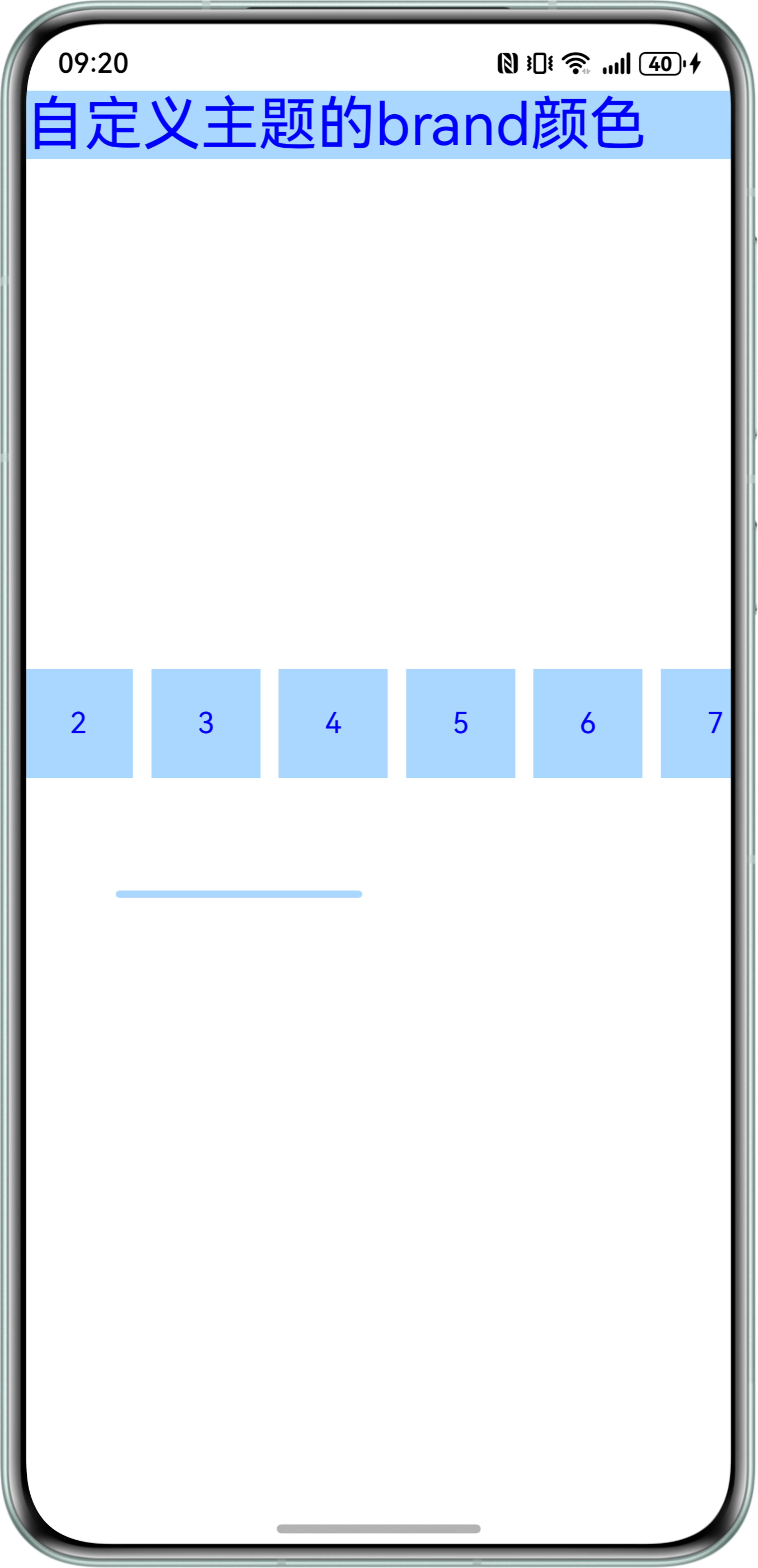
Q:使用scrollBarColor设置滚动条滑块的颜色不生效,可能什么原因导致?
A:scrollBarColor(color: Optional)设置滚动条滑块的颜色时,仅滚动条不放置子组件时生效。请检查滚动条组件ScrollBar是否包含子组件。