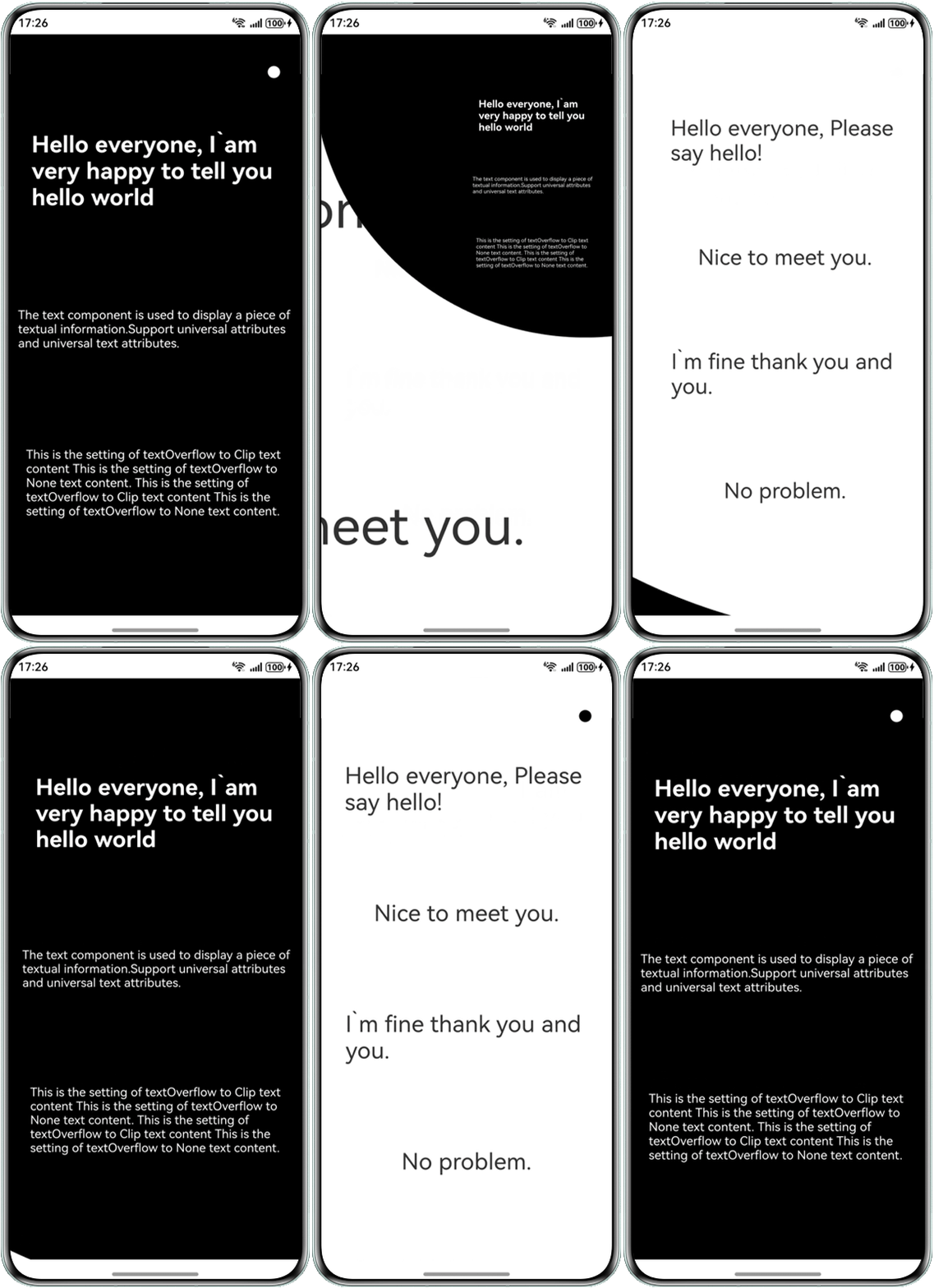
解决方案
可通过帧动画实现页面转场效果,具体步骤如下:
- 定义两个Page组件,分别用于展示不同的页面内容。
class PageContent { content: string; style: TextStyle; constructor(content: string, style: TextStyle = {}) { this.content = content; this.style = style; } } - 配置页面切换时的动画。
this.animator = this.getUIContext().createAnimator({ duration: 500, easing: 'ease', delay: 0, fill: 'forwards', direction: 'normal', iterations: 1, begin: 0, //动画插值起点 end: 500 //动画插值终点 }); this.animator.onFrame = progress => { this.pageController[0].onFrame?.(progress / 500, this.currentIndex === 1); this.pageController[1].onFrame?.(progress / 500, this.currentIndex === 0); }; this.animator.onFinish = () => { let lastIndex = this.currentIndex; this.currentIndex = 1 - this.currentIndex; this.zIndexList[lastIndex] = 1; this.zIndexList[this.currentIndex] = 0; this.isAnimating = false; }; - 使用Stack布局将两个页面组件堆叠显示。
Stack({ alignContent: Alignment.TopStart }) { Page({ content: page1Content, bgColor: '#000', scaleValue: 1, controller: this.pageController[0], isShow: true }) .zIndex(this.zIndexList[0]) .onClick(() => { this.handleClick(); }); Page({ content: page2Content, bgColor: '#fff', scaleValue: 0.01, controller: this.pageController[1] }) .zIndex(this.zIndexList[1]) .onClick(() => { this.handleClick(); }); } .width('100%') .height('100%') .id('root') .clip(true); - 在用户点击右上角圆形按钮时,触发动画切换。
handleClick() {
  if (this.isAnimating) {
    return;
  }
  this.isAnimating = true;
  this.animator?.play();
}
完整示例代码如下:
import { AnimatorResult } from '@kit.ArkUI';


class PageContent {
  content: string;
  style: TextStyle;


  constructor(content: string, style: TextStyle = {}) {
    this.content = content;
    this.style = style;
  }
}


const page1Content: PageContent[] = [
  new PageContent('Hello everyone, I`am very happy to tell you hello world ',
    { fontSize: 30, fontWeight: 700, fontColor: Color.White }),
  new PageContent('The text component is used to display a piece of textual information.Support universal attributes and universal text attributes.',
    { fontColor: Color.White }),
  new PageContent('This is the setting of textOverflow to Clip text content This is the setting of textOverflow to None text content. This is the setting of textOverflow to Clip text content This is the setting of textOverflow to None text content.',
    { fontColor: Color.White }),
];


const page2Content: PageContent[] = [
  new PageContent('Hello everyone, Please say hello! ', { fontSize: 30 }),
  new PageContent('Nice to meet you.', { fontSize: 30 }),
  new PageContent('I`m fine thank you and you.', { fontSize: 30 }),
  new PageContent('No problem.', { fontSize: 30 }),
];


interface PageInfo {
  width: number,
  height: number,
  centerX: number,
  centerY: number
}


class PageController {
  push?: (onFinish: () => void) => void;
  pop?: (onFinish: () => void) => void;
  onFrame?: (progress: number, isPush: boolean) => void;
}


@Entry
@Component
export struct TransitionPage {
  @Provide info: PageInfo = {
    width: 0,
    height: 0,
    centerX: 0,
    centerY: 0
  };
  pageController: PageController[] = [];
  @State zIndexList: number[] = [];
  private isAnimating: boolean = false;
  private animator?: AnimatorResult;
  private currentIndex: number = 0;


  aboutToAppear(): void {
    let observer = this.getUIContext().getUIInspector().createComponentObserver('root');
    observer.on('layout', () => {
      let node = this.getUIContext().getAttachedFrameNodeById('root');
      if (node) {
        this.info = {
          width: this.getUIContext().px2vp(node.getMeasuredSize().width),
          height: this.getUIContext().px2vp(node.getMeasuredSize().height),
          centerY: 50,
          centerX: this.getUIContext().px2vp(node.getMeasuredSize().width) - 40
        };
      }
    });
    for (let i = 0; i < 2; i++) {
      this.pageController.push(new PageController());
      this.zIndexList.push(i);
    }
    // 页面切换时的动画
    this.animator = this.getUIContext().createAnimator({
      duration: 500,
      easing: 'ease',
      delay: 0,
      fill: 'forwards',
      direction: 'normal',
      iterations: 1,
      begin: 0, //动画插值起点
      end: 500 //动画插值终点
    });
    this.animator.onFrame = progress => {
      this.pageController[0].onFrame?.(progress / 500, this.currentIndex === 1);
      this.pageController[1].onFrame?.(progress / 500, this.currentIndex === 0);
    };
    this.animator.onFinish = () => {
      let lastIndex = this.currentIndex;
      this.currentIndex = 1 - this.currentIndex;
      this.zIndexList[lastIndex] = 1;
      this.zIndexList[this.currentIndex] = 0;
      this.isAnimating = false;
    };
  }


  aboutToDisappear(): void {
    this.animator?.finish();
    this.animator = undefined;
  }


  push(index: number) {
    let promise: Promise<void>[] = [];
    promise.push(new Promise(resolve => {
      this.pageController[index].push?.(() => {
        this.zIndexList[index] = 0;
        resolve();
      });
    }));
    let lastIndex = 1 - index;
    promise.push(new Promise(resolve => {
      this.pageController[lastIndex].pop?.(() => {
        this.zIndexList[lastIndex] = 1;
        resolve();
      });
    }));
    Promise.all(promise).then(() => this.isAnimating = false);
  }
  // 动画切换事件
  handleClick() {
    if (this.isAnimating) {
      return;
    }
    this.isAnimating = true;
    this.animator?.play();
  }


  build() {
    // 两个页面组件堆叠显示
    Stack({ alignContent: Alignment.TopStart }) {
      Page({
        content: page1Content,
        bgColor: '#000',
        scaleValue: 1,
        controller: this.pageController[0],
        isShow: true
      })
        .zIndex(this.zIndexList[0])
        .onClick(() => {
          this.handleClick();
        });
      Page({
        content: page2Content,
        bgColor: '#fff',
        scaleValue: 0.01,
        controller: this.pageController[1]
      })
        .zIndex(this.zIndexList[1])
        .onClick(() => {
          this.handleClick();
        });
    }
    .width('100%')
    .height('100%')
    .id('root')
    .clip(true);
  }


  onDidBuild(): void {
    if (!this.animator) {
      return;
    }
  }
}


@Component
struct Page {
  @Require content: PageContent[] = [];
  @Consume @Watch('onInit') info: PageInfo;
  @State scaleValue: number = 0.01;
  @State r: number = 0;
  @State isShow: boolean = false;
  bgColor: string = '#fff';
  controller?: PageController;


  onInit() {
    this.r = Math.sqrt(this.info.centerX * this.info.centerX +
      (this.info.height - this.info.centerY) * (this.info.height - this.info.centerY));
  }


  aboutToAppear(): void {
    if (this.controller) {
      this.controller.push = (onFinish) => {
        this.onPush(onFinish);
      };
      this.controller.pop = (onFinish) => {
        this.onPop(onFinish);
      };
      this.controller.onFrame = (progress, isPush) => {
        if (isPush) {
          this.isShow = true;
          this.scaleValue = 0.01 + (1 - 0.01) * progress;
        } else {
          this.scaleValue = 1 + (4 - 1) * progress;
          if (progress >= 1) {
            this.isShow = false;
            this.scaleValue = 0.01;
          }
        }
      };
    }
  }


  onPush(onFinish: () => void) {
    this.isShow = true;
    this.getUIContext().animateTo({ duration: 500, onFinish: onFinish }, () => {
      this.scaleValue = 1;
    });
  }


  onPop(onFinish: () => void) {
    this.getUIContext().animateTo({
      duration: 500,
      onFinish: () => {
        this.scaleValue = 0.01;
        this.isShow = false;
        onFinish();
      }
    }, () => {
      this.scaleValue = 4;
    });
  }


  build() {
    Column() {
      if (this.isShow) {
        Column({ space: 20 }) {
          ForEach(this.content, (item: PageContent) => {
            Text(item.content)
              .fontSize(item.style.fontSize)
              .fontColor(item.style.fontColor)
              .fontWeight(item.style.fontWeight)
              .fontStyle(item.style.fontStyle)
              .fontFamily(item.style.fontFamily);
          });
        }
        .position({ x: this.r - this.info.centerX, y: this.r - this.info.centerY })
        .padding({ left: 16, right:16 })
        .width(this.info.width)
        .height(this.info.height)
        .justifyContent(FlexAlign.SpaceEvenly);
      }
    }
    .width(this.r * 2)
    .height(this.r * 2)
    .constraintSize({ minWidth: this.r * 2 })
    .scale({ x: this.scaleValue, y: this.scaleValue })
    .offset({ x: this.info.centerX - this.r, y: this.info.centerY - this.r })
    .borderRadius(this.r)
    .clip(true)
    .backgroundColor(this.bgColor);
  }
}
实现效果如下: