背景知识
护眼模式可通过以下方式实现:
- 通过设置根容器的grayscale,saturate等属性,实现护眼模式。因页面和组件没有继承机制,暂时无法实现全局生效,只能每个页面单独去实现。
- 使用createSubWindow创建子窗口,使用setUIContent根据当前工程中指定的某个页面路径为窗口加载具体页面内容,实现护眼模式。
修改建议
- 方案一:通过设置根容器的grayscale,saturate等属性,实现护眼模式。设置页面属性:
// 通过grayscale和saturate属性实现护眼模式。
.grayscale(this.grayScaleValue) // 设置灰度值,可调整页面亮度
.saturate(this.saturateValue) // 设置颜色饱和度
.backgroundColor(this.backgroundColorValue); // 设置页面颜色
开启/关闭护眼模式时改变grayscale,saturate等属性的值:
Column() {
  Button('开启护眼模式')
    .onClick(() => {
      this.grayScaleValue = 0.1;
      this.saturateValue = 0.72;
      this.backgroundColorValue = '#33eee685'; // 设置页面颜色淡黄
    });

  Button('关闭护眼模式')
    .onClick(() => {
      this.grayScaleValue = 0;
      this.saturateValue = 1;
      this.backgroundColorValue = ''; // 设置页面颜色透明
    })
    .margin({ top: 10 });
}
.margin({ left: 20 });
效果图如下:
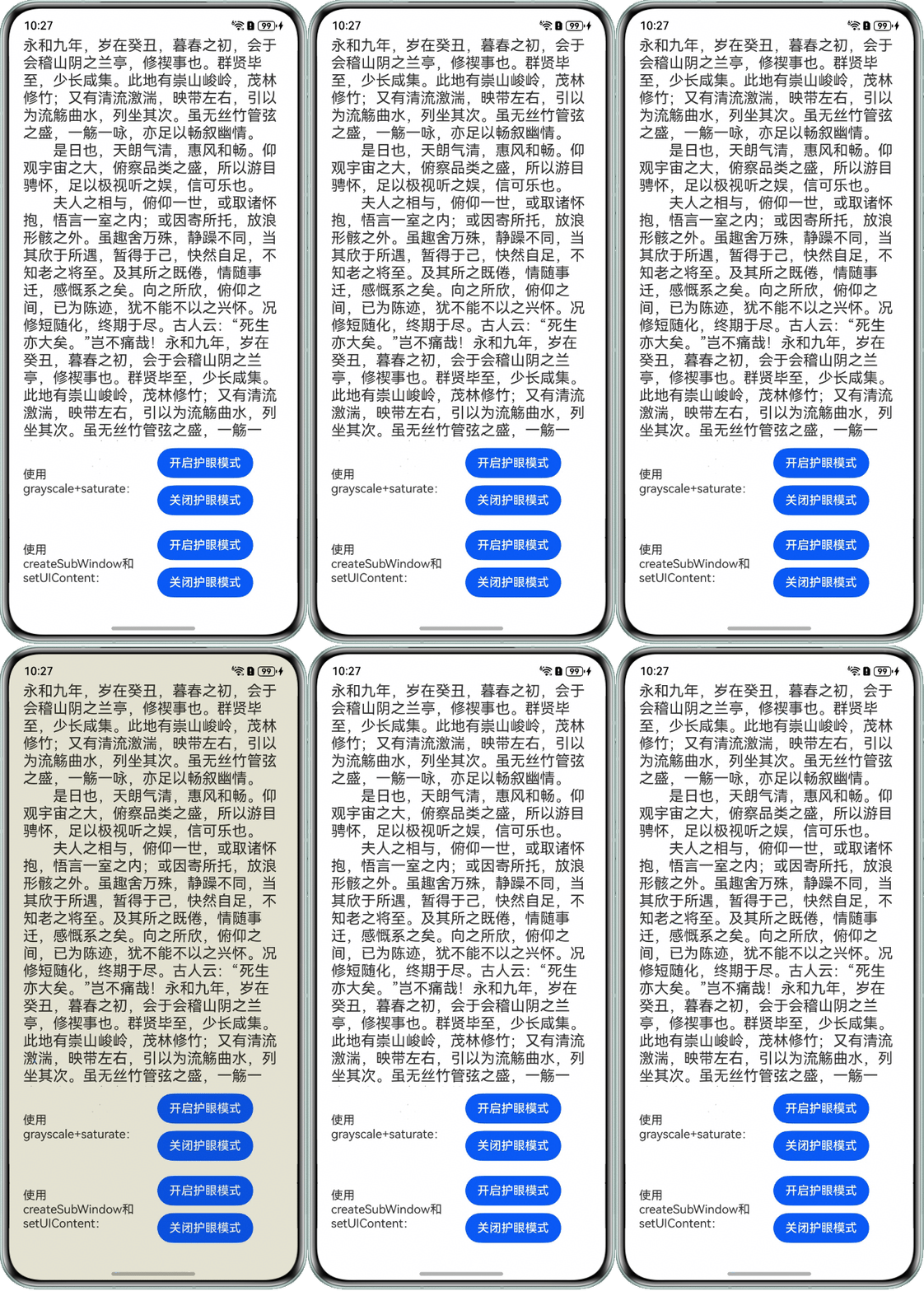
- 方案二:使用createSubWindow和setUIContent实现护眼模式。
Column() {

  Button('开启护眼模式')
    .onClick(() => {
      if (!this.showWindow) {
        // 通过不同颜色的子窗口覆盖在主窗口上实现护眼模式
        EyeProtectionMode.getInstance().createSubWithEyeWindow('#1Af3f364');
        this.showWindow = true;
      }
    })

  Button('关闭护眼模式')
    .onClick(() => {
      if (this.showWindow) {
        // 移除窗口
        EyeProtectionMode.getInstance().removeSubWithEyeWindow();
        this.showWindow = false;
      }
    })
    .margin({ top: 10 })
}
.margin({ left: 20 })
效果图如下:
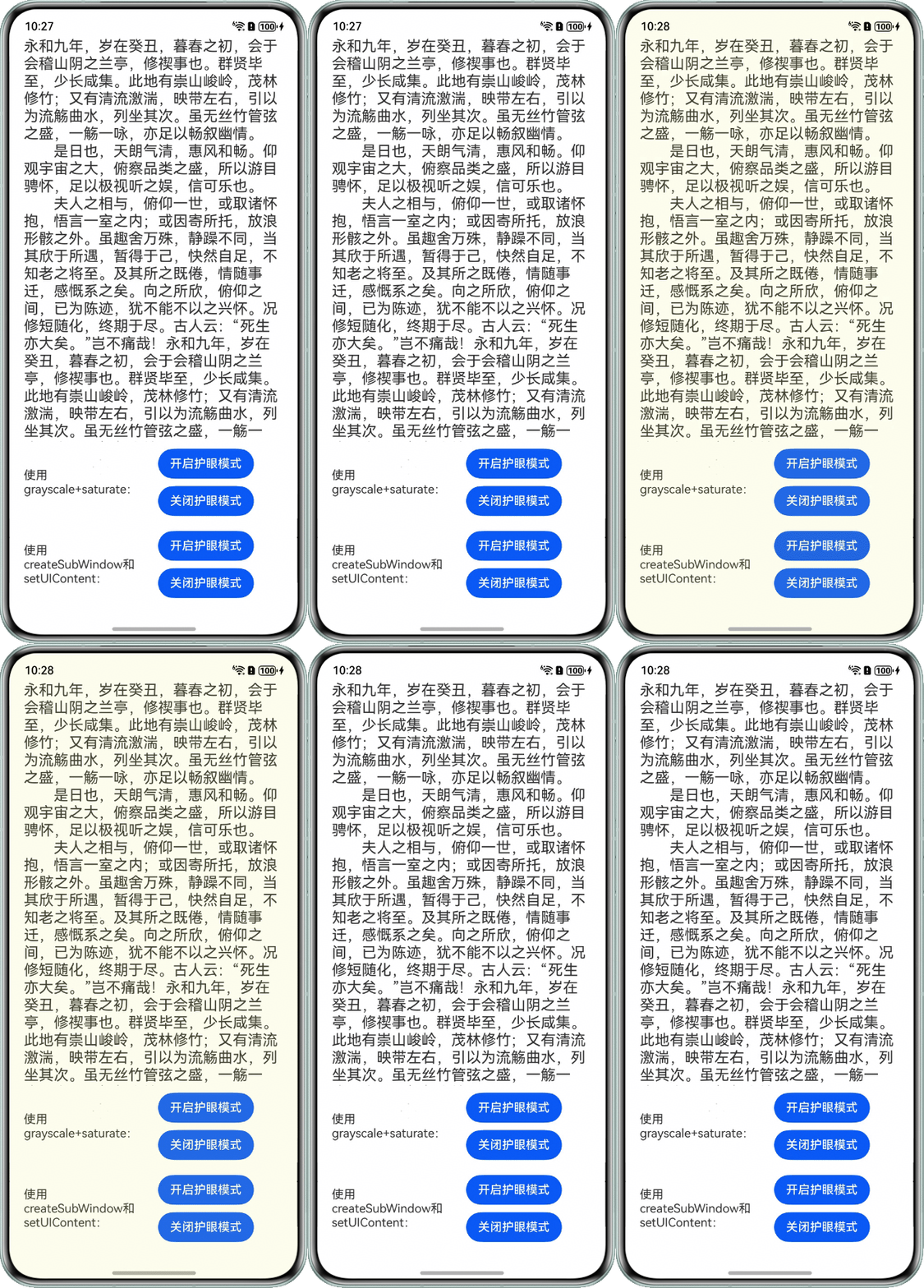
完整示例:
import { EyeProtectionMode } from '../utils/EyeProtectionMode';
import { window } from '@kit.ArkUI';
import { common } from '@kit.AbilityKit';

@Entry
@Component
struct Index {
  private message: string =
    '永和九年,岁在癸丑,暮春之初,会于会稽山阴之兰亭,修禊事也。群贤毕至,少长咸集。此地有崇山峻岭,茂林修竹;又有清流激湍,映带左右,引以为流觞曲水,列坐其次。虽无丝竹管弦之盛,一觞一咏,亦足以畅叙幽情。\n' +
      '  是日也,天朗气清,惠风和畅。仰观宇宙之大,俯察品类之盛,所以游目骋怀,足以极视听之娱,信可乐也。\n' +
      '  夫人之相与,俯仰一世,或取诸怀抱,悟言一室之内;或因寄所托,放浪形骸之外。虽趣舍万殊,静躁不同,当其欣于所遇,暂得于己,快然自足,不知老之将至。及其所之既倦,情随事迁,感慨系之矣。向之所欣,俯仰之间,已为陈迹,犹不能不以之兴怀。况修短随化,终期于尽。古人云:“死生亦大矣。”岂不痛哉!' +
      '永和九年,岁在癸丑,暮春之初,会于会稽山阴之兰亭,修禊事也。群贤毕至,少长咸集。此地有崇山峻岭,茂林修竹;又有清流激湍,映带左右,引以为流觞曲水,列坐其次。虽无丝竹管弦之盛,一觞一咏,亦足以畅叙幽情。\\n\' +\n' +
      '    \'  是日也,天朗气清,惠风和畅。仰观宇宙之大,俯察品类之盛,所以游目骋怀,足以极视听之娱,信可乐也。\\n\' +\n' +
      '    \'  夫人之相与,俯仰一世,或取诸怀抱,悟言一室之内;或因寄所托,放浪形骸之外。虽趣舍万殊,静躁不同,当其欣于所遇,暂得于己,快然自足,不知老之将至。及其所之既倦,情随事迁,感慨系之矣。向之所欣,俯仰之间,已为陈迹,犹不能不以之兴怀。况修短随化,终期于尽。古人云:“死生亦大矣。”岂不痛哉!' +
      '永和九年,岁在癸丑,暮春之初,会于会稽山阴之兰亭,修禊事也。群贤毕至,少长咸集。此地有崇山峻岭,茂林修竹;又有清流激湍,映带左右,引以为流觞曲水,列坐其次。虽无丝竹管弦之盛,一觞一咏,亦足以畅叙幽情。\\n\' +\n' +
      '    \'  是日也,天朗气清,惠风和畅。仰观宇宙之大,俯察品类之盛,所以游目骋怀,足以极视听之娱,信可乐也。\\n\' +\n' +
      '    \'  夫人之相与,俯仰一世,或取诸怀抱,悟言一室之内;或因寄所托,放浪形骸之外。虽趣舍万殊,静躁不同,当其欣于所遇,暂得于己,快然自足,不知老之将至。及其所之既倦,情随事迁,感慨系之矣。向之所欣,俯仰之间,已为陈迹,犹不能不以之兴怀。况修短随化,终期于尽。古人云:“死生亦大矣。”岂不痛哉!' +
      '永和九年,岁在癸丑,暮春之初,会于会稽山阴之兰亭,修禊事也。群贤毕至,少长咸集。此地有崇山峻岭,茂林修竹;又有清流激湍,映带左右,引以为流觞曲水,列坐其次。虽无丝竹管弦之盛,一觞一咏,亦足以畅叙幽情。\\n\' +\n' +
      '    \'  是日也,天朗气清,惠风和畅。仰观宇宙之大,俯察品类之盛,所以游目骋怀,足以极视听之娱,信可乐也。\\n\' +\n' +
      '    \'  夫人之相与,俯仰一世,或取诸怀抱,悟言一室之内;或因寄所托,放浪形骸之外。虽趣舍万殊,静躁不同,当其欣于所遇,暂得于己,快然自足,不知老之将至。及其所之既倦,情随事迁,感慨系之矣。向之所欣,俯仰之间,已为陈迹,犹不能不以之兴怀。况修短随化,终期于尽。古人云:“死生亦大矣。”岂不痛哉!';
  @State grayScaleValue: number = 0;
  @State saturateValue: number = 1;
  @State backgroundColorValue: string = '';
  context: common.UIAbilityContext = this.getUIContext().getHostContext() as common.UIAbilityContext;
  private showWindow: boolean = false;

  aboutToAppear(): void {
    window.getLastWindow(this.context).then((lastWindow) => {
      lastWindow.setWindowLayoutFullScreen(true);
    });
  }

  build() {
    Column() {
      Scroll() {
        Text(this.message)
          .fontSize(20)
          .width('90%');
      }
      .height('70%')
      .width('100%');

      Row() {
        Text('使用grayscale+saturate:')
          .width(160);
        Column() {
          Button('开启护眼模式')
            .onClick(() => {
              this.grayScaleValue = 0.1;
              this.saturateValue = 0.72;
              this.backgroundColorValue = '#33eee685'; // 设置页面颜色淡黄
            });

          Button('关闭护眼模式')
            .onClick(() => {
              this.grayScaleValue = 0;
              this.saturateValue = 1;
              this.backgroundColorValue = ''; // 设置页面颜色透明
            })
            .margin({ top: 10 });
        }
        .margin({ left: 20 });

      }
      .margin({ top: 10 })
      .width('90%');

      Row() {
        Text('使用createSubWindow和setUIContent:')
          .width(160)
        Column() {

          Button('开启护眼模式')
            .onClick(() => {
              if (!this.showWindow) {
                // 通过不同颜色的子窗口覆盖在主窗口上实现护眼模式
                EyeProtectionMode.getInstance().createSubWithEyeWindow('#1Af3f364');
                this.showWindow = true;
              }
            })

          Button('关闭护眼模式')
            .onClick(() => {
              if (this.showWindow) {
                // 移除窗口
                EyeProtectionMode.getInstance().removeSubWithEyeWindow();
                this.showWindow = false;
              }
            })
            .margin({ top: 10 })
        }
        .margin({ left: 20 })
      }
      .margin({ top: 20 })
      .width('90%')
    }
    .height('100%')
    .padding({ top: '123px', bottom: '91px' })
    .width('100%')
    // 通过grayscale和saturate属性实现护眼模式。
    .grayscale(this.grayScaleValue) // 设置灰度值,可调整页面亮度
    .saturate(this.saturateValue) // 设置颜色饱和度
    .backgroundColor(this.backgroundColorValue); // 设置页面颜色
  }
}
ets/utils/EyeProtectionMode.ets:
import { window } from '@kit.ArkUI';
import { bundleManager } from '@kit.AbilityKit';
import { BusinessError } from '@kit.BasicServicesKit';

export class EyeProtectionMode {
  windowStage: window.WindowStage | null = null;
  eyeWindowClass: window.Window | null = null;
  private static sInstance: EyeProtectionMode;

  public static getInstance(): EyeProtectionMode {
    if (!EyeProtectionMode.sInstance) {
      EyeProtectionMode.sInstance = new EyeProtectionMode();
    }
    return EyeProtectionMode.sInstance;
  }

  createSubWithEyeWindow(backgroundColor: string): void {
    if (this.windowStage == null) {
      console.error('windowStage为空,请先传值后再创建');
    } else {
      // 创建子窗口
      this.windowStage.createSubWindow('eyeWindow', (error: BusinessError, data) => {
        const errCode: number = error.code;
        if (errCode) {
          console.error(`Failed to create the subwindow. Cause code: ${error.code}, message: ${error.message}`);
          return;
        }
        // 1、单列设置的属性
        this.eyeWindowClass = data;
        // 2、设置全屏显示
        this.eyeWindowClass?.setWindowLayoutFullScreen(true);
        // 3、设置不可触摸,防止护眼模式窗口阻挡主窗口的手势
        this.eyeWindowClass.setWindowTouchable(false);
        // 4、设置window的承载content,必须设置,否则会显示失败
        // 下面是页面路由路径的获取,appBundleName方法已在下面贴出,TBXBaseLib是我自己的具体组件模块名:
        const pagePath = 'ets/utils/EyesProtectPage.ets';
        let url = `@bundle:${this.appBundleName()}/entry/${pagePath}`;
        this.eyeWindowClass.setUIContent(url, () => {
          // 5.设置背景颜色
          this.eyeWindowClass?.setWindowBackgroundColor(backgroundColor);
        });

        // 6、显示窗口
        this.eyeWindowClass?.showWindow(() => {
        });
      });
    }
  }

  // 移除护眼模式子窗口
  removeSubWithEyeWindow(): void {
    if (this.eyeWindowClass != null) {
      this.eyeWindowClass.destroyWindow(() => {
        this.eyeWindowClass = null;
      });
    }

  }

  // 获取app的bundleName
  appBundleName(): string {
    return bundleManager.getBundleInfoForSelfSync(bundleManager.BundleFlag.GET_BUNDLE_INFO_WITH_APPLICATION)
      .appInfo
      .descriptionResource
      .bundleName;
  }
}
src/main/ets/entryability/EntryAbility.ets:
import { ConfigurationConstant, UIAbility } from '@kit.AbilityKit';
import { hilog } from '@kit.PerformanceAnalysisKit';
import { window } from '@kit.ArkUI';
import { EyeProtectionMode } from '../utils/EyeProtectionMode';

const DOMAIN = 0x0000;

export default class EntryAbility extends UIAbility {
  onCreate(): void {
    try {
      this.context.getApplicationContext().setColorMode(ConfigurationConstant.ColorMode.COLOR_MODE_NOT_SET);
    } catch (err) {
      hilog.error(DOMAIN, 'testTag', 'Failed to set colorMode. Cause: %{public}s', JSON.stringify(err));
    }
    hilog.info(DOMAIN, 'testTag', '%{public}s', 'Ability onCreate');
  }

  onDestroy(): void {
    hilog.info(DOMAIN, 'testTag', '%{public}s', 'Ability onDestroy');
  }

  onWindowStageCreate(windowStage: window.WindowStage): void {
    // Main window is created, set main page for this ability
    hilog.info(DOMAIN, 'testTag', '%{public}s', 'Ability onWindowStageCreate');

    EyeProtectionMode.getInstance().windowStage = windowStage;

    windowStage.loadContent('pages/Index', (err) => {
      if (err.code) {
        hilog.error(DOMAIN, 'testTag', 'Failed to load the content. Cause: %{public}s', JSON.stringify(err));
        return;
      }
      hilog.info(DOMAIN, 'testTag', 'Succeeded in loading the content.');
    });
  }

  onWindowStageDestroy(): void {
    // Main window is destroyed, release UI related resources
    hilog.info(DOMAIN, 'testTag', '%{public}s', 'Ability onWindowStageDestroy');
  }

  onForeground(): void {
    // Ability has brought to foreground
    hilog.info(DOMAIN, 'testTag', '%{public}s', 'Ability onForeground');
  }

  onBackground(): void {
    // Ability has back to background
    hilog.info(DOMAIN, 'testTag', '%{public}s', 'Ability onBackground');
  }
};