问题现象
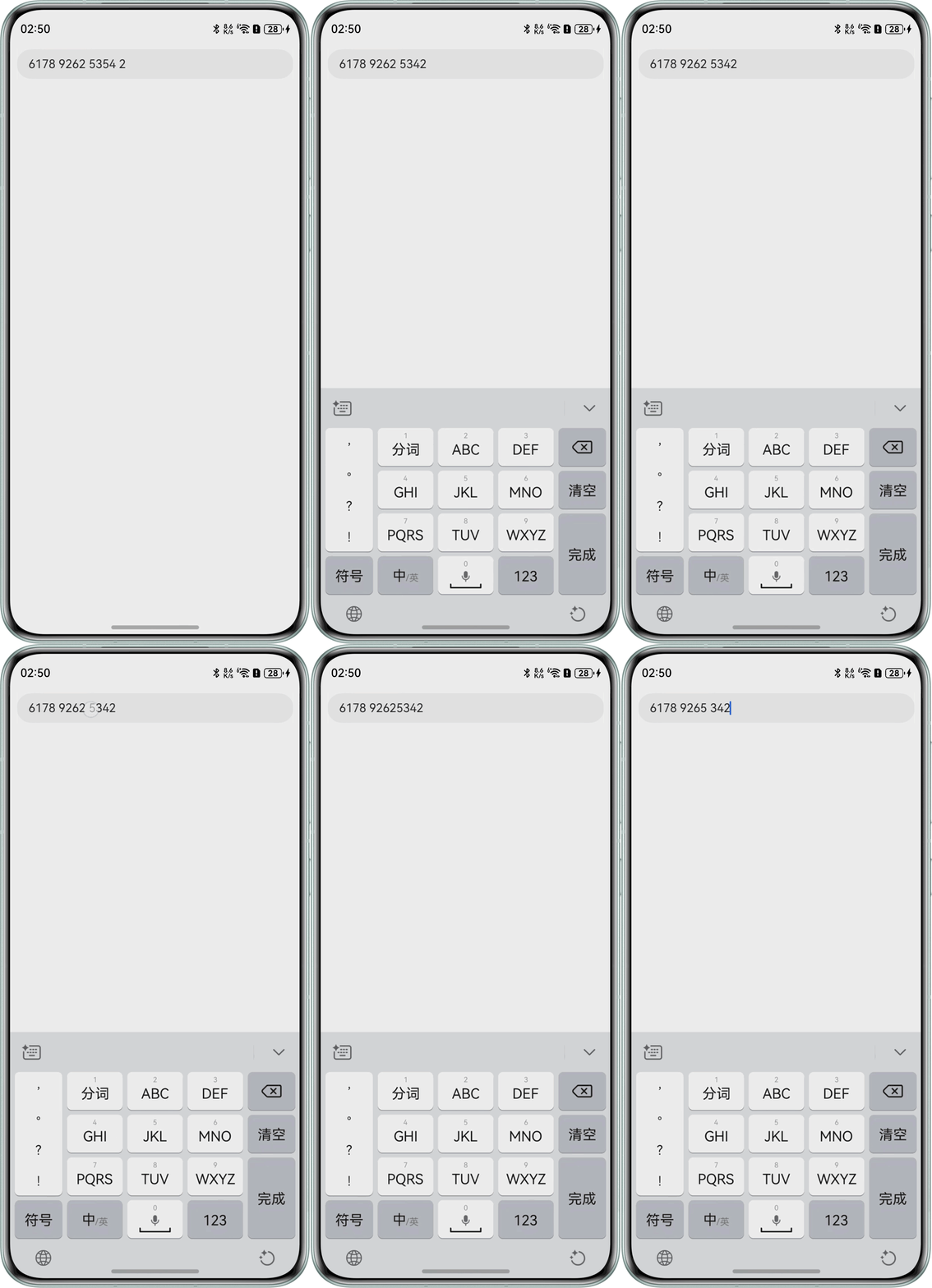
在使用TextInput组件银行卡号格式化(每四位数字后自动添加一个空格)或电话号码格式化时,用户在任意位置进行删除或新增操作,光标应保留在操作位置。但实际使用中存在两个问题:一是空格可以被删除,二是执行删除或插入操作时,光标会重置到输入框末尾。
问题效果预览:

修改建议
参考电话号码格式化中示例,做出以下修改:
- 在onTextSelectionChange回调函数中记录当前光标的位置;
- 实现calcCaretPosition计算光标位置的函数;
- 在onWillInsert和onWillDelete方法中,自定义处理增删空格逻辑。
完整示例参考如下:
@Entry
@Component
struct caretPositionExample {
  @State text: string = '';
  @State bankNumberNoSpace: string = '';
  @State nextCaret: number = -1; // 用于记录下次光标设置的位置
  @State actualCh: number = -1; // 用于记录光标在第i个数字后插入或者第i个数字前删除
  @State lastCaretPosition: number = 0;
  @State lastCaretPositionEnd: number = 0;
  controller: TextInputController = new TextInputController();

  isEmpty(str?: string): boolean {
    return str === 'undefined' || !str || !new RegExp('[^\\s]').test(str);
  }

  removeSpace(str: string): string {
    if (this.isEmpty(str)) {
      return '';
    }
    return str.replace(new RegExp('[\\s]', 'g'), '');
  }

  setCaret() {
    if (this.nextCaret !== -1) {
      console.info('to keep caret position right, change caret to', this.nextCaret);
      this.controller.caretPosition(this.nextCaret);
      this.nextCaret = -1;
    }
  }

  calcCaretPosition(nextText: string) {
    let befNumberNoSpace: string = this.removeSpace(this.text);
    this.actualCh = 0;
    if (befNumberNoSpace.length < this.bankNumberNoSpace.length) { // 插入场景
      for (let i = 0; i < this.lastCaretPosition; i++) {
        if (this.text[i] !== ' ') {
          this.actualCh += 1;
        }
      }
      this.actualCh += this.bankNumberNoSpace.length - befNumberNoSpace.length;
      for (let i = 0; i < nextText.length; i++) {
        if (nextText[i] !== ' ') {
          this.actualCh -= 1;
          if (this.actualCh <= 0) {
            this.nextCaret = i + 1;
            break;
          }
        }
      }
    } else if (befNumberNoSpace.length > this.bankNumberNoSpace.length) { // 删除场景
      if (this.lastCaretPosition === this.text.length) {
        console.info('Caret at last, no need to change');
      } else if (this.lastCaretPosition === this.lastCaretPositionEnd) {
        // 按键盘上回退键一个一个删的情况
        for (let i = this.lastCaretPosition; i < this.text.length; i++) {
          if (this.text[i] !== ' ') {
            this.actualCh += 1;
          }
        }
        for (let i = nextText.length - 1; i >= 0; i--) {
          if (nextText[i] !== ' ') {
            this.actualCh -= 1;
            if (this.actualCh <= 0) {
              this.nextCaret = i;
              break;
            }
          }
        }
      } else {
        // 剪切/手柄选择一次删多个字符
        this.nextCaret = this.lastCaretPosition; // 保持光标位置
      }
    }
  }

  build() {
    Column() {
      Row() {
        TextInput({ text: `${this.text}`, controller: this.controller })
          .height('48vp')
          .onChange((number: string) => {
            this.bankNumberNoSpace = this.removeSpace(number);
            let nextText: string = '';
            if (this.bankNumberNoSpace.length <= 4) {
              nextText = this.bankNumberNoSpace;
            } else {
              for (let i = 0; i < this.bankNumberNoSpace.length; i++) {
                nextText += this.bankNumberNoSpace[i];
                if ((i + 1) % 4 === 0 && i !== this.bankNumberNoSpace.length - 1) {
                  nextText += ' ';
                }
              }
            }
            if (this.text === nextText && nextText === number) {
              // 此时说明数字已经格式化完成了,在这个时候改变光标位置不会被重置掉
              this.setCaret();
            } else {
              this.calcCaretPosition(nextText);
            }
            this.text = nextText;
          })
          .onTextSelectionChange((selectionStart, selectionEnd) => {
            // 记录光标位置
            console.info('selection change: ', selectionStart, selectionEnd);
            this.lastCaretPosition = selectionStart;
            this.lastCaretPositionEnd = selectionEnd;
          }) // 使用onWillInsert和onWillDelete判断是否为空格,是空格就不给添加和删除,如果需要用户删除空格的时候不删除空格而是直接后退一位
          .onWillInsert((info: InsertValue) => {
            let value = info.insertValue;
            if (value === ' ') {
              return false;
            } else {
              return true;
            }
          })
          .onWillDelete((info: DeleteValue) => {
            let value = info.deleteValue;
            if (value === ' ') {
              return false;
            } else {
              return true;
            }
          })
      }
    }
    .width('100%')
    .height('100%')
  }
}