背景知识
- List:列表组件。列表包含一系列相同宽度的列表项。适合连续、多行呈现同类数据,例如图片和文本。
- cachedCount:设置列表中ListItem/ListItemGroup的预加载数量,懒加载场景只会预加载List显示区域外cachedCount的内容,非懒加载场景会全部加载。懒加载、非懒加载都只布局List显示区域+List显示区域外cachedCount的内容。
问题定位
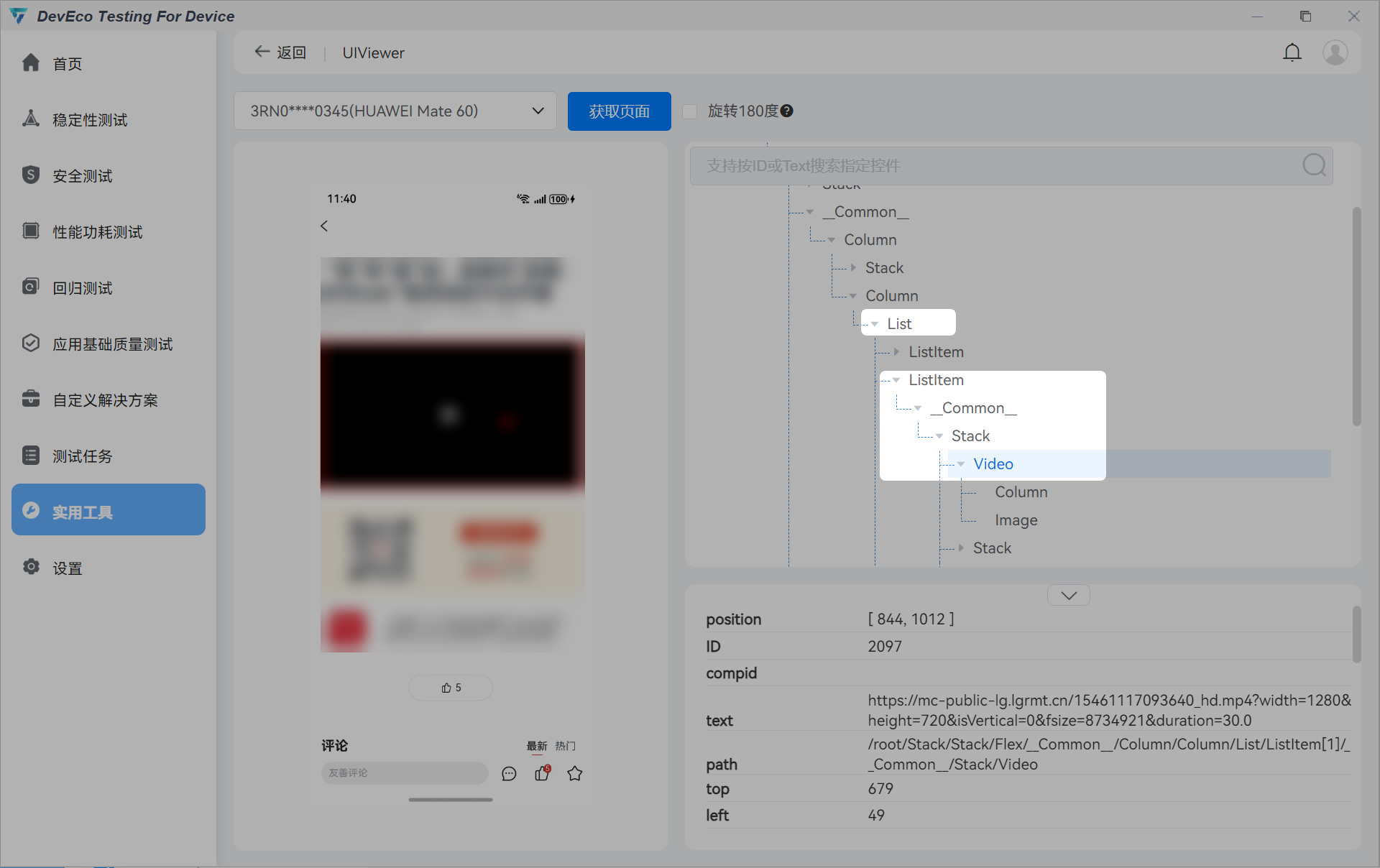
- 通过DevEco Testing软件的UIViewer可以查看到视频组件为Video,整体页面通过List组件进行组合。
- 在上下滑动过程中搜索日志关键词Player current status可以观察到视频进入了STOPPED状态,重新上滑后又恢复到STARTED播放状态。
07-23 19:32:06.579   53213-53213   C03906/com.hm.example/AceVideo  com.hm.example     I     [(100000:100000:scope)] Player current status is PREPARED.
07-23 19:32:06.605   53213-53213   C03906/com.hm.example/AceVideo  com.hm.example     I     [(100000:100000:scope)] Player current status is STARTED.
07-23 19:32:21.971   53213-53213   C03906/com.hm.example/AceVideo  com.hm.example     I     [(100000:100000:scope)] Player current status is STOPPED.
07-23 19:32:26.600   53213-53213   C03906/com.hm.example/AceVideo  com.hm.example     I     [(100000:100000:scope)] Player current status is PREPARED.
07-23 19:32:26.622   53213-53213   C03906/com.hm.example/AceVideo  com.hm.example     I     [(100000:100000:scope)] Player current status is STARTED.
- 检查代码中List组件是否配置了cachedCount参数。
分析结论
使用List组件以及配置cachedCount属性会导致组件滑出时组件被其他ListItem占用,视频播放暂停;当对应组件滑动至界面时,Video组件重新创建并初始化播放资源,导致重新开始播放。
修改建议
将Video组件从List组件中剥离单独显示,可以参考如下代码:
- CustomDataSource定义:
export interface ItemType { type: string, url: string } export class BasicDataSource<T> implements IDataSource { originDataArray: T[] = []; private listeners: DataChangeListener[] = []; public totalCount(): number { return this.originDataArray.length; } public getData(index: number): T { return this.originDataArray[index]; } registerDataChangeListener(listener: DataChangeListener): void { if (this.listeners.indexOf(listener) < 0) { this.listeners.push(listener); } } unregisterDataChangeListener(listener: DataChangeListener): void { const pos = this.listeners.indexOf(listener); if (pos >= 0) { this.listeners.splice(pos, 1); } } notifyDataReload(): void { this.listeners.forEach(listener => { listener.onDatasetChange([{ type: DataOperationType.RELOAD }]); }); } notifyDatasetChange(operations: DataOperation[]): void { this.listeners.forEach(listener => { listener.onDatasetChange(operations); }); } } export class CustomDataSource extends BasicDataSource<ItemType> { constructor(data: ItemType[]) { super(); this.originDataArray = data; } public addData(data: ItemType): void { this.originDataArray.push(data); this.notifyDatasetChange([ { type: DataOperationType.ADD, index: this.originDataArray.length - 1 } ]); } public deleteData(index: number): void { if (index < this.originDataArray.length) { this.originDataArray.splice(index, 1); this.notifyDatasetChange([ { type: DataOperationType.DELETE, index: index } ]); } } } - Index实现:
import { CustomDataSource, ItemType } from '../common/CustomDataSource';

@Entry
@Component
struct MixedListPage {
  @State data: CustomDataSource = new CustomDataSource([
    {
      type: 'image',
      url: 'app.media.picture'   // 此处地址实际使用过程中替换为真实地址
    },
    { type: 'text', url: '这是一段文本内容' },
    {
      type: 'image',
      url: 'app.media.picture'   // 此处地址实际使用过程中替换为真实地址
    },
    { type: 'text', url: '这是一段文本内容' },
    {
      type: 'image',
      url: 'app.media.picture'   // 此处地址实际使用过程中替换为真实地址
    },
    { type: 'text', url: '这是一段文本内容' },
    {
      type: 'image',
      url: 'app.media.picture'   // 此处地址实际使用过程中替换为真实地址
    },
    { type: 'text', url: '这是一段文本内容' },
  ]);

  build() {
    Column() {
      Video({
        // 此处地址实际使用过程中替换为真实地址
        src: 'xx.xx.xx/demo.mp4',
      })
        .width('100%')
        .height(200)
        .objectFit(ImageFit.Cover)
        .autoPlay(true)
      List() {
        LazyForEach(this.data, (item: ItemType) => {
          ListItem() {
            if (item.type === 'image') {
              Image($r(item.url))
                .width('100%')
                .height(200)
                .objectFit(ImageFit.Cover)
            } else if (item.type === 'text') {
              Text(item.url)
                .fontSize(18)
                .textAlign(TextAlign.Center)
                .padding(10)
            }
          }
        }, (item: ItemType) => item.url);
      }
      .scrollBar(BarState.Auto)
      .divider({ strokeWidth: 1, color: Color.Gray })
    }
  }
}