问题现象
如何实现当List的ListItem刚到达Tab底部时Tab页签切换?即如下图所示,当b线到达a线处时,Tab的页签切换至Title3页。
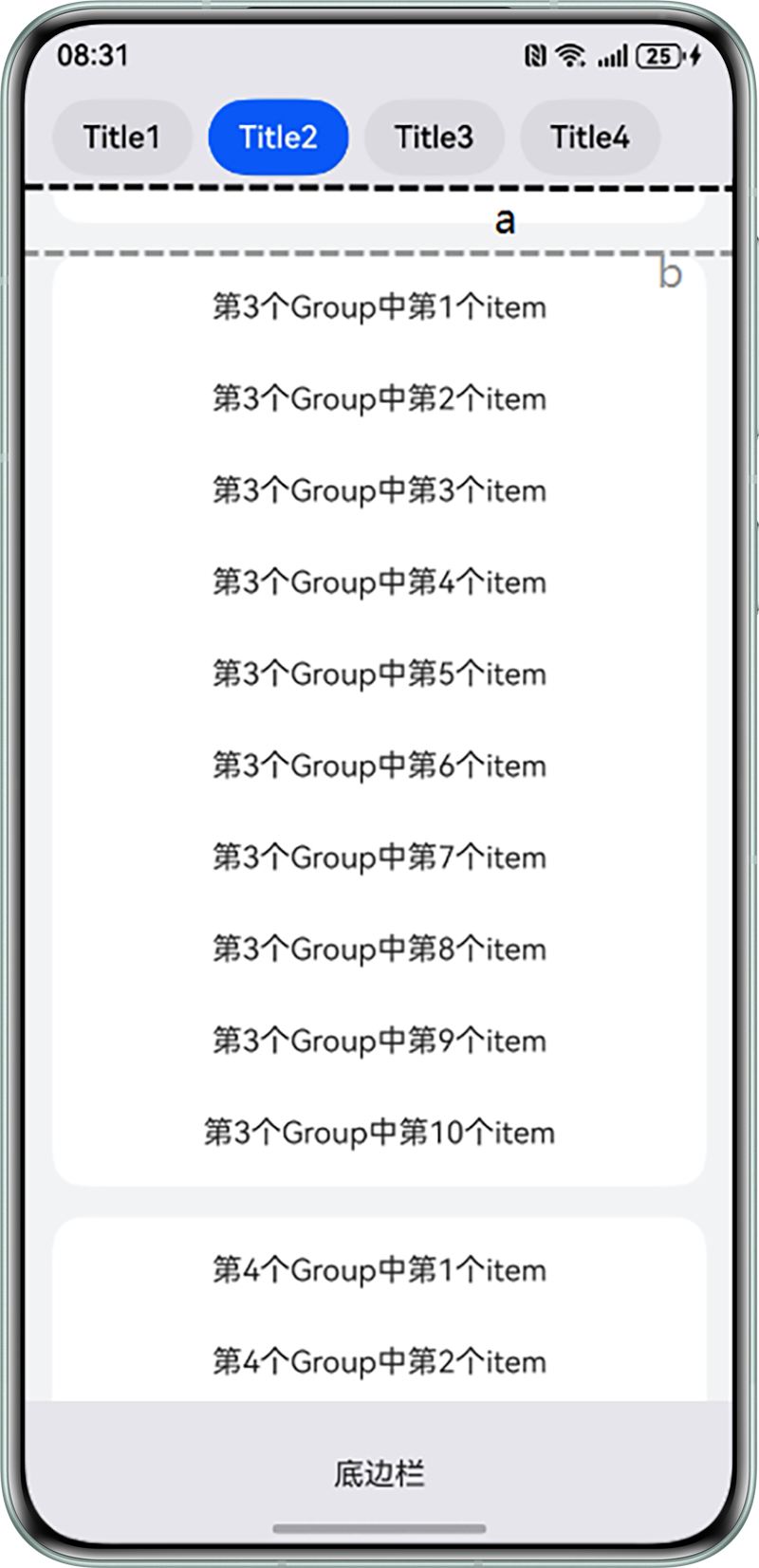
因为Tab是堆叠在List上方的,Tab与List组件上方有显示区域重叠部分。如果使用List的onScrollIndex方法,当b到达a时,获取的index是被Tab遮挡的List的ListItem索引,而非b所在的ListItem,所以onScrollIndex无法实现需求。是否有其他方法?

解决方案
因为Tab的位置是固定不变的,可以在滚动事件onDidScroll中,使用ListScroll的getVisibleListContentInfo方法,根据a线的坐标获取该位置List的ListItem的索引信息。
import { CommonModifier, LengthUnit } from '@kit.ArkUI';

@Entry
@Component
struct ListFollowTab {
  private LIST_GROUP_NUM = 4;
  private TAB_BAR_HEIGHT: number = 56;
  @State arrayList: number[][] = new Array<number[]>(this.LIST_GROUP_NUM);
  @State currentIndex: number = 0;
  @State tabOpacity: boolean = false;
  private controller: TabsController = new TabsController();
  private listScroller: ListScroller = new ListScroller();
  @State tabBarModifier: CommonModifier = new CommonModifier();
  @State toEnd: boolean = false;

  aboutToAppear(): void {
    let item: number[] = new Array(10);
    item.fill(0);
    this.arrayList.fill(item);
    this.tabBarModifier.align(Alignment.Start);
  }

  @Builder
  tabBuilder(index: number, name: string) {
    Button(name)
      .type(ButtonType.ROUNDED_RECTANGLE)
      .padding({
        left: 16,
        right: 16,
        top: 8,
        bottom: 8
      })
      .margin({right: 4, left: 4})
      .backgroundColor(this.currentIndex === index ? '#0A59F7' : '#0D000000')
      .fontColor(this.currentIndex === index ? Color.White : Color.Black)
      .onClick(() => {
        // 通过页签切换,避免item被页签栏挡住
        this.listScroller.scrollToIndex(index, true, ScrollAlign.START, {
          extraOffset: { value: -1 * this.TAB_BAR_HEIGHT, unit: LengthUnit.VP }
        });
      })
  }

  build() {
    Column() {
      Stack() {
        List({ space: 16, scroller: this.listScroller }) {
          ForEach(this.arrayList, (group: number[], index: number) => {
            ListItemGroup({ style: ListItemGroupStyle.CARD }) {
              ForEach(group, (item: number, itemIndex: number) => {
                ListItem({ style: ListItemStyle.CARD }) {
                  Text('第' + (index + 1) + '个Group中第' + (itemIndex + 1) + '个item')
                    .width('100%')
                    .textAlign(TextAlign.Center)
                }
              })
            }.margin({ left: 16, right: 16 })
          })
        }
        .onDidScroll((offset, scrollState) => {
          // 滑动至底部时,继续下滑和惯性回弹操作不影响页签
          if (this.toEnd) {
            if (offset > 0 || (offset < 0 && scrollState === ScrollState.Fling)) {
              return;
            }
          }
          this.toEnd = false;
          // 获取当前Tab位置的item索引,判断是否切换页签
          let currentItem = this.listScroller.getVisibleListContentInfo(50, this.TAB_BAR_HEIGHT).index;
          if (currentItem > 0 && this.currentIndex !== currentItem) {
            this.currentIndex = currentItem;
          }
        })
        .onReachEnd(() => {
          // 如果最后一个页签对应的item高度小于List区域高度,List滑动到底时切换至最后一个页签
          this.toEnd = true;
          this.currentIndex = this.LIST_GROUP_NUM - 1;
        })
        .onScrollIndex((start: number) => {
          if (start > 0) {
            this.tabOpacity = true;
          } else {
            this.tabOpacity = false;
          }
        })

        Tabs({
          barPosition: BarPosition.Start,
          index: this.currentIndex,
          controller: this.controller,
          barModifier: this.tabBarModifier
        }) {
          TabContent() {
          }
          .tabBar(this.tabBuilder(0, 'Title1'))

          TabContent() {
          }.tabBar(this.tabBuilder(1, 'Title2'))

          TabContent() {
          }.tabBar(this.tabBuilder(2, 'Title3'))

          TabContent() {
          }.tabBar(this.tabBuilder(3, 'Title4'))
        }
        .vertical(false)
        .barMode(BarMode.Scrollable, { margin: 12 })
        .barHeight(this.TAB_BAR_HEIGHT)
        .animationDuration(400)
        .onChange((index: number) => {
          // currentIndex控制TabContent显示页签
          this.currentIndex = index;
        })
        .backgroundColor('#E5E5EA')
        .expandSafeArea([SafeAreaType.SYSTEM], [SafeAreaEdge.TOP])
        .width('100%')
        .height('auto')
        .visibility(this.tabOpacity ? Visibility.Visible : Visibility.Hidden)
      }
      .alignContent(Alignment.Top)
      .height('90%')

      Row() {
        Text('底边栏')
      }
      .justifyContent(FlexAlign.Center)
      .backgroundColor('#E5E5EA')
      .height('10%')
      .width('100%')
      .expandSafeArea([SafeAreaType.SYSTEM], [SafeAreaEdge.BOTTOM])
    }
    .backgroundColor('#F1F3F5')
    .expandSafeArea([SafeAreaType.SYSTEM], [SafeAreaEdge.TOP, SafeAreaEdge.BOTTOM])
    .width('100%')
    .height('100%')
  }
}