解决方案
根据问题中提到的功能可知,实现该功能需要使用到能判断单击/长按的事件监听,而onClick只能监听用户点击过程中抬起的操作,无法判断是否长按。所以这里使用onTouch监听触摸事件,计算按下和抬起的时间差,如果小于长按时间就算作触发点击功能。
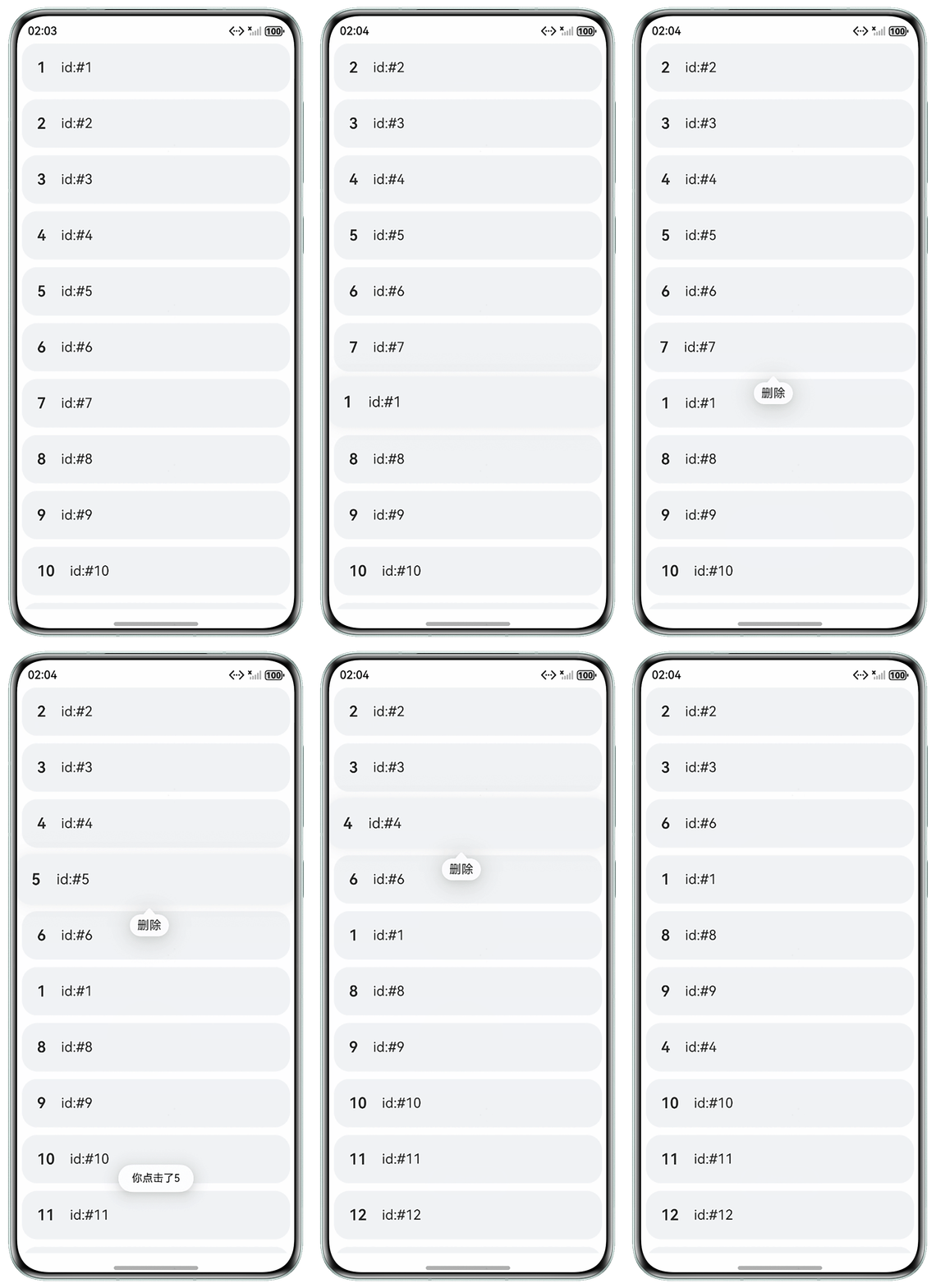
List组件下使用ForEach,通过设置onMove事件可以实现列表拖拽排序。在API20中可以设置拖拽过程中(长按、开始拖拽、拖拽时经过其他组件、拖拽结束)产生的事件回调。让长按显示气泡,开始拖拽隐藏气泡。
- 方案一(API20及以上):
- 使用onTouch事件判断单击。
.onTouch((e) => { // 获取当前按下的时间戳 if (e.type === TouchType.Down) { this.startTime = Date.now(); console.info(`按下时的时间:${this.startTime}`); } // 超过500ms当作长按 if (e.type === TouchType.Up && Date.now() - this.startTime < 500) { this.prompt.openToast({ message: `你点击了${item.id}` }); console.info(`触发单击${(Date.now() - this.startTime) / 1000}s`); } else if (e.type === TouchType.Up && Date.now() - this.startTime >= 500) { console.info(`触发长按${(Date.now() - this.startTime) / 1000}s`); } }) - 通过给渲染列表项的ForEach添加onMove事件,通过API20的接口实现列表拖拽排序,并设置长按显示气泡,拖拽后气泡隐藏。
.onMove((from: number, to: number) => {
  let tmp = this.list.splice(from, 1);
  this.list.splice(to, 0, tmp[0]);
}, {
  // 长按显示气泡
  onLongPress: (index: number) => {
    if (this.list[index].showPopup === true) {
      this.list[index].showPopup = false;
      this.list[index].showPopup = true;
    } else {
      this.list[index].showPopup = true;
    }
  },
  // 列表项开始拖拽,隐藏气泡
  onDragStart: (index: number) => {
    this.list[index].showPopup = false;
  }
});
以下为完整代码:
import { PromptAction } from '@ohos.arkui.UIContext'; @Observed export class Item { id: number = 0; showPopup: boolean = false; // 气泡是否展示 constructor(id: number, showPopup: boolean) { this.id = id; this.showPopup = showPopup; } } @Entry @Component struct Page1 { @State list: Item[] = []; startTime: number = 0; prompt: PromptAction = this.getUIContext().getPromptAction(); aboutToAppear(): void { for (let index = 1; index <= 20; index++) { this.list[index - 1] = new Item(index, false); } } build() { Column() { List({ space: 10 }) { ForEach(this.list, (item: Item, index: number) => { ListItem() { CustomItem({ item: item, callBack: () => { this.list.splice(index, 1); } }); } .borderRadius(20) .backgroundColor('#f1f3f5') .onTouch((e) => { // 获取当前按下的时间戳 if (e.type === TouchType.Down) { this.startTime = Date.now(); console.info(`按下时的时间:${this.startTime}`); } // 超过500ms当作长按 if (e.type === TouchType.Up && Date.now() - this.startTime < 500) { this.prompt.openToast({ message: `你点击了${item.id}` }); console.info(`触发单击${(Date.now() - this.startTime) / 1000}s`); } else if (e.type === TouchType.Up && Date.now() - this.startTime >= 500) { console.info(`触发长按${(Date.now() - this.startTime) / 1000}s`); } }) .margin({ left: 10, right: 10 }); }, (item: Item) => JSON.stringify(item)) .onMove((from: number, to: number) => { let tmp = this.list.splice(from, 1); this.list.splice(to, 0, tmp[0]); }, { // 长按显示气泡 onLongPress: (index: number) => { if (this.list[index].showPopup === true) { this.list[index].showPopup = false; this.list[index].showPopup = true; } else { this.list[index].showPopup = true; } }, // 列表项开始拖拽,隐藏气泡 onDragStart: (index: number) => { this.list[index].showPopup = false; } }); }.height('100%') .width('100%'); } .height('100%') .width('100%'); } } @Component export struct CustomItem { @ObjectLink item: Item; callBack: () => void = () => { }; @Builder Popup() { Row({ space: 10 }) { Text('删除').onClick(() => { this.callBack(); }); } .padding({ top: 5, bottom: 5, left: 10, right: 10 }); } build() { Row({ space: 20 }) { Text(this.item.id + '').fontSize(20).fontWeight(600); Text(`id:#${this.item.id}`).fontSize(18); } .padding(20) .width('100%') .bindPopup(this.item.showPopup, { builder: this.Popup(), onStateChange: (e) => { console.info(`${e.isVisible}`); } }); } } - 使用onTouch事件判断单击。
- 方案二:
可以在onTouch触摸回调中按下时添加定时器,抬起时间隔小于500ms或者滑动,取消定时器不显示气泡。参考代码如下:
import { PromptAction } from '@kit.ArkUI';
import { CustomItem, Item } from './Page1';


@Entry
@Component
struct Demo {
  @State list: Item[] = [];
  startTime: number = 0;
  pressId: number = 0;
  startY: number = 0;
  isMove: boolean = false;
  prompt: PromptAction = this.getUIContext().getPromptAction();

  aboutToAppear(): void {
    for (let index = 1; index <= 20; index++) {
      this.list[index - 1] = new Item(index, false);
    }
  }

  build() {
    Column() {
      List({ space: 10 }) {
        ForEach(this.list, (item: Item, index: number) => {
          ListItem() {
            CustomItem({
              item: item, callBack: () => {
                this.list.splice(index, 1);
              }
            });
          }
          .borderRadius(20)
          .backgroundColor('#f1f3f5')
          .onTouch((e) => {
            // 获取当前按下的时间戳
            if (e.type === TouchType.Down) {
              this.isMove = false;
              this.startTime = Date.now();
              this.startY = e.touches[0].y;
              // 定时器,按下后500ms显示气泡
              this.pressId = setTimeout(() => {
                if (this.list[index].showPopup === true) {
                  this.list[index].showPopup = false;
                }
                this.list[index].showPopup = true;
                if (this.isMove === false) {
                  console.info(`触发长按`);
                }
              }, 500);
            }
            // 低于500ms当作点击
            if (e.type === TouchType.Up) {
              let time = Date.now();
              if (time - this.startTime < 500) {
                // 清掉显示气泡的定时器
                clearTimeout(this.pressId);
                if (this.isMove === false) {
                  this.prompt.openToast({ message: `你点击了${item.id}` });
                  console.info(`触发单击${(time - this.startTime) / 1000}s`);
                }
              }
            }
            // 滑动不显示气泡,y方向滑动距离超过10当作滑动
            if (e.type === TouchType.Move && Math.abs(e.touches[0].y - this.startY) > 10) {
              this.isMove = true;
              console.info('触发滑动');
              if (this.list[index].showPopup === true) {
                this.list[index].showPopup = false;
              }
            }
          })
          .margin({ left: 10, right: 10 });
        }, (item: Item) => JSON.stringify(item))
          .onMove((from: number, to: number) => {
            let tmp = this.list.splice(from, 1);
            this.list.splice(to, 0, tmp[0]);
          });
      }.height('100%')
      .width('100%');
    }
    .height('100%')
    .width('100%');
  }
}
以下为效果展示: