问题现象
伙伴Hypium脚本中使用“from hypium.advance.deveco_testing import UiDriver”进行导入,在运行脚本时报错:imported module hypium中找不到引用UiDriver,该问题如何解决?
问题定位
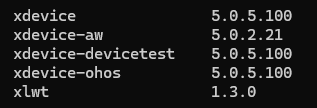
- 查看运行环境上依赖的安装包是否存在,版本是否正确,执行pip list命令查看xdevice、hypium。
安装成功后示例如下(具体版本号根据实际情况检查):

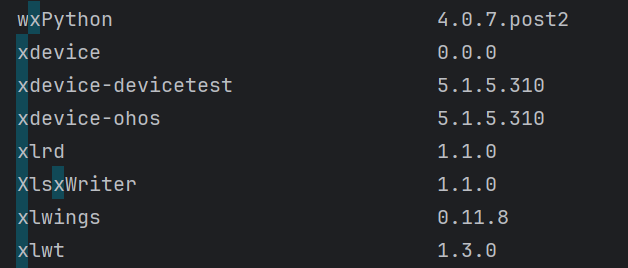
而伙伴的xdevice版本显示为0.0.0。
- 检查import的导入方法使用是否正确。
找到Hypium插件的安装包路径,打开hypium_api的md文件(举例D:\devecotesting-hypium-6.0.7.202\hypium-6.0.7.202\doc下的hypium_api_6.0.7.202.md)。
在该文件中查找“import UiDriver”,未发现“hypium.advance.deveco_testing”。

修改建议
- 使用“python -m pip uninstall xx”命令进行xdevice和hypium卸载,需要依次卸载hypium、xdevice-ohos、xdevice-devicetest、xdevice。
python -m pip uninstall -y hypium
python -m pip uninstall -y xdevice-ohos
python -m pip uninstall -y xdevice-devicetest
python -m pip uninstall -y xdevice
- 按照安装向导中的“安装Hypium”指导,重新进行xdevice和hypium的安装。
- 基于已安装的Hypium版本,使用“from hypium import UiDriver”或md文件中的“from hypium.action.device.uidriver import UiDriver”导入,举例:
