问题现象
开发者在处理Tabs组件生命周期时,最常遇到以下几个问题:
- 问题一:子页面生命周期缺失。当Tabs中的TabContent被切换时,为什么不会触发aboutToAppear和aboutToDisappear生命周期函数?
- 问题二:页面级生命周期不触发。开发者期望在TabContent切换时能触发类似onPageShow和onPageHide的页面级生命周期,但为什么这些函数完全不会被调用?
- 问题三:TabBar切换速度比TabContent切换速度慢。Tabs组件的页面切换事件会在什么时候触发?为什么TabBar切换速度比TabContent切换速度慢?
- 问题四:监听TabContent的显隐。如何调用Tabs组件相关的事件?
- 问题五:监听TabBar是否被点击。非自定义TabBar的情况下,如何监听TabBar是否被点击?
背景知识
- Tabs组件:通过页签进行内容视图切换的容器组件,每个页签对应一个内容视图。
- TabContent:仅在Tabs中使用,对应一个切换页签的内容视图。
- aboutToAppear:自定义组件的生命周期。aboutToAppear函数在创建自定义组件的新实例后,在其build()函数执行前调用。
- aboutToDisappear:自定义组件的生命周期。aboutToDisappear函数在自定义组件析构销毁时执行。
- onPageShow:自定义组件的生命周期。router路由页面(即@Entry装饰的自定义组件)每次显示时触发一次,包括路由跳转、应用进入前台等场景。
- onPageHide:自定义组件的生命周期。router路由页面(即@Entry装饰的自定义组件)每次隐藏时触发一次,包括路由跳转、应用进入后台等场景。
- Tabs组件事件:Tabs组件支持触发的事件,包含onChange、onAnimationStart、onTabBarClick等。
- TabContent组件事件:TabContent组件支持触发的事件,包含onWillShow和onWillHide。
- onVisibleAreaChange:组件可见区域变化时触发该回调。
解决方案
- 问题一:子页面生命周期缺失。
作为ArkUI组件的通用生命周期,在组件即将出现时触发一次。对于TabContent内的子组件,仅在首次创建时触发,后续切换不再触发。
- 问题二:页面级生命周期不触发。
与Navigation组件实现的跨页面导航不同,Tabs组件被设计为单页面内的视图切换容器。这意味着Tabs内的所有内容共享同一个页面上下文。
从系统视角看,当用户在Tabs间切换时,只是在同一个“窗口”内浏览不同的“面板”,并非离开或进入一个新页面。因此,系统自然不会为这种内部切换触发完整的页面生命周期序列。
- 问题三:TabBar切换速度比TabContent切换速度慢。
TabBar会在TabContent切换动作完成后自动触发切换。使用自定义页签时,在onChange事件中联动可能会导致滑动页面切换后才执行页签联动,引起自定义页签切换效果延迟。建议在onAnimationStart中监听并刷新当前索引,以确保动效能够及时触发。具体实现可参考示例3(自定义页签切换联动)。
- 问题四:监听TabContent的显隐。
TabContent的显隐可以通过多种事件进行监听,以下将展示四种不同的实现方案,开发者可根据实际场景选择合适的监听方式。
- 方案一:使用onChange监听全局切换。
这是最常见的Tabs组件事件,会在Tab页签切换后触发该事件。
关键代码如下:
// 使用onChange监听页面切换 .onChange((index: number) => { try { this.getUIContext().getPromptAction().showToast({ message: `监听onChange,当前切换的是第${index + 1}个Tab`, duration: 2000, showMode: promptAction.ToastShowMode.TOP_MOST, bottom: 85 }); } catch (error) { let message = (error as BusinessError).message; let code = (error as BusinessError).code; console.error(`showToast args error code is ${code}, message is ${message}`); } }) - 方案二:使用onAnimationStart监听动画显示。
切换动画开始时触发该回调。当animationDuration为0时动画关闭且scrollable为false时,不触发该回调。
关键代码如下:
// 使用onAnimationStart监听切换动画开始 .onAnimationStart((index: number, targetIndex: number) => { if (index === targetIndex) { return; } this.selectedIndex = targetIndex; try { this.getUIContext().getPromptAction().showToast({ message: `监听onAnimationStart,当前切换掉的是第${index + 1}个Tab,展示的是第${targetIndex + 1}个Tab`, duration: 2000, showMode: promptAction.ToastShowMode.TOP_MOST, bottom: 85 }); } catch (error) { let message = (error as BusinessError).message; let code = (error as BusinessError).code; console.error(`showToast args error code is ${code}, message is ${message}`); } }); - 方案三:使用onWillShow/onWillHide监听页面即将显示/消失。
TabContent将要显示或者快不显示的时候会触发上述两个回调。场景包括TabContent首次显示,TabContent切换,页面切换,窗口前后台切换。
关键代码如下:
// 通过onWillShow .onWillShow(() => { try { this.getUIContext().getPromptAction().showToast({ message: '首页要出现了', duration: 2000, showMode: promptAction.ToastShowMode.TOP_MOST, bottom: 85 }); } catch (error) { let message = (error as BusinessError).message; let code = (error as BusinessError).code; console.error(`showToast args error code is ${code}, message is ${message}`); } }) .onWillHide(() => { try { this.getUIContext().getPromptAction().showToast({ message: '首页要隐藏了', duration: 2000, showMode: promptAction.ToastShowMode.TOP_MOST, bottom: 85 }); } catch (error) { let message = (error as BusinessError).message; let code = (error as BusinessError).code; console.error(`showToast args error code is ${code}, message is ${message}`); } }); - 方案四:使用onVisibleAreaChange监听显示区域的变化。
关键代码如下:
// 通过onVisibleAreaChange实现监控当前页面是否占据了屏幕至少一半的部分
.onVisibleAreaChange([0.0, 1.0], (isExpanding: boolean, currentRatio: number) => {
  console.info(`Test Text isExpanding: ${isExpanding}, currentRatio: ${currentRatio}`);
  if (isExpanding && currentRatio >= 0.5) {
    try {
      this.getUIContext().getPromptAction().showToast({
        message: '第二页在界面上展示了至少一半的部分',
        duration: 2000,
        showMode: promptAction.ToastShowMode.TOP_MOST,
        bottom: 85
      });
    } catch (error) {
      let message = (error as BusinessError).message;
      let code = (error as BusinessError).code;
      console.error(`showToast args error code is ${code}, message is ${message}`);
    }
    console.info(`Test Text is fully visible. currentRatio: ${currentRatio}`);
  }
});
- 方案一:使用onChange监听全局切换。
全量代码如下:
import { promptAction } from '@kit.ArkUI';
import { BusinessError } from '@kit.BasicServicesKit';

@Entry
@Component
struct TabsLifeCycle {
  @State selectedIndex: number = 0;
  fontColor: string = '#000';
  selectedFontColor: string = '#0A59F7';
  private controller: TabsController = new TabsController();

  @Builder
  tabBuilder(index: number, name: string) {
    Column() {
      Text(name)
        .fontColor(this.selectedIndex === index ? this.selectedFontColor : this.fontColor)
        .fontSize(16)
        .fontWeight(this.selectedIndex === index ? 500 : 400)
        .lineHeight(22);
    }
    .onClick(() => {
      this.controller.changeIndex(index);
      this.selectedIndex = index;
    });
  }

  build() {
    Column() {
      Tabs({ controller: this.controller }) {
        TabContent() {
          Column() {
            Text('onWillShow/onWillHide事件');
          }
          .justifyContent(FlexAlign.Center)
          .width('100%')
          .height('100%');
        }
        .tabBar(this.tabBuilder(0, '首页'))
        // 通过onWillShow
        .onWillShow(() => {
          try {
            this.getUIContext().getPromptAction().showToast({
              message: '首页要出现了',
              duration: 2000,
              showMode: promptAction.ToastShowMode.TOP_MOST,
              bottom: 85
            });
          } catch (error) {
            let message = (error as BusinessError).message;
            let code = (error as BusinessError).code;
            console.error(`showToast args error code is ${code}, message is ${message}`);
          }
        })
        .onWillHide(() => {
          try {
            this.getUIContext().getPromptAction().showToast({
              message: '首页要隐藏了',
              duration: 2000,
              showMode: promptAction.ToastShowMode.TOP_MOST,
              bottom: 85
            });
          } catch (error) {
            let message = (error as BusinessError).message;
            let code = (error as BusinessError).code;
            console.error(`showToast args error code is ${code}, message is ${message}`);
          }
        });
        TabContent() {
          Column()
            .width('100%')
            .height('100%');
        }
        .tabBar(this.tabBuilder(1, '商城'))
        // 通过onVisibleAreaChange实现监控当前页面是否占据了屏幕至少一半的部分
        .onVisibleAreaChange([0.0, 1.0], (isExpanding: boolean, currentRatio: number) => {
          console.info(`Test Text isExpanding: ${isExpanding}, currentRatio: ${currentRatio}`);
          if (isExpanding && currentRatio >= 0.5) {
            try {
              this.getUIContext().getPromptAction().showToast({
                message: '第二页在界面上展示了至少一半的部分',
                duration: 2000,
                showMode: promptAction.ToastShowMode.TOP_MOST,
                bottom: 85
              });
            } catch (error) {
              let message = (error as BusinessError).message;
              let code = (error as BusinessError).code;
              console.error(`showToast args error code is ${code}, message is ${message}`);
            }
            console.info(`Test Text is fully visible. currentRatio: ${currentRatio}`);
          }
        });
        TabContent() {
          Column()
            .width('100%')
            .height('100%');
        }
        .tabBar(this.tabBuilder(2, '我的'));
      }
      .onTabBarClick(() => {
        try {
          this.getUIContext().getPromptAction().showToast({
            message: 'TabBar被点击了',
            duration: 2000,
            showMode: promptAction.ToastShowMode.TOP_MOST,
            bottom: 85
          });
        } catch (error) {
          let message = (error as BusinessError).message;
          let code = (error as BusinessError).code;
          console.error(`showToast args error code is ${code}, message is ${message}`);
        }
      })
      // 使用onChange监听页面切换
      .onChange((index: number) => {
        try {
          this.getUIContext().getPromptAction().showToast({
            message: `监听onChange,当前切换的是第${index + 1}个Tab`,
            duration: 2000,
            showMode: promptAction.ToastShowMode.TOP_MOST,
            bottom: 85
          });
        } catch (error) {
          let message = (error as BusinessError).message;
          let code = (error as BusinessError).code;
          console.error(`showToast args error code is ${code}, message is ${message}`);
        }
      })
      // 使用onAnimationStart监听切换动画开始
      .onAnimationStart((index: number, targetIndex: number) => {
        if (index === targetIndex) {
          return;
        }
        this.selectedIndex = targetIndex;
        try {
          this.getUIContext().getPromptAction().showToast({
            message: `监听onAnimationStart,当前切换掉的是第${index + 1}个Tab,展示的是第${targetIndex + 1}个Tab`,
            duration: 2000,
            showMode: promptAction.ToastShowMode.TOP_MOST,
            bottom: 85
          });
        } catch (error) {
          let message = (error as BusinessError).message;
          let code = (error as BusinessError).code;
          console.error(`showToast args error code is ${code}, message is ${message}`);
        }
      });
    }
    .width('100%')
    .height('100%');
  }
} - 实现效果展示如下图:
方案对比:
方案一:onChange
方案二:onAnimationStart
方案三:onWillShow
方案四:onVisibleAreaChange
所属组件
Tabs组件。
Tabs组件。
TabContent组件。
任何组件(通常用于TabContent内部子组件)。
触发时机与条件
Tabs切换动作完成,新页索引已确定时。
切换动画开始播放的第一帧。
属于该TabContent的显示流程开始时。
组件在屏幕视窗内的可见面积比例达到设定阈值时。
典型场景
①更新全局状态;
②数据埋点。
①自定义联动动画。
①刷新某个子页面数据。
②申请资源(如播视频)。
①广告曝光埋点。
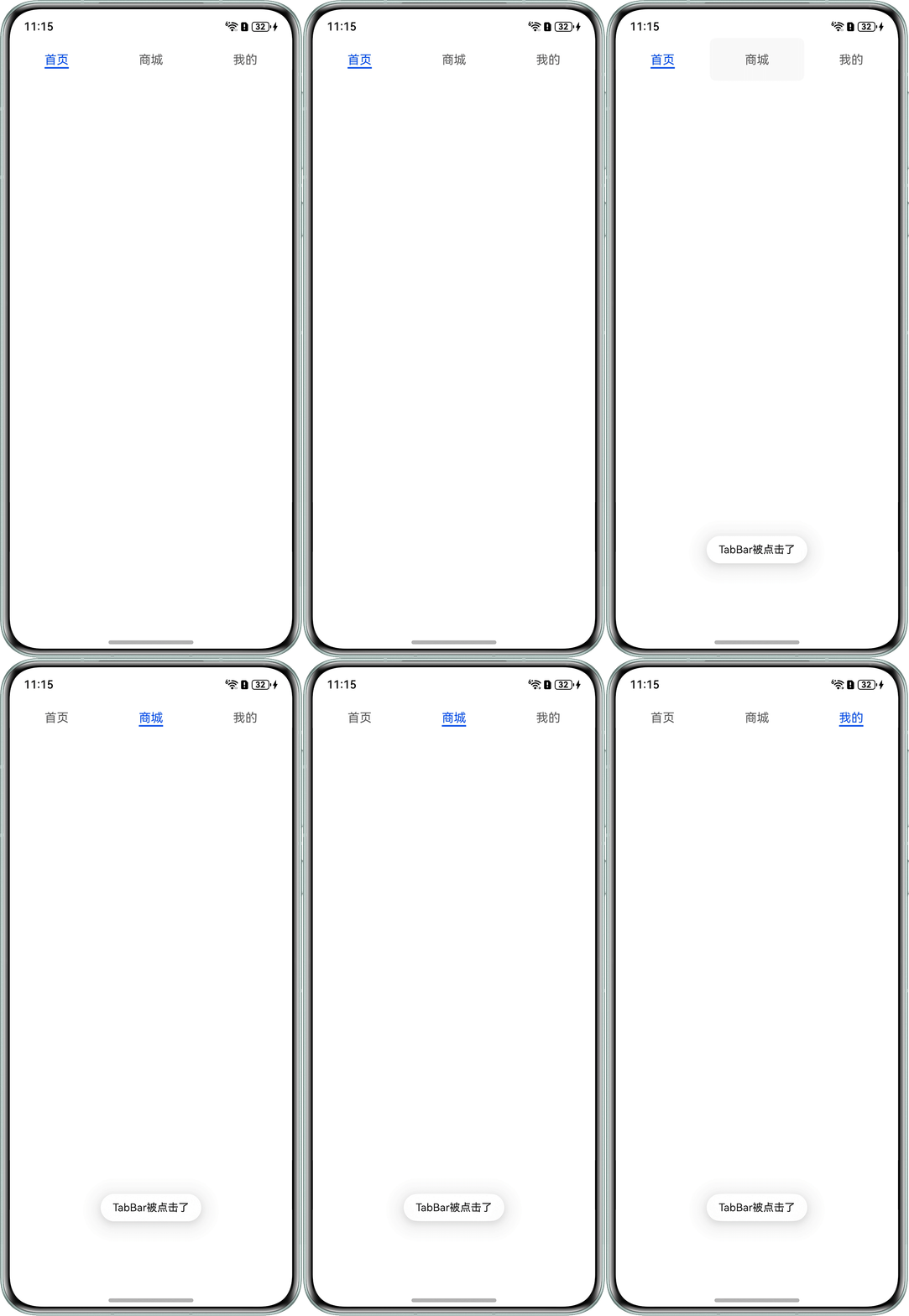
- 问题五:监听TabBar是否被点击。
可以通过onTabBarClick实现监听TabBar是否被点击,已经选中的TabBar再次点击也可触发该事件。
实现代码如下:
import { promptAction } from '@kit.ArkUI';
import { BusinessError } from '@kit.BasicServicesKit';

@Entry
@Component
struct TabBarBeClicked {
  build() {
    Column() {
      Tabs() {
        TabContent() {
          Column()
            .width('100%')
            .height('100%');
        }
        .tabBar('首页');

        TabContent() {
          Column()
            .width('100%')
            .height('100%');
        }
        .tabBar('商城');

        TabContent() {
          Column()
            .width('100%')
            .height('100%');
        }
        .tabBar('我的');
      }
      .onTabBarClick(() => {
        try {
          this.getUIContext().getPromptAction().showToast({
            message: 'TabBar被点击了',
            duration: 2000,
            showMode: promptAction.ToastShowMode.TOP_MOST,
            bottom: 85
          });
        } catch (error) {
          let message = (error as BusinessError).message;
          let code = (error as BusinessError).code;
          console.error(`showToast args error code is ${code}, message is ${message}`);
        }
      });
    }
    .width('100%')
    .height('100%');
  }
}
实现效果如下:

总结
Tabs及其子组件生命周期相关问题可以总结成如下表格:
组件 | 关键生命周期监听事件 | 功能描述与触发时机 |
Tabs事件 | onChange | 最核心的切换事件。当TabContent发生切换(无论是点击TabBar、滑动还是代码控制)时触发,返回切换后的新索引。 |
onTabBarClick | 专门监听TabBar的点击事件。当用户点击TabBar上的某个标签时触发,返回被点击标签的索引。注意:即使点击当前已选中的标签也会触发。 | |
TabContent事件 | onWillShow | 当对应的TabContent即将显示时触发。在非首次创建的切换场景中,这是子内容“显示”的信号。 |
onWillHide | 当对应的TabContent即将隐藏时触发。是子内容“隐藏”的信号。 | |
通用组件生命周期 | aboutToAppear/aboutToDisappear | 作为ArkUI组件的通用生命周期,在组件即将出现或消失时触发一次。对于TabContent内的子组件,仅在首次创建、最终销毁时分别触发,后续切换页面不再触发。 |
页面生命周期 | onPageShow/onPageHide | 完全不会触发。这些是@Entry页面独有的生命周期,TabContent内的子组件不具备触发该事件的能力。 |