问题现象
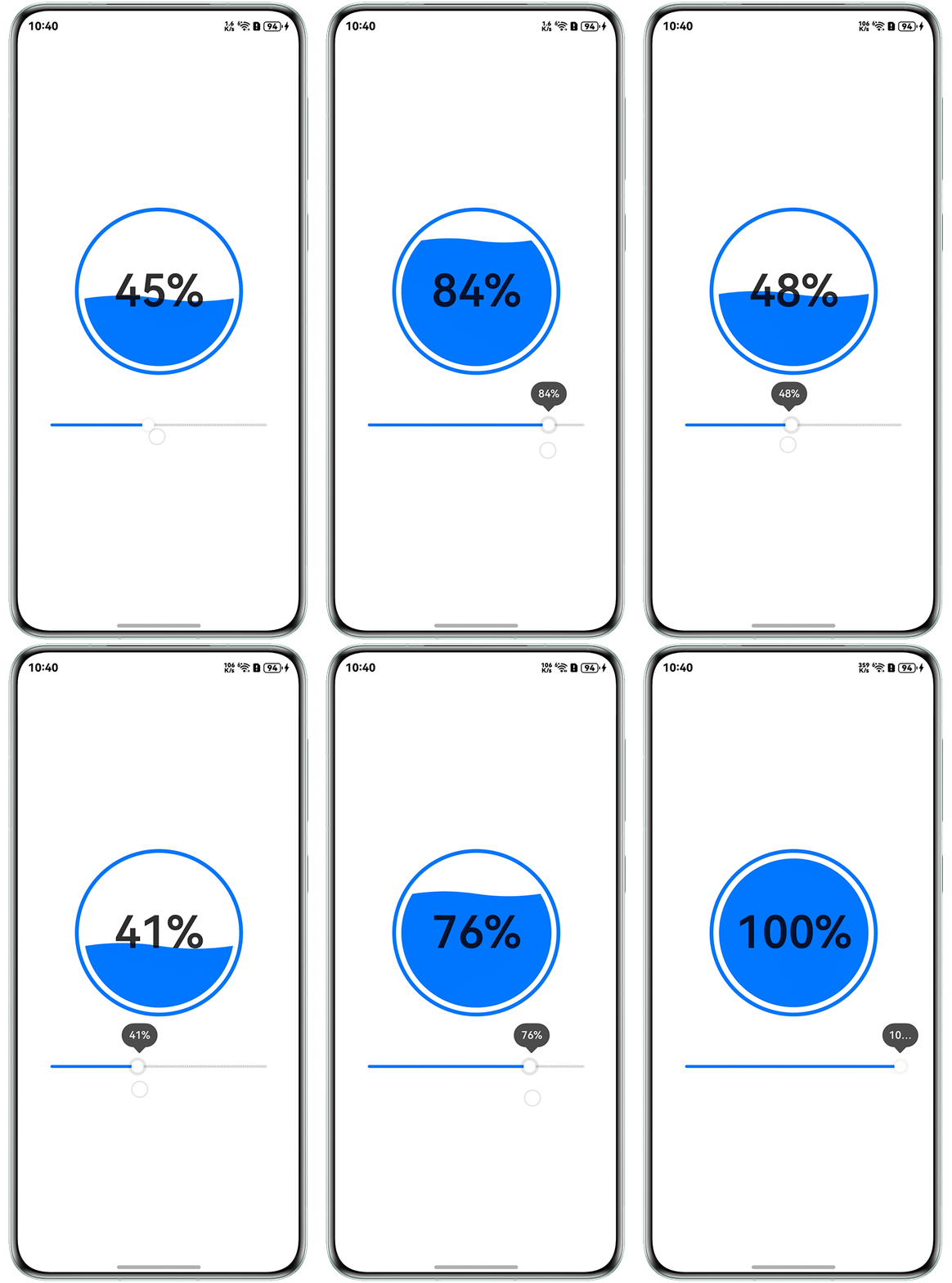
如何在圆形区域内展示不同加载进度,并在其中心采用类似水波纹的效果?
效果预览
背景知识
- Circle组件用于绘制圆形,支持设置填充区域的颜色、边框颜色等特性。
- Path组件可实现路径绘制,根据绘制路径生成封闭的自定义形状。
- 圆的标准方程(x-a)²+(y-b)²=r²中,有三个参数a、b、r,即圆心坐标为(a,b),只要求出a、b、r,这时圆的方程就被确定,因此确定圆方程,需三个独立条件,其中圆心坐标是圆的定位条件,半径是圆的定形条件。
解决方案
- 以Stack组件作为容器,分层次地绘制各个部分,首先使用Circle组件来绘制外部的圆环。
Circle({ width: BIG_DIAMETER, height: BIG_DIAMETER })
  .fill(COLOR_TRANSPARENT)
  .stroke('#007DFF')
.strokeWidth(5); - 在绘制中间进度的填充时,中间填充具有两个状态:
- 当进度为100%时,显示为填充颜色的圆形。
- 当进度不是100%时,使用Path组件绘制闭合曲线以实现填充效果。在使用Path组件绘制时的计算过程及相关函数的应用中,Path组件的坐标原点位于左上角。Path组件在内部计算路径时以px为单位,因此需要进行单位转换。
- 进度百分比k和y的关系:y =(1 - k)*2r。(剩余进度百分比乘以圆形的直径)。
- 圆心点的坐标是(r, r),使用圆方程就可以计算出圆弧的起点和终点。
calPathCommands(value: number): string {
  let y = this.calY(value / 100.0);
  let squareX = this.calXSquare(y);
  if (squareX >= 0) {
    let x = Math.sqrt(squareX);
    let x1 = this.RADIUS_IN_PX - x;
    let x2 = this.RADIUS_IN_PX + x;
    return this.formatPathCommands(x1, x2, y, this.RADIUS_IN_PX);
  }
  return '';
} - 使用Path的commands设置符合SVG路径描述规范的命令字符串,单位为px。
formatPathCommands(x1: number, x2: number, y: number, radius: number) {
  return `M${x1} ${y} A${radius} ${radius} 0 ${y > this.RADIUS_IN_PX ? 0 : 1} 0  ${x2} ${y} ` +
    `Q${(x1 + 3 * x2) / 4} ${y + 12.5 * (x2 - x1) / radius}, ${(x1 + x2) / 2} ${y} T${x1} ${y}`;
}
- 绘制最上层的百分比显示,可以直接采用Text控件来实现。
Text(this.outSetValue.toFixed(0) + '%')
  .fontSize(60);
- 完整示例参考如下:
const COLOR_TRANSPARENT = '#00000000';
const COLOR_BACKGROUND_FILL = '#007DFF';
const DIAMETER = 200;
const BIG_DIAMETER = 220;

@Entry
@Component
struct WaterRipplePage {
  @State outSetValue: number = 50;
  @State pathCommands: string = '';
  @State backGroundColor: string = '#00000000';
  RADIUS_IN_PX: number = this.getUIContext().vp2px(DIAMETER / 2.0);

  onPageShow() {
    this.pathCommands = this.calPathCommands(this.outSetValue);
  }

  calXSquare(y: number) {
    return this.RADIUS_IN_PX * this.RADIUS_IN_PX - (y - this.RADIUS_IN_PX) * (y - this.RADIUS_IN_PX);
  }

  calY(k: number) {
    return (1 - k) * this.RADIUS_IN_PX * 2;
  }
  formatPathCommands(x1: number, x2: number, y: number, radius: number) {
    return `M${x1} ${y} A${radius} ${radius} 0 ${y > this.RADIUS_IN_PX ? 0 : 1} 0  ${x2} ${y} ` +
      `Q${(x1 + 3 * x2) / 4} ${y + 12.5 * (x2 - x1) / radius}, ${(x1 + x2) / 2} ${y} T${x1} ${y}`;
  }
  calPathCommands(value: number): string {
    let y = this.calY(value / 100.0);
    let squareX = this.calXSquare(y);
    if (squareX >= 0) {
      let x = Math.sqrt(squareX);
      let x1 = this.RADIUS_IN_PX - x;
      let x2 = this.RADIUS_IN_PX + x;
      return this.formatPathCommands(x1, x2, y, this.RADIUS_IN_PX);
    }
    return '';
  }
  build() {
    Column() {
      Column() {
        Stack() {
          // 外框圆环
          Circle({ width: BIG_DIAMETER, height: BIG_DIAMETER })
            .fill(COLOR_TRANSPARENT)
            .stroke('#007DFF')
            .strokeWidth(5);
          // 进度显示
          Circle({ width: DIAMETER, height: DIAMETER })
            .fill(this.backGroundColor);
          Path()
            .width(DIAMETER)
            .height(DIAMETER)
            .stroke('#007DFF')
            .commands(this.pathCommands)
            .fill(COLOR_BACKGROUND_FILL);
          // 进度
          Text(this.outSetValue.toFixed(0) + '%')
            .fontSize(60);
        }.width(BIG_DIAMETER)
        .height(BIG_DIAMETER);

        Row() {
          Slider({
            value: this.outSetValue,
            min: 0,
            max: 100,
            step: 1,
            style: SliderStyle.OutSet
          })
            .blockColor('#FFFFFF')
            .trackColor('#05000000')
            .selectedColor('#007DFF')
            .showSteps(true)
            .showTips(true)
            .onChange((value: number) => {
              this.outSetValue = value;
              if (this.outSetValue === 100) {
                this.backGroundColor = COLOR_BACKGROUND_FILL;
                this.pathCommands = '';
              } else {
                this.backGroundColor = COLOR_TRANSPARENT;
                this.pathCommands = this.calPathCommands(this.outSetValue);
              }
            });
        }
        .padding({ top: 50 })
        .width('80%');
      }.width('100%');
    }
    .height('100%')
    .justifyContent(FlexAlign.Center);
  }
}