问题现象
使用Swiper组件动态加载数据:
- 当用户从第一页向右滑动时,在数据列表的最前面添加新数据。
- 当用户从最后一页向左滑动时,在数据列表的最后面添加新数据。
另外,在数据动态刷新过程中可能出现以下问题:
- items头部插入数据时,currentIndex发生跳变,无法保持当前浏览位置。
- 推荐算法增量更新场景中,数据刷新后currentIndex被重置为0,导致无感刷新失效。
背景知识
- 在Swiper组件中,当页面切换时会触发onAnimationStart回调函数,用于监听动画的开始事件。该回调函数可提供当前页码index、目标页码targetIndex以及额外信息extraInfo,可用于判断滑动方向。
- onAnimationEnd回调函数在页面切换动画结束时触发,可在动画完成后执行预加载等后续操作。
- cryptoFramework:对于安全要求比较高的场景,推荐使用加解密算法库框架@ohos.security.cryptoFramework包生成安全随机数。
解决方案
在Swiper组件的onAnimationStart回调中,通过index和targetIndex判断滑动方向,并在相应条件下加载新数据:
- 当index === 0且targetIndex === 0时,表示从第一页向右滑动,此时在数据列表的最前面添加新数据;
- 当index === this.data.totalCount() - 1时,表示从最后一页向左滑动,此时在数据列表的最后面添加新数据。
完整示例如下:
import cryptoFramework from '@ohos.security.cryptoFramework';

// 数据源,支持对数据的增删改查,并通知UI更新
class MyDataSource implements IDataSource {
  private list: number[] = [];
  private listeners: DataChangeListener[] = [];

  constructor(list: number[]) {
    this.list = list;
  }

  totalCount(): number {
    return this.list.length;
  }

  getData(index: number): number {
    return this.list[index];
  }

  // 数组末尾添加数据
  pushData(element: number) {
    this.list.push(element);
    this.notifyDataReload();
  }

  // 数组开头添加数据
  unshiftData(element: number) {
    this.list.unshift(element);
    this.notifyDataAdd(0);
  }

  deleteData(index: number) {
    this.list.splice(index, 1);
    this.notifyDataReload();
  }

  registerDataChangeListener(listener: DataChangeListener): void {
    if (this.listeners.indexOf(listener) < 0) {
      console.info('add listener');
      this.listeners.push(listener);
    }
  }

  unregisterDataChangeListener(listener: DataChangeListener) {
    const pos = this.listeners.indexOf(listener);
    if (pos >= 0) {
      console.info('remove listener');
      this.listeners.splice(pos, 1);
    }
  }

  // 通知LazyForEach组件需要重载所有子组件
  notifyDataReload(): void {
    this.listeners.forEach(listener => {
      listener.onDataReloaded();
    });
  }

  // 通知LazyForEach组件需要在index对应索引处添加子组件
  notifyDataAdd(index: number): void {
    this.listeners.forEach(listener => {
      listener.onDataAdd(index);
    });
  }

  // 通知LazyForEach组件在index对应索引处数据有变化,需要重建该子组件
  notifyDataChange(index: number): void {
    this.listeners.forEach(listener => {
      listener.onDataChange(index);
    });
  }

  // 通知LazyForEach组件需要在index对应索引处删除该子组件
  notifyDataDelete(index: number): void {
    this.listeners.forEach(listener => {
      listener.onDataDelete(index);
    });
  }

  // 通知LazyForEach组件将from索引和to索引处的子组件进行交换
  notifyDataMove(from: number, to: number): void {
    this.listeners.forEach(listener => {
      listener.onDataMove(from, to);
    });
  }
}


@Entry
@Component
struct SwiperExample {
  private swiperController: SwiperController = new SwiperController();
  private data: MyDataSource = new MyDataSource([]);

  aboutToAppear(): void {
    let list: number[] = [];
    for (let i = 1; i <= 10; i++) {
      list.push(i);
    }
    this.data = new MyDataSource(list);
  }

  build() {
    Column({ space: 5 }) {
      Swiper(this.swiperController) {
        LazyForEach(this.data, (item: string) => {
          Text(item.toString())
            .width('90%')
            .height(160)
            .backgroundColor(0xAFEEEE)
            .textAlign(TextAlign.Center)
            .fontSize(30);
        }, (item: string) => item);
      }
      .cachedCount(2)
      .index(0)
      .loop(false)
      .itemSpace(5)
      .curve(Curve.Linear)
      .onAnimationStart((index: number, targetIndex: number, extraInfo: SwiperAnimationEvent) => {
        console.info('extraInfo', extraInfo);
        // 下标为0时,向右滑动,模拟拉取新数据
        if (index === 0 && targetIndex === 0 && extraInfo.currentOffset > 0) {
          let rand = cryptoFramework.createRandom();
          // 设置生成随机数的字节长度为1
          let randData = rand.generateRandomSync(1);
          // 自定义范围(0-10之内)
          let num: number = Math.round(randData.data[0] * 10 / 255);
          this.data.unshiftData(num);
          this.swiperController.changeIndex(1);
        }
        // 下标为数组最后一个时,向左滑动,模拟拉取新数据
        if (index === this.data.totalCount() - 1 && targetIndex === index && extraInfo.currentOffset < 0) {
          let rand = cryptoFramework.createRandom();
          let randData = rand.generateRandomSync(1);
          let num: number = Math.round(randData.data[0] * 10 / 255);
          this.data.pushData(num);
        }
      })
      .onAnimationEnd((index: number, extraInfo: SwiperAnimationEvent) => {
        console.info(`index:\n${index}`);
        console.info(`velocity:\n${extraInfo.velocity}`);
        console.info(`target offset:\n${extraInfo.targetOffset}`);
        console.info(`current offset::\n${extraInfo.currentOffset}`);
      })
      .maintainVisibleContentPosition(true);

      Row({ space: 5 }) {
        Button('FAST 0')
          .onClick(() => {
            this.swiperController.changeIndex(0, SwiperAnimationMode.FAST_ANIMATION);
          });
      };

      Row() {
        Button('FAST LAST')
          .onClick(() => {
            this.swiperController.changeIndex(this.data.totalCount() - 1, SwiperAnimationMode.FAST_ANIMATION);
          });
      };

      Row() {
        Button('顶部添加数据')
          .onClick(() => {
            let rand = cryptoFramework.createRandom();
            let randData = rand.generateRandomSync(1);
            let num: number = Math.round(randData.data[0] * 10 / 255);
            this.data.unshiftData(num);
          });
      };

      Row() {
        Button('尾部添加数据')
          .onClick(() => {
            let rand = cryptoFramework.createRandom();
            let randData = rand.generateRandomSync(1);
            let num: number = Math.round(randData.data[0] * 10 / 255);
            this.data.pushData(num);
          });
      };

      Row() {
        Button('删除第一个')
          .onClick(() => {
            this.data.deleteData(0);
          });
      };
    }.width('100%');
  }
}
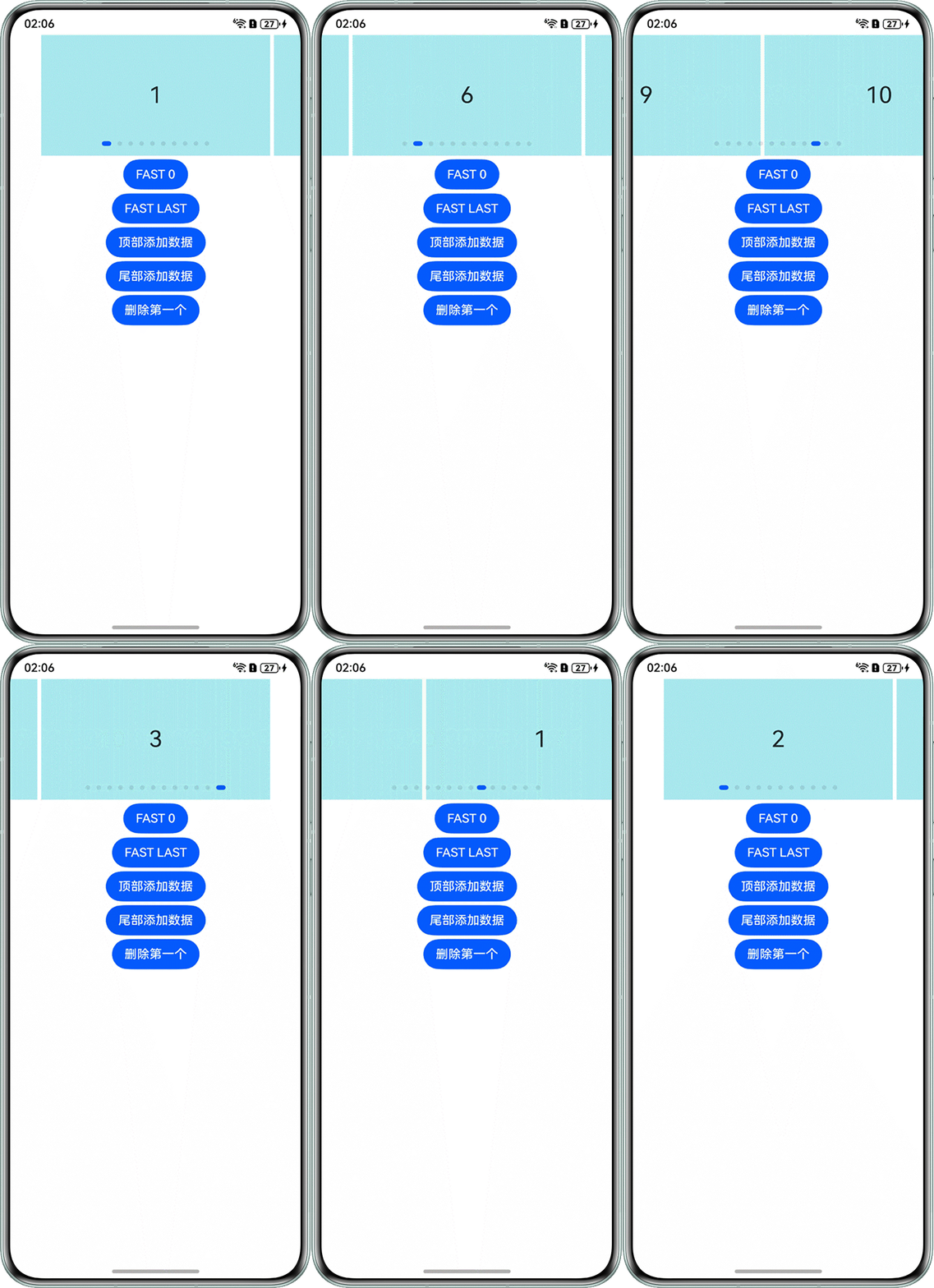
效果图如下:
另外,针对currentIndex跳变和算法增量更新场景,补充以下方案:
方案一:items头部插入数据保持不跳变。
上述示例中已通过设置maintainVisibleContentPosition(true)实现前插保持,并且新数据推送items刷新时,通过onDataAdd通知组件index的位置有数据添加。补充说明,不建议在onAnimationStart中预加载,可以在onAnimationEnd中触发prefetchNext()。
方案二:算法增量更新场景无感刷新。
在刷新前记录当前item,刷新后通过findIndex找回它的新下标,避免重置currentIndex为0。需要在MyDataSource中补充update方法,并在组件中添加@State currentIndex状态变量和updateItems方法。完整示例如下:
import cryptoFramework from '@ohos.security.cryptoFramework';

// 数据源,支持对数据的增删改查,并通知UI更新
class MyDataSource implements IDataSource {
  private list: number[] = [];
  private listeners: DataChangeListener[] = [];

  constructor(list: number[]) {
    this.list = list;
  }

  totalCount(): number {
    return this.list.length;
  }

  getData(index: number): number {
    return this.list[index];
  }

  // 数组末尾添加数据
  pushData(element: number) {
    this.list.push(element);
    this.notifyDataReload();
  }

  // 数组开头添加数据
  unshiftData(element: number) {
    this.list.unshift(element);
    this.notifyDataAdd(0);
  }

  deleteData(index: number) {
    this.list.splice(index, 1);
    this.notifyDataReload();
  }

  // 替换数据列表并通知组件重载
  update(newList: number[]) {
    this.list = newList;
    this.notifyDataReload();
  }

  registerDataChangeListener(listener: DataChangeListener): void {
    if (this.listeners.indexOf(listener) < 0) {
      console.info('add listener');
      this.listeners.push(listener);
    }
  }

  unregisterDataChangeListener(listener: DataChangeListener) {
    const pos = this.listeners.indexOf(listener);
    if (pos >= 0) {
      console.info('remove listener');
      this.listeners.splice(pos, 1);
    }
  }

  notifyDataReload(): void {
    this.listeners.forEach(listener => {
      listener.onDataReloaded();
    });
  }

  notifyDataAdd(index: number): void {
    this.listeners.forEach(listener => {
      listener.onDataAdd(index);
    });
  }

  notifyDataChange(index: number): void {
    this.listeners.forEach(listener => {
      listener.onDataChange(index);
    });
  }

  notifyDataDelete(index: number): void {
    this.listeners.forEach(listener => {
      listener.onDataDelete(index);
    });
  }

  notifyDataMove(from: number, to: number): void {
    this.listeners.forEach(listener => {
      listener.onDataMove(from, to);
    });
  }
}

@Entry
@Component
struct SwiperExample {
  private swiperController: SwiperController = new SwiperController();
  private data: MyDataSource = new MyDataSource([]);
  @State currentIndex: number = 0;

  aboutToAppear(): void {
    let list: number[] = [];
    for (let i = 1; i <= 10; i++) {
      list.push(i);
    }
    this.data = new MyDataSource(list);
  }

  // 处理算法增量更新
  updateItems(newItems: number[]) {
    // 记录当前显示的数据
    let currentData = this.data.getData(this.currentIndex);
    // 数据源刷新
    this.data.update(newItems);
    // 查找当前数据在新列表中的位置
    const newIndex = newItems.findIndex(item => item === currentData);
    if (newIndex !== -1) {
      // 找到了,保持当前卡片位置
      this.currentIndex = newIndex;
    } else {
      // 未找到,索引重置为0
      this.currentIndex = 0;
    }
  }

  build() {
    Column({ space: 5 }) {
      Swiper(this.swiperController) {
        LazyForEach(this.data, (item: number) => {
          Text(item.toString())
            .width('90%')
            .height(160)
            .backgroundColor(0xAFEEEE)
            .textAlign(TextAlign.Center)
            .fontSize(30);
        }, (item: number) => item.toString());
      }
      .cachedCount(2)
      .index(this.currentIndex)
      .loop(false)
      .itemSpace(5)
      .curve(Curve.Linear)
      .onChange((index: number) => {
        this.currentIndex = index;
      })
      .onAnimationStart((index: number, targetIndex: number, extraInfo: SwiperAnimationEvent) => {
        console.info('extraInfo', extraInfo);
        // 下标为0时,向右滑动,模拟拉取新数据
        if (index === 0 && targetIndex === 0 && extraInfo.currentOffset > 0) {
          let rand = cryptoFramework.createRandom();
          let randData = rand.generateRandomSync(1);
          let num: number = Math.round(randData.data[0] * 10 / 255);
          this.data.unshiftData(num);
          this.swiperController.changeIndex(1);
        }
        // 下标为数组最后一个时,向左滑动,模拟拉取新数据
        if (index === this.data.totalCount() - 1 && targetIndex === index && extraInfo.currentOffset < 0) {
          let rand = cryptoFramework.createRandom();
          let randData = rand.generateRandomSync(1);
          let num: number = Math.round(randData.data[0] * 10 / 255);
          this.data.pushData(num);
        }
      })
      .onAnimationEnd((index: number, extraInfo: SwiperAnimationEvent) => {
        console.info(`index:\n${index}`);
        console.info(`velocity:\n${extraInfo.velocity}`);
        console.info(`target offset:\n${extraInfo.targetOffset}`);
        console.info(`current offset::\n${extraInfo.currentOffset}`);
      })
      .maintainVisibleContentPosition(true);

      Row({ space: 5 }) {
        Button('FAST 0')
          .onClick(() => {
            this.swiperController.changeIndex(0, SwiperAnimationMode.FAST_ANIMATION);
          });
      };

      Row() {
        Button('FAST LAST')
          .onClick(() => {
            this.swiperController.changeIndex(this.data.totalCount() - 1, SwiperAnimationMode.FAST_ANIMATION);
          });
      };

      Row() {
        Button('顶部添加数据')
          .onClick(() => {
            let rand = cryptoFramework.createRandom();
            let randData = rand.generateRandomSync(1);
            let num: number = Math.round(randData.data[0] * 10 / 255);
            this.data.unshiftData(num);
          });
      };

      Row() {
        Button('尾部添加数据')
          .onClick(() => {
            let rand = cryptoFramework.createRandom();
            let randData = rand.generateRandomSync(1);
            let num: number = Math.round(randData.data[0] * 10 / 255);
            this.data.pushData(num);
          });
      };

      Row() {
        Button('删除第一个')
          .onClick(() => {
            this.data.deleteData(0);
          });
      };

      Row() {
        Button('模拟增量更新')
          .onClick(() => {
            // 模拟算法增量更新,生成新数据列表
            let newList: number[] = [];
            for (let i = 1; i <= 15; i++) {
              newList.push(i);
            }
            this.updateItems(newList);
          });
      };
    }.width('100%');
  }
}