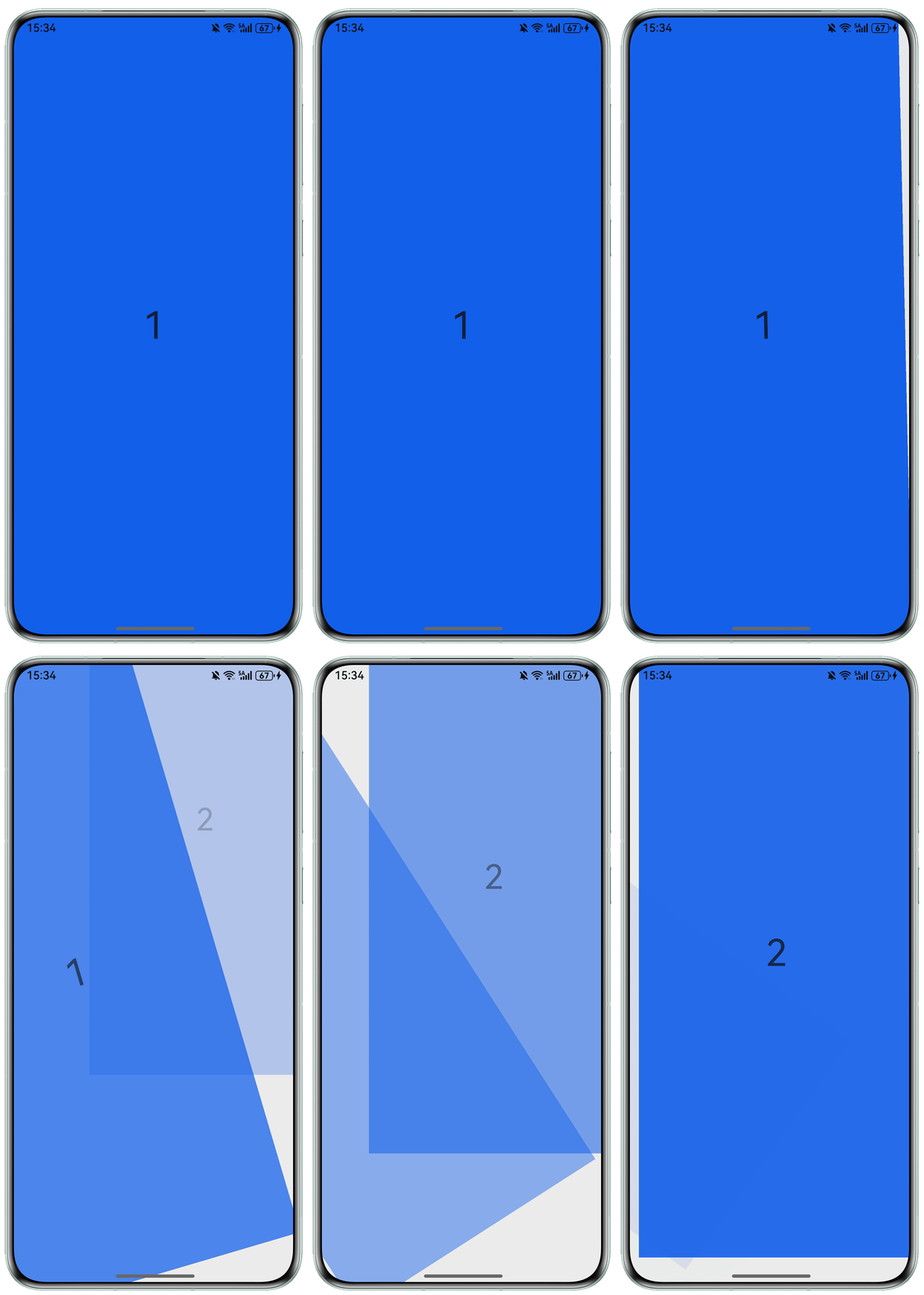
背景知识
- Swiper组件:滑块视图容器组件,它提供了子组件滑动轮播显示的能力。
- customContentTransition:用于实现自定义的过渡动画效果,该属性允许开发者通过回调函数动态控制轮播切换过程中的动画细节,特别是可结合进度参数进行精细化动画控制。
- rotate:主要用于设置组件的旋转,可使组件在以组件左上角为坐标原点的坐标系中进行旋转。其中,(x,y,z)指定一个矢量,作为旋转轴。旋转轴和旋转中心点都基于坐标系设定,组件发生位移时,坐标系不会随之移动。默认值:在x、y、z都不指定时,x、y、z的默认值分别为0、0、1。指定了x、y、z任何一个值时,x、y、z中未指定的值默认为0。
- 设置自定义页面切换动画:该示例通过customContentTransition接口,实现了自定义Swiper页面按组翻页动画效果。
解决方案
Swiper组件要实现弧形旋转切换动画效果,可以使用customContentTransition来自定义过渡动画。轮播切换过程中,动态设置子组件的透明度(opacity)、缩放比例(scale)、平移(translate)、堆叠顺序(zIndex)和旋转(rotate)属性,实现弧形旋转切换动画。
- 给Swiper子组件设置旋转等属性:
Text(item.toString()) .width('100%') .height('100%') .fontSize(50) .textAlign(TextAlign.Center) .backgroundColor('#0A59F7') // 自定义动画变化透明度、缩放页面、抵消系统默认位移、渲染层级等 .opacity(this.opacityList[index]) .scale({ x: this.scaleList[index], y: this.scaleList[index] }) .translate({ x: this.translateList[index], y: this.translateList[index] }) .zIndex(this.zIndexList[index]) .rotate({ angle: this.angleList[index], // 设定旋转角度 }); - 给Swiper组件设置页面切换动画属性customContentTransition,在页面切换时逐帧触发回调,在回调中设置子组件的旋转等属性值:
.customContentTransition({
  // 页面移除视窗时超时1000ms下渲染树
  timeout: 1000,
  // 对视窗内所有页面逐帧回调transition,在回调中修改opacity、scale、translate、zIndex等属性值,实现自定义动画
  transition: (proxy: SwiperContentTransitionProxy) => {
    if (proxy.position <= proxy.index % this.DISPLAY_COUNT ||
      proxy.position >= this.DISPLAY_COUNT + proxy.index % this.DISPLAY_COUNT) {
      // 同组页面往左滑或往右完全滑出视窗外时,重置属性值
      this.opacityList[proxy.index] = 1.0;
      this.scaleList[proxy.index] = 1.0;
      this.translateList[proxy.index] = 0.0;
      this.zIndexList[proxy.index] = 0;
      this.angleList[proxy.index] = 0;
    } else {
      // 同组页面往右滑且未滑出视窗外时,对同组中左右两个页面,逐帧根据position修改属性值,页面靠拢并透明缩放的自定义切换动画
      if (proxy.index % this.DISPLAY_COUNT === 0) {
        this.opacityList[proxy.index] = 1 - proxy.position / this.DISPLAY_COUNT;
        this.scaleList[proxy.index] =
          this.MIN_SCALE + (1 - this.MIN_SCALE) * (1 - proxy.position / this.DISPLAY_COUNT);
        this.translateList[proxy.index] = -proxy.position * proxy.mainAxisLength +
          (1 - this.scaleList[proxy.index]) * proxy.mainAxisLength / this.DISPLAY_COUNT;
      } else {
        this.opacityList[proxy.index] = 1 - (proxy.position - 1) / this.DISPLAY_COUNT;
        this.scaleList[proxy.index] =
          this.MIN_SCALE + (1 - this.MIN_SCALE) * (1 - (proxy.position - 1) / this.DISPLAY_COUNT);
        this.translateList[proxy.index] = -(proxy.position - 1) * proxy.mainAxisLength -
          (1 - this.scaleList[proxy.index]) * proxy.mainAxisLength / this.DISPLAY_COUNT;
      }
      this.zIndexList[proxy.index] = -1;
    }
    if (proxy.position < 0 && proxy.position > -1) {
      // 当前页向左滑出或上一页向右滑入
      this.angleList[proxy.index] = proxy.position * 60;
      this.opacityList[proxy.index] = 1 + proxy.position;
    }
  }
})
完整代码如下:
import { window } from '@kit.ArkUI';
import { common } from '@kit.AbilityKit';
import { BusinessError } from '@kit.BasicServicesKit';
import { hilog } from '@kit.PerformanceAnalysisKit';

@Entry
@Component
struct SwiperArcPage {
  context: Context | undefined = undefined;
  private DISPLAY_COUNT: number = 1;
  private MIN_SCALE: number = 0.75;
  @State swiperItems: number[] = [1, 2, 3, 4, 5];
  @State opacityList: number[] = [];
  @State scaleList: number[] = [];
  @State translateList: number[] = [];
  @State zIndexList: number[] = [];
  @State angleList: number[] = [];

  setWindowFull() { // 设置沉浸式
    let windowClass: window.Window | undefined = undefined;
    try {
      let promise = window.getLastWindow(this.context);
      promise.then((data) => {
        windowClass = data;
        windowClass.setWindowLayoutFullScreen(true).then(() => {
          hilog.info(0x0000, 'testTag', 'Succeeded in setting the window layout to full-screen mode.');
        }).catch((err: BusinessError) => {
          hilog.error(0x0000, 'testTag',
            'Failed to set the window layout to full-screen mode. Cause:' + JSON.stringify(err));
        });
        //状态栏隐藏
        windowClass.setSpecificSystemBarEnabled('status', true).then(() => {
          hilog.info(0x0000, 'testTag', 'Succeeded in setting the status bar to be invisible.');
        }).catch((err: BusinessError) => {
          hilog.error(0x0000, 'testTag', `Failed to set the status bar to be invisible. Code is ${err.code},
          message is ${err.message}`);
        });
        //导航条隐藏
        windowClass.setSpecificSystemBarEnabled('navigationIndicator', false).then(() => {
          hilog.info(0x0000, 'testTag', 'Succeed in setting the system bar to be invisible');
        }).catch((err: BusinessError) => {
          hilog.error(0x0000, 'testTag',
            `Failed to set the system bar to be invisible. Cause code: ${err.code}, message: ${err.message}`);
        });
      }).catch((err: BusinessError) => {
        console.error('getLastWindow error', err);
      });
    } catch (e) {
      console.error('setScreenOrientation error');
    }
  }

  aboutToAppear(): void {
    for (let i = 0; i < this.swiperItems.length; i++) {
      this.opacityList.push(1.0);
      this.scaleList.push(1.0);
      this.translateList.push(0.0);
      this.zIndexList.push(0);
      this.angleList.push(0);
    }
    this.context = this.getUIContext().getHostContext() as common.Context;
    this.setWindowFull();
  }

  build() {
    Column() {
      Swiper() {
        ForEach(this.swiperItems, (item: number, index: number) => {
          Text(item.toString())
            .width('100%')
            .height('100%')
            .fontSize(50)
            .textAlign(TextAlign.Center)
            .backgroundColor('#0A59F7')
            // 自定义动画变化透明度、缩放页面、抵消系统默认位移、渲染层级等
            .opacity(this.opacityList[index])
            .scale({ x: this.scaleList[index], y: this.scaleList[index] })
            .translate({
              x: this.translateList[index],
              y: this.translateList[index]
            })
            .zIndex(this.zIndexList[index])
            .rotate({
              angle: this.angleList[index], // 设定旋转角度
            });
        });
      }
      .loop(true)
      .height('100%')
      .indicator(false)
      .displayCount(this.DISPLAY_COUNT, true)
      .customContentTransition({
        // 页面移除视窗时超时1000ms下渲染树
        timeout: 1000,
        // 对视窗内所有页面逐帧回调transition,在回调中修改opacity、scale、translate、zIndex等属性值,实现自定义动画
        transition: (proxy: SwiperContentTransitionProxy) => {
          if (proxy.position <= proxy.index % this.DISPLAY_COUNT ||
            proxy.position >= this.DISPLAY_COUNT + proxy.index % this.DISPLAY_COUNT) {
            // 同组页面往左滑或往右完全滑出视窗外时,重置属性值
            this.opacityList[proxy.index] = 1.0;
            this.scaleList[proxy.index] = 1.0;
            this.translateList[proxy.index] = 0.0;
            this.zIndexList[proxy.index] = 0;
            this.angleList[proxy.index] = 0;
          } else {
            // 同组页面往右滑且未滑出视窗外时,对同组中左右两个页面,逐帧根据position修改属性值,页面靠拢并透明缩放的自定义切换动画
            if (proxy.index % this.DISPLAY_COUNT === 0) {
              this.opacityList[proxy.index] = 1 - proxy.position / this.DISPLAY_COUNT;
              this.scaleList[proxy.index] =
                this.MIN_SCALE + (1 - this.MIN_SCALE) * (1 - proxy.position / this.DISPLAY_COUNT);
              this.translateList[proxy.index] = -proxy.position * proxy.mainAxisLength +
                (1 - this.scaleList[proxy.index]) * proxy.mainAxisLength / this.DISPLAY_COUNT;
            } else {
              this.opacityList[proxy.index] = 1 - (proxy.position - 1) / this.DISPLAY_COUNT;
              this.scaleList[proxy.index] =
                this.MIN_SCALE + (1 - this.MIN_SCALE) * (1 - (proxy.position - 1) / this.DISPLAY_COUNT);
              this.translateList[proxy.index] = -(proxy.position - 1) * proxy.mainAxisLength -
                (1 - this.scaleList[proxy.index]) * proxy.mainAxisLength / this.DISPLAY_COUNT;
            }
            this.zIndexList[proxy.index] = -1;
          }
          if (proxy.position < 0 && proxy.position > -1) {
            // 当前页向左滑出或上一页向右滑入
            this.angleList[proxy.index] = proxy.position * 60;
            this.opacityList[proxy.index] = 1 + proxy.position;
          }
        }
      })
      .onContentDidScroll((selectedIndex: number, index: number, position: number, mainAxisLength: number) => {
        // 监听Swiper页面滑动事件,在该回调中可以实现自定义导航点切换动画等
        console.info(`onContentDidScroll selectedIndex: ${selectedIndex}, index: ${index}, position: ${position}, mainAxisLength: ${mainAxisLength}`);
      })
    }
    .height('100%')
    .width('100%')
  }
}
运行效果如下: