背景知识
- Image为图片组件,常用于在应用中显示图片。
- 设置Image组件的objectFit属性可调整图片的填充效果。
- 通过Image组件的onComplete事件,可在图片数据加载成功和解码成功时获取图片尺寸。
问题定位
- 使用DevEco Testing查看问题组件,问题组件为Image组件。
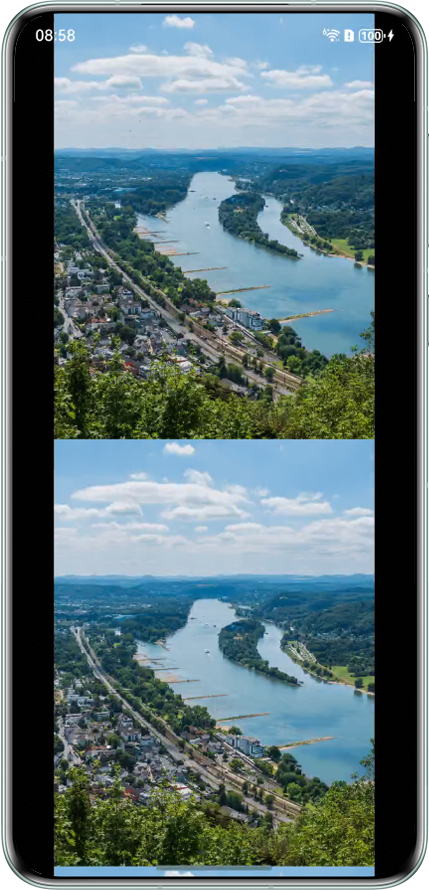
- 查看该Image组件的设置,显示完整图片时的组件尺寸设置不合理,高度为屏幕的高度而不是等比例缩放下完整图片的高度。
// 全屏显示图片
@Builder
export function DialogBuilder() {
  Dialog();
}

@Component
export struct Dialog {
  pageInfos: NavPathStack = new NavPathStack();

  build() {
    NavDestination() {
      Stack() {
        Image($r('app.media.imggroup2')) // $r('app.media.imggroup2')需要更换为开发者需要的图片资源
          .width('80%')
          .height('100%') // 高度与屏幕一致
          .objectFit(ImageFit.Fill); // 图片充满显示边界
      }
      .height('100%')
    }
    .height('100%')
  }
}

修改建议
不设置Image组件的高度,按照设置的宽度进行等比例缩放。
import { window } from '@kit.ArkUI';
import { common } from '@kit.AbilityKit';

@Entry
@Component
struct NavigationCustomTransitionExample {
  pageInfos: NavPathStack = new NavPathStack();

  aboutToAppear() {
    this.pageInfos.pushPath({ name: 'PageMain' }, false);
  }

  build() {
    Stack() {
      Navigation(this.pageInfos)
        .hideNavBar(true)
        .width('100%')
        .height('100%');
    }
    .width('100%')
    .height('100%')
    .expandSafeArea([SafeAreaType.SYSTEM], [SafeAreaEdge.TOP, SafeAreaEdge.BOTTOM]);
  }
}

@Builder
export function PageMainBuilder() {
  PageMain();
}

// 全屏显示图片
@Builder
export function DialogBuilder() {
  Dialog();
}

@Component
export struct Dialog {
  pageInfos: NavPathStack = new NavPathStack();

  aboutToAppear(): void {
    let context: common.UIAbilityContext = this.getUIContext().getHostContext() as common.UIAbilityContext;
    window.getLastWindow(context).then((lastWindow) => {
      lastWindow.setWindowSystemBarEnable([]);
    });
  }

  aboutToDisappear(): void {
    let context: common.UIAbilityContext = this.getUIContext().getHostContext() as common.UIAbilityContext;
    window.getLastWindow(context).then((lastWindow) => {
      lastWindow.setWindowSystemBarEnable(['status', 'navigation']);
    });
  }

  build() {
    NavDestination() {
      Stack() {
        // 图片过长时可滑动
        Scroll() {
          Image($r('app.media.imggroup2')) // $r('app.media.imggroup2')需要更换为开发者需要的图片资源
            .objectFit(ImageFit.Contain)
            .width('80%');
          // 不设置Image组件的高度,按照设置的宽度进行等比例缩放
        }
        .height('100%')
        .width('100%');
      }
      .height('100%')
      .width('100%')
      .onClick(() => {
        this.pageInfos.pop(); // 完整图时点击缩小,显示缩略图
      })
      .backgroundColor(Color.Black)
      .expandSafeArea([SafeAreaType.SYSTEM], [SafeAreaEdge.TOP, SafeAreaEdge.BOTTOM]);
    }
    .hideTitleBar(true)
    .onReady((context: NavDestinationContext) => {
      this.pageInfos = context.pathStack;
    })
    .height('100%')
    .width('100%')
    .mode(NavDestinationMode.DIALOG)
    .systemTransition(NavigationSystemTransitionType.NONE)
    .expandSafeArea([SafeAreaType.SYSTEM], [SafeAreaEdge.TOP, SafeAreaEdge.BOTTOM]);
  }
}

@Component
export struct PageMain {
  pageInfos: NavPathStack = new NavPathStack();

  build() {
    NavDestination() {
      Stack() {
        Image($r('app.media.imggroup2')) // $r('app.media.imggroup2')需要更换为开发者需要的图片资源
          .width(300)
          .height(300)
          .objectFit(ImageFit.CENTER)
          .onClick(() => {
            this.pageInfos.pushPath({ name: 'Dialog' }); // 缩略图时点击放大,显示完整图片
          });
      }
      .width('100%')
      .height('100%');
    }
    .hideTitleBar(true)
    .onReady((context: NavDestinationContext) => {
      this.pageInfos = context.pathStack;
    })
    .height('100%')
    .width('100%')
    .mode(NavDestinationMode.STANDARD);
  }
}
src/main/resources/base/profile/route_map.json:
{
  "routerMap": [
    {
      "name": "PageMain",
      "pageSourceFile": "src/main/ets/pages/Index.ets",
      "buildFunction": "PageMainBuilder"
    },
    {
      "name": "Dialog",
      "pageSourceFile": "src/main/ets/pages/Index.ets",
      "buildFunction": "DialogBuilder"
    }
  ]
}
src/main/module.json5:
{
  "module": {
    "name": "entry",
    "type": "entry",
    "description": "$string:module_desc",
    "mainElement": "EntryAbility",
    "deviceTypes": [
      "phone"
    ],
    "deliveryWithInstall": true,
    "installationFree": false,
    "pages": "$profile:main_pages",
    "abilities": [
      {
        "name": "EntryAbility",
        "srcEntry": "./ets/entryability/EntryAbility.ets",
        "description": "$string:EntryAbility_desc",
        "icon": "$media:layered_image",
        "label": "$string:EntryAbility_label",
        "startWindowIcon": "$media:startIcon",
        "startWindowBackground": "$color:start_window_background",
        "exported": true,
        "skills": [
          {
            "entities": [
              "entity.system.home"
            ],
            "actions": [
              "ohos.want.action.home"
            ]
          }
        ]
      }
    ],
    "extensionAbilities": [
      {
        "name": "EntryBackupAbility",
        "srcEntry": "./ets/entrybackupability/EntryBackupAbility.ets",
        "type": "backup",
        "exported": false,
        "metadata": [
          {
            "name": "ohos.extension.backup",
            "resource": "$profile:backup_config"
          }
        ],
      }
    ],
    "routerMap": "$profile:router_map"
  }
}
效果图如下: