问题现象
如何实现bindSheet与List联动,主要有以下几个场景:
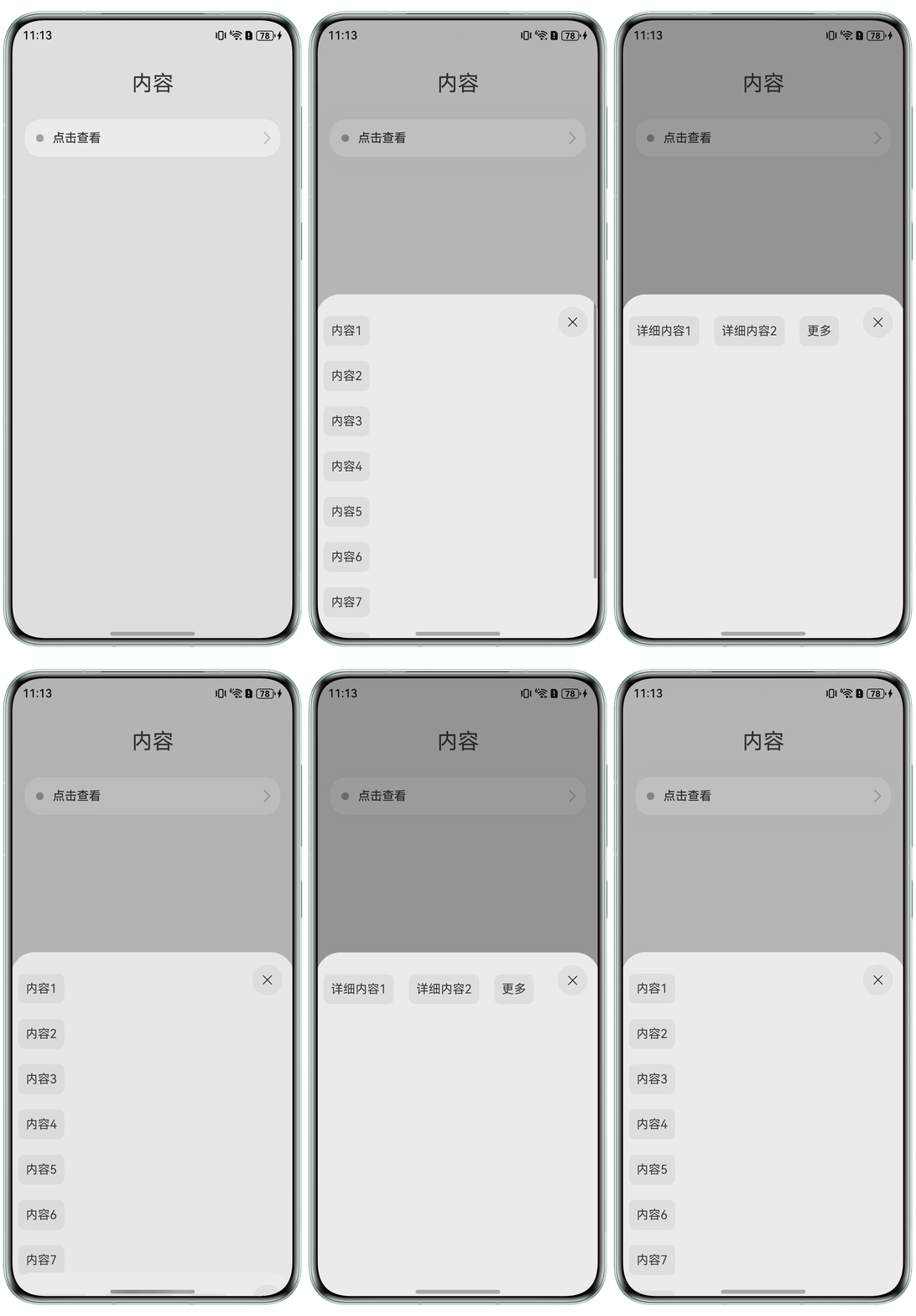
场景一:bindSheet如何与List联动,实现点击List出现模态页面的效果。
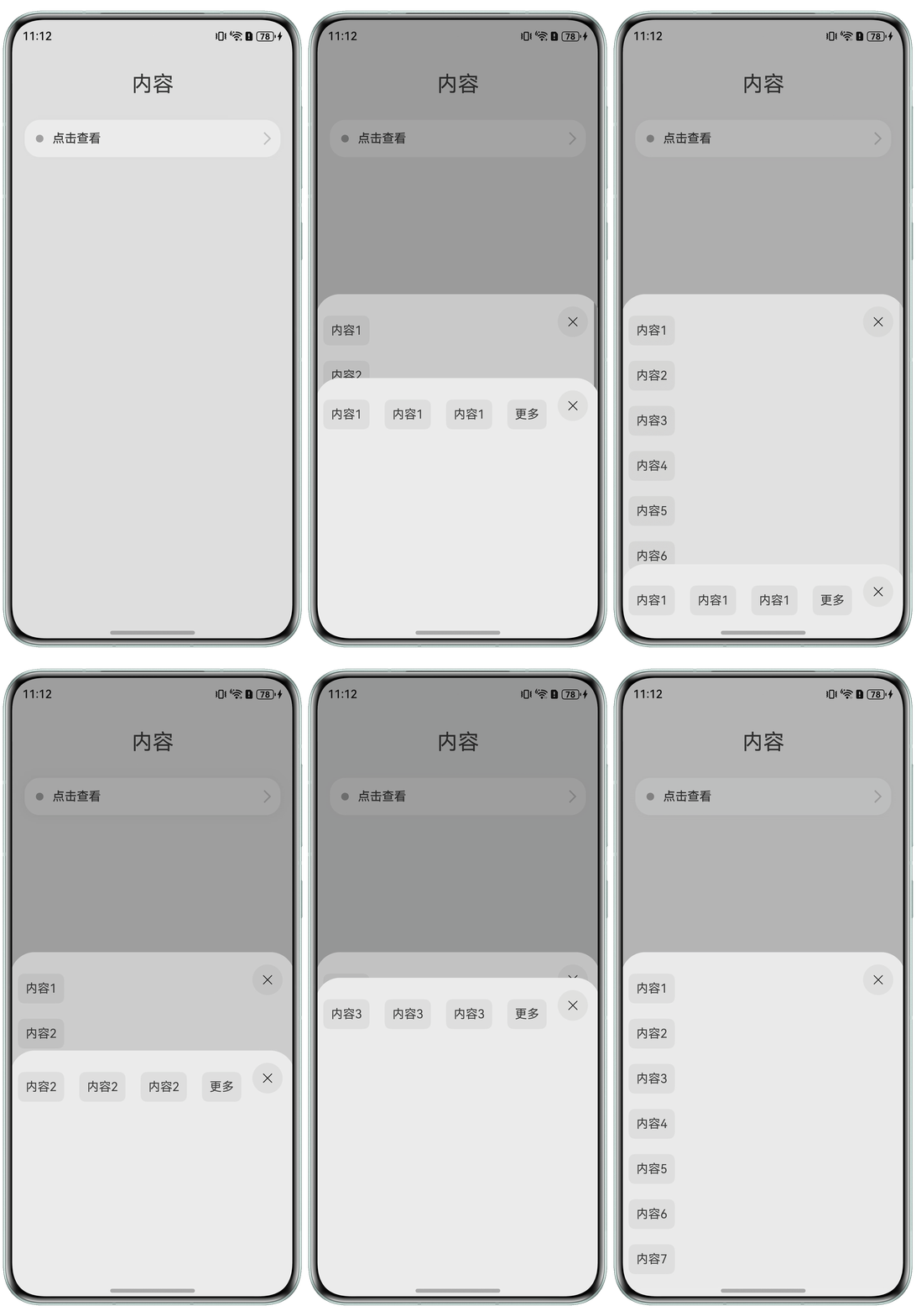
场景二:对List中每一个ListItem绑定bindSheet,实现点击不同item出现不同模态页面的效果。
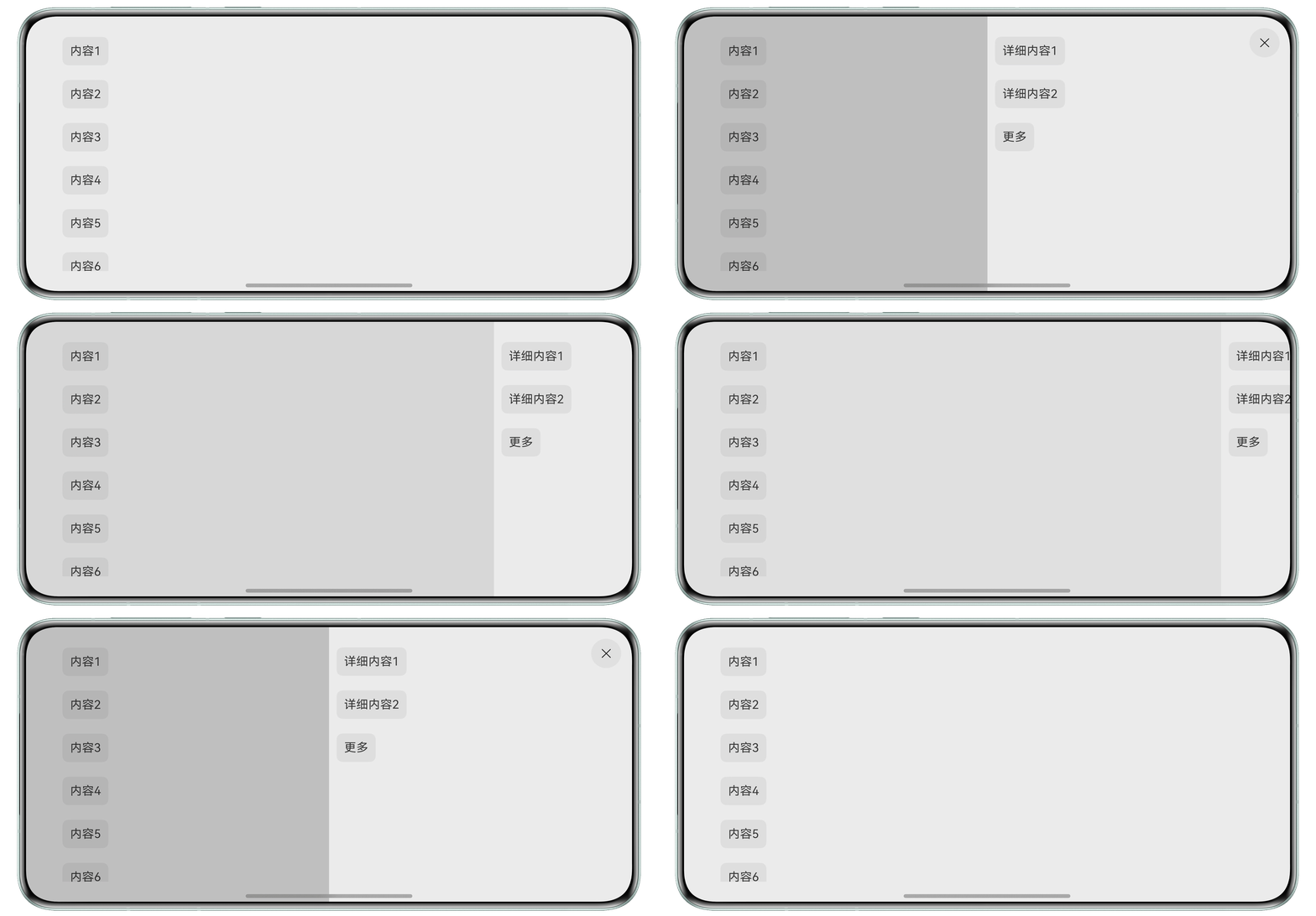
场景三:在横屏状态下,使用bindSheet与List联动,实现点击List从侧面出现模态页面的效果。
解决方案
bindSheet通过isShow参数决定是否显示半模态页面。使用@State装饰的变量传入isShow,当绑定的组件被点击时触发变量修改,组件渲染更新,即可实现半模态页面的显示与关闭。
- 场景一:可以给List组件绑定bindSheet属性,同时给每一个ListItem绑定点击事件,实现当点击任意ListItem中的元素则显示模态页面。完整示例参考如下:
@Entry
@Component
struct BindSheetDemo {
  // 半模态转场显示隐藏控制
  @State isShowSheet: boolean = false;
  @State isShowDetailSheet: boolean = false;
  private menuList: string[] = ['内容1', '内容2', '内容3', '内容4', '内容5', '内容6', '内容7', '内容8', '内容9'];
  private detailList: string[] = ['详细内容1', '详细内容2', '更多'];
  // 通过@Builder构建半模态展示界面
  @Builder
  mySheet() {
    Column() {
      List() {
        ForEach(this.menuList, (item: string) => {
          ListItem() {
            Text(item)
              .fontSize(16)
              .fontColor(0x333333)
              .backgroundColor(0xf1f1f1)
              .borderRadius(8)
              .margin(10)
              .padding(10)
          }
          .onClick(() => {
            this.isShowDetailSheet = true;
          })
        })
      }
      .width('100%')
      .height('100%')
      .padding({ top: 18 })
      .bindSheet(this.isShowDetailSheet, this.myDetailSheet(), {
        height: 450,
        dragBar: true,
        onDisappear: () => {
          this.isShowDetailSheet = false;
        }
      })
    }
    .width('100%')
    .height('100%')
    .backgroundColor(Color.White)
  }
  @Builder
  myDetailSheet() {
    Column() {
      Flex({ direction: FlexDirection.Row, wrap: FlexWrap.Wrap }) {
        ForEach(this.detailList, (item: string) => {
          Text(item)
            .fontSize(16)
            .fontColor(0x333333)
            .backgroundColor(0xf1f1f1)
            .borderRadius(8)
            .margin(10)
            .padding(10)
        })
      }
      .padding({ top: 18 })
    }
    .width('100%').height('100%').backgroundColor(Color.White)
  }
  build() {
    Column() {
      Text('内容')
        .fontSize(28)
        .padding({ top: 30, bottom: 30 })
      Column() {
        Row() {
          Row()
            .width(10)
            .height(10)
            .backgroundColor('#a8a8a8')
            .margin({ right: 12 })
            .borderRadius(20)

          Column() {
            Text('点击查看')
              .fontSize(16)
              .fontWeight(FontWeight.Medium)
          }
          .alignItems(HorizontalAlign.Start)
          Blank()
          Row()
            .width(12)
            .height(12)
            .margin({ right: 15 })
            .border({
              width: { top: 2, right: 2 },
              color: 0xcccccc
            })
            .rotate({ angle: 45 })
        }
        .borderRadius(20)
        .shadow({ radius: 100, color: '#ededed' })
        .width('90%')
        .alignItems(VerticalAlign.Center)
        .padding({ left: 15, top: 15, bottom: 15 })
        .backgroundColor(Color.White)
        .bindSheet(this.isShowSheet, this.mySheet(), {
          height: 450,
          dragBar: false,
          onDisappear: () => {
            this.isShowSheet = !this.isShowSheet;
          }
        })
        .onClick(() => {
          this.isShowSheet = !this.isShowSheet;
        })
      }
      .width('100%')
    }
    .expandSafeArea([SafeAreaType.SYSTEM], [SafeAreaEdge.TOP, SafeAreaEdge.BOTTOM])
    .width('100%').height('100%').backgroundColor(0xf1f1f1)
  }
}
实现效果如下:
- 场景二:bindSheet通过builder参数配置半模态页面内容。可以在@Builder装饰的构建函数中规定一个传入参数,根据传入的参数选择构建的半模态页面。对于List组件中的每个元素,绑定bindSheet属性,判断当前组件的参数是否应该显示半模态页面。完整示例参考如下:
@Entry
@Component
struct BindSheetDemo1 {
  // 半模态转场显示隐藏控制
  @State isShowSheet: boolean = false;
  private menuList: string[] = ['内容1', '内容2', '内容3', '内容4', '内容5', '内容6', '内容7', '内容8', '内容9'];
  @State isShowDetailSheet: boolean[] = new Array(this.menuList.length).fill(false);
  // 通过@Builder构建半模态展示界面
  @Builder
  mySheet() {
    Column() {
      List() {
        ForEach(this.menuList, (item: string, index: number) => {
          ListItem() {
            Text(item)
              .fontSize(16)
              .fontColor(0x333333)
              .backgroundColor(0xf1f1f1)
              .borderRadius(8)
              .margin(10)
              .padding(10)
              .bindSheet(this.isShowDetailSheet[index], this.myDetailSheet(item), {
                height: 450,
                dragBar: true,
                onDisappear: () => {
                  this.isShowDetailSheet[index] = false;
                }
              })
          }
          .onClick(() => {
            this.isShowDetailSheet[index] = true;
          })
        })
      }
      .width('100%')
      .height('100%')
      .padding({ top: 18 })
    }
    .width('100%')
    .height('100%')
    .backgroundColor(Color.White)
  }
  @Builder
  myDetailSheet(id: string) {
    Column() {
      Flex({ direction: FlexDirection.Row, wrap: FlexWrap.Wrap }) {
        ForEach([id, id, id, '更多'], (item: string) => {
          Text(item)
            .fontSize(16)
            .fontColor(0x333333)
            .backgroundColor(0xf1f1f1)
            .borderRadius(8)
            .margin(10)
            .padding(10)
        })
      }
      .padding({ top: 18 })
    }
    .width('100%').height('100%').backgroundColor(Color.White)
  }
  build() {
    Column() {
      Text('内容')
        .fontSize(28)
        .padding({ top: 30, bottom: 30 })
      Column() {
        Row() {
          Row()
            .width(10)
            .height(10)
            .backgroundColor('#a8a8a8')
            .margin({ right: 12 })
            .borderRadius(20)
          Column() {
            Text('点击查看')
              .fontSize(16)
              .fontWeight(FontWeight.Medium)
          }
          .alignItems(HorizontalAlign.Start)
          Blank()
          Row()
            .width(12)
            .height(12)
            .margin({ right: 15 })
            .border({
              width: { top: 2, right: 2 },
              color: 0xcccccc
            })
            .rotate({ angle: 45 })
        }
        .borderRadius(20)
        .shadow({ radius: 100, color: '#ededed' })
        .width('90%')
        .alignItems(VerticalAlign.Center)
        .padding({ left: 15, top: 15, bottom: 15 })
        .backgroundColor(Color.White)
        .bindSheet(this.isShowSheet, this.mySheet(), {
          height: 450,
          dragBar: false,
          onDisappear: () => {
            this.isShowSheet = !this.isShowSheet;
          }
        })
        .onClick(() => {
          this.isShowSheet = !this.isShowSheet;
        })
      }
      .width('100%')
    }
    .width('100%').height('100%').backgroundColor(0xf1f1f1)
    .expandSafeArea([SafeAreaType.SYSTEM], [SafeAreaEdge.TOP, SafeAreaEdge.BOTTOM])
  }
}
实现效果如下:
- 场景三:实现侧边弹窗需要将preferType设置为SheetType.SIDE,具体可参考SheetType枚举说明。同时设置自动旋转方向类型,实现横屏效果。完整示例参考如下:
@Entry
@Component
struct BindSheetDemo2 {
  // 半模态转场显示隐藏控制
  @State isShowSheet: boolean = false;
  private menuList: string[] = ['内容1', '内容2', '内容3', '内容4', '内容5', '内容6', '内容7', '内容8', '内容9'];
  private detailList: string[] = ['详细内容1', '详细内容2', '更多'];
  // 通过@Builder构建半模态展示界面
  @Builder
  mySheet() {
    Column() {
      List() {
        ForEach(this.detailList, (item: string) => {
          ListItem() {
            Text(item)
              .fontSize(16)
              .fontColor(0x333333)
              .backgroundColor(0xf1f1f1)
              .borderRadius(8)
              .margin(10)
              .padding(10)
          }
        })
      }
      .width('100%')
      .height('100%')
      .padding({ top: 18 })
    }
    .width('100%')
    .height('100%')
    .backgroundColor(Color.White)
  }
  build() {
    Column() {
      List() {
        ForEach(this.menuList, (item: string) => {
          ListItem() {
            Text(item)
              .fontSize(16)
              .fontColor(0x333333)
              .backgroundColor(0xf1f1f1)
              .borderRadius(8)
              .margin({left: 50, top: 10, bottom: 10})
              .padding(10)
          }
        })
      }
      .width('100%')
      .height('100%')
      .padding({ top: 18 })
      .bindSheet(this.isShowSheet, this.mySheet(), {
        preferType: SheetType.SIDE,
        onDisappear: () => {
          this.isShowSheet = !this.isShowSheet;
        }
      })
      .onClick(() => {
        this.isShowSheet = !this.isShowSheet;
      })
    }
    .expandSafeArea([SafeAreaType.SYSTEM], [SafeAreaEdge.TOP, SafeAreaEdge.BOTTOM])
    .width('100%')
    .height('100%')
    .backgroundColor(Color.White)
  }
}
实现效果如下: