解决方案
- 通过RichEditorController.getSpans获取光标前一个span的内容;
- 若光标前一个span是内容为@的TextSpan,则先删除;
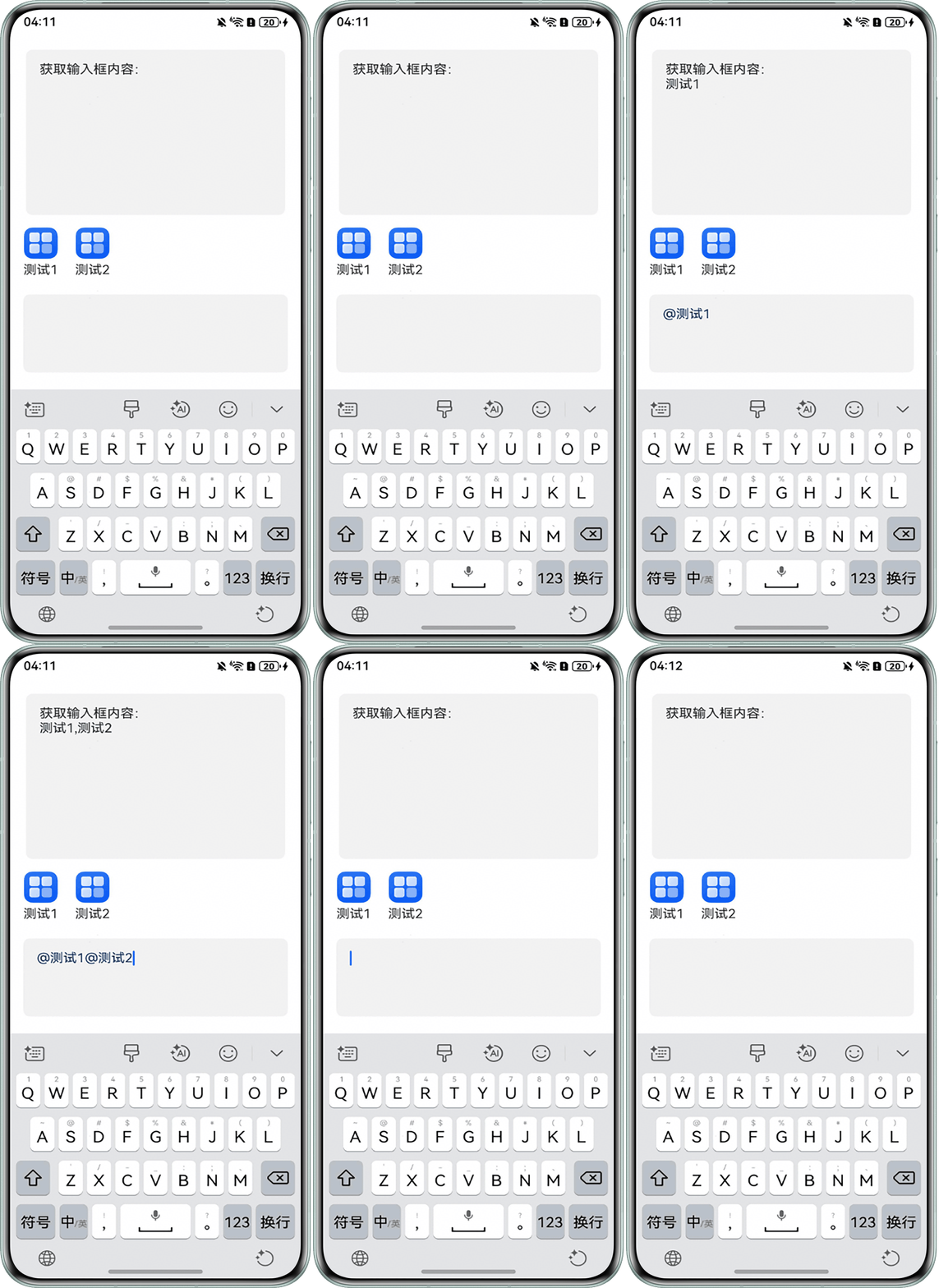
- 然后通过RichEditorController.addBuilderSpan将“@[好友昵称]”以指定的样式作为一个整体添加到编辑区域中;
- 通过onIMEInputComplete回调,当输入框完成输入后,更新数组中builderSpan中的内容。
完整示例参考如下:
interface User {
  id: string,
  avatar: ResourceStr
  nickname: string
}

interface ImageInfo {
  id: string;
  title: string;
  resource: ResourceStr;
}

interface RichEditorSpanClass {
  value?: string;
  resourceValue?: ResourceStr;
  type: 'text' | 'image' | 'builder';
  data?: User | ImageInfo;
}

@Entry
@Component
struct RichEditorSpanExample {
  controller: RichEditorController = new RichEditorController();
  // 选中内容的终止位置
  @State end: number = 0;
  // 当前输入框内容
  @State content: string = '';
  // 定义一个内容长度
  @State flag: number = 0;
  @State contentList: Array<string> = [];
  // 人员列表
  private friends: User[] = [
    { id: '0', avatar: $r('app.media.startIcon'), nickname: '测试1' },
    { id: '1', avatar: $r('app.media.startIcon'), nickname: '测试2' },
  ];
  private builderSpans: RichEditorSpanClass[] = [];
  // 人员点击事件
  onAtFriendClick: (friend: User) => void = friend => {
    const controller = this.controller;
    const offset = controller.getCaretOffset();
    const range: RichEditorRange = { start: offset - 1, end: offset };
    if (offset !== 0 && (controller.getSpans(range)[0] as RichEditorTextSpanResult).value === '@') {
      controller.deleteSpans(range);
    }
    controller.addBuilderSpan(() => this.AtSpan(friend.nickname), {
      offset: controller.getCaretOffset()
    });
    this.setBuilderSpans(controller, friend);
    this.contentList.push(friend.nickname);
    this.content = '';
    // 当前长度=插入@内容后的长度
    this.flag = this.contentList.length;
  };

  @Builder
  AtSpan(nickname: string) {
    Text(`@${nickname}`).fontColor(0xFF133667);
  }

  // 创建builderSpan
  setBuilderSpans(controller: RichEditorController, friend: User) {
    const builderSpan: RichEditorSpanClass = {
      value: `@${friend.nickname}`,
      data: friend,
      type: 'builder'
    };
    const range: RichEditorRange = { end: controller.getCaretOffset() };
    const index = this.getBuilderSpanCount(controller, range) - 1;
    this.builderSpans.splice(index, 0, builderSpan);
  }

  getBuilderSpanCount(controller: RichEditorController, range: RichEditorRange) {
    return controller.getSpans(range).reduce((count: number, span) => {
      return this.isBuilderSpan(span) ? count + 1 : count;
    }, 0);
  }

  isBuilderSpan(span: RichEditorImageSpanResult | RichEditorTextSpanResult): boolean {
    return !(span as RichEditorTextSpanResult).value &&
      !(span as RichEditorImageSpanResult).valueResourceStr?.toString().replaceAll(' ', '');
  }

  onAtButtonClick: (event?: ClickEvent) => void = () => {
    const controller = this.controller;
    controller.addTextSpan('@', { offset: controller.getCaretOffset() });
  };

  build() {
    Column() {
      Column() {
        Text('获取输入框内容:');
        Text(this.contentList.toString());
      }
      .padding(16)
      .justifyContent(FlexAlign.Start)
      .alignItems(HorizontalAlign.Start)
      .height('30%')
      .width('98%')
      .borderRadius(8)
      .backgroundColor('#0d000000');

      List({ space: 20 }) {
        ForEach(this.friends, (friend: User) => {
          ListItem() {
            Column({ space: 5 }) {
              Image(friend.avatar).width(40);
              Text(friend.nickname);
            }
            .onClick(() => this.onAtFriendClick(friend));
          };
        }, (friend: User) => friend.id);
      }
      .margin(16)
      .listDirection(Axis.Horizontal)
      .width('100%')
      .height(70)
      .align(Alignment.Start);

      RichEditor({ controller: this.controller })
        .aboutToIMEInput((value: RichEditorInsertValue) => {
          if (value.insertValue === '@') {
            this.onAtButtonClick();
            return false;
          }
          return true;
        })
        .onDidChange((rangeAfter: TextRange) => {
          this.end = rangeAfter.end ? rangeAfter.end : 0;
          // 当点击删除按钮时,输入框内容随之删除
          this.contentList.splice(this.end - 1, 1);
        })
        .onIMEInputComplete((value: RichEditorTextSpanResult) => {
          // 输入框内容
          this.content = value.value;
          // 当刚开始输入时,将输入的文本内容push进去contentList
          if (this.contentList.length === this.flag) {
            this.contentList.push(this.content);
          } else if (this.contentList.length - 1 === this.flag) {
            this.contentList[this.contentList.length-1] = this.content;
          }
        })
        .width('100%')
        .height(100)
        .backgroundColor('#0d000000')
        .borderRadius(8)
        .padding(16);
    }
    .width('100%')
    .height('100%')
    .padding(16);
  }
}
运行结果: