背景知识
直接使用Text包含Span,无法设置Span相关样式,因此使用CustomSpan自定义绘制Span。
- 自定义绘制Span时,使用画刷对象Brush的setColor方法设置文本和标签颜色。
- 使用TextBlob的makeFromPosText方法绘制标签字形。
- 使用Canvas的drawRoundRect方法绘制圆角矩形,以此作为标签的背景。
- 通过属性字符串中insertStyledString方法将标签插入初始化标题文本前。
解决方案
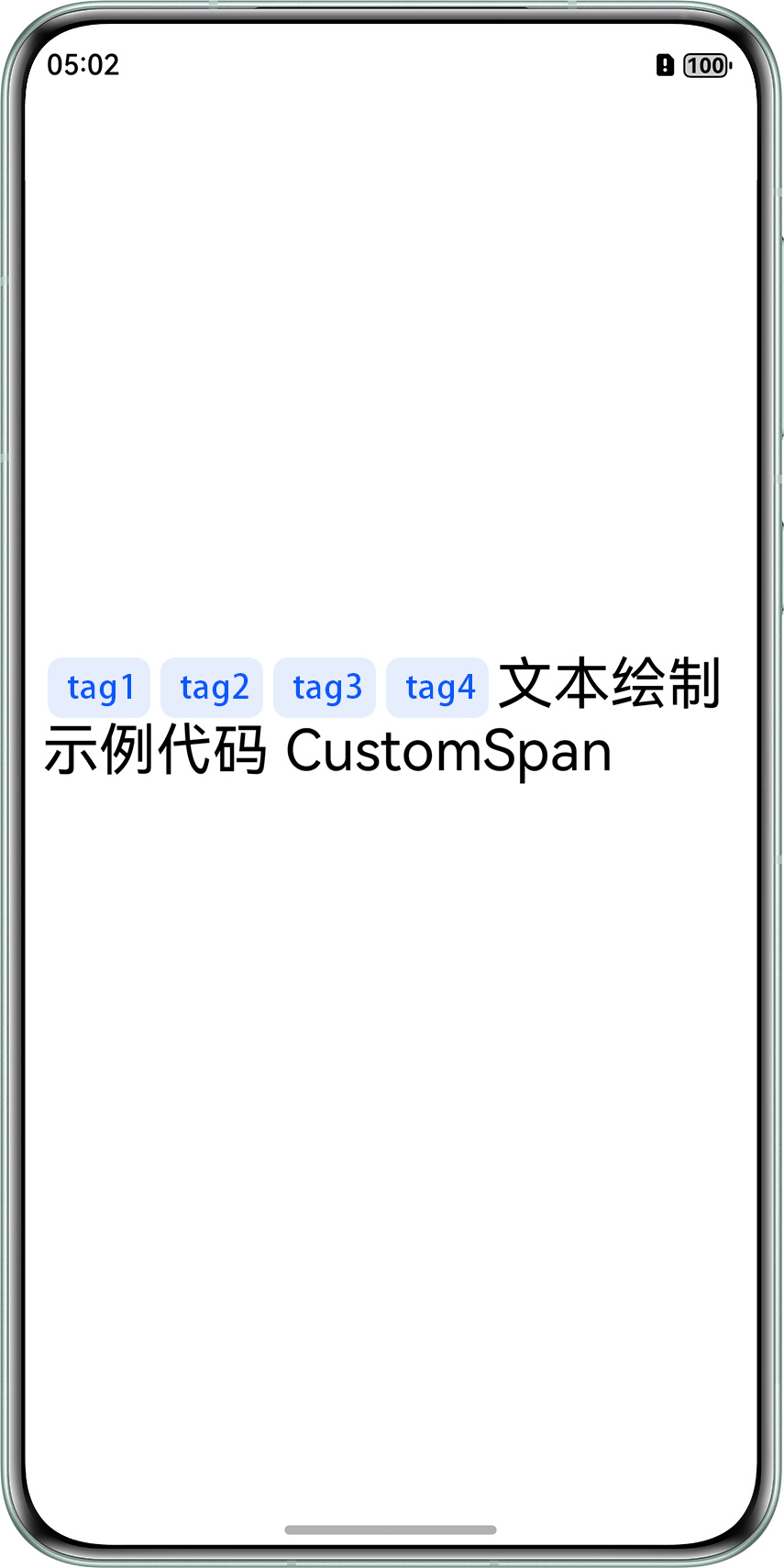
通过CustomSpan在Text中绘制带圆角背景和文字的标签,借助MutableStyledString实现灵活插入,具体步骤如下:
- 构建并绑定TextController。
textController: TextController = new TextController(); build() { Row() { Column() { Text(undefined, { controller: this.textController }) .copyOption(CopyOptions.InApp) .fontSize(30); } .width('100%'); } .height('100%') .padding(3) .expandSafeArea([SafeAreaType.SYSTEM], [SafeAreaEdge.TOP, SafeAreaEdge.BOTTOM]); } - 通过MutableStyledString加载初始化文本。
style: MutableStyledString = new MutableStyledString(this.str, [ { start: 0, length: -1, styledKey: StyledStringKey.FONT, styledValue: new TextStyle({ fontColor: Color.Black }) } ]); - 在页面组件的onPageShow生命周期中将预设的标签插入原始文本中并渲染。调用setStyledString()更新TextController,触发UI重绘。
async onPageShow() { if (!this.isPageShow) { return; } this.isPageShow = false; for (let index = 0; index < this.tagsArr.length; index++) { let custom = this.tagsArr[index]; this.style.insertStyledString(index, new StyledString(custom)); } this.textController.setStyledString(this.style); } - 当TextController渲染文本时,系统会遍历每一个StyledString,遇到CustomSpan就调用其onDraw方法。
onDraw(context: DrawContext, options: CustomSpanDrawInfo) {
  // 创建画布和画刷
  let canvas = context.canvas;
  const brush = new drawing.Brush();
  // 定义画刷颜色,用于设置背景色
  brush.setColor({
    alpha: 255,
    red: 229,
    green: 237,
    blue: 254
  });
  // 创建文字,设置文字属性
  const font = new drawing.Font();
  font.setSize(gUIContext.vp2px(18));
  const textBlob = drawing.TextBlob.makeFromString(this.word, font, drawing.TextEncoding.TEXT_ENCODING_UTF8);
  // 绑定画刷
  canvas.attachBrush(brush);
  // 绘制Tag背景形状为圆角矩形
  let rect: common2D.Rect = {
    left: options.x + 10,
    right: options.x + gUIContext.vp2px(this.width) - 10,
    top: options.lineTop + 10,
    bottom: options.lineBottom
  };
  let roundRect = new drawing.RoundRect(rect, gUIContext.vp2px(8), gUIContext.vp2px(8));
  canvas.drawRoundRect(roundRect);

  // 定义画刷颜色,用于设置文本颜色
  brush.setColor({
    alpha: 255,
    red: 12,
    green: 90,
    blue: 247
  });
  canvas.attachBrush(brush);
  // 绘制文字
  canvas.drawTextBlob(textBlob, options.x + gUIContext.vp2px(12), options.lineBottom - gUIContext.vp2px(this.height));
  canvas.detachBrush();
}
完整代码如下:
import { common2D, drawing } from '@kit.ArkGraphics2D';

let gUIContext: UIContext;

class MyCustomSpan extends CustomSpan {
  constructor(word: string, width: number, height: number) {
    super();
    this.word = word;
    this.width = width;
    this.height = height;
  }

  onMeasure(): CustomSpanMetrics {
    return { width: this.width, height: this.height };
  }

  onDraw(context: DrawContext, options: CustomSpanDrawInfo) {
    // 创建画布和画刷
    let canvas = context.canvas;
    const brush = new drawing.Brush();
    // 定义画刷颜色,用于设置背景色
    brush.setColor({
      alpha: 255,
      red: 229,
      green: 237,
      blue: 254
    });
    // 创建文字,设置文字属性
    const font = new drawing.Font();
    font.setSize(gUIContext.vp2px(18));
    const textBlob = drawing.TextBlob.makeFromString(this.word, font, drawing.TextEncoding.TEXT_ENCODING_UTF8);
    // 绑定画刷
    canvas.attachBrush(brush);
    // 绘制Tag背景形状为圆角矩形
    let rect: common2D.Rect = {
      left: options.x + 10,
      right: options.x + gUIContext.vp2px(this.width) - 10,
      top: options.lineTop + 10,
      bottom: options.lineBottom
    };
    let roundRect = new drawing.RoundRect(rect, gUIContext.vp2px(8), gUIContext.vp2px(8));
    canvas.drawRoundRect(roundRect);

    // 定义画刷颜色,用于设置文本颜色
    brush.setColor({
      alpha: 255,
      red: 12,
      green: 90,
      blue: 247
    });
    canvas.attachBrush(brush);
    // 绘制文字
    canvas.drawTextBlob(textBlob, options.x + gUIContext.vp2px(12), options.lineBottom - gUIContext.vp2px(this.height));
    canvas.detachBrush();
  }

  setWord(word: string) {
    this.word = word;
  }

  width: number = 160;
  word: string = 'drawing';
  height: number = 10;
}

@Entry
@Component
struct styled_string_set_customspan_demo {
  isPageShow: boolean = true;
  tagsArr: MyCustomSpan[] = [];
  @State str: string = '文本绘制 示例代码 CustomSpan';
  style: MutableStyledString = new MutableStyledString(this.str, [
    {
      start: 0,
      length: -1,
      styledKey: StyledStringKey.FONT,
      styledValue: new TextStyle({ fontColor: Color.Black })
    }
  ]);

  aboutToAppear() {
    gUIContext = this.getUIContext();
    for (let index = 1; index < 5; index++) {
      this.tagsArr.push(new MyCustomSpan(`tag${index}`, 60, 8));
    }
  }

  async onPageShow() {
    if (!this.isPageShow) {
      return;
    }
    this.isPageShow = false;

    for (let index = 0; index < this.tagsArr.length; index++) {
      let custom = this.tagsArr[index];
      this.style.insertStyledString(index, new StyledString(custom));
    }
    this.textController.setStyledString(this.style);
  }

  textController: TextController = new TextController();

  build() {
    Row() {
      Column() {
        Text(undefined, { controller: this.textController })
          .copyOption(CopyOptions.InApp)
          .fontSize(30);
      }
      .width('100%');
    }
    .height('100%')
    .padding(3)
    .expandSafeArea([SafeAreaType.SYSTEM], [SafeAreaEdge.TOP, SafeAreaEdge.BOTTOM]);
  }

}
效果如下: