问题现象
如下示例中,组件2由组件1旋转90度得到,两个组件本应位于屏幕中的不同位置,但使用getRectangleById方法获取两个组件的坐标时,返回的screenOffset值却是相同的。
问题代码示例参考如下:
@Entry
@Component
struct Index {
  build() {
    NavDestination() {
      RelativeContainer() {
        Text('组件1')
          .width(50)
          .height(50)
          .backgroundColor('#0A59F7')
          .alignRules({
            'middle': { 'anchor': '__container__', 'align': HorizontalAlign.Center },
            'top': { 'anchor': '__container__', 'align': VerticalAlign.Top }
          })
          .id('itemOne')

        RelativeContainer() {
          Text('组件2')
            .width(50)
            .height(50)
            .backgroundColor('#0A59F7')
            .alignRules({
              'middle': { 'anchor': '__container__', 'align': HorizontalAlign.Center },
              'top': { 'anchor': '__container__', 'align': VerticalAlign.Top }
            })
            .rotate({
              angle: '-90deg'
            })
            .id('itemTwo')
        }.width('100%').height('100%')
        .rotate({
          angle: '90deg'
        })
      }
      .width(300)
      .height(300)
      .backgroundColor('#F1F3F5')
      .onAppear(() => {
        setTimeout(() => {
          const infoOne = this.getUIContext().getComponentUtils().getRectangleById('itemOne')
          console.info('坐标1:', 'x:', infoOne.screenOffset.x.toString(), ' y:', infoOne.screenOffset.y.toString())
          const infoTwo = this.getUIContext().getComponentUtils().getRectangleById('itemTwo')
          console.info('坐标2:', 'x:', infoTwo.screenOffset.x.toString(), ' y:', infoTwo.screenOffset.y.toString())
        }, 1000);
      })
    }
  }
}
问题效果预览:
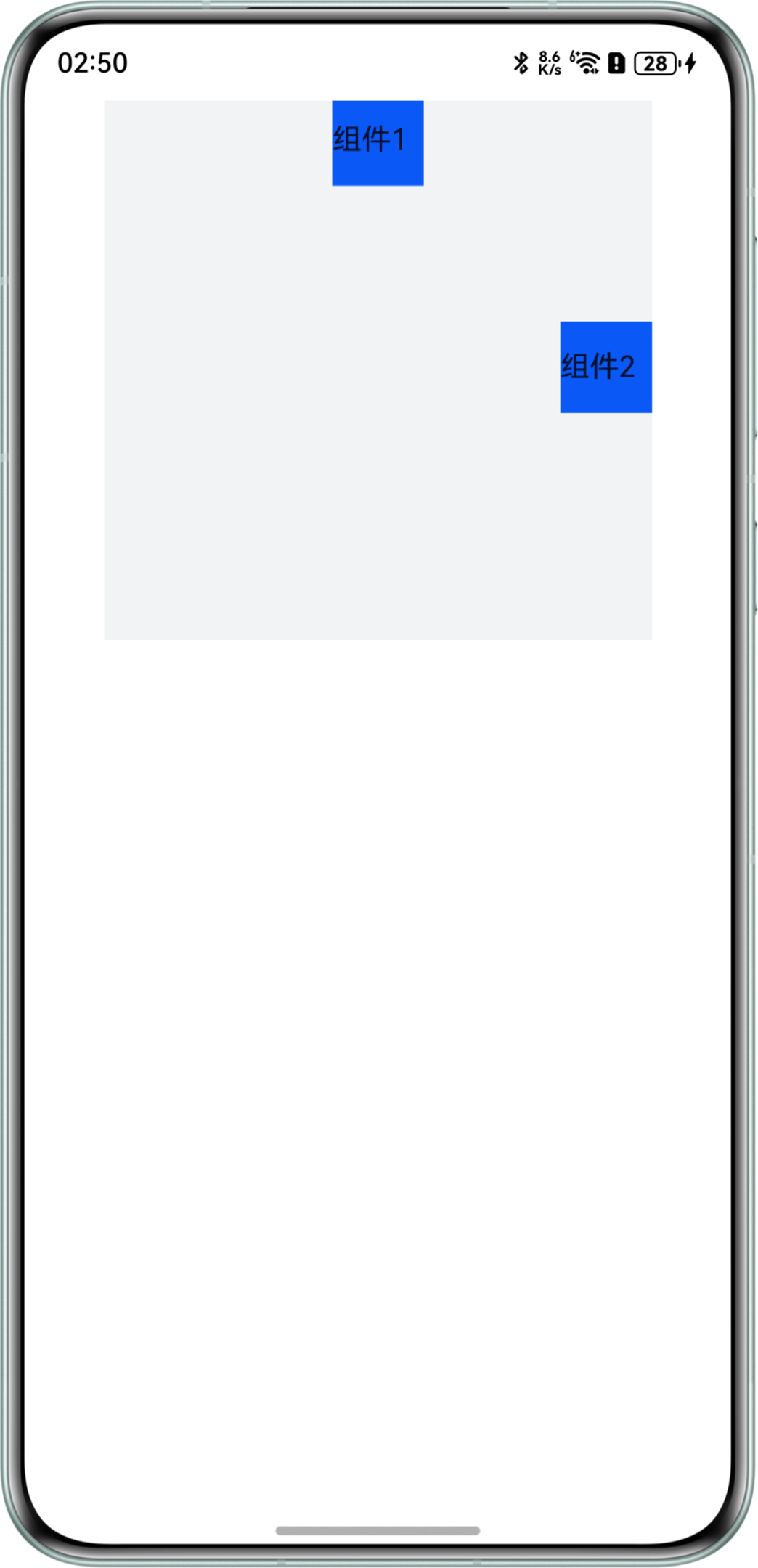
日志信息如下:
I     坐标1: x:570.5  y: 136
I     坐标2: x: 570.5  y: 136
可以看到,组件1和组件2的screenOffset值完全相同。
背景知识
- componentUtilsAPI提供了获取组件绘制区域坐标和大小的能力。其返回值ComponentInfo中的screenOffset是组件在屏幕中的位置信息。
- rotate:可以对组件进行旋转操作。
问题定位
注意到问题代码中使用了两个RelativeContainer组件,在外部RelativeContainer中定义Text组件后,又在其中继续嵌套RelativeContainer组件,从而出现了坐标异常。
修改建议
将两个Row组件放在一个RelativeContainer组件中,即可得到正确的坐标。
@Entry
@Component
struct CoordinateDisplay {
  build() {
    NavDestination() {
      RelativeContainer() {
        Row() {
          Text('组件1');
        }
        .width(50)
        .height(50)
        .backgroundColor('#0A59F7')
        .alignRules({
          top: { anchor: '__container__', align: VerticalAlign.Top },
          left: { anchor: '__container__', align: HorizontalAlign.Center }
        })
        .margin({ left: -25 })
        .id('ItemOne')
        .onClick(() => {
          let modePosition = this.getUIContext().getComponentUtils().getRectangleById('ItemOne');
          console.info('坐标1:', 'x:', modePosition.screenOffset.x.toString(), ' y:',
            modePosition.screenOffset.y.toString());
        });

        Row() {
          Text('组件2');
        }
        .width(50)
        .height(50)
        .backgroundColor('#0A59F7')
        .alignRules({
          top: { anchor: '__container__', align: VerticalAlign.Center },
          right: { anchor: '__container__', align: HorizontalAlign.End }
        })
        .onClick(() => {
          let modePosition = this.getUIContext().getComponentUtils().getRectangleById('ItemTwo');
          console.info('坐标2:', 'x:', modePosition.screenOffset.x.toString(), ' y:',
            modePosition.screenOffset.y.toString());
        })
        .margin({ top: -25 })
        .id('ItemTwo');
      }
      .width(300).height(300)
      .backgroundColor('#F1F3F5')
    }
    .height('100%');
  }
}
返回信息如下:

可以看到,组件1和组件2的screenOffset不再相同。