
背景知识
- SaveButton组件。
SaveButton允许用户通过点击按钮临时获取存储权限,无需额外的编写权限申请代码。当用户点击该控件时,应用会获得一分钟内单次访问媒体库特权接口的授权。这适用于任何需要将文件保存到媒体库的应用场景,例如保存图片或视频等。
- 图片处理服务。
- Image Kit是一个用于图片处理和显示的服务,它提供了一系列的功能和工具,帮助开发者在HarmonyOS应用中高效地处理和展示图片,主要功能包括图片解码、图片处理、图片编码。
- ImagePacker主要用于图片编码,图片编码指将PixelMap编码成不同格式的存档图片,jpeg、webp、png、heic、gif(不同硬件设备支持情况不同,可通过ImagePacker的supportedFormats属性查看)。
- packToFile:指定打包参数,将PixelMap图片源编码后直接打包进文件,需要注意的是:使用packToFile方法,需要调用release主动释放ImagePacker,打开媒体库时才能看到新存入的图片。
问题定位
媒体库需要在全部file文件的fd都close后才会刷新媒体库。如果使用packToFile方法,需要调用release主动释放ImagePacker,此时ImagePacker内的fd也会close,媒体库才会刷新,打开媒体库才能看到新存入的图片。
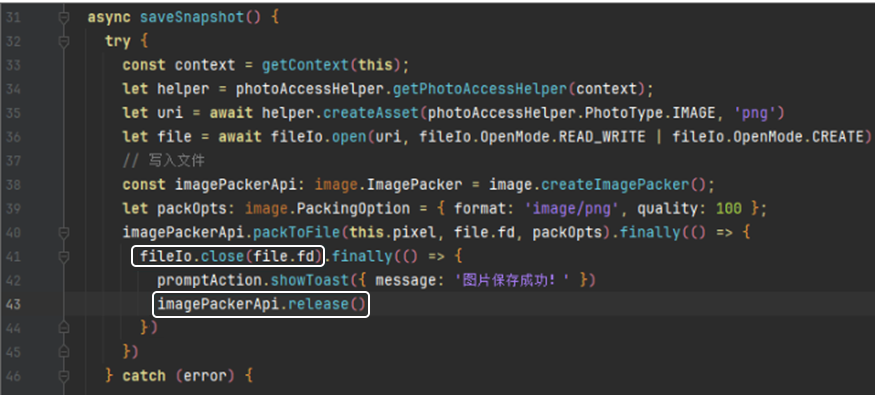
分析结论
ArkTS有内存回收机制,ImagePacker对象不调用release方法,内存最终也会由系统统一释放。但图片使用的内存往往较大,为尽快释放内存,建议应用在使用完成后主动调用release方法提前释放内存。
修改建议
import { photoAccessHelper } from '@kit.MediaLibraryKit';
import { image } from '@kit.ImageKit';
import { fileIo } from '@kit.CoreFileKit';

@Entry
@Component
export struct SavePixelMapToAlbum {
  @State saveButtonOptions: SaveButtonOptions = {
    icon: SaveIconStyle.FULL_FILLED,
    text: SaveDescription.SAVE,
    buttonType: ButtonType.Capsule
  };
  @State pixel: image.PixelMap | undefined = undefined;
  private context = this.getUIContext();

  async aboutToAppear() {
    let resourceMgr = this.context.getHostContext()?.resourceManager;
    const fileData: Uint8Array = await resourceMgr!.getMediaContent($r('app.media.example').id); // 本图片仅作示例,实际请按照目录下图片引用
    let buffer = new Uint8Array(fileData).buffer as object as ArrayBuffer;
    let imageResource = image.createImageSource(buffer);
    let opts: image.DecodingOptions = { editable: true };
    this.pixel = await imageResource.createPixelMap(opts);
  }

  async saveSnapshot() {
    try {
      let uContext = this.getUIContext().getHostContext();
      let helper = photoAccessHelper.getPhotoAccessHelper(uContext);
      let uri = await helper.createAsset(photoAccessHelper.PhotoType.IMAGE, 'png');
      let file = await fileIo.open(uri, fileIo.OpenMode.READ_WRITE | fileIo.OpenMode.CREATE);
      // 写入文件
      const imagePackerApi: image.ImagePacker = image.createImagePacker();
      let packOpts: image.PackingOption = { format: 'image/png', quality: 100 };
      imagePackerApi.packToFile(this.pixel, file.fd, packOpts).finally(() => {
        //指定打包参数,将PixelMap图片源编码后直接打包进文件
        fileIo.close(file.fd).finally(() => {
          this.getUIContext().getPromptAction().showToast({ message: '图片保存成功!' });
          imagePackerApi.release(); //主动调用release方法释放内存
        });
      });
    } catch (error) {
    }
  }
  build() {
    Column() {
      Image(this.pixel)
        .objectFit(ImageFit.Contain)
        .height('50%')
      SaveButton(this.saveButtonOptions)
      //点击保存图片
        .onClick(async (event, result: SaveButtonOnClickResult) => {
          if (result === SaveButtonOnClickResult.SUCCESS) {
            this.saveSnapshot();
          }
        })
    }
    .justifyContent(FlexAlign.Start)
    .height('100%')
    .width('100%')
  }
}
总结
- ArkTS有内存自动回收机制,数据类型分为两类,简单类型和引用类型。简单类型内容直接保存在栈(Stack)中,由操作系统自动分配和释放。引用类型保存在堆(heap)中,需要引擎进行手动释放。GC就是针对堆空间的内存自动回收的管理机制。
- 在开发过程中,碰到内存使用较大的业务场景,需要主动尽快释放内存,有效地进行内存管理和避免内存泄漏,提高应用的性能和稳定性,例如:
- 使用on注册回调,需要及时进行off释放。
- 注册媒体查询,需要解注册。
- 自定义弹窗即将析构销毁时将dialogController置空。