解决方案
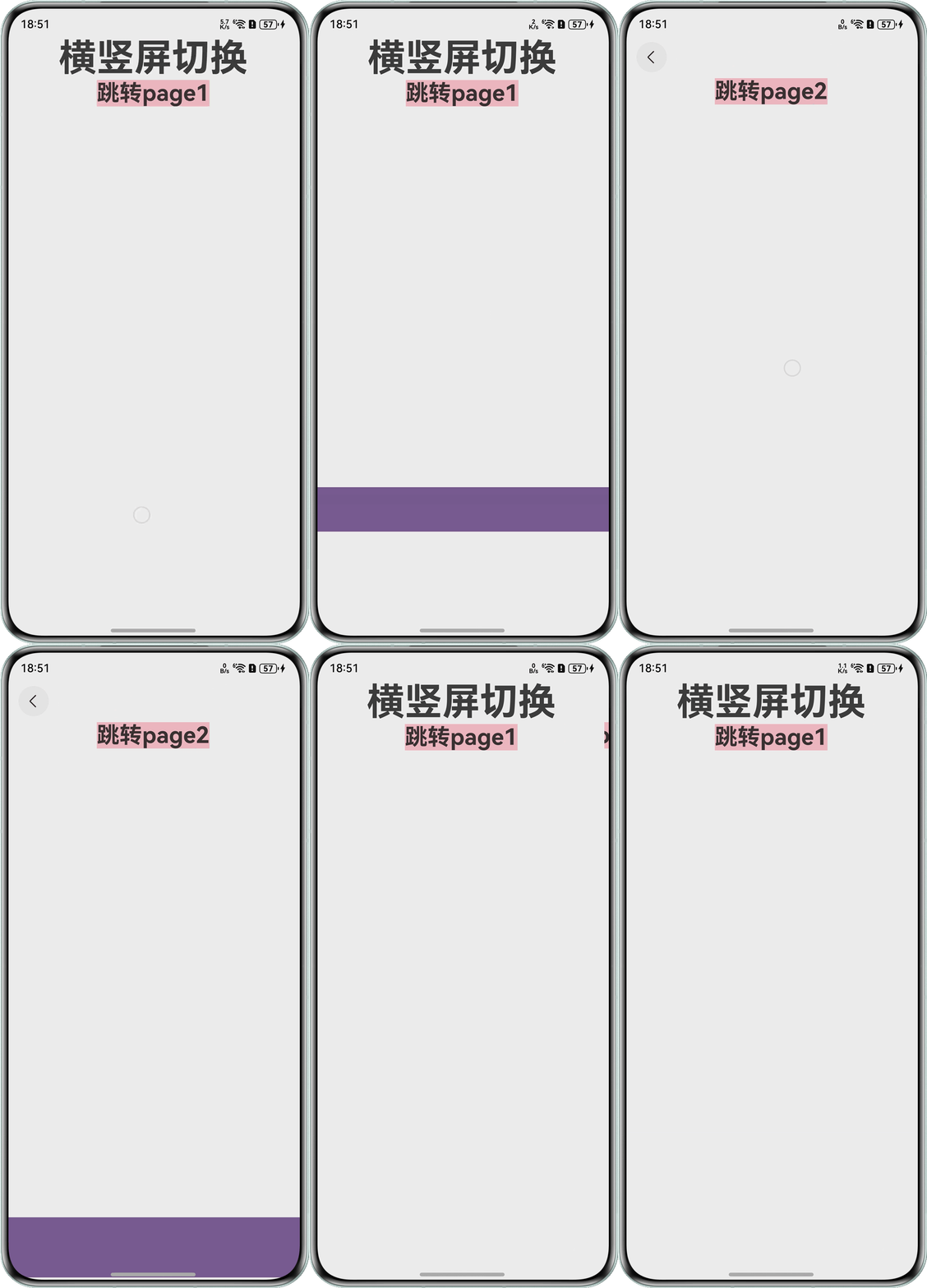
- 创建一个紫色的stack组件,设置visibility属性,通过判断标记isDirectShowPlayPanel来控制组件的显示与隐藏。
if (this.isShowPlayPanel) { Stack() { } .width('100%') .height(80) .hitTestBehavior(HitTestMode.None) .backgroundColor('#785694') .margin({ bottom: 50 }) .visibility(this.isDirectShowPlayPanel ? Visibility.Visible : Visibility.None) .position({ y: 600 }) .transition( TransitionEffect .move(TransitionEdge.BOTTOM) .animation({ duration: 500, curve: Curve.Friction }) ); } - 使用onTouch监听全局的滑动,获取event对象,在TouchType.Up回调里获取滑动的距离和滑动的时间,计算出滑动的速度,速度大于零表示下滑,此时紫色组件显示;速度小于零表示上滑,此时紫色组件隐藏。
.onTouch((event: TouchEvent) => {
  if (!event) {
    return;
  }
  switch (event.type) {
    case TouchType.Down:
      this.startX = event.touches[0].displayX;
      this.startY = event.touches[0].displayY;
      this.startTime = event.timestamp;
      break;
    case TouchType.Move:
      break;
    case TouchType.Up:
      let endY = event.touches[0].displayY;
      let endTime = event.timestamp;
      let deltaTime = (endTime - this.startTime) / 1000000000;
      let speed = (endY - this.startY) / (deltaTime === 0 ? 1 : deltaTime);
      if (Math.abs(speed) > 800) {
        if (speed < 0) {
          this.isShowPlayPanel = false;
          this.isDirectShowPlayPanel = false;
        } else if (speed > 0) {
          this.isDirectShowPlayPanel = true;
          this.isShowPlayPanel = true;
        }
      }
      break;
  }
});
全量代码示例如下:
- Index.ets。
@Entry @Component struct Index { message: string = '横竖屏切换'; @Provide('pageStack') pageStack: NavPathStack = new NavPathStack(); @State startX: number = 0; @State startY: number = 0; @State startTime: number = 0; @Provide('isShow') isShowPlayPanel: boolean = false; @Provide('isDirectShow') isDirectShowPlayPanel: boolean = false; build() { Navigation(this.pageStack) { Text(this.message) .id('HelloWorld') .fontSize(50) .fontWeight(FontWeight.Bold); Text('跳转page1') .fontSize(30) .fontWeight(FontWeight.Bold) .backgroundColor(Color.Pink) .onClick(() => { this.pageStack.pushPathByName('page1', null, false); }); if (this.isShowPlayPanel) { Stack() { } .width('100%') .height(80) .hitTestBehavior(HitTestMode.None) .backgroundColor('#785694') .margin({ bottom: 50 }) .visibility(this.isDirectShowPlayPanel ? Visibility.Visible : Visibility.None) .position({ y: 600 }) .transition( TransitionEffect .move(TransitionEdge.BOTTOM) .animation({ duration: 500, curve: Curve.Friction }) ); } } .backgroundColor('#f1f3f5') .height('100%') .width('100%') .onTouch((event: TouchEvent) => { if (!event) { return; } switch (event.type) { case TouchType.Down: this.startX = event.touches[0].displayX; this.startY = event.touches[0].displayY; this.startTime = event.timestamp; break; case TouchType.Move: break; case TouchType.Up: let endY = event.touches[0].displayY; let endTime = event.timestamp; let deltaTime = (endTime - this.startTime) / 1000000000; let speed = (endY - this.startY) / (deltaTime === 0 ? 1 : deltaTime); if (Math.abs(speed) > 800) { if (speed < 0) { this.isShowPlayPanel = false; this.isDirectShowPlayPanel = false; } else if (speed > 0) { this.isDirectShowPlayPanel = true; this.isShowPlayPanel = true; } } break; } }); } } - Page1.ets。
@Component export struct Page1 { @Consume('pageStack') pageStack: NavPathStack; @Consume('isShow') isShowPlayPanel: boolean; @Consume('isDirectShow') isDirectShowPlayPanel: boolean; build() { NavDestination() { Text('page2') .fontSize(30) .fontWeight(FontWeight.Bold) .backgroundColor(Color.Pink) if (this.isShowPlayPanel) { Stack() { } .width('100%') .height(80) .hitTestBehavior(HitTestMode.None) .backgroundColor('#785694') .margin({ bottom: 50 }) .visibility(this.isDirectShowPlayPanel ? Visibility.Visible : Visibility.None) .position({ y: 600 }) .transition( TransitionEffect .move(TransitionEdge.BOTTOM) .animation({ duration: 500, curve: Curve.Friction }) ); } } .width('100%') .height('100%') .backgroundColor('#f1f3f5') } } @Builder export function getPage1RouterMap(): void { Page1(); } - router_map:参考routerMap标签配置,在module.json5中的module字段里配置"routerMap": "$profile:router_map"。
{
  "routerMap": [
    {
      "name": "page1",
      "pageSourceFile": "src/main/ets/pages/Page1.ets",
      "buildFunction": "getPage1RouterMap"
    }
  ]
}
效果图: