背景知识
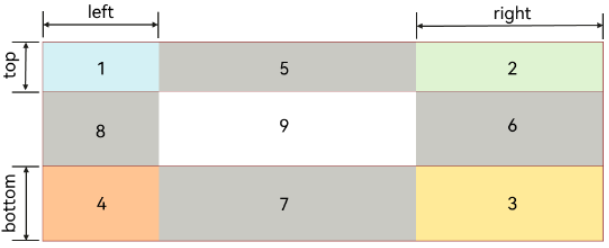
- .9图是一种特殊的PNG图像,用于根据内容大小自动拉伸背景或边框。它能定义哪些区域可以拉伸、内容如何填充。一张.9图会被系统划分为一个3×3的九宫格:
其中四角TL/TR/BL/BR不会被拉伸,上下边T/B只会被水平拉伸,左右边L/R只会被垂直拉伸,中心C可以随意拉伸。
- 通用属性backgroundImageResizable以及Image的resizable属性支持设置图像在拉伸时可调整大小,其参数ResizableOptions类型的slice属性为EdgeWidths,可设置top/right/bottom/left使图像顶部/右部/底部/左部拉伸时保持不变的距离,与.9图的拉伸规则类似。

解决方案
背景适配.9图并根据图案布局,有组件直接使用通用属性backgroundImageResizable和使用Stack堆叠Image和布局两种方案,其核心思路是相同的。思路如下:
- 首先确定不发生形变的位置。以该问题为例,该图片是一个1038×753px的图形,其中斜杠位置是从(240,0)到(296,131),因此slice的top、left参数要分别大于131px、296px,可以适当放大。除斜杠位置外,四角圆角不变,测量圆角半径约为40px,因此slice的right、bottom参数要大于40px。slice的四个参数单位为vp,因此ResizableOptions值可以为:
slice: {
  top: this.getUIContext().px2vp(140),
  bottom: this.getUIContext().px2vp(50),
  left: this.getUIContext().px2vp(300),
  right: this.getUIContext().px2vp(50)
}
- 定位文本位置。这里需要注意的是,对于不同设备,相同vp/fp值对应的px不同,而通过slice设置的不形变距离是通过原图的px确认的。因此,这里所有涉及位置、大小的属性需要使用px值,否则会发生定位不准的情况。同样以该问题为例,布局示例代码如下:
Row() {
  Text(deviceInfo.deviceType)
    .width(this.getUIContext().px2vp(260))
    .textAlign(TextAlign.Center)
    .fontSize(this.getUIContext().px2fp(60));

  Text('使用backgroundImageResizable')
    .padding({ left: this.getUIContext().px2vp(24) })
    .fontSize(this.getUIContext().px2fp(40));
}
.margin({ top: this.getUIContext().px2vp(36) })
.width('100%')
.justifyContent(FlexAlign.Start);
该问题两种方案的完整示例参考如下:
- 组件直接使用通用属性backgroundImageResizable。
- 使用Stack堆叠Image和布局。
import { deviceInfo } from '@kit.BasicServicesKit';

@Entry
@Component
struct Point9 {
  build() {
    Column({ space: 10 }) {
      Column() {
        Row() {
          Text(deviceInfo.deviceType)
            .width(this.getUIContext().px2vp(260))
            .textAlign(TextAlign.Center)
            .fontSize(this.getUIContext().px2fp(60));

          Text('使用backgroundImageResizable')
            .padding({ left: this.getUIContext().px2vp(24) })
            .fontSize(this.getUIContext().px2fp(40));
        }
        .margin({ top: this.getUIContext().px2vp(36) })
        .width('100%')
        .justifyContent(FlexAlign.Start);
      }
      .backgroundImage($r('app.media.point9'))
      .backgroundImageSize(ImageSize.FILL)
      .backgroundImageResizable({
        slice: {
          top: this.getUIContext().px2vp(140),
          bottom: this.getUIContext().px2vp(50),
          left: this.getUIContext().px2vp(300),
          right: this.getUIContext().px2vp(50)
        }
      })
      .width('90%')
      .height(200);

      Stack() {
        Image($r('app.media.point9'))
          .objectFit(ImageFit.Fill)
          .resizable({
            slice: {
              top: this.getUIContext().px2vp(140),
              bottom: this.getUIContext().px2vp(50),
              left: this.getUIContext().px2vp(300),
              right: this.getUIContext().px2vp(50)
            }
          });

        Row() {
          Text(deviceInfo.deviceType)
            .width(this.getUIContext().px2vp(260))
            .textAlign(TextAlign.Center)
            .fontSize(this.getUIContext().px2fp(60));

          Text('使用Image的resizable')
            .padding({ left: this.getUIContext().px2vp(24) })
            .fontSize(this.getUIContext().px2fp(40));
        }
        .margin({ top: this.getUIContext().px2vp(36) })
        .width('100%')
        .justifyContent(FlexAlign.Start);
      }
      .alignContent(Alignment.TopStart)
      .width('90%')
      .height(200);
    }
    .width('100%')
    .height('100%')
    .justifyContent(FlexAlign.Center);
  }
}
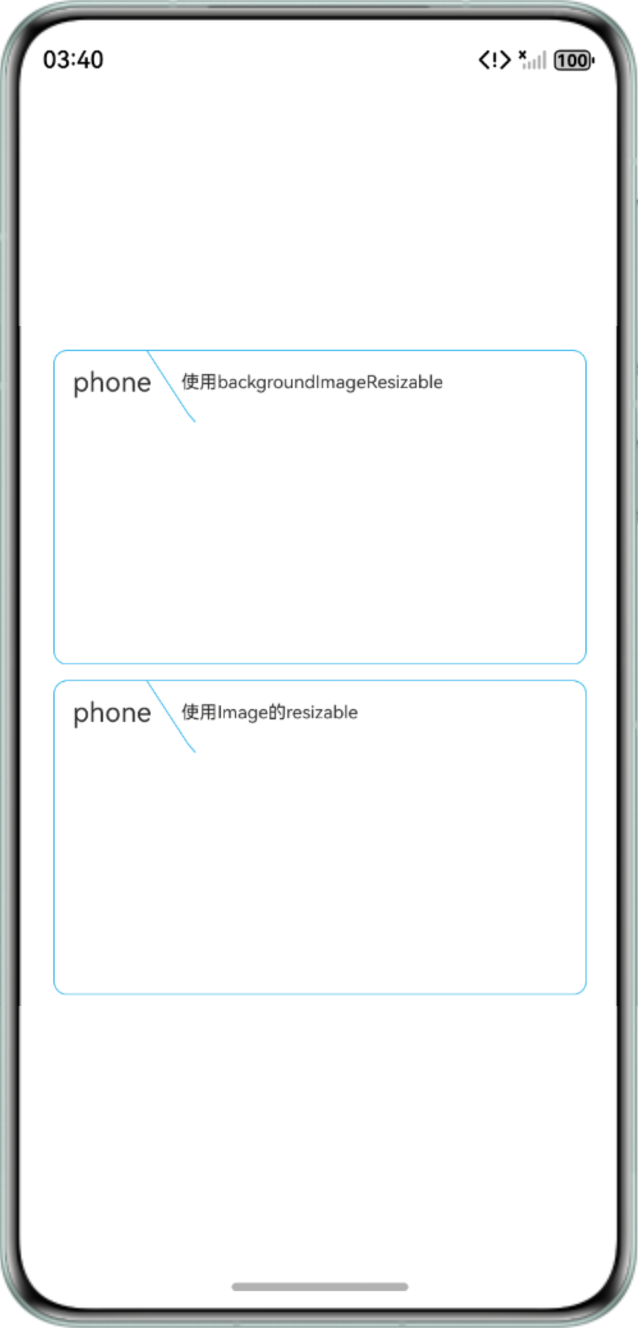
在手机设备上的效果预览:
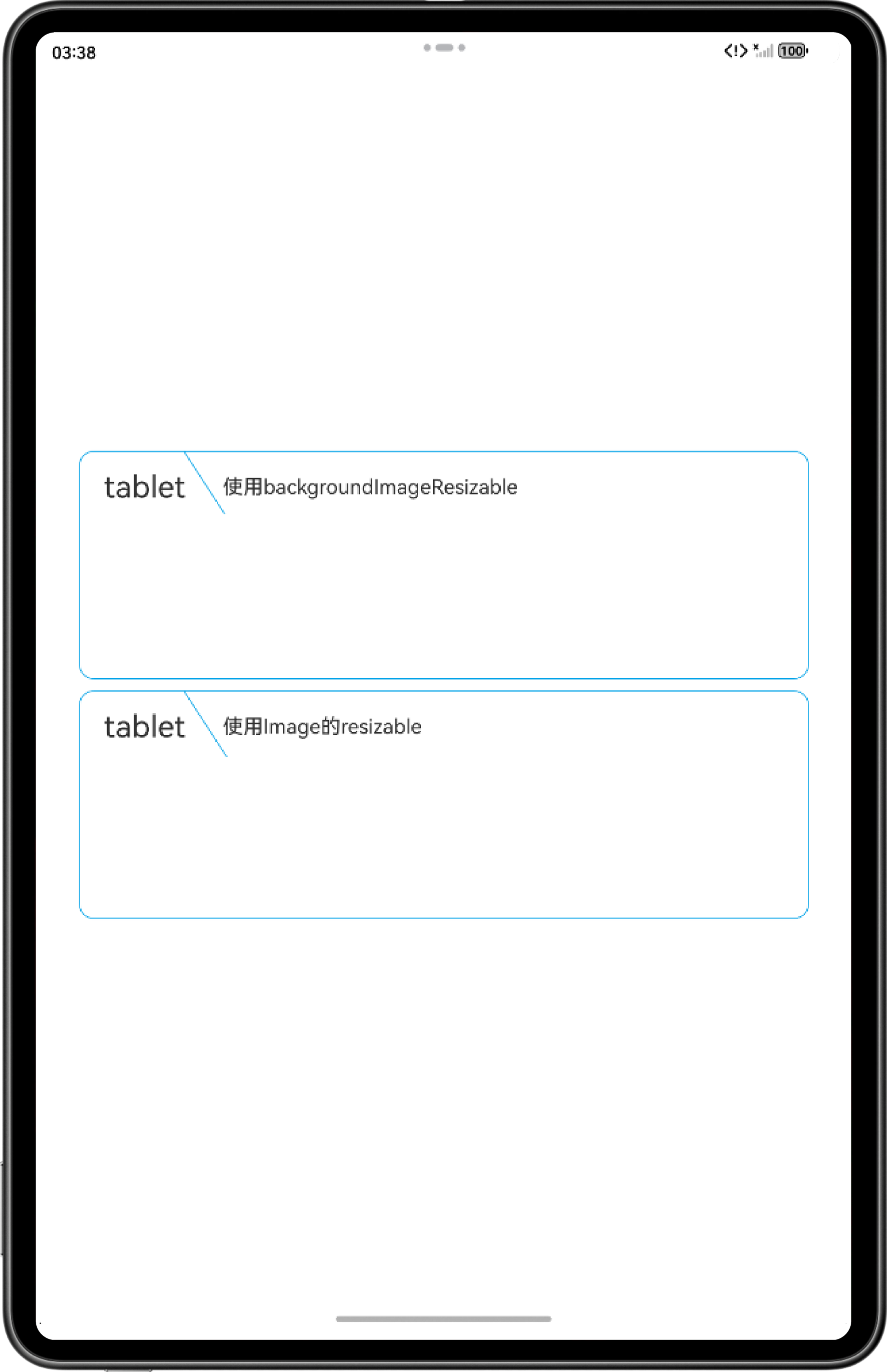
在平板设备上的效果预览: