背景知识
- IME Kit(输入法开发服务):负责建立编辑框所在应用与输入法应用之间的通信通道,确保两者可以共同协作提供文本输入功能,也为系统应用提供管理输入法应用的能力(相关API请参考IME Kit)。

IME Kit提供输入法框架和输入法服务两类API。用于实现输入法应用,也可以用于实现自绘编辑框以及实现对输入法应用的控制。

IME Kit在输入法软键盘和自绘编辑框时使用ArkUI提供的部分组件、事件、动效、状态管理等能力,例如Text、Button组件,onClick点击事件。
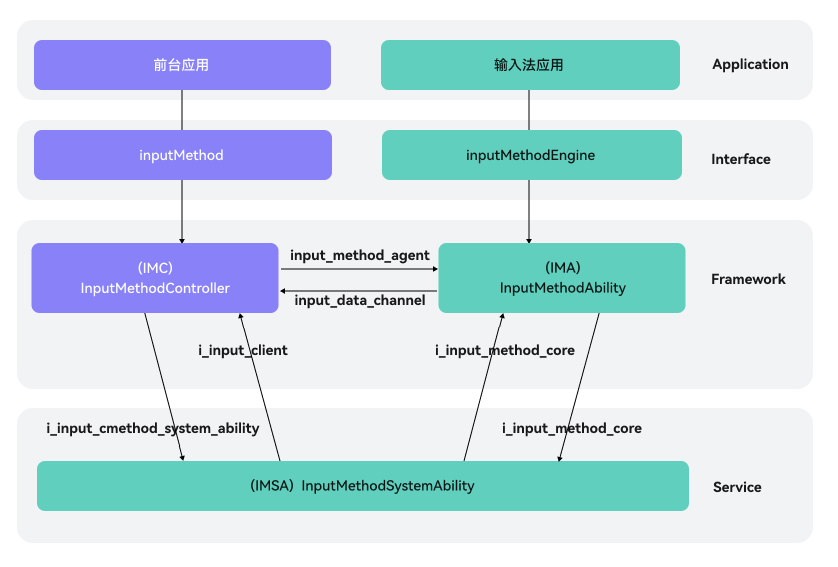
在自绘编辑框中使用输入法:在输入法框架中,可以通过getController方法获取到InputMethodController实例来绑定输入法并监听输入法应用的各种操作,比如插入、删除、选择、光标移动等。这样就可以在自绘编辑框中使用输入法,并实现更加灵活和自由的编辑操作。
- 文本输入 (TextInput/TextArea):输入框组件,用于响应用户输入,比如评论区的输入、聊天框的输入、表格的输入等,也可以结合其它组件构建功能页面,例如登录注册页面。相关API请参考和TextInput和TextArea。
- 输入框类型:包括基本输入、纯数字输入和邮箱地址输入等模式,具体参考相应的API,InputType和TextAreaType。
- inputFilter:输入框组件(TextInput/TextArea)均有此属性,通过正则表达式设置输入过滤器。匹配表达式的输入允许显示,不匹配的输入将被过滤。仅支持单个字符匹配,不支持字符串匹配。具体参考相应的API,TextInput.inputFilter和TextArea.inputFilter。

对于TextInput,设置inputFilter且输入的字符不为空字符,会导致设置输入框类型(即type接口)附带的文本过滤效果失效。
- 添加事件:文本框主要用于获取用户输入的信息,并将信息处理成数据进行上传,绑定onChange事件可以获取输入框内改变的文本内容,绑定onSubmit事件可以获取回车提交的文本信息等等,用户也可以使用通用事件进行相应的交互操作。
- 富文本(RichEditor):支持图文混排和文本交互式编辑的组件,通常用于响应用户对图文混合内容的输入操作,例如可以输入图文的评论区。
- 创建RichEditor组件:开发者可以创建基于属性字符串进行内容管理的RichEditor组件或者基于Span进行内容管理的RichEditor组件的RichEditor组件。
- 事件回调:包括但不限于添加组件初始化完成后可触发的回调、添加图文变化前和图文变化后可触发的回调和添加输入法输入内容前和完成输入后可触发的回调。
- Input Kit(多模输入服务):为多种输入设备提供服务,如触控板、触摸屏、鼠标、键盘等。通过对这些输入设备上报驱动事件的归一化处理,确保不同输入设备与用户交互体验统一和流畅。相关API请参考ArkTS API。
输入设备开发指导:当用户需要输入文本时,输入法会根据当前是否插入了物理键盘来决定是否弹出虚拟键盘,开发者可以通过监听设备热插拔判断是否有物理键盘插入。
- HTML的<input>标签:规定了用户可以在其中输入数据的输入字段。<input>元素在<form>元素中使用,用来声明允许用户输入数据的input控件。输入字段可通过多种方式改变,取决于type属性。
属性
值
描述
max
number date
属性规定元素的最大值。
maxlength
number
属性规定元素中允许的最大字符数。
min
number date
属性规定元素的最小值。
multiple
multiple
属性规定允许用户输入到元素的多个值。
pattern
regexp
pattern 属性规定用于验证元素的值的正则表达式。
type
button;checkbox;color;date;datetime;datetime-local;email;file;hidden;image;month;number;password;radio;range;reset;search;submit;tel;text;time;url;week
type 属性规定要显示的元素的类型。
问题定位
- 对于输入法输入无效这个场景,主要原因可能是对应组件事件设置问题导致的。因此首先需要确认用于呈现输入内容的ArkUI组件。
- TextInput/TextArea:单行文本/多行文本输入框组件:主要分析onChange事件和onSubmit事件或者其他事件设置是否合理。

在密码模式下,设置showPassword属性时,在onSecurityStateChange回调中,建议增加状态同步。
onWillInsert、onDidInsert、onWillDelete、onDidDelete回调仅支持系统输入法的场景。
onWillChange的回调时序晚于onWillInsert、onWillDelete,早于onDidInsert、onDidDelete。
- RichEditor:支持图文混排和文本交互式编辑的组件,检查onWillChange/onDidChange事件(添加图文变化前/后可触发的回调)或者aboutToIMEInput/onDidIMEInput事件(添加输入法输入内容前/后触发回调)设置是否正确。

使用RichEditorStyledStringOptions构建的RichEditor组件不支持上述回调。
- 如果上述ArkUI组件事件,问题也可能发生在自绘编辑框中,检查作为自绘编辑框的组件能力和状态变量设置是否正确。

一般使用Text组件作为自绘编辑框的文本显示组件,状态变量作为Text组件要显示的内容。
- TextInput/TextArea:单行文本/多行文本输入框组件:主要分析onChange事件和onSubmit事件或者其他事件设置是否合理。
- 除此之外,应用对于输入内容可能存在校验机制,导致输入字段被限制无法输入。
- ArkUI组件:可以查看输入框组件是否设置输入框类型、正则表达过滤器和最大输入字符数限制等,参考具体组件的API。
- Web组件:可以查看H5页面HTML的<input>标签,检查是否设置type和pattern。
[h2]场景三
应用对于输入内容有校验机制不合理。例如,作为输入框使用的ArkUI组件,未正确设置输入框类型、正则表达过滤器和最大输入字符数限制等,则可能导致无效输入无法被及时拦截。同样,在H5页面中,HTML的<input>标签若未合理设置type属性或pattern正则模式,也会造成输入验证失效,影响用户体验。
[h2]场景一
修复或者完善对应事件逻辑,优化用户体验。其中以TextInput为例(其他请参考背景知识),添加事件:
TextInput({ text: 'Hello World', placeholder: 'input your word...', controller: this.controller })
  .type(InputType.Password)
  .showPassword(this.passwordState)
  .onChange((value: string) => {
    // 文本内容发生变化时触发该回调
    console.info('onChange is triggering: ', value);
  })
  .onSubmit((enterKey: EnterKeyType, event: SubmitEvent) => {
    // 按下输入法回车键时触发该回调
    console.info('onSubmit is triggering: ', enterKey, event.text);
  })
  .onTextSelectionChange((selectionStart: number, selectionEnd: number) => {
    // 文本选择的位置发生变化或编辑状态下光标位置发生变化时,触发该回调
    console.info('onTextSelectionChange is triggering: ', selectionStart, selectionEnd);
  })
  .onSecurityStateChange((isShowPassword: boolean) => {
    // 密码显隐状态切换时,触发该回调
    console.info('onSecurityStateChange is triggering: ', isShowPassword);
    this.passwordState = isShowPassword;
  })
  .onWillInsert((info: InsertValue) => {
    // 在将要输入时,触发该回调
    console.info('onWillInsert is triggering: ', info.insertValue, info.insertOffset);
    return true;
  })
  .onDidInsert((info: InsertValue) => {
    // 在输入完成时,触发该回调
    console.info('onDidInsert is triggering: ', info.insertValue, info.insertOffset);
  })
  .onWillDelete((info: DeleteValue) => {
    // 在将要删除时,触发该回调
    console.info('onWillDelete is triggering: ', info.deleteValue, info.deleteOffset);
    return true;
  })
  .onDidDelete((info: DeleteValue) => {
    // 在删除完成时,触发该回调
    console.info('onDidDelete is triggering: ', info.deleteValue, info.deleteOffset);
  })
  .onFocus(() => {
    // 绑定通用事件,输入框获焦时触发该回调
    console.info('onFocus is triggering');
  })
[h2]场景二
根据具体场景使用正确的组件能力和状态变量管理。以Text组件作为自绘编辑框的文本显示组件,状态变量inputText作为Text组件要显示的内容为例:
import { inputMethod } from '@kit.IMEKit';

@Component
export struct CustomInput {
  @State inputText: string = ''; // inputText作为Text组件要显示的内容。
  private isAttach: boolean = false;
  private inputController: inputMethod.InputMethodController = inputMethod.getController();

  build() {
    Text(this.inputText) // Text组件作为自绘编辑框的文本显示组件。
      .fontSize(16)
      .width('100%')
      .lineHeight(40)
      .id('customInput')
      .onBlur(() => {
        this.off();
      })
      .height(45)
      .border({ color: '#554455', radius: 30, width: 1 })
      .maxLines(1)
      .onClick(() => {
        this.attachAndListener(); // 点击控件
      })
  }

  async attachAndListener() { // 绑定和设置监听
    focusControl.requestFocus('CustomInput');
    try {
      await this.inputController.attach(true, {
        inputAttribute: {
          textInputType: inputMethod.TextInputType.TEXT,
          enterKeyType: inputMethod.EnterKeyType.SEARCH
        }
      });
    } catch (error) {
      // TODO: Implement error handling.
    }
    if (!this.isAttach) {
      try {
        this.inputController.on('insertText', (text) => {
          this.inputText += text;
        });
      } catch (error) {
        // TODO: Implement error handling.
      }
      try {
        this.inputController.on('deleteLeft', (length) => {
          this.inputText = this.inputText.substring(0, this.inputText.length - length);
        });
      } catch (error) {
        // TODO: Implement error handling.
      }
      this.isAttach = true;
    }
  }

  off() {
    this.isAttach = false;
    this.inputController.off('insertText');
    this.inputController.off('deleteLeft');
  }
}
[h2]场景三
设置正确的校验机制,并增加提醒,引导用户合法输入。
完整示例:
import { inputMethod } from '@kit.IMEKit';

@Component
export struct CustomInput {
  @State inputText: string = ''; // inputText作为Text组件要显示的内容。
  private isAttach: boolean = false;
  private inputController: inputMethod.InputMethodController = inputMethod.getController();

  build() {
    Text(this.inputText) // Text组件作为自绘编辑框的文本显示组件。
      .fontSize(16)
      .width('100%')
      .lineHeight(40)
      .id('customInput')
      .onBlur(() => {
        this.off();
      })
      .height(45)
      .border({ color: '#554455', radius: 30, width: 1 })
      .maxLines(1)
      .onClick(() => {
        this.attachAndListener(); // 点击控件
      })
  }

  async attachAndListener() { // 绑定和设置监听
    focusControl.requestFocus('CustomInput');
    try {
      await this.inputController.attach(true, {
        inputAttribute: {
          textInputType: inputMethod.TextInputType.TEXT,
          enterKeyType: inputMethod.EnterKeyType.SEARCH
        }
      });
    } catch (error) {
      // TODO: Implement error handling.
    }
    if (!this.isAttach) {
      try {
        this.inputController.on('insertText', (text) => {
          this.inputText += text;
        });
      } catch (error) {
        // TODO: Implement error handling.
      }
      try {
        this.inputController.on('deleteLeft', (length) => {
          this.inputText = this.inputText.substring(0, this.inputText.length - length);
        });
      } catch (error) {
        // TODO: Implement error handling.
      }
      this.isAttach = true;
    }
  }

  off() {
    this.isAttach = false;
    this.inputController.off('insertText');
    this.inputController.off('deleteLeft');
  }
}


@Entry
@Component
struct NavTitleSolution1 {
  controller: TextInputController = new TextInputController();
  @State passwordState: boolean = false;

  build() {
    Column() {
      TextInput({ text: 'Hello World', placeholder: 'input your word...', controller: this.controller })
        .type(InputType.Password)
        .showPassword(this.passwordState)
        .onChange((value: string) => {
          // 文本内容发生变化时触发该回调
          console.info('onChange is triggering: ', value);
        })
        .onSubmit((enterKey: EnterKeyType, event: SubmitEvent) => {
          // 按下输入法回车键时触发该回调
          console.info('onSubmit is triggering: ', enterKey, event.text);
        })
        .onTextSelectionChange((selectionStart: number, selectionEnd: number) => {
          // 文本选择的位置发生变化或编辑状态下光标位置发生变化时,触发该回调
          console.info('onTextSelectionChange is triggering: ', selectionStart, selectionEnd);
        })
        .onSecurityStateChange((isShowPassword: boolean) => {
          // 密码显隐状态切换时,触发该回调
          console.info('onSecurityStateChange is triggering: ', isShowPassword);
          this.passwordState = isShowPassword;
        })
        .onWillInsert((info: InsertValue) => {
          // 在将要输入时,触发该回调
          console.info('onWillInsert is triggering: ', info.insertValue, info.insertOffset);
          return true;
        })
        .onDidInsert((info: InsertValue) => {
          // 在输入完成时,触发该回调
          console.info('onDidInsert is triggering: ', info.insertValue, info.insertOffset);
        })
        .onWillDelete((info: DeleteValue) => {
          // 在将要删除时,触发该回调
          console.info('onWillDelete is triggering: ', info.deleteValue, info.deleteOffset);
          return true;
        })
        .onDidDelete((info: DeleteValue) => {
          // 在删除完成时,触发该回调
          console.info('onDidDelete is triggering: ', info.deleteValue, info.deleteOffset);
        })
        .onFocus(() => {
          // 绑定通用事件,输入框获焦时触发该回调
          console.info('onFocus is triggering');
        })
    }
    .justifyContent(FlexAlign.Center)
    .width('100%')
    .height('100%');

  }
}