问题现象
如何在新闻等列表页面中实现可展开的缩略图?
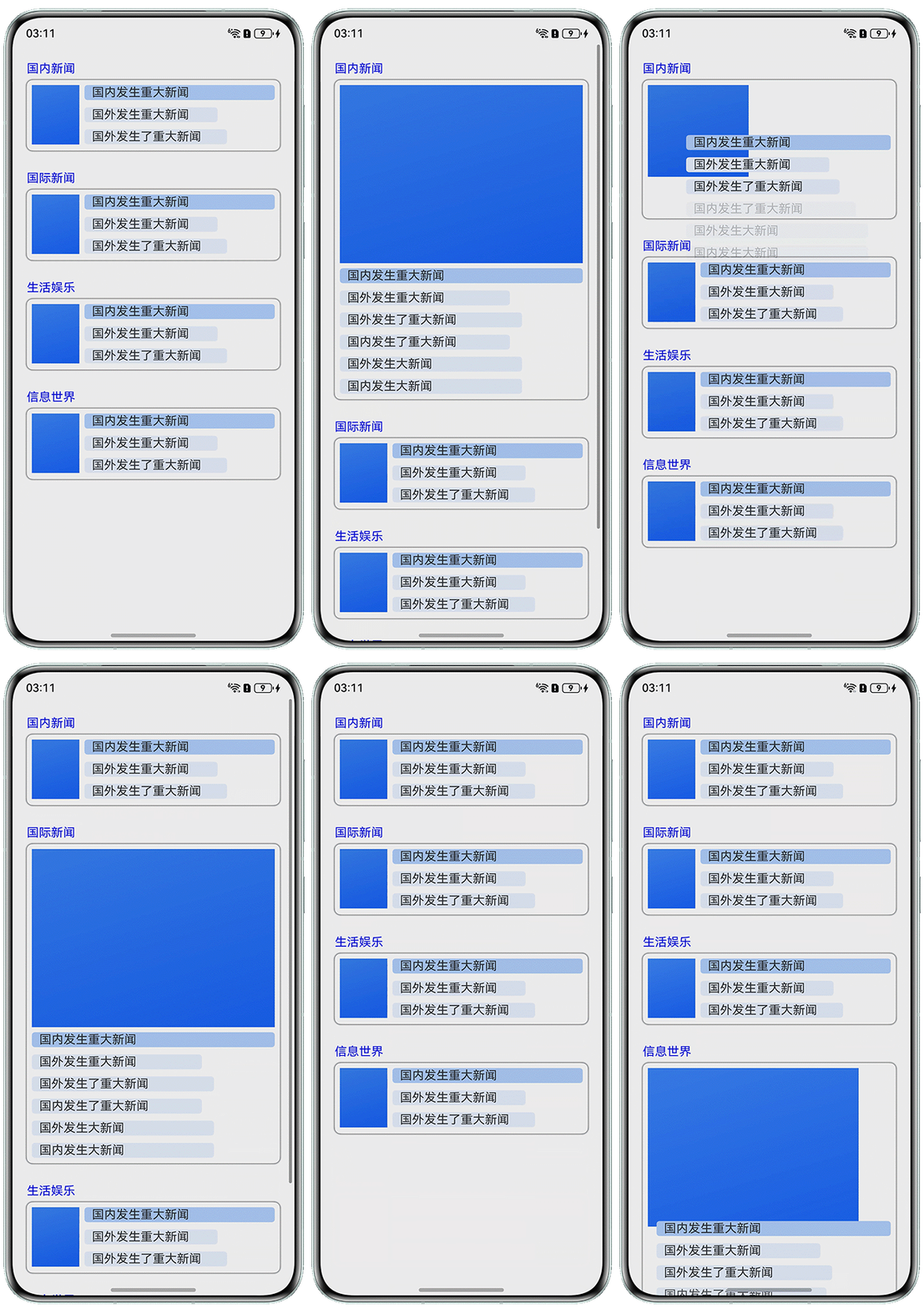
解决方案
- 创建一个名为scrollItems的自定义组件。在build函数中,先用Text显示标题,再通过Flex布局展示内容。当flag为true时,Flex使用横向排列;当flag为false时,改为纵向排列。
- 为Flex添加点击事件onClick,点击时调用animateTo方法触发动画效果,并将flag的值取反,从而实现布局方向的切换动画。
- 在父组件中使用ForEach对scrollItems进行循环渲染,传入不同的数据,实现多个模块的复用展示。每个scrollItems都可以独立切换布局。
@Entry
@Component
struct ExpandableThumbnailDemo {
  @State arr: string[] = ['国内新闻', '国际新闻', '生活娱乐', '信息世界'];

  build() {
    Scroll() {
      Column() {
        ForEach(this.arr, (item: string, index: number) => {
          scrollItems({ text: item, colorID: index }).transition({ type: TransitionType.All });
        }, (value: string) => value);
      };
    }
    .width('100%')
    .height('100%')
    .expandSafeArea([SafeAreaType.SYSTEM], [SafeAreaEdge.BOTTOM])
    .align(Alignment.Top);
  }
}

@Component
struct scrollItems {
  @State flag: boolean = true;
  text: string = '';
  colorID: number = 0;
  color: string = ((index: number): string => {
    const colors: string[] = ['255,0,0', '255,0,0', '255,0,0', '255,0,0'];
    return colors[index];
  })(this.colorID);

  build() {
    Column() {
      Text(this.text)
        .width('100%')
        .height(25)
        .margin({ bottom: 3 })
        .fontColor(this.color);
      Flex({
        direction: this.flag ? FlexDirection.Row : FlexDirection.Column, // 横向布局和纵向布局切换
        justifyContent: FlexAlign.Start,
        alignItems: ItemAlign.Start
      }) {
        Column() {
          Image($r('app.media.startIcon')); // 此处仅为样例,请开发者更换为可用图片
        }
        .width(this.flag ? 80 : '100%')
        .height(this.flag ? 80 : 240)
        .borderRadius(4)
        .backgroundColor('#ffadcfff')
        .margin({ right: 7, bottom: 7 });

        Column() {
          Row() {
            Text('国内发生重大新闻');
          }
          .width('100%')
          .height(20)
          .backgroundColor('#ffadcfff')
          .borderRadius(4)
          .padding({ left: 10 });

          Row() {
            Text('国外发生重大新闻');
          }
          .width('70%')
          .height(20)
          .backgroundColor('#FFE8F0FF')
          .borderRadius(4)
          .padding({ left: 10 })
          .margin({ top: 10 });

          Row() {
            Text('国外发生了重大新闻');
          }
          .width('75%')
          .height(20)
          .backgroundColor('#FFE8F0FF')
          .padding({ left: 10 })
          .borderRadius(4)
          .margin({ top: 10 });

          if (!this.flag) {
            Row() {
              Text('国内发生了重大新闻');
            }
            .width('70%')
            .height(20)
            .backgroundColor('#FFE8F0FF')
            .borderRadius(4)
            .padding({ left: 10 })
            .margin({ top: 10 });

            Row() {
              Text('国外发生大新闻');
            } // 最小每行内容
            .width('75%')
            .height(20)
            .backgroundColor('#FFE8F0FF')
            .padding({ left: 10 })
            .borderRadius(4)
            .margin({ top: 10 });

            Row() {
              Text('国内发生大新闻');
            } // 最小每行内容
            .width('75%')
            .height(20)
            .backgroundColor('#FFE8F0FF')
            .padding({ left: 10 })
            .borderRadius(4)
            .margin({ top: 10 });
          }
        }
        .alignItems(HorizontalAlign.Start);
      }
      .width('100%')
      .height(this.flag ? 95 : 430)
      .padding({
        top: 7,
        left: 7,
        bottom: 7,
        right: 7
      })
      .margin({ bottom: 5 })
      .borderRadius(8)
      .shadow({ radius: 10, color: 'rgba(0,0,0,1)' })
      .onClick(() => {
        // 布局切换动画效果
        this.getUIContext().animateTo({ duration: 500, curve: Curve.FastOutSlowIn }, () => {
          this.flag = !this.flag;
        });
      });
    }
    .width('100%')
    .padding({ left: 20, right: 20 })
    .margin({ top: 20 });
  }
}