背景知识
- 自定义弹窗(CustomDialog):通过CustomDialogController类显示自定义弹窗。使用弹窗组件时,优先考虑自定义弹窗,便于弹窗样式与内容的自定义。
- defaultFocus:设置当前组件是否为当前页面上的默认焦点。
- on('keyboardHeightChange'):开启固定态软键盘高度变化的监听,当软键盘由本窗口唤出并存在重叠区域时通知键盘高度变化。
- Stack:堆叠容器,子组件按照顺序依次入栈,后一个子组件覆盖前一个子组件。
- alignContent:设置子组件在容器内的对齐方式。该属性与通用属性align同时设置时,后设置的属性生效。
解决方案
针对跟随键盘的工具栏,可采用以下两种实现方案:
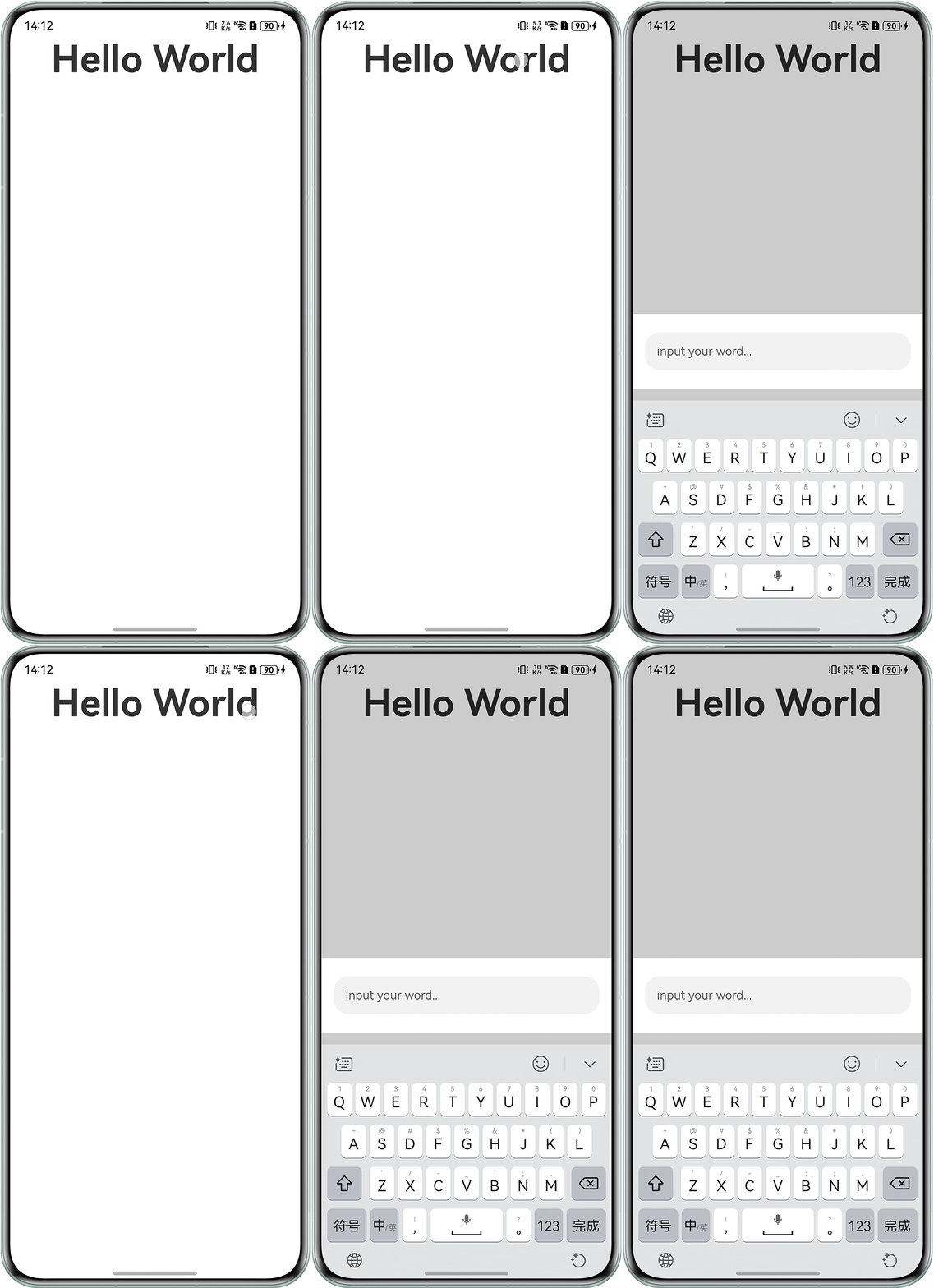
- 方案一:使用CustomDialog组件自定义工具栏。以下示例通过点击文本组件使弹窗自动获焦,设置弹窗从底部弹出,并为弹窗添加弹出与关闭时的过渡动画,以实现跟随键盘的动画效果。
// 自定义对话框组件,用于显示输入框
@CustomDialog
@Component
export struct Dialog {
  dialogController: CustomDialogController;

  build() {
    Column() {
      TextInput({ text: '', placeholder: 'input your word...' })
        .type(InputType.Normal)
        .defaultFocus(true) // 设置为默认聚焦状态
        .onBlur(() => {
          // 输入框失去焦点时关闭对话框
          this.dialogController.close();
        })
        .height('50%')
        .margin({ top: 25, left: 16, right: 16 });
    }
    .height(100)
    .backgroundColor(Color.White);
  }
}

@Entry
@Component
struct Index {
  message: string = 'Hello World';
  // 自定义对话框控制器,配置对话框的显示参数
  customDialogController: CustomDialogController = new CustomDialogController({
    builder: Dialog(), // 设置对话框内容组件
    alignment: DialogAlignment.Bottom, // 对话框从底部弹出
    cornerRadius: 0,
    customStyle: true,
    openAnimation: { duration: 0.001, tempo: 0 }, // 打开弹窗时动画设置
    closeAnimation: { duration: 0.001, tempo: 0 }, // 关闭弹窗时动画设置
  });

  build() {
    Column() {
      // 点击按钮打开对话框
      Text(this.message)
        .onClick(() => {
          this.customDialogController.open(); // 触发对话框显示
        })
        .id('HelloWorld')
        .fontSize(50)
        .fontWeight(FontWeight.Bold);
    }
    .height('100%')
    .width('100%');
  }
}
效果预览:
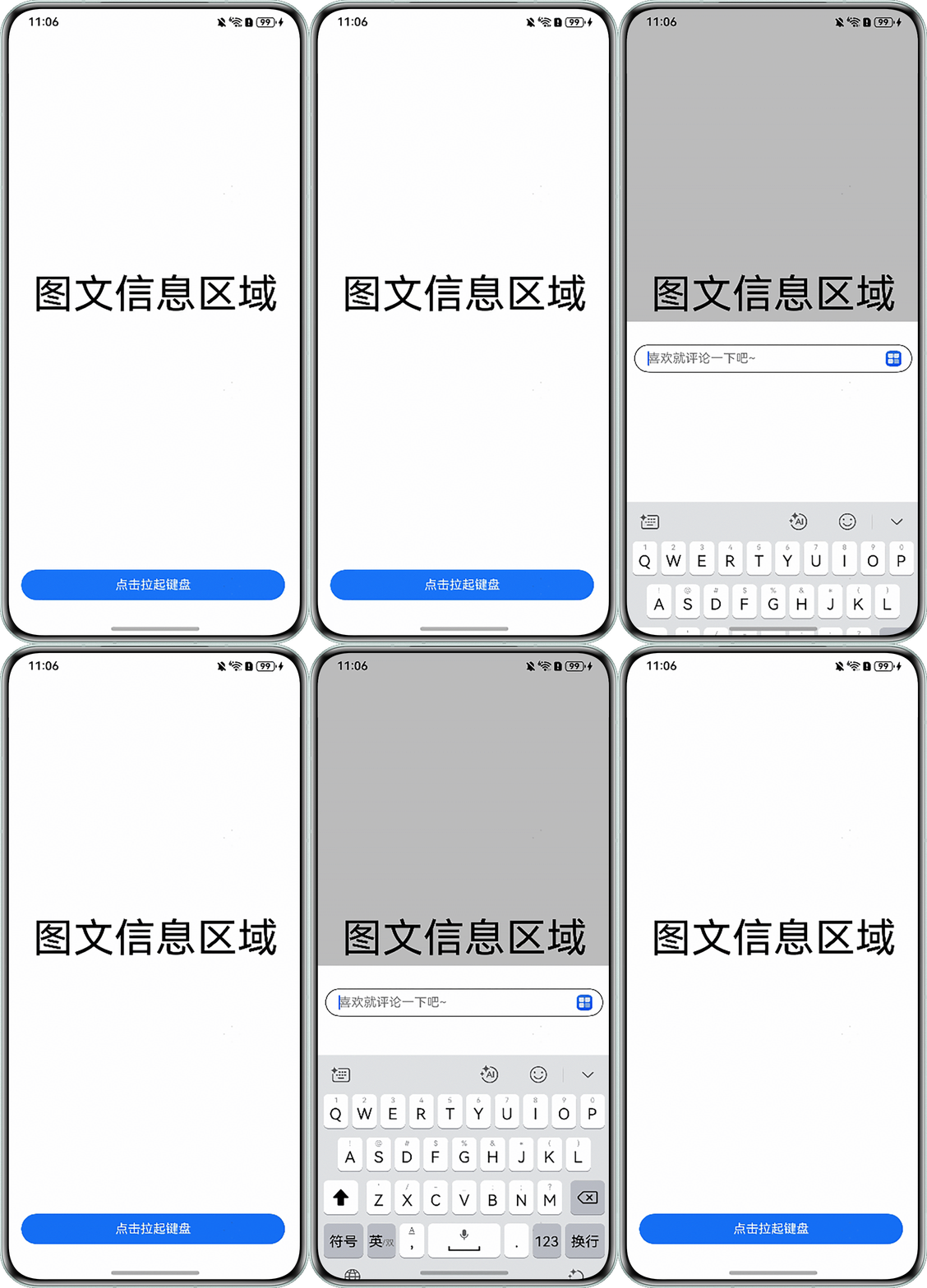
- 方案二:自定义工具栏组件,借助堆叠容器Stack进行页面布局,将组件设置为底部横向居中。定义状态变量isVisible以控制自定义工具栏的显示与隐藏:在TextInput组件聚焦时显示,失焦时隐藏。同时,通过on('keyboardHeightChange')方法监听软键盘高度变化,依据键盘高度动态调整自定义工具栏的位置,使其紧贴于键盘上方。
import { window } from '@kit.ArkUI';

@Entry
@Component
struct Index {
  message: string = '图文信息区域';
  // 控制自定义工具栏组件可见性
  @State isVisible: Visibility = Visibility.Hidden;
  // 存储键盘高度信息
  @State keyboardHeight: string = '0px';
  controller: RichEditorController = new RichEditorController();

  // 页面加载时监听键盘高度变化
  aboutToAppear(): void {
    window.getLastWindow(this.getUIContext().getHostContext()).then((win) => {
      win.on('keyboardHeightChange', (height) => {
        console.info('height' + height.toString());
        if (height) {
          this.keyboardHeight = height.toString() + 'px'; // 保存键盘高度
          this.isVisible = Visibility.Visible; // 显示自定义组件
        } else {
          this.isVisible = Visibility.Hidden; // 隐藏自定义组件
        }
      });
    });
  }

  build() {
    // 使用Stack布局,底部对齐
    Stack({ alignContent: Alignment.Bottom }) {
      Column() {
        Text(this.message)
          .fontSize(52)
          .height('90%')
          .width('100%')
          .textAlign(TextAlign.Center)
          .fontColor(Color.Black);
        // 操作按钮行
        Row() {
          Text('点击拉起键盘')
            .fontColor(Color.White)
            .width('90%')
            .height('40')
            .backgroundColor('#ff1a73f8')
            .borderRadius(20)
            .textAlign(TextAlign.Center)
            .margin({ left: 16, right: 16 })
            .onClick(() => {
              this.isVisible = Visibility.Visible; // 显示自定义组件
              setTimeout(() => {
                focusControl.requestFocus('textArea'); // 焦点切换到输入框
              }, 10);
            });
        }.height('10%').width('100%');
      }
      .expandSafeArea([SafeAreaType.KEYBOARD], [SafeAreaEdge.BOTTOM]); // 适配键盘区域

      // 遮罩层(点击隐藏自定义)
      Column()
        .width('100%')
        .height('120%')
        .opacity(0.5)
        .backgroundColor('rgba(0,0,0,0.5)')
        .onClick(() => {
          this.isVisible = Visibility.Hidden; // 隐藏自定义组件
        })
        .visibility(this.isVisible)
        .expandSafeArea([SafeAreaType.KEYBOARD], [SafeAreaEdge.BOTTOM, SafeAreaEdge.TOP]);
      // 动态加载自定义组件
      CommentComponent({ isVisible: this.isVisible, keyboardHeight: this.keyboardHeight });
    };
  }

  // 页面卸载时隐藏自定义组件
  aboutToDisappear(): void {
    this.isVisible = Visibility.Hidden;
  }
}

// 自定义工具栏组件
@Component
struct CommentComponent {
  controller: RichEditorController = new RichEditorController();
  @Link isVisible: Visibility;
  @Link keyboardHeight: string;

  build() {
    Flex({ direction: FlexDirection.ColumnReverse, justifyContent: FlexAlign.Start, alignItems: ItemAlign.Stretch }) {
      Row() {
        RichEditor({ controller: this.controller })
          .id('textArea') // 设置输入框ID用于焦点控制
          .placeholder('喜欢就评论一下吧~', { fontColor: Color.Gray, font: { size: 16, weight: FontWeight.Normal } })
          .width('65%');
        Flex({ direction: FlexDirection.Row, justifyContent: FlexAlign.End, alignItems: ItemAlign.Stretch }) {
          Image($r('app.media.startIcon')).height(20).constraintSize({ minWidth: 20, maxWidth: 20 });
        }
        .width(110);
      }
      .margin({
        top: 10,
        bottom: this.keyboardHeight, // 根据键盘高度设置动态调整底部边距
        left: 10,
        right: 10
      })
      .border({ width: 1 })
      .borderRadius(50);
    }
    .width('100%')
    .height(380)
    .expandSafeArea([SafeAreaType.KEYBOARD], [SafeAreaEdge.BOTTOM, SafeAreaEdge.TOP]) // 适配键盘区域
    .backgroundColor(Color.White)
    .visibility(this.isVisible);
  }
}
效果预览: