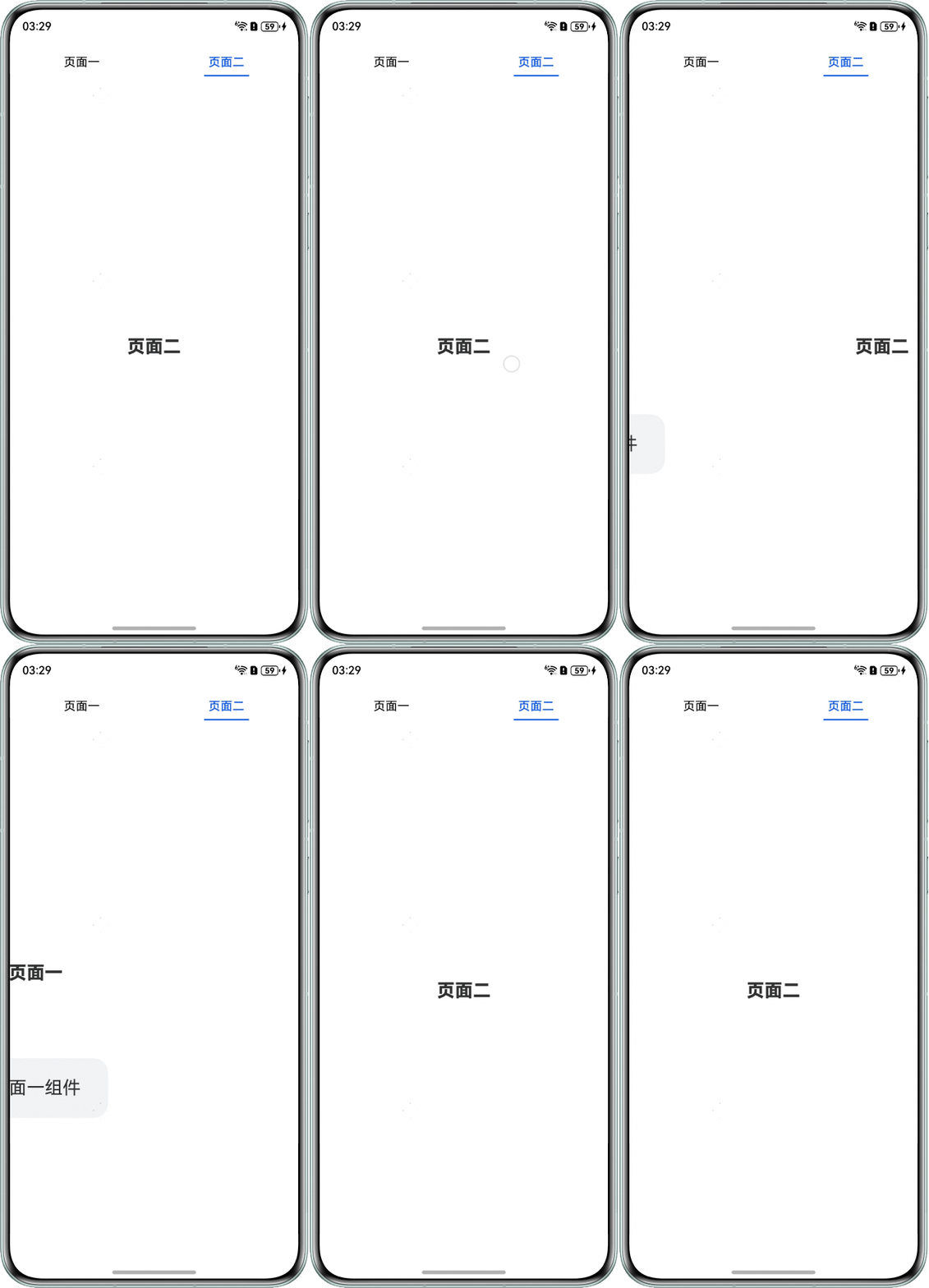
问题定位
- 使用DevEco Testing查看问题组件,该组件为Stack组件下的Column组件的子组件。
- 查看组件的相关设置,应用使用了PanGesture进行页面切换,且触发页面切换的偏移值设置不合理。查看底部页签和页面显示组件Column组件的设置,页签和页面由不同的指示器控制,两者变化不能同步。底部页签切换时页签对应的组件能够实时响应,页面无法实时响应,导致组件闪动。
@Entry
@Component
struct Index {
  build() {
    Stack() {
      // 页面
      Column() {
        Column() {
          // 与页签的指示器不同
          Text(this.componentIndex === 0 ? '页面一' : '页面二');
        };

        if (this.currentIndex === 0) {
          Column() {
            Text('页面一组件');
          };
        }
      };

      // 页签
      Row() {
        Text('页面一')
          .fontColor(this.currentIndex === 0 ? '#0A59F7' : Color.Black);

        Text('页面二')
          .fontColor(this.currentIndex === 1 ? '#0A59F7' : Color.Black);
      };
    }
    .gesture(
      PanGesture()
        .onActionUpdate((event: GestureEvent) => {
          if (event) {
            this.offsetX = event.offsetX;
            // 触发页面切换的偏移值设置不合理
            if (this.offsetX - this.positionX > 0) {
              if (this.currentIndex >= 0) {
                this.indexIncrease = -1;
              }
            } else if (event.offsetX - this.positionX < 0) {
              if (this.currentIndex < 1) {
                this.indexIncrease = 1;
              }
            }
          }
        })
    );
  }
}

修改建议
使用Tabs组件来实现滑动页面切换。
@Entry
@Component
struct TabsExample {
  fontColor: string = '#000000';
  selectedFontColor: string = '#0A59F7';
  @State currentIndex: number = 0;
  @State selectedIndex: number = 0;
  private tabsController: TabsController = new TabsController();
  color: string = '#0A59F7';

  @Builder
  tabBuilder(index: number, name: string) {
    Column() {
      Text(name)
        .fontColor(this.selectedIndex === index ? this.selectedFontColor :
          this.fontColor)
        .fontSize(16)
        .fontWeight(this.selectedIndex === index ? 500 : 400)
        .lineHeight(22)
        .margin({ top: 17, bottom: 7 })
        .textAlign(TextAlign.Center)
        .width('100%');
      Divider()
        .strokeWidth(2)
        .color('#0A59F7')
        .opacity(this.selectedIndex === index ? 1 : 0)
        .width(60);
    }
    .width('50%')
    .alignItems(HorizontalAlign.Center);
  }

  build() {
    Stack() {
      // 使用Tabs组件来实现滑动页面切换
      Tabs({ barPosition: BarPosition.Start, index: this.currentIndex, controller: this.tabsController }) {
        TabContent() {
          Column() {
            Text('页面一')
              .fontSize(24)
              .width('100%')
              .fontWeight(800)
              .textAlign(TextAlign.Center)
              .margin({ top: 320 });

            Text('页面一组件')
              .fontSize(24)
              .width('50%')
              .height(80)
              .backgroundColor('#f1f3f5')
              .borderRadius(20)
              .margin({ top: 100 })
              .textAlign(TextAlign.Center);
          }
          .alignItems(HorizontalAlign.Center)
          .backgroundColor(Color.White)
          .height('100%')
          .width('100%');
        }.tabBar(this.tabBuilder(0, '页面一'));

        TabContent() {
          Stack() {
            Column() {
              Text('页面二')
                .fontSize(24)
                .width('100%')
                .fontWeight(800)
                .textAlign(TextAlign.Center);
            }
            .alignItems(HorizontalAlign.Center)
            .backgroundColor(Color.White);
          }
          .width('100%')
          .height('100%');
        }.tabBar(this.tabBuilder(1, '页面二'));

      }
      .barMode(BarMode.Scrollable)
      .barWidth('100%')
      .barHeight(56)
      .animationMode(AnimationMode.ACTION_FIRST_WITH_JUMP)
      .onChange((index: number) => {
        // currentIndex控制TabContent显示页签
        this.currentIndex = index;
        this.selectedIndex = index;
      })
      .onAnimationStart((index: number, targetIndex: number) => {
        if (index === targetIndex) {
          return;
        }
        // selectedIndex控制自定义TabBar内Image和Text颜色切换
        this.selectedIndex = targetIndex;
      })
      .width('100%')
      .height('100%');
    }
    .width('100%')
    .height('100%');
  }
}
效果图如下: