问题现象
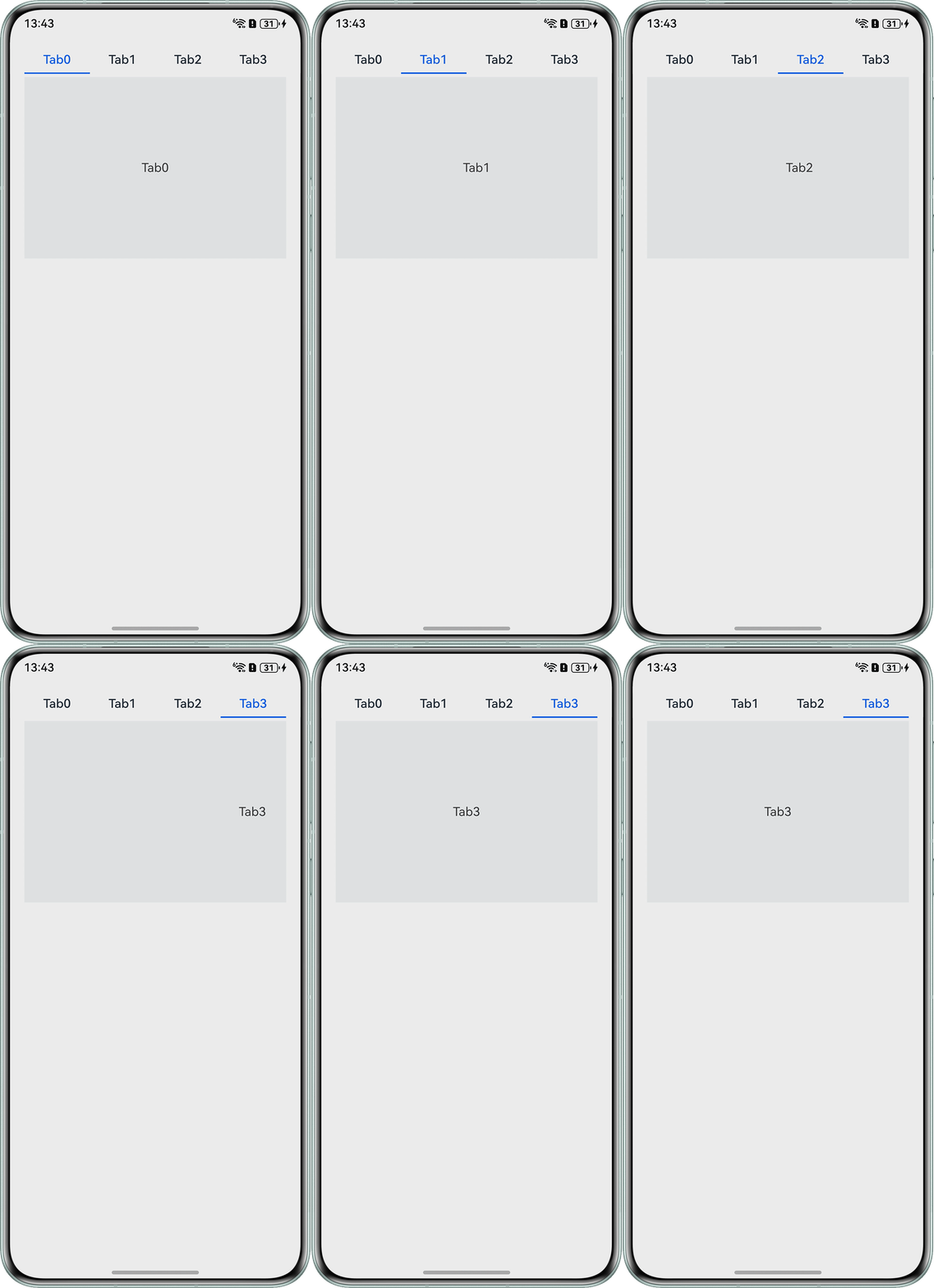
首页有个Tabs组件,由于有个双击Tabs刷新当前页面的需求,用priorityGesture监听单指双击事件,但是加了priorityGesture监听之后,导致单击Tabs切换页面卡顿。
参考问题示例代码:
@Entry
@Component
struct TabsExample {
  @State selectedIndex: number = 0;
  private controller: TabsController = new TabsController();


  @Builder
  tabBuilder(index: number, name: string) {
    Column() {
      Text(name)
        .fontColor(this.selectedIndex === index ? '#0A59F7' : '#182431')
        .fontSize(16)
        .fontWeight(500)
        .lineHeight(22)
        .margin({ top: 17, bottom: 7 });
      Divider()
        .strokeWidth(2)
        .color('#0A59F7')
        .opacity(this.selectedIndex === index ? 1 : 0);
    }.width('100%')
    .priorityGesture(
      TapGesture({ count: 2 })
        .onAction(() => {
          this.getUIContext().getPromptAction().showToast({
            message: `double click tab ${this.selectedIndex}`
          });
        })
    );
  }


  build() {
    Column() {
      Tabs({ barPosition: BarPosition.Start, controller: this.controller }) {
        TabContent() {
          Column() {
            Text('Tab0');
          }
          .width('100%')
          .height('100%')
          .justifyContent(FlexAlign.Center)
          .backgroundColor('#f1f3f5');
        }
        .tabBar(this.tabBuilder(0, 'Tab0'));


        TabContent() {
          Column() {
            Text('Tab1');
          }
          .width('100%')
          .height('100%')
          .justifyContent(FlexAlign.Center)
          .backgroundColor('#f1f3f5');
        }
        .tabBar(this.tabBuilder(1, 'Tab1'));


        TabContent() {
          Column() {
            Text('Tab2');
          }
          .width('100%')
          .height('100%')
          .justifyContent(FlexAlign.Center)
          .backgroundColor('#f1f3f5');
        }
        .tabBar(this.tabBuilder(2, 'Tab2'));


        TabContent() {
          Column() {
            Text('Tab3');
          }
          .width('100%')
          .height('100%')
          .justifyContent(FlexAlign.Center)
          .backgroundColor('#f1f3f5');
        }
        .tabBar(this.tabBuilder(3, 'Tab3'));
      }
      .vertical(false)
      .barMode(BarMode.Fixed)
      .barWidth(360)
      .barHeight(56)
      .onAnimationStart((index: number, targetIndex: number, event: TabsAnimationEvent) => {
        if (index === targetIndex) {
          return;
        }
        // selectedIndex控制自定义TabBar内Image和Text颜色切换
        this.selectedIndex = targetIndex;
      })
      .width('90%')
      .height(296);
    }.width('100%');
  }
}
问题示例实现效果:
背景知识
priorityGesture方法可以绑定优先识别手势。其参数如下:
- gesture:绑定的手势类型,其类型为GestureType。
- mask:事件响应设置。
- 默认情况下,子组件优先识别通过gesture绑定的手势,当父组件配置priorityGesture时,父组件优先识别priorityGesture绑定的手势。
- 长按手势时,设置触发长按的最短时间小的组件会优先响应,会忽略priorityGesture设置。
onAnimationStart事件:Tabs组件切换动画开始时触发该回调。参数为动画开始前的index值(不是最终结束动画的index值)。当animationDuration为0时动画关闭,不触发该回调。
问题定位
通过问题描述的效果图可以发现,最后双击Tab2页签时,并没有优先跳转Tab2页面,而是优先响应双击事件,打开promptAction弹窗。
由此可发现priorityGesture监听多次点击事件会有一定的等待时间,判断是否有连续点击事件。
修改建议
采用if/else语句先判定单击跳转事件。在跳转之后,再判定是否进行双击事件的监听,完整代码修改如下:
@Entry
@Component
struct TabsExample {
  @State selectedIndex: number = 0;
  private controller: TabsController = new TabsController();


  @Builder
  tabBuilder(index: number, name: string) {
    // 优先判定单击跳转事件,只有当前页面才可监听双击事件
    if (this.selectedIndex === index) {
      Column() {
        Text(name)
          .fontColor('#0A59F7')
          .fontSize(16)
          .fontWeight(500)
          .lineHeight(22)
          .margin({ top: 17, bottom: 7 });
        Divider()
          .strokeWidth(2)
          .color('#0A59F7')
          .opacity(1);
      }.width('100%')
      .priorityGesture(
        TapGesture({ count: 2 })
          .onAction(() => {
            this.getUIContext().getPromptAction().showToast({
              message: `double click tab ${this.selectedIndex}`
            });
          })
      );
    } else {
      Column() {
        Text(name)
          .fontColor('#182431')
          .fontSize(16)
          .fontWeight(400)
          .lineHeight(22)
          .margin({ top: 17, bottom: 7 });
        Divider()
          .strokeWidth(2)
          .color('#0A59F7')
          .opacity(0);
      };
    }
  }


  build() {
    Column() {
      Tabs({ barPosition: BarPosition.Start, controller: this.controller }) {
        TabContent() {
          Column() {
            Text('Tab0');
          }
          .width('100%')
          .height('100%')
          .justifyContent(FlexAlign.Center)
          .backgroundColor('#f1f3f5');
        }
        .tabBar(this.tabBuilder(0, 'Tab0'));


        TabContent() {
          Column() {
            Text('Tab1');
          }
          .width('100%')
          .height('100%')
          .justifyContent(FlexAlign.Center)
          .backgroundColor('#f1f3f5');
        }
        .tabBar(this.tabBuilder(1, 'Tab1'));


        TabContent() {
          Column() {
            Text('Tab2');
          }
          .width('100%')
          .height('100%')
          .justifyContent(FlexAlign.Center)
          .backgroundColor('#f1f3f5');
        }
        .tabBar(this.tabBuilder(2, 'Tab2'));


        TabContent() {
          Column() {
            Text('Tab3');
          }
          .width('100%')
          .height('100%')
          .justifyContent(FlexAlign.Center)
          .backgroundColor('#f1f3f5');
        }
        .tabBar(this.tabBuilder(3, 'Tab3'));
      }
      .vertical(false)
      .barMode(BarMode.Fixed)
      .barWidth(360)
      .barHeight(56)
      .onAnimationStart((index: number, targetIndex: number, event: TabsAnimationEvent) => {
        if (index === targetIndex) {
          return;
        }
        // selectedIndex控制自定义TabBar内Image和Text颜色切换
        this.selectedIndex = targetIndex;
        console.info(JSON.stringify(event));
      })
      .width('90%')
      .height(296);
    }.width('100%');
  }
}
实现效果如下,当双击的页面不是当前Tab2页面时,不会触发Tab2页面双击事件,优先响应单击跳转事件,跳转到Tab1页面:

常见FAQ
Q:为什么Tabs优先判断单击事件后,还是存在页签切换卡顿现象?
A:排查是否采用的onChange事件代替的onAnimationStart事件,由于onChange事件是在Tab页签切换后(切换动画结束后)触发的事件,从而导致的切换卡顿现象。而onAnimationStart事件是动画开始时就会触发,从使用的体验感来讲onAnimationStart事件优于onChange事件。