

背景知识
- Image为图片组件,常用于在应用中显示图片。
- PanGesture为滑动手势事件,当滑动的最小距离达到设定的最小值时触发滑动手势事件。
- PinchGesture用于触发捏合手势,触发捏合手势的最少手指为2指,最大为5指,最小识别距离为5vp。
- 组合手势即多种手势组合为复合手势,支持连续识别、并行识别和互斥识别。通过GestureGroup接口实现。
- translate可设置组件平移。
问题定位
场景一:
- 使用DevEco Testing查看问题组件,该组件为Image组件。
- 查看Image组件的设置,该组件绑定了PinchGesture和PanGesture,实现图片放大缩小和图片移动功能,且没有对图片未放大时的交互做限制,未放大时也能移动。正常情况下应用能够放大图片并移动图片查看细节。
Stack() {
  Image($r('app.media.product003')) // $r('app.media.product003')需要替换为开发者需要的图片资源文件
    .width('80%')
    .objectFit(ImageFit.Contain)
    .backgroundColor(Color.White)
    .translate({ x: this.offsetX, y: this.offsetY, z: 0 }) // 移动图片
    .scale({ x: this.scaleValue, y: this.scaleValue, z: 1 }); // 缩放图片
}
.height('100%')
.width('100%')
.gesture(
  GestureGroup(GestureMode.Exclusive,
    // 双指缩放
    PinchGesture({ fingers: 2 })
      .onActionUpdate((event: GestureEvent) => {
        if (event) {
          this.scaleValue = this.pinchValue * event.scale;
        }
      })
      .onActionEnd(() => {
        this.pinchValue = this.scaleValue;
      })
    ,
    // 拖动图片,且未放大时也能移动
    PanGesture(this.panOption)
      .onActionUpdate((event: GestureEvent) => {
        if (event) {
          this.offsetX = this.lastX + event.offsetX;
          this.offsetY = this.lastY + event.offsetY;
        }
      })
      .onActionEnd(() => {
        this.lastX = this.offsetX;
        this.lastY = this.offsetY;
      })
  )
)

场景二:
- 使用DevEco Testing查看问题组件,该问题组件为Image组件。
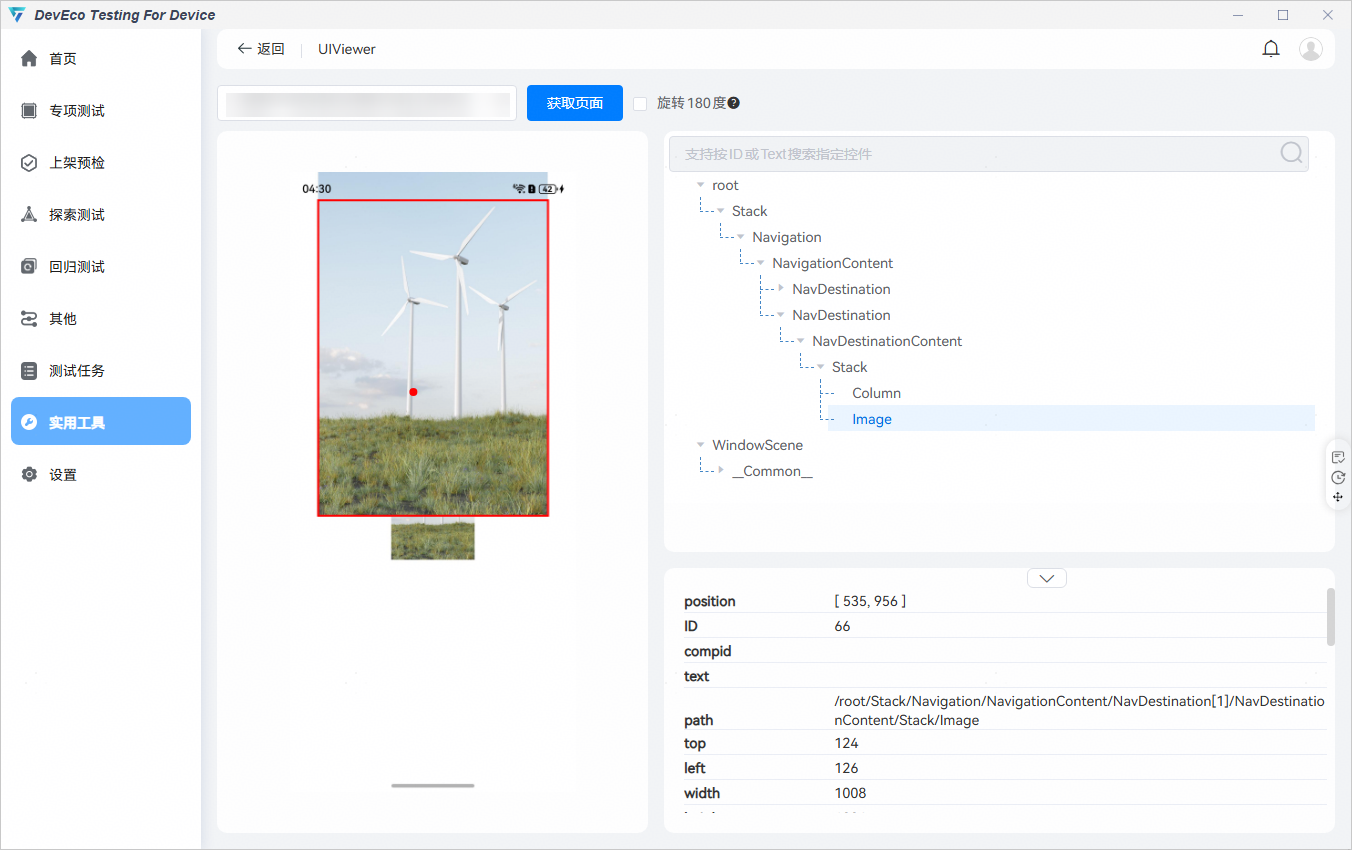
- 查看该Image组件的设置,Image组件通过PanGesture响应滑动手势事件,并通过translate实现平移功能。然而组件在onActionEnd中设置了滑动结束后更新图片位置,导致图片后无法回到原来位置。
@Component
export struct Dialog {
  pageInfos: NavPathStack = new NavPathStack();
  @State offsetX: number = 0;
  @State offsetY: number = 0;
  @State positionX: number = 0;
  @State positionY: number = 0;
  private panOption: PanGestureOptions = new PanGestureOptions({ direction: PanDirection.Vertical });

  build() {
    NavDestination() {
      Stack() {
        Column()
        Image($r('app.media.beauty')) // $r('app.media.beauty')需要替换为开发者
          .translate({ x: this.offsetX, y: this.offsetY }) // 平移图片
      }
      .height('100%')
      .width('100%')
      .gesture(
        PanGesture(this.panOption)
          .onActionUpdate((event: GestureEvent) => {
            if (event) {
              this.offsetX = this.positionX + event.offsetX;
              this.offsetY = this.positionY + event.offsetY;
            }
          })
          .onActionEnd((event: GestureEvent) => {
            // 滑动结束后更新图片位置
            this.positionX = this.offsetX;
            this.positionY = this.offsetY;
          })
      )
    }
  }
}
分析结论
场景一:应用设置了图片能够放大缩小和移动,但没有对图片未放大时的交互做限制,导致全屏显示图片时,未放大的图片也能够响应拖拽手势。
场景二:Image组件在onActionEnd中设置了拖动结束后更新图片位置,导致停止拖动图片后无法回到原来位置。
修改建议
- 场景一:
关键代码如下:
isDragable() {
  if (this.scaleValue > 1) {
    // 放大后才可拖动图片
    this.myDragable = true;
  } else {
    // 原来尺寸或缩小时无法拖动图片
    this.myDragable = false;
  }
}
.gesture( GestureGroup(GestureMode.Exclusive, // 双指缩放 PinchGesture({ fingers: 2 }) .onActionUpdate((event: GestureEvent) => { if (event) { this.scaleValue = this.pinchValue * event.scale; // 获取缩放比例 } }) .onActionEnd(() => { this.pinchValue = this.scaleValue; }) , // 拖动图片 PanGesture(this.panOption) .onActionUpdate((event: GestureEvent) => { // 缩放比例大于1时才可拖动 if (event && this.myDragable) { this.offsetX = this.lastX + event.offsetX; this.offsetY = this.lastY + event.offsetY; } })
完整示例如下:
src/main/ets/pages/SituationOne.ets:
import { window } from '@kit.ArkUI';
import { common } from '@kit.AbilityKit';
import { BusinessError } from '@kit.BasicServicesKit';
@Entry
@Component
struct SituationOne {
pageInfos: NavPathStack = new NavPathStack();
aboutToAppear() {
this.pageInfos.pushPath({ name: 'SituationOne_PageMain' }, false);
}
build() {
Stack() {
Navigation(this.pageInfos)
.hideNavBar(true)
.width('100%')
.height('100%');
}
.width('100%')
.height('100%')
.expandSafeArea([SafeAreaType.SYSTEM], [SafeAreaEdge.TOP, SafeAreaEdge.BOTTOM]);
}
}
@Builder
export function SituationOne_PageMainBuilder() {
SituationOne_PageMain();
}
@Builder
export function SituationOne_DialogBuilder() {
SituationOne_Dialog();
}
// 通过弹窗全屏显示图片
@Component
export struct SituationOne_Dialog {
pageInfos: NavPathStack = new NavPathStack();
@State offsetX: number = 0;
@State offsetY: number = 0;
@State @Watch('isDragable') scaleValue: number = 1;
myDragable: boolean = false;
pinchValue: number = 1;
private lastX: number = 0;
private lastY: number = 0;
private panOption: PanGestureOptions = new PanGestureOptions({ direction: PanDirection.All });
isDragable() {
if (this.scaleValue > 1) {
// 放大后才可拖动图片
this.myDragable = true;
} else {
// 原来尺寸或缩小时无法拖动图片
this.myDragable = false;
}
}
aboutToAppear(): void {
let context: common.UIAbilityContext = this.getUIContext().getHostContext() as common.UIAbilityContext;
window.getLastWindow(context).then((lastWindow) => {
lastWindow.setWindowLayoutFullScreen(true);
lastWindow.setWindowSystemBarEnable([]);
}).catch((err: BusinessError) => {
console.error(err.message, err.code);
});
}
aboutToDisappear(): void {
let context: common.UIAbilityContext = this.getUIContext().getHostContext() as common.UIAbilityContext;
window.getLastWindow(context).then((lastWindow) => {
lastWindow.setWindowLayoutFullScreen(false);
lastWindow.setWindowSystemBarEnable(['status', 'navigation']);
}).catch((err: BusinessError) => {
console.error(err.message, err.code);
});
}
build() {
NavDestination() {
Stack() {
Image($r('app.media.beauty')) // $r('app.media.beauty')需要替换为开发者需要的图片资源
.width('80%')
.objectFit(ImageFit.Contain)
.backgroundColor(Color.White)
.translate({ x: this.offsetX, y: this.offsetY, z: 0 }) // 移动图片
.scale({ x: this.scaleValue, y: this.scaleValue, z: 1 }); // 缩放图片
}
.height('100%')
.width('100%')
.gesture(
  GestureGroup(GestureMode.Exclusive,
    // 双指缩放
    PinchGesture({ fingers: 2 })
      .onActionUpdate((event: GestureEvent) => {
        if (event) {
          this.scaleValue = this.pinchValue * event.scale; // 获取缩放比例
        }
      })
      .onActionEnd(() => {
        this.pinchValue = this.scaleValue;
      })
    ,
    // 拖动图片
    PanGesture(this.panOption)
      .onActionUpdate((event: GestureEvent) => {
        // 缩放比例大于1时才可拖动
        if (event && this.myDragable) {
          this.offsetX = this.lastX + event.offsetX;
          this.offsetY = this.lastY + event.offsetY;
        }
      })
.onActionEnd(() => {
this.lastX = this.offsetX;
this.lastY = this.offsetY;
})
)
)
.onClick(() => {
this.pageInfos.pop();
})
.expandSafeArea([SafeAreaType.SYSTEM], [SafeAreaEdge.TOP, SafeAreaEdge.BOTTOM]);
}
.hideTitleBar(true)
.systemTransition(NavigationSystemTransitionType.NONE)
.onReady((context: NavDestinationContext) => {
this.pageInfos = context.pathStack;
})
.height('100%')
.width('100%')
.backgroundColor(Color.Black)
.mode(NavDestinationMode.DIALOG)
.expandSafeArea([SafeAreaType.SYSTEM], [SafeAreaEdge.TOP, SafeAreaEdge.BOTTOM]);
}
}
@Component
export struct SituationOne_PageMain {
pageInfos: NavPathStack = new NavPathStack();
build() {
NavDestination() {
Stack() {
Image($r('app.media.beauty')) // $r('app.media.beauty')需要替换为开发者需要的图片资源
.width(200)
.height(200)
.objectFit(ImageFit.Contain)
.onClick(() => {
this.pageInfos.pushPath({ name: 'SituationOne_Dialog' });
});
}
.width('100%')
.height('100%');
}
.hideTitleBar(true)
.onReady((context: NavDestinationContext) => {
this.pageInfos = context.pathStack;
})
.height('100%')
.width('100%')
.mode(NavDestinationMode.STANDARD);
}
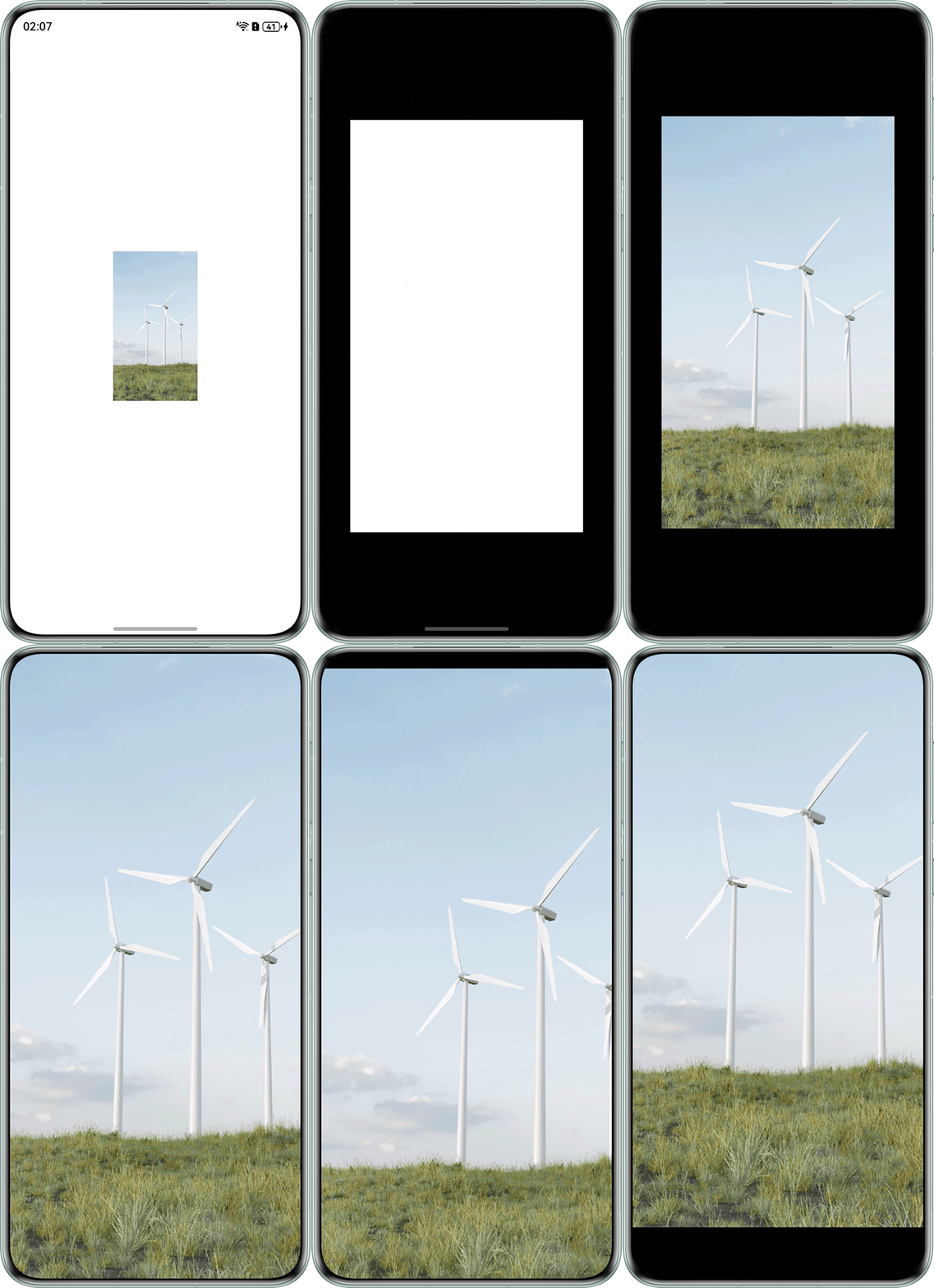
} 运行效果如下:
- 场景二:
关键代码如下:
Stack() {
  Column()
    .width('100%')
    .height('100%')
    .backgroundColor(Color.Black)
    .opacity(this.myOpacity);
  Image($r('app.media.beauty')) // $r('app.media.beauty')需要替换为开发者需要的图片资源
    .width('80%')
    .backgroundColor(Color.White)
    .objectFit(ImageFit.Contain)
    .translate({ x: this.offsetX, y: this.offsetY }); // 图片平移
}
.height('100%')
.width('100%')
.gesture(
  PanGesture(this.panOption)
    .onActionUpdate((event: GestureEvent) => {
      if (event) {
        // 平移图片
        this.offsetX = event.offsetX;
        this.offsetY = event.offsetY;
        this.myOpacity = 0;
        window.getLastWindow(this.context).then((lastWindow) => {
          lastWindow.setWindowLayoutFullScreen(false);
          lastWindow.setWindowSystemBarEnable(['status', 'navigation']);
        }).catch((err: BusinessError) => {
          console.error(err.message, err.code);
        });
      }
    })
    .onActionEnd(() => {
      // 滑动结束后回到原来位置
      this.myOpacity = 1;
      this.offsetX = 0;
      this.offsetY = 0;
      window.getLastWindow(this.context).then((lastWindow) => {
        lastWindow.setWindowLayoutFullScreen(true);
        lastWindow.setWindowSystemBarEnable([]);
      }).catch((err: BusinessError) => {
        console.error(err.message, err.code);
      });
    })
完整示例如下:
src/main/ets/pages/SituationTwo.ets:
import { window } from '@kit.ArkUI';
import { common } from '@kit.AbilityKit';
import { BusinessError } from '@kit.BasicServicesKit';

@Entry
@Component
struct SituationTwo {
  pageInfos: NavPathStack = new NavPathStack();

  aboutToAppear() {
    this.pageInfos.pushPath({ name: 'SituationTwo_PageMain' }, false);
  }

  build() {
    Stack() {
      Navigation(this.pageInfos)
        .hideNavBar(true)
        .width('100%')
        .height('100%');
    }
    .width('100%')
    .height('100%')
    .alignContent(Alignment.Top)
    .expandSafeArea([SafeAreaType.SYSTEM], [SafeAreaEdge.TOP, SafeAreaEdge.BOTTOM]);
  }
}

@Builder
export function SituationTwo_PageMainBuilder() {
  SituationTwo_PageMain();
}

@Builder
export function SituationTwo_DialogBuilder() {
  SituationTwo_Dialog();
}

@Component
export struct SituationTwo_Dialog {
  pageInfos: NavPathStack = new NavPathStack();
  @State offsetX: number = 0;
  @State offsetY: number = 0;
  @State myOpacity: number = 1;
  private panOption: PanGestureOptions = new PanGestureOptions({ direction: PanDirection.Vertical });
  private context: common.UIAbilityContext = this.getUIContext().getHostContext() as common.UIAbilityContext;

  aboutToAppear(): void {
    window.getLastWindow(this.context).then((lastWindow) => {
      lastWindow.setWindowSystemBarEnable([]);
    });
  }

  aboutToDisappear(): void {
    window.getLastWindow(this.context).then((lastWindow) => {
      lastWindow.setWindowSystemBarEnable(['status', 'navigation']);
    }).catch((err: BusinessError) => {
      console.error(err.message, err.code);
    });
  }

  build() {
    NavDestination() {
      Stack() {
        Column()
          .width('100%')
          .height('100%')
          .backgroundColor(Color.Black)
          .opacity(this.myOpacity);
        Image($r('app.media.beauty')) // $r('app.media.beauty')需要替换为开发者需要的图片资源
          .width('80%')
          .backgroundColor(Color.White)
          .objectFit(ImageFit.Contain)
          .translate({ x: this.offsetX, y: this.offsetY }); // 图片平移
      }
      .height('100%')
      .width('100%')
      .gesture(
        PanGesture(this.panOption)
          .onActionUpdate((event: GestureEvent) => {
            if (event) {
              // 平移图片
              this.offsetX = event.offsetX;
              this.offsetY = event.offsetY;
              this.myOpacity = 0;
              window.getLastWindow(this.context).then((lastWindow) => {
                lastWindow.setWindowLayoutFullScreen(false);
                lastWindow.setWindowSystemBarEnable(['status', 'navigation']);
              }).catch((err: BusinessError) => {
                console.error(err.message, err.code);
              });
            }
          })
          .onActionEnd(() => {
            // 滑动结束后回到原来位置
            this.myOpacity = 1;
            this.offsetX = 0;
            this.offsetY = 0;
            window.getLastWindow(this.context).then((lastWindow) => {
              lastWindow.setWindowLayoutFullScreen(true);
              lastWindow.setWindowSystemBarEnable([]);
            }).catch((err: BusinessError) => {
              console.error(err.message, err.code);
            });
          })
      )
      .onClick(() => {
        this.pageInfos.pop();
      })
      .backgroundColor('#00000000')
      .expandSafeArea([SafeAreaType.SYSTEM], [SafeAreaEdge.TOP, SafeAreaEdge.BOTTOM]);
    }
    .hideTitleBar(true)
    .systemTransition(NavigationSystemTransitionType.NONE)
    .onReady((context: NavDestinationContext) => {
      this.pageInfos = context.pathStack;
    })
    .height('100%')
    .width('100%')
    .backgroundColor('#00000000')
    .mode(NavDestinationMode.DIALOG)
    .expandSafeArea([SafeAreaType.SYSTEM], [SafeAreaEdge.TOP, SafeAreaEdge.BOTTOM]);
  }
}

@Component
export struct SituationTwo_PageMain {
  pageInfos: NavPathStack = new NavPathStack();

  build() {
    NavDestination() {
      Stack() {
        Image($r('app.media.beauty')) // $r('app.media.beauty')需要替换为开发者需要的图片资源
          .width(200)
          .height(200)
          .objectFit(ImageFit.Contain)
          .onClick(() => {
            this.pageInfos.pushPath({ name: 'SituationTwo_Dialog' }); // 跳转到弹窗页面
          });
      }
      .width('100%')
      .height('100%');
    }
    .hideTitleBar(true)
    .onReady((context: NavDestinationContext) => {
      this.pageInfos = context.pathStack;
    })
    .height('100%')
    .width('100%')
    .mode(NavDestinationMode.STANDARD);
  }
}
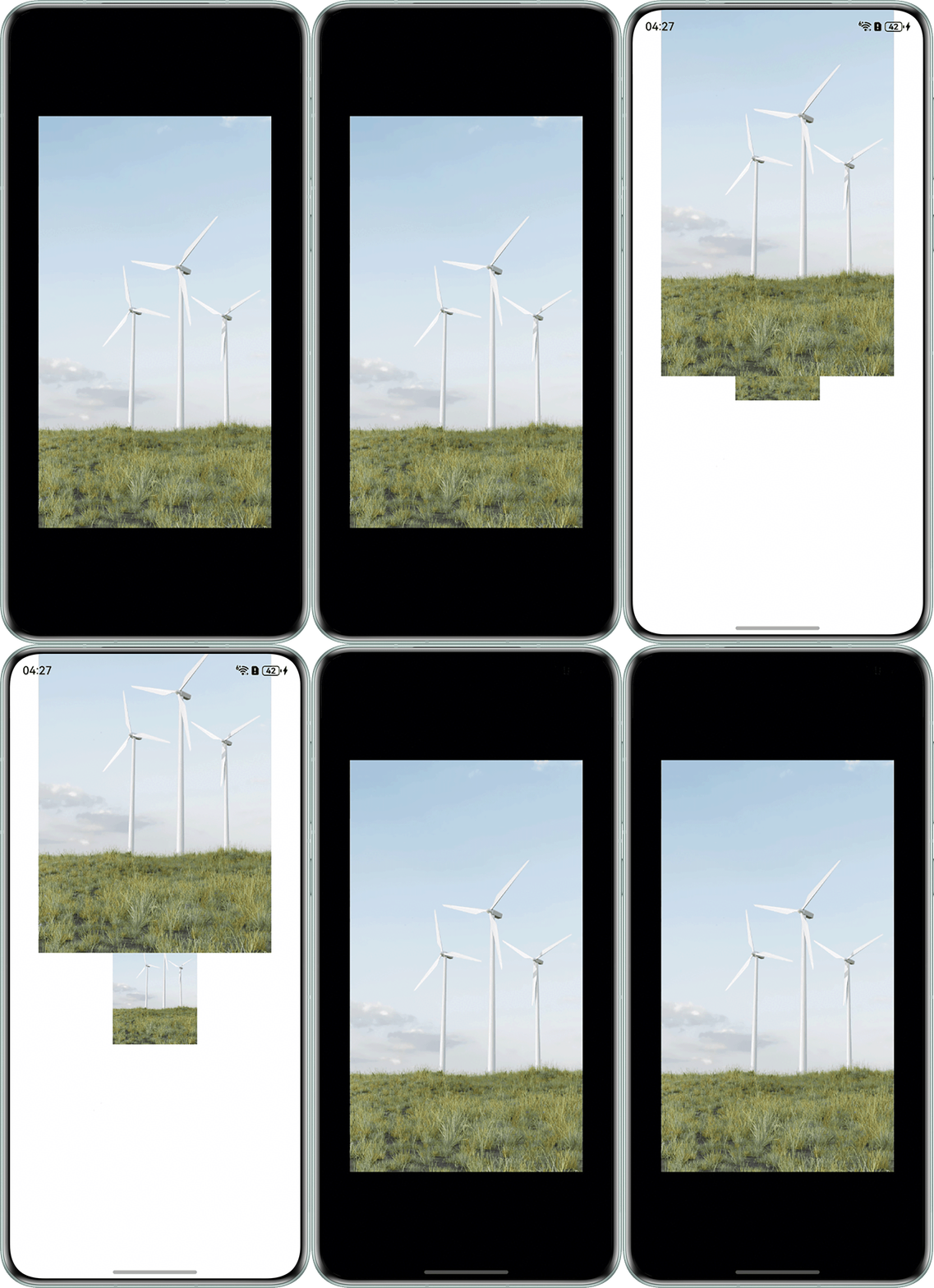
运行效果如下:
- src/main/module.json5文件中需添加"routerMap": "$profile:router_map",且需添加如下所示的src/main/resources/base/profile/router_map.json文件。SituationOne_PageMain和SituationOne_Dialog为场景一的内容,SituationTwo_PageMain和SituationTwo_Dialog为场景二的内容。
{
  "routerMap": [
    {
      "name": "SituationOne_PageMain",
      "pageSourceFile": "src/main/ets/pages/SituationOne.ets",
      "buildFunction": "SituationOne_PageMainBuilder"
    },
    {
      "name": "SituationOne_Dialog",
      "pageSourceFile": "src/main/ets/pages/SituationOne.ets",
      "buildFunction": "SituationOne_DialogBuilder"
    },
    {
      "name": "SituationTwo_PageMain",
      "pageSourceFile": "src/main/ets/pages/SituationTwo.ets",
      "buildFunction": "SituationTwo_PageMainBuilder"
    },
    {
      "name": "SituationTwo_Dialog",
      "pageSourceFile": "src/main/ets/pages/SituationTwo.ets",
      "buildFunction": "SituationTwo_DialogBuilder"
    }
  ]
}