问题现象
如何获取状态栏,导航栏,挖孔区等避让区具体高度进行避让。具体场景有以下几个。
场景一:避让区为顶部状态栏,底部导航栏,在屏幕旋转,窗口大小变化时需要动态避让。
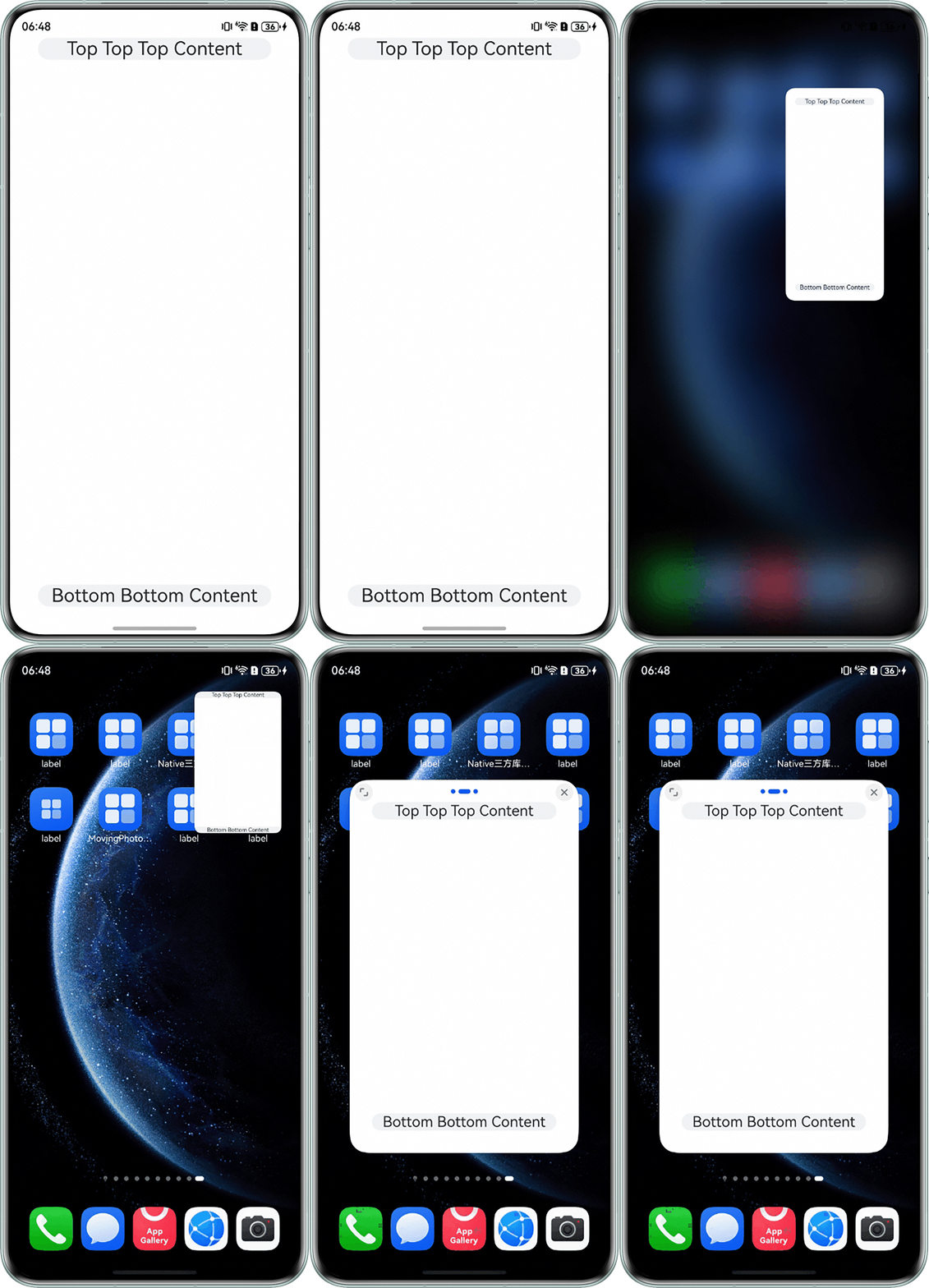
场景二:沉浸式应用变为悬浮窗、分屏模式时,顶部窗口控制条需要避让。
场景三:设备旋转情况下的挖孔区域需要避让。
背景知识
- 典型应用的全屏窗口,其UI元素包括状态栏、应用界面和底部导航栏。状态栏和导航栏在沉浸式布局下称为避让区。
- getWindowAvoidArea获取宿主应用窗口内容规避的区域;如系统栏区域、刘海屏区域、手势区域、软键盘区域等与宿主窗口内容重叠时,需要宿主窗口内容避让的区域。
- Display.getCutoutInfo方法获取挖孔区域宽高和位置信息。
- setWindowLayoutFullScreen()设置窗口为全屏模式。
解决方案
设备 | 布局时要注意的避让区 |
|---|---|
手机 | 手机上需避让顶部信号栏、底部导航条安全区、与两侧margin,有需要时预留键盘占据的空间 |
折叠设备 | 除顶部信号栏与底部导航条以外,需避免将关键信息放置在折叠设备的转轴区(即折痕处) |
平板 | 平板基础布局需避让顶部信号栏、底部导航条安全区、与两侧margin(根据断点规则计算) |
智能穿戴 | 智能穿戴产品的信息布局需要根据设备为圆表或方表,以及当前应用的实际内容进行设计。避让水平屏幕边缘间距的同时,在不同的界面架构中,需要考量垂直布局额外进行避让 |
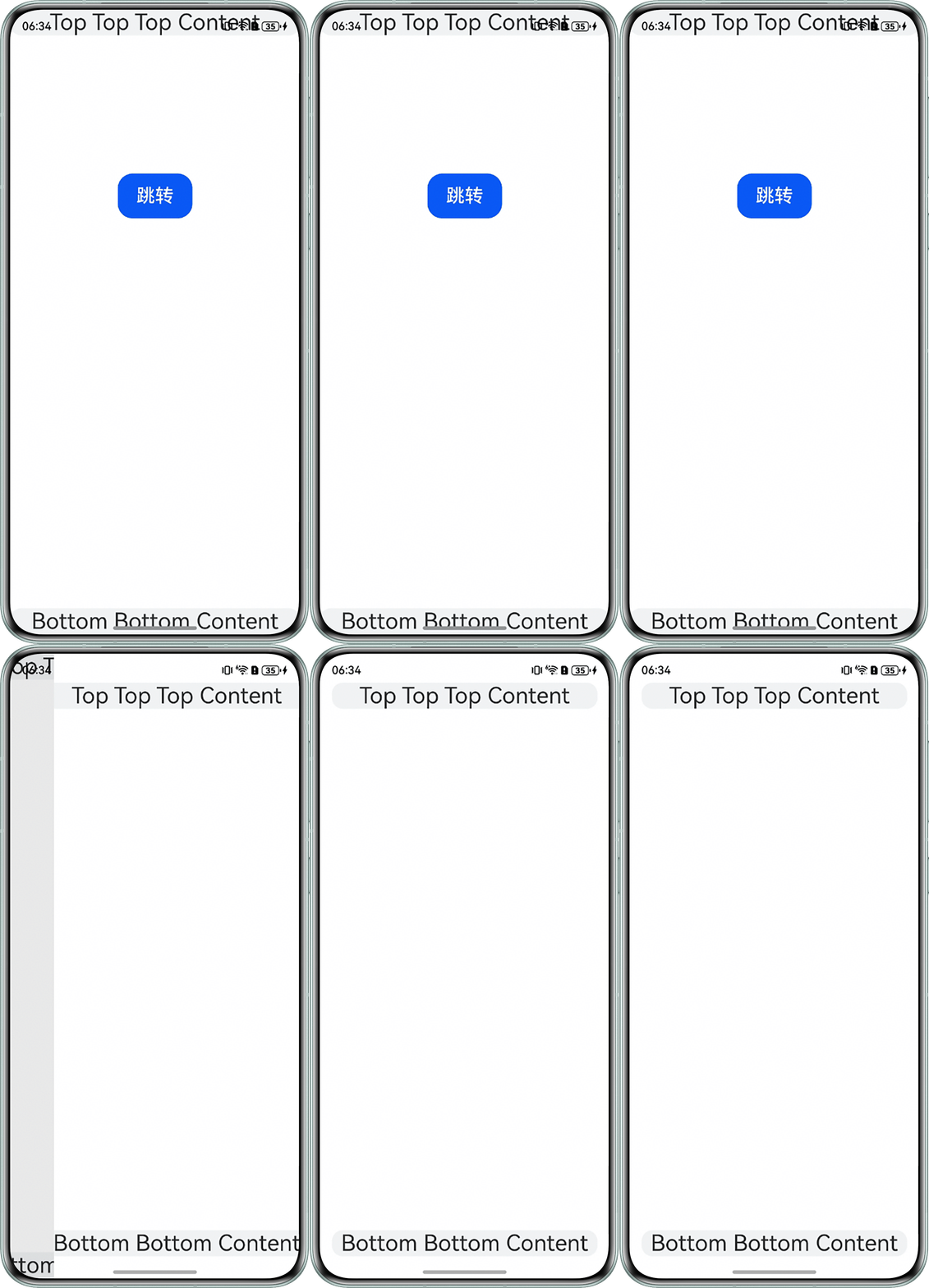
- 场景一: 避让区为顶部状态栏,底部导航栏,在屏幕旋转,窗口大小变化时需要动态避让。
- 在EntryAbility.ets中使用windowClass.setWindowLayoutFullScreen(true),设置窗口全屏。
let windowClass: window.Window = windowStage.getMainWindowSync(); // 获取应用主窗口 // 1. 设置窗口全屏 let isLayoutFullScreen = true; windowClass.setWindowLayoutFullScreen(isLayoutFullScreen).then(() => { console.info('Succeeded in setting the window layout to full-screen mode.'); }).catch((err: BusinessError) => { console.error(`Failed to set the window layout to full-screen mode. Code is ${err.code}, message is ${err.message}`); }); - 在EntryAbility.ets中使用AppStorage全局UI状态存储顶部状态栏,底部导航栏高度。
let type = window.AvoidAreaType.TYPE_NAVIGATION_INDICATOR; // 此处以导航条避让为例 let avoidArea = windowClass.getWindowAvoidArea(type); let bottomRectHeight = avoidArea.bottomRect.height; // 获取到导航区域的高度 AppStorage.setOrCreate('bottomRectHeight', bottomRectHeight); type = window.AvoidAreaType.TYPE_SYSTEM; // 以状态栏避让为例 avoidArea = windowClass.getWindowAvoidArea(type); let topRectHeight = avoidArea.topRect.height; // 获取状态栏区域高度 AppStorage.setOrCreate('topRectHeight', topRectHeight); - 在EntryAbility.ets中注册windowClass.on('avoidAreaChange')监听函数,动态监听顶部状态栏,底部导航栏高度,用于在屏幕旋转、窗口大小变化动态调整避让区域。
//3. 注册监听函数,动态获取避让区域数据 windowClass.on('avoidAreaChange', (data) => { if (data.type === window.AvoidAreaType.TYPE_SYSTEM) { let topRectHeight = data.area.topRect.height; AppStorage.setOrCreate('topRectHeight', topRectHeight); } else if (data.type == window.AvoidAreaType.TYPE_NAVIGATION_INDICATOR) { let bottomRectHeight = data.area.bottomRect.height; AppStorage.setOrCreate('bottomRectHeight', bottomRectHeight); } }); - 在应用页面获取顶部状态栏,底部导航栏高度,以此设置padding值来实现动态避让。
@Entry
@Component
struct FirstPageB {
  @StorageProp('bottomRectHeight')
  bottomRectHeight: number = 0;
  @StorageProp('topRectHeight')
  topRectHeight: number = 0;

  build() {
    Column() {
      Row() {
        Text('Top Top Top Content').fontSize(30).textAlign(TextAlign.Center).width('100%');
      }.backgroundColor('#f1f3f5')
      .borderRadius(15)


      Row() {
        Text('Bottom Bottom Content').fontSize(30).textAlign(TextAlign.Center).width('100%')
      }.backgroundColor('#f1f3f5')
      .borderRadius(15)
    }
    .width('100%')
    .height('100%')
    .alignItems(HorizontalAlign.Center)
    .backgroundColor(Color.White)
    .justifyContent(FlexAlign.SpaceBetween)
    // top数值与状态栏区域高度保持一致;bottom数值与导航区域高度保持一致
    .padding({
      top: this.getUIContext().px2vp(this.topRectHeight + 5),
      bottom: this.getUIContext().px2vp(this.bottomRectHeight + 5),
      left: 16,
      right: 16
    })
  }
}
运行效果如下:
- 在EntryAbility.ets中使用windowClass.setWindowLayoutFullScreen(true),设置窗口全屏。
- 场景二: 沉浸式应用全屏页面切换到悬浮窗时和分屏模式时,顶部窗口控制条需要进行避让,通过windowClass.getWindowAvoidArea(window.AvoidAreaType.TYPE_SYSTEM).topRect.height)顶部窗口控制条高度topSafeHeight,并且注册windowClass.on('avoidAreaChange')避让区域监听函数动态调整topSafeHeight,页面根据topSafeHeight动态调整应用布局。
import { BusinessError } from '@kit.BasicServicesKit';
import { common } from '@kit.AbilityKit';
import { window } from '@kit.ArkUI';

@Entry
@Component
struct SecondPage {
  @State topSafeHeight: number = 0;

  aboutToAppear(): void {
    try {
      let windowClass: window.Window | undefined = undefined;
      window.getLastWindow(this.getUIContext()?.getHostContext() as common.UIAbilityContext,
        (err: BusinessError, data) => {
          const errCode: number = err.code;
          if (errCode) {
            console.error('Failed to obtain the top window');
            return;
          }
          windowClass = data;
          windowClass.setWindowLayoutFullScreen(true);
          this.topSafeHeight = this.getUIContext()?.px2vp(
            windowClass.getWindowAvoidArea(window.AvoidAreaType.TYPE_SYSTEM).topRect.height);
          windowClass.on('avoidAreaChange', (data) => {
            if (data.type == window.AvoidAreaType.TYPE_SYSTEM) {
              this.topSafeHeight = this.getUIContext()?.px2vp(data.area.topRect.height);
            }
          });
          console.info('Succeeded in obtaining the top window');
        });
    } catch (exception) {
      console.error('Failed to obtain the top window');
    }
  }

  build() {
    Column() {
      Row() {
        Text('Top Top Top Content').fontSize(25).textAlign(TextAlign.Center).width('100%');
      }.backgroundColor('#f1f3f5')
      .borderRadius(15)

      Row() {
        Text('Bottom Bottom Content').fontSize(25).textAlign(TextAlign.Center).width('100%')
      }.backgroundColor('#f1f3f5')
      .borderRadius(15)
    }
    .width('100%')
    .height('100%')
    .alignItems(HorizontalAlign.Center)
    .backgroundColor(Color.White)
    .justifyContent(FlexAlign.SpaceBetween)
    // top数值与状态栏区域高度保持一致;bottom数值与导航区域高度保持一致
    .padding(this.topSafeHeight)
  }
}
实现效果如下:
常见FAQ
Q:getWindowAvoidArea函数获取的高度单位是什么。
A:该方式获取的高度单位为px。若要显示为vp格式需要用px2vp函数转换:
Q:使用setPreferredOrientation切换横竖屏时应用一侧有白边。
A:如果module.json5中是否配置了挖孔区域避让,如果设置了避让,会导致应用两侧留白不一致。
Q:使用windowClass.getWindowAvoidArea(window.AvoidAreaType.TYPE_SYSTEM).topRect获取刘海屏高度时height、top的含义。
A:top指刘海屏原点(矩形左上角)距离屏幕顶端的像素值,left为距屏幕左侧的像素值,width和height分别为刘海屏所在外包矩形的宽高。