问题现象
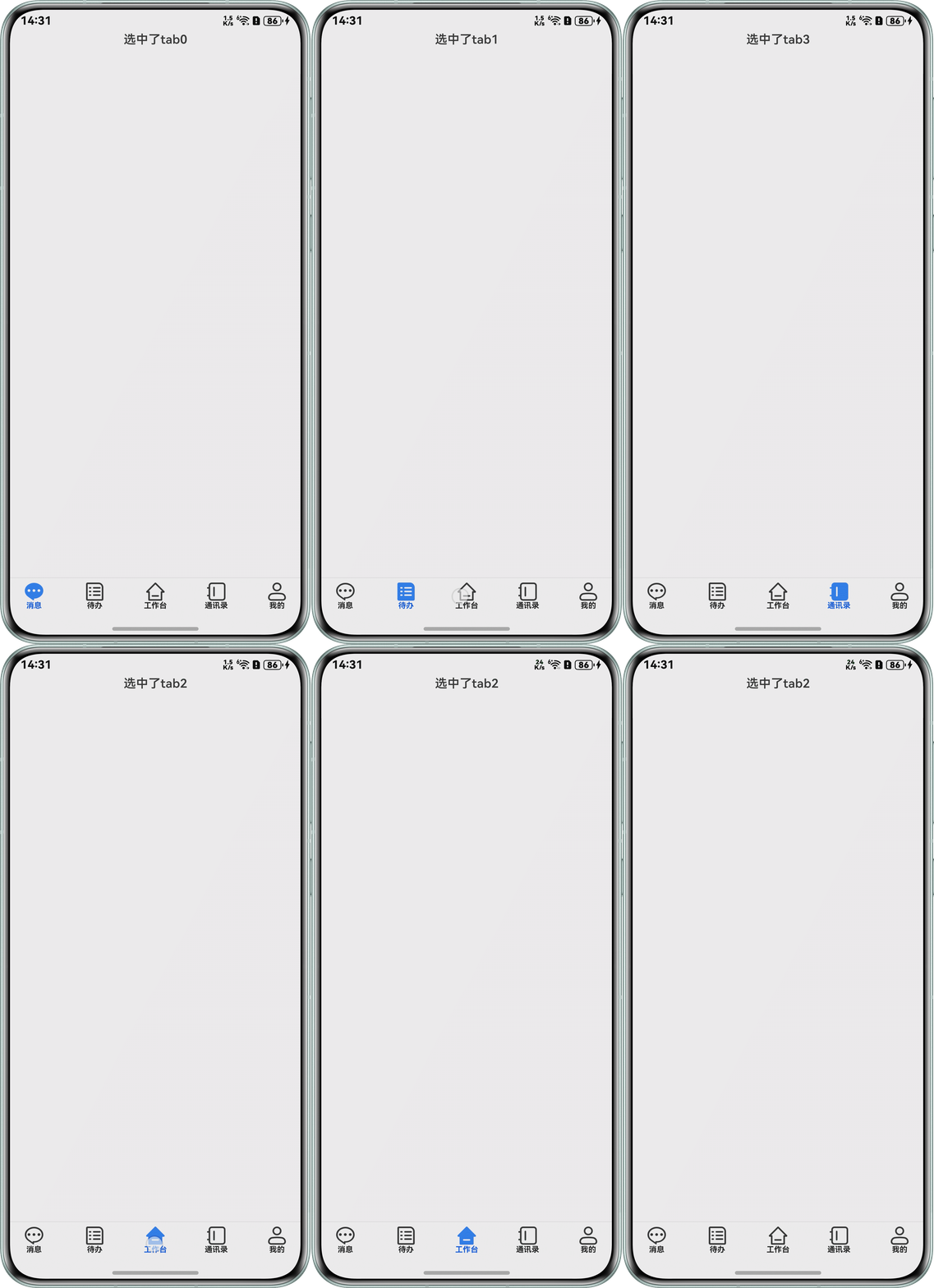
在Navigation中定义工具栏,点击高亮标签时,标签会在高亮与不高亮之间切换,无法实现多次点击同一个页签,页签常亮的功能。问题代码如下:
@Entry
@Component
struct MethodOne {
  @Provide('navPathStack') navPathStack: NavPathStack = new NavPathStack();
  @State currentTabIndex: number = 0;

  build() {
    Column() {
      Navigation() {
        Text('选中了tab' + this.currentTabIndex);
      }
      .width('100%')
      .navBarWidth('100%')
      .hideBackButton(true)
      .hideTitleBar(true)
      .hideToolBar(false)
      .mode(NavigationMode.Stack)
      .toolbarConfiguration(MenuList.GetDefaultMenuNavBarList(this.currentTabIndex, (index) => {
        this.currentTabIndex = index;
      }), { backgroundColor: Color.White, backgroundBlurStyle: BlurStyle.Regular })
      .height('100%')
      .width('100%')
      .backgroundColor('#F1F3F5');
    };
  }
}

class MenuList {
  public static GetDefaultMenuList(): MenuEntity[] {
    return [
      new MenuEntity('消息', 0, $r('app.media.nav_bar_btn_msg'), $r('app.media.nav_bar_btn_msg_selected')),
      new MenuEntity('待办', 1, $r('app.media.nav_bar_btn_todo'), $r('app.media.nav_bar_btn_todo_selected')),
      new MenuEntity('工作台', 2, $r('app.media.nav_bar_btn_work'), $r('app.media.nav_bar_btn_work_selected')),
      new MenuEntity('通讯录', 3, $r('app.media.nav_bar_btn_addressbook'),
        $r('app.media.nav_bar_btn_addressbook_selected')),
      new MenuEntity('我的', 4, $r('app.media.nav_bar_btn_me'), $r('app.media.nav_bar_btn_me_selected')),
    ];
  }

  public static GetDefaultMenuNavBarList(currentIndex: number,
    menuOnClick?: (index: number) => void): Array<ToolbarItem> {
    let toolbarList: Array<ToolbarItem> = [];
    for (let i = 0; i < MenuList.GetDefaultMenuList().length; i++) {
      let menuEntity: MenuEntity = MenuList.GetDefaultMenuList()[i];
      toolbarList.push({
        value: menuEntity.name,
        icon: menuEntity.menuIcon,
        activeIcon: menuEntity.focusMenuIcon,
        status: currentIndex == i ? ToolbarItemStatus.ACTIVE : ToolbarItemStatus.NORMAL,
        action: () => {
          if (menuOnClick) {
            menuOnClick(menuEntity.index);
          }
        }
      });
    }
    return toolbarList;
  }
};

class MenuEntity {
  menuIcon?: Resource = $r('app.media.startIcon');
  focusMenuIcon?: Resource = $r('app.media.startIcon');
  name: string | Resource = 'text';
  index: number = 0;
  isShow?: boolean = true;
  gotoPage: string = '';

  constructor(name: string | Resource, index: number, menuIcon?: Resource,
    focusMenuIcon?: Resource, isShow?: boolean) {
    this.menuIcon = menuIcon;
    this.focusMenuIcon = focusMenuIcon;
    this.name = name;
    this.index = index;
    this.isShow = isShow;
  }
};
问题现象:
背景知识
- Tabs:页签切换组件,可实现自定义TabBar,并实现切换逻辑。TabBar实现方式参考官方示例。
- Navigation:官方推荐的路由切换组件,其自带的工具栏通过toolbarConfiguration属性实现。该属性内实现的工具栏可使用官方提供的ToolbarItem类实现或者通过CustomBuilder自定义实现。
- 状态变量:被状态装饰器装饰的变量,状态变量值的改变会引起UI的渲染更新。示例:@State num: number = 1,其中,@State是状态装饰器,num是状态变量。
Tabs的TabBar和Navigation工具栏点击效果区分:
标签类型 | 实现类型 | 常用效果 |
|---|---|---|
Navigation工具栏 | Array<ToolbarItem> 或 CustomBuilder | 作为工具栏时,通过点击实现工具栏开启与关闭,所以需要实现多次点击时高亮与不高亮循环显示。 |
Tabs标签 | ComponentContent、SubTabBarStyle、BottomTabBarStyle、string、Resource、CustomBuilder、TabBarOptions | 页签的切换,需要实现多次点击同一个标签时该标签一直高亮的效果。 |
问题定位
- 状态变量this.currentTabIndex代表的是当前页签的索引值,第一次点击其它页签时,this.currentTabIndex会通过action属性执行传入的箭头函数更新为点击的页签索引,重复点击相同页签时,this.currentTabIndex的值不会发生改变。
- @State会监听this.currentTabIndex的变化,当状态变量this.currentTabIndex变化时,会自动刷新UI。该问题代码是通过点击更改状态变量this.currentTabIndex的值,将点击的标签设置为ToolbarItemStatus.ACTIVE,显示activeIcon的图标,从而实现第一次点击高亮的效果。
- 由于第一次点击后,再次点击该标签时,this.currentTabIndex不会发生变化,所以不会重新刷新toolbarConfiguration属性。已经是ToolbarItemStatus.ACTIVE属性的情况下,后续点击该标签时,实现的是ToolbarItemStatus.ACTIVE内在逻辑:点击取消高亮(显示icon图标),再次点击高亮(显示activeIcon图标)。
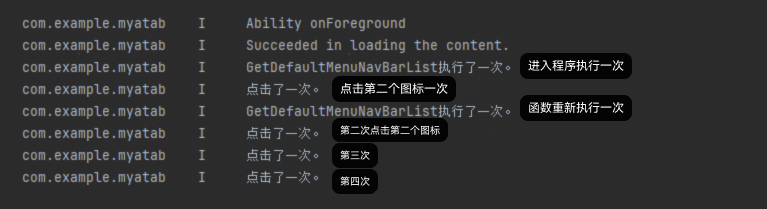
- 通过在GetDefaultMenuNavBarList()函数内设置打印信息,监听其是否执行可以显示。验证代码如下:
public static GetDefaultMenuNavBarList(currentIndex: number,
  menuOnClick?: (index: number) => void): Array<ToolbarItem> {
  console.info('GetDefaultMenuNavBarList执行了一次。') // 监听函数执行。
  let toolbarList: Array<ToolbarItem> = [];
  for (let i = 0; i < MenuList.GetDefaultMenuList().length; i++) {
    let menuEntity: MenuEntity = MenuList.GetDefaultMenuList()[i];
    toolbarList.push({
      value: menuEntity.name,
      icon: menuEntity.menuIcon,
      activeIcon: menuEntity.focusMenuIcon,
      status: currentIndex === i ? ToolbarItemStatus.ACTIVE : ToolbarItemStatus.NORMAL,
      action: () => {
        console.info('点击了一次。') // 监听点击次数。
        menuOnClick ? menuOnClick(menuEntity.index) : undefined
      }
    })
  }
  return toolbarList;
}
验证效果如下:
分析结论
第一次点击后的后续点击,由于状态变量this.currentTabIndex没有变化,导致toolbarConfiguration属性没有刷新,实现的是标签本身的ToolbarItemStatus.ACTIVE逻辑,所以导致多次点击无法一直常亮。
修改建议
参考代码实现逻辑给出以下两种Navigation实现TabBar点击效果:
- 方案一:采用官方提供的Array<ToolbarItem>对象数组。方式一:每次点击时都更改一次状态变量参数this.currentTabIndex的值,强制刷新UI,核心修改如下:
.toolbarConfiguration(MenuList.GetDefaultMenuNavBarList(this.currentTabIndex, (index) => {
  this.currentTabIndex = -1;
  this.currentTabIndex = index;
}), { backgroundColor: Color.White, backgroundBlurStyle: BlurStyle.Regular })
示例完整demo如下:
@Entry
@Component
struct MethodOne {
  @Provide('navPathStack') navPathStack: NavPathStack = new NavPathStack();
  @State currentTabIndex: number = 0;

  build() {
    Column() {
      Navigation() {
        Text('选中了tab' + this.currentTabIndex);
      }
      .width('100%')
      .navBarWidth('100%')
      .hideBackButton(true)
      .hideTitleBar(true)
      .hideToolBar(false)
      .mode(NavigationMode.Stack)
      .toolbarConfiguration(MenuList.GetDefaultMenuNavBarList(this.currentTabIndex, (index) => {
        this.currentTabIndex = -1;
        this.currentTabIndex = index;
      }), { backgroundColor: Color.White, backgroundBlurStyle: BlurStyle.Regular })
      .height('100%')
      .width('100%')
      .backgroundColor('#F1F3F5');
    };
  }
}

class MenuList {
  public static GetDefaultMenuList(): MenuEntity[] {
    return [
      new MenuEntity('消息', 0, $r('app.media.nav_bar_btn_msg'), $r('app.media.nav_bar_btn_msg_selected')),
      new MenuEntity('代办', 1, $r('app.media.nav_bar_btn_todo'), $r('app.media.nav_bar_btn_todo_selected')),
      new MenuEntity('工作台', 2, $r('app.media.nav_bar_btn_work'), $r('app.media.nav_bar_btn_work_selected')),
      new MenuEntity('通讯录', 3, $r('app.media.nav_bar_btn_addressbook'),
        $r('app.media.nav_bar_btn_addressbook_selected')),
      new MenuEntity('我的', 4, $r('app.media.nav_bar_btn_me'), $r('app.media.nav_bar_btn_me_selected')),
    ];
  }

  public static GetDefaultMenuNavBarList(currentIndex: number,
    menuOnClick?: (index: number) => void): Array<ToolbarItem> {
    let toolbarList: Array<ToolbarItem> = [];
    for (let i = 0; i < MenuList.GetDefaultMenuList().length; i++) {
      let menuEntity: MenuEntity = MenuList.GetDefaultMenuList()[i];
      toolbarList.push({
        value: menuEntity.name,
        icon: menuEntity.menuIcon,
        activeIcon: menuEntity.focusMenuIcon,
        status: currentIndex == i ? ToolbarItemStatus.ACTIVE : ToolbarItemStatus.NORMAL,
        action: () => {
          if (menuOnClick) {
            menuOnClick(menuEntity.index);
          }
        }
      });
    }
    return toolbarList;
  }
};

class MenuEntity {
  menuIcon?: Resource = $r('app.media.startIcon');
  focusMenuIcon?: Resource = $r('app.media.startIcon');
  name: string | Resource = 'text';
  index: number = 0;
  isShow?: boolean = true;
  gotoPage: string = '';

  constructor(name: string | Resource, index: number, menuIcon?: Resource,
    focusMenuIcon?: Resource, isShow?: boolean) {
    this.menuIcon = menuIcon;
    this.focusMenuIcon = focusMenuIcon;
    this.name = name;
    this.index = index;
    this.isShow = isShow;
  }
};
方式二:禁用ToolbarItemStatus.ACTIVE逻辑。
由于上述分析结论,在实现过程中不需要执行ToolbarItemStatus.ACTIVE逻辑,故取消activeIcon、status设置,将icon属性设置为三目运算的形式:@Entry @Component struct MethodTwo { @State currentTabIndex: number = 0; // 标签信息。 @State toolList: Array<Array<string>> = [ ['menuItem1', 'app.media.background', 'app.media.startIcon'], ['menuItem2', 'app.media.background', 'app.media.startIcon'], ['menuItem3', 'app.media.background', 'app.media.startIcon'], ['menuItem4', 'app.media.background', 'app.media.startIcon'], ]; // 设置函数遍历标签信息并返回Array<ToolbarItem>类型数组。 GetDefaultMenuNavBarList(currentIndex: number, menuOnClick?: (index: number) => void): Array<ToolbarItem> { let toolbarList: Array<ToolbarItem> = []; for (let i = 0; i < this.toolList.length; i++) { toolbarList.push({ value: this.toolList[i][0], icon: currentIndex === i ? $r(this.toolList[i][1]) : $r(this.toolList[i][2]), action: () => { if (menuOnClick) { menuOnClick(i); } } }); } return toolbarList; } build() { Column() { Navigation() { Text('选中了tab' + this.currentTabIndex); } .width('100%') .navBarWidth('100%') .hideBackButton(true) .hideTitleBar(true) .hideToolBar(false) .mode(NavigationMode.Stack) .toolbarConfiguration(this.GetDefaultMenuNavBarList(this.currentTabIndex, (index: number) => { this.currentTabIndex = index; }), { backgroundColor: Color.White, backgroundBlurStyle: BlurStyle.Thin }); }.height('100%') .width('100%') .backgroundColor('#F1F3F5'); } }
- 方案二:采用CustomBuilder自定义。
采用@Builder封装UI构件,通过三目运算实现点击聚焦功能。
@Entry
@Component
struct OptionTwo {
  @State currentTabIndex: number = 0;
  @State toolList: Array<Array<string>> = [
    ['item1', 'app.media.startIcon', 'app.media.background'],
    ['item2', 'app.media.startIcon', 'app.media.background'],
    ['item3', 'app.media.startIcon', 'app.media.background'],
    ['item4', 'app.media.startIcon', 'app.media.background'],
  ];

  @Builder
  GetDefaultMenuNavBarList() {
    Row() {
      ForEach(this.toolList, (item: Array<string>, index: number) => {
        Column() {
          Stack() {
            Image($r(item[1]))
              .height(30)
              .width(30)
              .draggable(false);
            Image($r(item[2]))
              .height(30)
              .width(30)
              .draggable(false)
              .visibility(this.currentTabIndex === index ? Visibility.Visible : Visibility.None);
          };

          Text(item[0])
            .fontSize(10)
            .width(30)
            .fontColor(this.currentTabIndex === index ? Color.Blue : Color.Black);
        }
        .width(70)
        .onClick(() => {
          this.currentTabIndex = index;
        });
      });
    }
    .width('100%')
    .justifyContent(FlexAlign.SpaceBetween);
  }

  build() {
    Column() {
      Navigation() {
        Text('选中了tab' + this.currentTabIndex);
      }
      .width('100%')
      .navBarWidth('100%')
      .hideBackButton(true)
      .hideTitleBar(true)
      .hideToolBar(false)
      .mode(NavigationMode.Stack)
      .toolbarConfiguration(this.GetDefaultMenuNavBarList(),
        { backgroundColor: Color.White, backgroundBlurStyle: BlurStyle.Thin });
    }
    .height('100%')
    .width('100%')
    .backgroundColor('#F1F3F5');
  }
}