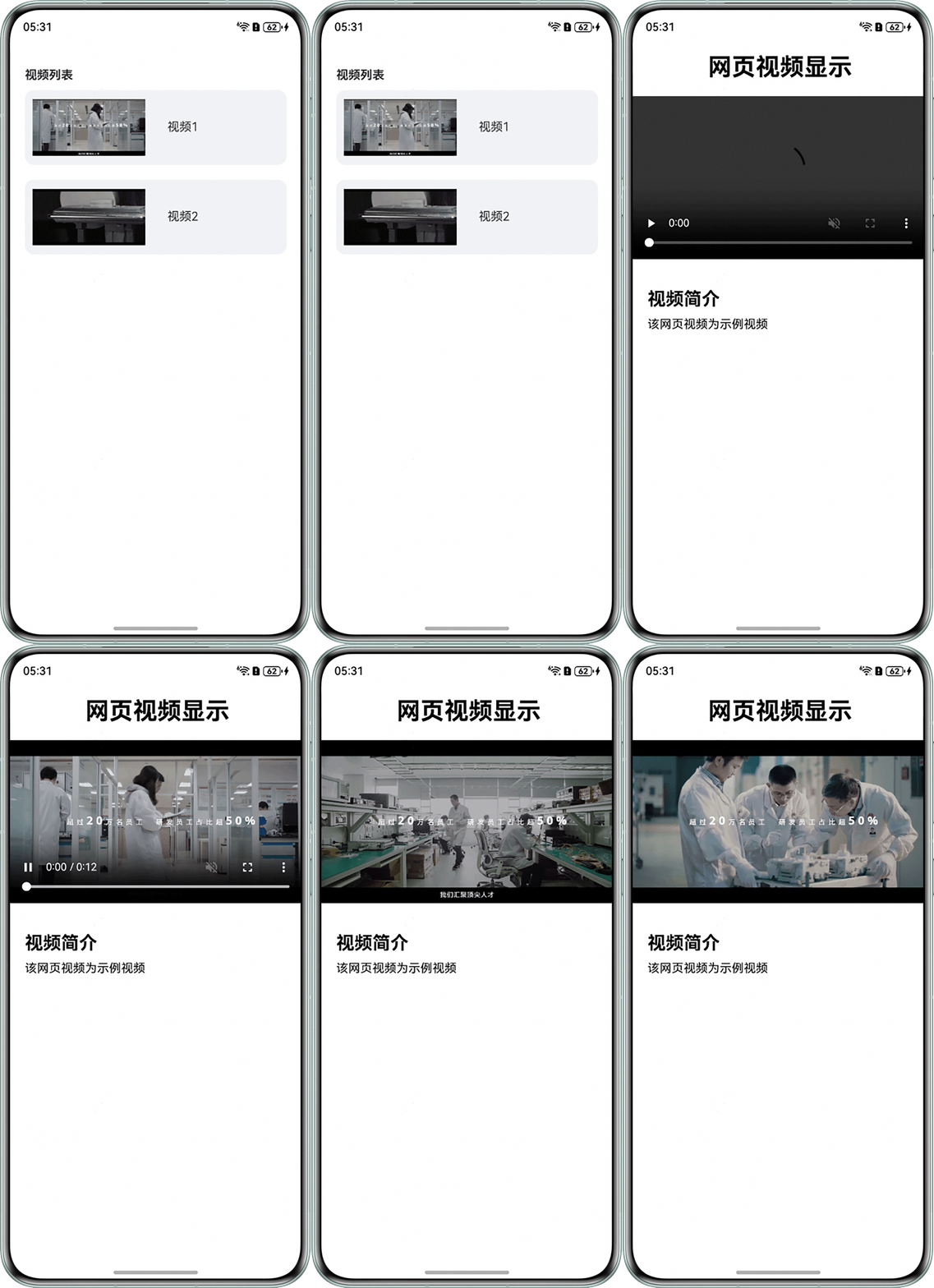
问题定位
- 使用DevEco Testing查看该页面的组件,跳转前后的页面分别通过不同的Web组件显示。
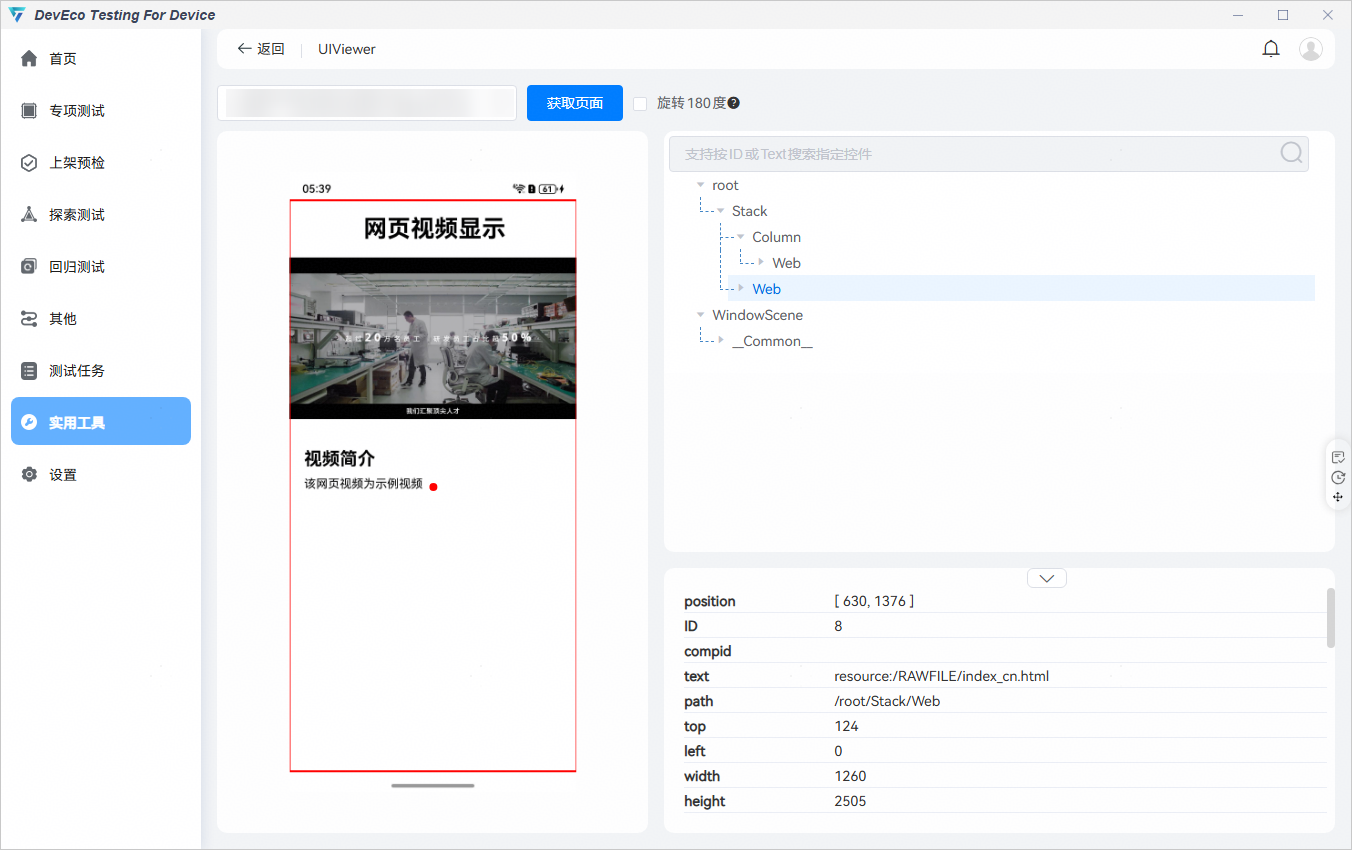
- 查看跳转之后的Web组件的相关设置,发现应用transition属性设置了透明度渐变的过渡效果。
import { webview } from '@kit.ArkWeb';

@Entry
@Component
struct WebVideo {
  controller: webview.WebviewController = new webview.WebviewController();
  @State isShowNewWeb: boolean = false;

  build() {
    Stack() {
      Column() {
        Web({ src: $rawfile('VideoList.html'), controller: this.controller })
          .height('100%')
          .width('100%')
          .fileAccess(true)
          .geolocationAccess(false)
          .onLoadIntercept((event) => {
            if (event.data.getRequestUrl() === 'resource://rawfile/index_cn.html') {
              this.isShowNewWeb = true;
              return true; // 拦截此次跳转
            } else {
              return false; // 允许跳转
            }
          });
      };

      if (this.isShowNewWeb) {
        Web({ src: $rawfile('index_cn.html'), controller: this.controller })
          .height('100%')
          .width('100%')
          .fileAccess(true)
          .geolocationAccess(false)
          .transition(TransitionEffect.OPACITY.animation({ duration: 2000, curve: Curve.Ease })); // 设置透明度渐变的过渡效果
      }
    }
    .height('100%')
    .width('100%');
  }
}

修改建议
- 方案一:不使用新的Web组件来显示页面,而是在原来的Web组件上进行页面跳转。
import { webview } from '@kit.ArkWeb';

@Entry
@Component
struct SolutionOne {
  controller: webview.WebviewController = new webview.WebviewController();

  build() {
    Stack() {
      Column() {
        Web({ src: $rawfile('VideoList.html'), controller: this.controller })
          .height('100%')
          .width('100%')
          .fileAccess(true)
          .geolocationAccess(false)
        // 不对视频播放页面进行拦截,在原来的Web组件上进行页面跳转
      };
    }
    .height('100%')
    .width('100%');
  }
}
src/main/resources/rawfile/VideoList.html:
<!DOCTYPE html>
<html lang="zh">
<head>
    <meta charset="UTF-8" />
    <meta name="viewport" content="width=device-width, initial-scale=1.0"/>
    <title>视频列表</title>
    <style>
        body {
          font-family: 'Segoe UI', sans-serif;
          margin: 0;
          padding: 20px;
          color: #333;
        }

        /* 视频列表容器 */
        .video-list {
          display: grid;
          grid-template-columns: repeat(auto-fit, minmax(280px, 1fr)));
          gap: 20px;
          max-width: 1400px;
          margin: 0 auto;
        }

        /* 视频卡片 */
        .video-card {
          display: flex;           /* 启用 Flexbox */
          background-color: #f1f3f5;
          border-radius: 12px;
          overflow: hidden;
          transition: all 0.3s ease;
          position: relative;
        }

        .video-text {
          text-align: center;
          width: 100px;
          margin-top: 40px;
        }

        .video-thumbnail {
          width: 150px;
          height: 100px;
          object-fit: contain;
          display: block;
          margin-left: 10px;
        }

    </style>
</head>
<body>

<h1 style="font-size: 16px;">视频列表</h1>

<div class="video-list">
    <!-- 视频项 1 -->
    <div class="video-card" onclick="newPage()">
        <!-- "img/poster1.PNG"需要替换为开发者需要的图片资源文件 -->
        <img src="img/poster1.PNG" alt="视频封面" class="video-thumbnail">
        <div class="video-text"> 视频1</div>
    </div>

    <!-- 视频项 2 -->
    <div class="video-card">
        <!-- "img/poster2.PNG"需要替换为开发者需要的图片资源文件 -->
        <img src="img/poster2.PNG" alt="视频封面" class="video-thumbnail">
        <div class="video-text"> 视频2</div>
    </div>
</div>

<script>
    function newPage() {
        // 跳转到新页面
        window.location.href = "./index_cn.html";
    }
</script>

</body>
</html>
src/main/resources/rawfile/index_cn.html:
<!DOCTYPE html>
<html lang="en">

<head>
    <meta charset="UTF-8">
    <meta name="viewport" content="width=device-width, initial-scale=1.0">
    <title>测试页面</title>
    <style>
        * {
            padding: 0;
            margin: 0;
        }

        body {
            width: 100vw;
            height: 100vh;
            box-sizing: border-box;
        }

        .page {
            display: flex;
            flex-direction: column;
            justify-content: flex-start;
            align-items: flex-start;
            width: 100%;
            height: 100%;
            box-sizing: border-box;
        }

        .video-box {
            width: 100%;
            display: flex;
            flex-direction: column;
            justify-content: start;
            align-items: center;
            box-sizing: border-box;
            margin-top: 20px;
        }

        .myVideo {
            width: 100%;
            height: calc(100vw * 9 / 16);
            object-fit: contain;
            background-color: black;
        }
    </style>
</head>

<body>
<div class="page">
    <h1 style="margin-left: 100px;margin-top: 20px">网页视频显示</h1>
    <div class="video-box">
        <video autoplay muted loop class="myVideo" controls>
            <!-- "www.example.mp4"需要替换为开发者需要的视频资源文件 -->
            <source src="www.example.mp4" type="video/mp4">
        </video>
    </div>

    <div style="margin-top: 40px; margin-left: 20px">
        <h2>视频简介</h2>
        <div style="margin-top: 10px">
            该网页视频为示例视频
        </div>
    </div>
</div>

</body>

</html>
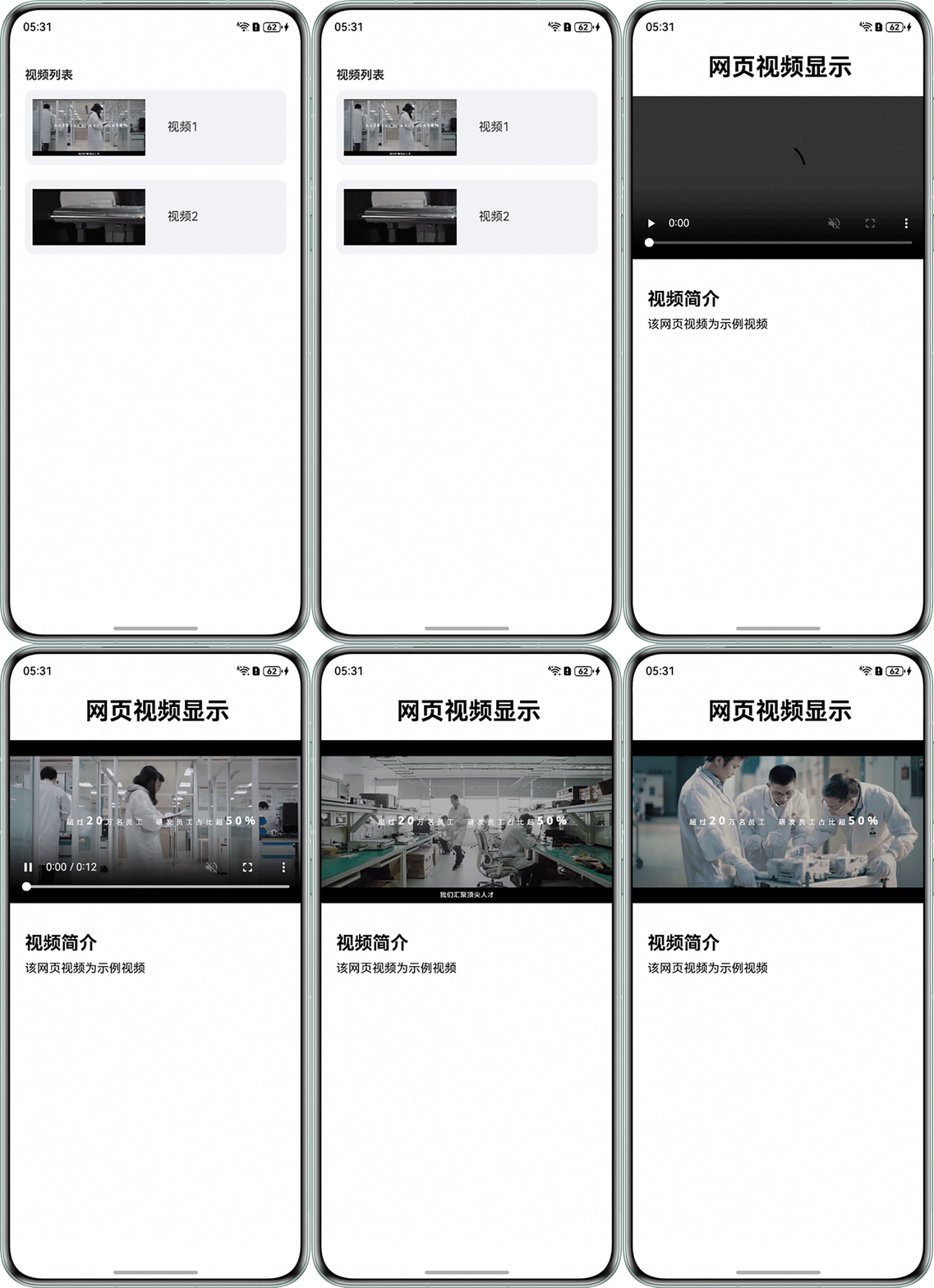
效果图如下:
- 方案二:跳转后的Web组件不设置透明度渐变的过渡效果。
import { webview } from '@kit.ArkWeb';

@Entry
@Component
struct SolutionTwo {
  controller: webview.WebviewController = new webview.WebviewController();
  @State isShowNewWeb: boolean = false;

  build() {
    Stack() {
      Column() {
        Web({ src: $rawfile('VideoList.html'), controller: this.controller })
          .height('100%')
          .width('100%')
          .fileAccess(true)
          .geolocationAccess(false)
          .onLoadIntercept((event) => {
            console.info('url:' + event.data.getRequestUrl());
            if (event.data.getRequestUrl() === 'resource://rawfile/index_cn.html') {
              this.isShowNewWeb = true;
              return true; // 拦截此次跳转
            } else {
              return false; // 允许跳转
            }
          });
      };

      if (this.isShowNewWeb) {
        Web({ src: $rawfile('index_cn.html'), controller: this.controller })
          .height('100%')
          .width('100%')
          .fileAccess(true)
          .geolocationAccess(false)
        // 不设置透明度由浅到深的转场效果
      }
    }
    .height('100%')
    .width('100%');
  }
}
src/main/resources/rawfile/VideoList.html:
<!DOCTYPE html>
<html lang="zh">
<head>
    <meta charset="UTF-8" />
    <meta name="viewport" content="width=device-width, initial-scale=1.0"/>
    <title>视频列表</title>
    <style>
        body {
          font-family: 'Segoe UI', sans-serif;
          margin: 0;
          padding: 20px;
          color: #333;
        }

        /* 视频列表容器 */
        .video-list {
          display: grid;
          grid-template-columns: repeat(auto-fit, minmax(280px, 1fr)));
          gap: 20px;
          max-width: 1400px;
          margin: 0 auto;
        }

        /* 视频卡片 */
        .video-card {
          display: flex;           /* 启用 Flexbox */
          background-color: #f1f3f5;
          border-radius: 12px;
          overflow: hidden;
          transition: all 0.3s ease;
          position: relative;
        }

        .video-text {
          text-align: center;
          width: 100px;
          margin-top: 40px;
        }

        .video-thumbnail {
          width: 150px;
          height: 100px;
          object-fit: contain;
          display: block;
          margin-left: 10px;
        }

    </style>
</head>
<body>

<h1 style="font-size: 16px;">视频列表</h1>

<div class="video-list">
    <!-- 视频项 1 -->
    <div class="video-card" onclick="newPage()">
        <!-- "img/poster1.PNG"需要替换为开发者需要的图片资源文件 -->
        <img src="img/poster1.PNG" alt="视频封面" class="video-thumbnail">
        <div class="video-text"> 视频1</div>
    </div>

    <!-- 视频项 2 -->
    <div class="video-card">
        <!-- "img/poster2.PNG"需要替换为开发者需要的图片资源文件 -->
        <img src="img/poster2.PNG" alt="视频封面" class="video-thumbnail">
        <div class="video-text"> 视频2</div>
    </div>
</div>

<script>
    function newPage() {
        // 跳转到新页面
        window.location.href = "./index_cn.html";
    }
</script>

</body>
</html>
src/main/resources/rawfile/index_cn.html:
<!DOCTYPE html>
<html lang="en">

<head>
    <meta charset="UTF-8">
    <meta name="viewport" content="width=device-width, initial-scale=1.0">
    <title>测试页面</title>
    <style>
        * {
            padding: 0;
            margin: 0;
        }

        body {
            width: 100vw;
            height: 100vh;
            box-sizing: border-box;
        }

        .page {
            display: flex;
            flex-direction: column;
            justify-content: flex-start;
            align-items: flex-start;
            width: 100%;
            height: 100%;
            box-sizing: border-box;
        }

        .video-box {
            width: 100%;
            display: flex;
            flex-direction: column;
            justify-content: start;
            align-items: center;
            box-sizing: border-box;
            margin-top: 20px;
        }

        .myVideo {
            width: 100%;
            height: calc(100vw * 9 / 16);
            object-fit: contain;
            background-color: black;
        }
    </style>
</head>

<body>
<div class="page">
    <h1 style="margin-left: 100px;margin-top: 20px">网页视频显示</h1>
    <div class="video-box">
        <video autoplay muted loop class="myVideo" controls>
            <!-- "www.example.mp4"需要替换为开发者需要的视频资源文件 -->
            <source src="www.example.mp4" type="video/mp4">
        </video>
    </div>

    <div style="margin-top: 40px; margin-left: 20px">
        <h2>视频简介</h2>
        <div style="margin-top: 10px">
            该网页视频为示例视频
        </div>
    </div>
</div>

</body>

</html>
效果图如下: