背景知识
- windowStage为窗口管理器,管理各个基本窗口单元。
- 通过CustomDialogController类显示自定义弹窗,需要使用@CustomDialog定义弹窗内容。调用弹窗时,需要new CustomDialogController(),并将@CustomDialog作为CustomDialogControllerOptions中的builder参数传入。
- openCustomDialog用于创建并弹出dialogContent对应的自定义弹窗。
解决方案
实现一个全局可调用弹窗,可通过如下三种方式实现:
- 方案一:实现全局可调用弹窗推荐使用:不依赖UI组件的全局自定义弹出框 (openCustomDialog),示例请参考完整示例。
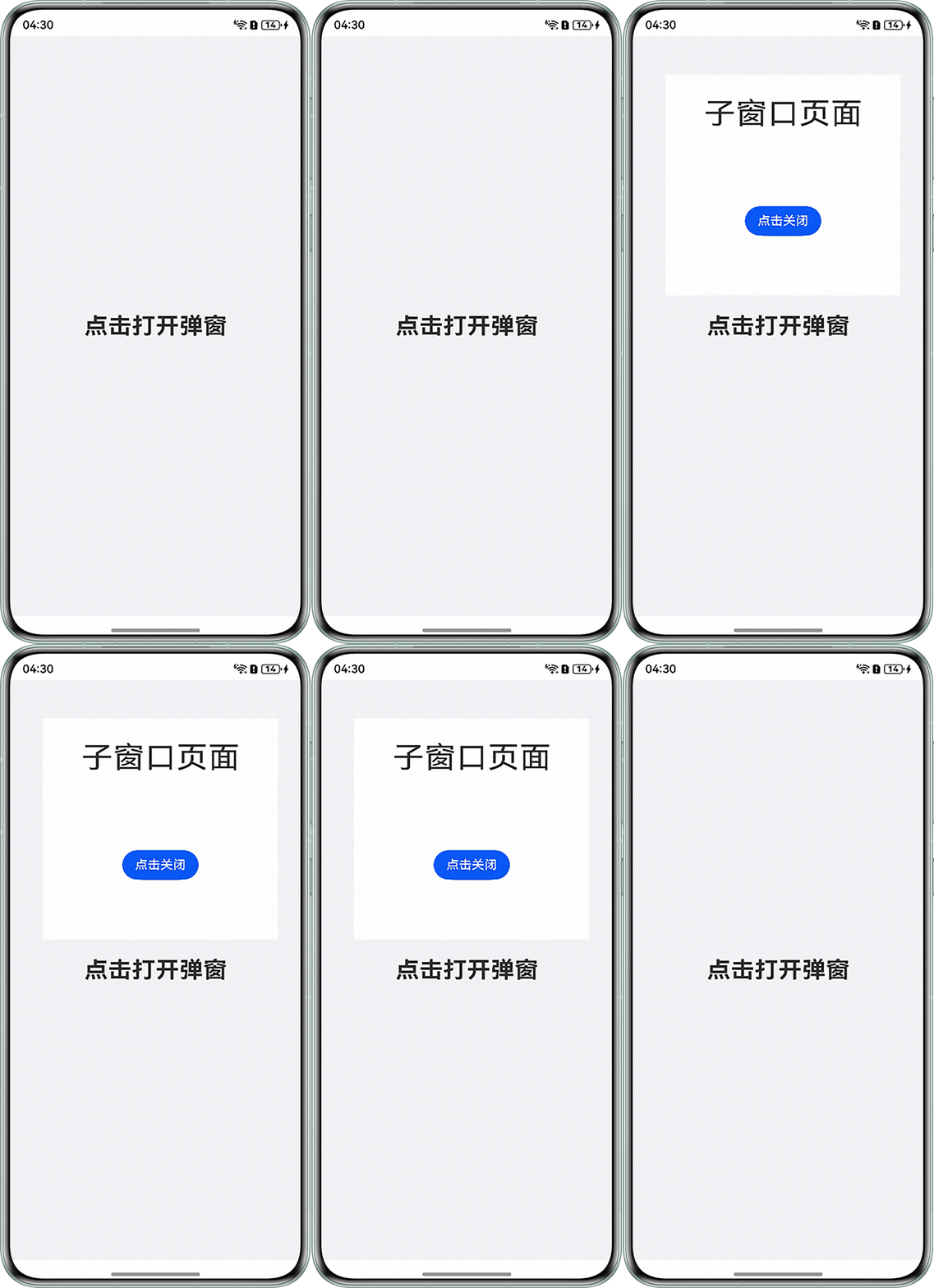
- 方案二:可使用子窗口方式实现全局可调用弹窗,实现方式如下:
- 在EntryAbility.ets中通过AppStorage获取窗口管理器用于后续获取Window实例实现子窗口的创建与销毁,代码如下:
import { ConfigurationConstant, UIAbility } from '@kit.AbilityKit'; import { hilog } from '@kit.PerformanceAnalysisKit'; import { window } from '@kit.ArkUI'; const DOMAIN = 0x0000; export default class EntryAbility extends UIAbility { onCreate(): void { try { this.context.getApplicationContext().setColorMode(ConfigurationConstant.ColorMode.COLOR_MODE_NOT_SET); } catch (err) { hilog.error(DOMAIN, 'testTag', 'Failed to set colorMode. Cause: %{public}s', JSON.stringify(err)); } hilog.info(DOMAIN, 'testTag', '%{public}s', 'Ability onCreate'); } onDestroy(): void { hilog.info(DOMAIN, 'testTag', '%{public}s', 'Ability onDestroy'); } onWindowStageCreate(windowStage: window.WindowStage): void { AppStorage.setOrCreate('windowStage', windowStage); windowStage.loadContent('pages/Index', (err) => { if (err.code) { hilog.error(DOMAIN, 'testTag', 'Failed to load the content. Cause: %{public}s', JSON.stringify(err)); return; } hilog.info(DOMAIN, 'testTag', 'Succeeded in loading the content.'); }); } onWindowStageDestroy(): void { // Main window is destroyed, release UI related resources hilog.info(DOMAIN, 'testTag', '%{public}s', 'Ability onWindowStageDestroy'); } onForeground(): void { // Ability has brought to foreground hilog.info(DOMAIN, 'testTag', '%{public}s', 'Ability onForeground'); } onBackground(): void { // Ability has back to background hilog.info(DOMAIN, 'testTag', '%{public}s', 'Ability onBackground'); } }; - SubWindow.ets页面封装打开弹窗createMySubWindowFun方法,通过createSubWindow实现弹窗的弹出,使用setUIContent设置SubPage页面为子窗口加载的具体页面内容,通过moveWindowTo、resize等方法设置子窗口样式。封装deleteMySubWindowFun方法通过destroyWindow实现弹窗的关闭。代码如下:
import { window } from '@kit.ArkUI'; import { BusinessError } from '@kit.BasicServicesKit'; // 获取windowStage let windowStage = AppStorage.get('windowStage') as window.WindowStage; let windowClass: window.Window | undefined = undefined; export class mySubWindow { createMySubWindowFun(subWindowName: string) { // 创建子窗口 windowStage.createSubWindow(subWindowName, (err: BusinessError, data) => { windowClass = data; data.setUIContent('pages/SubPage', () => { // 设置子窗口左上角坐标 data.moveWindowTo(150, 300); // 设置子窗口大小 data.resize(1000, 1000); // 展示子窗口 data.showWindow(); }); }); } deleteMySubWindowFun() { if (windowClass) { windowClass.destroyWindow(); } } } - SubPage.ets页面用于展示子窗页面内容,代码如下:
// 子窗口显示页面 import { mySubWindow } from '../utils/SubWindow'; @Entry @Component struct SubPage { mySubWindow: mySubWindow = new mySubWindow(); build() { Column() { Text('子窗口页面') .fontSize(40) .margin({ top: 30 }); Button('点击关闭') .onClick(() => { this.mySubWindow.deleteMySubWindowFun(); }) .margin({ top: 100 }); } .width('100%') .height('100%'); } } - Index.ets页面使用方式通过引入SubWindow页面,通过调用封装的createMySubWindowFun方法实现弹窗的打开,代码如下:
import { mySubWindow } from '../utils/SubWindow';


@Entry
@Component
struct Index {
  mySubWindow: mySubWindow = new mySubWindow();


  build() {
    RelativeContainer() {
      Text('点击打开弹窗')
        .id('HelloWorld')
        .fontSize(30)
        .fontWeight(FontWeight.Bold)
        .alignRules({
          center: { anchor: '__container__', align: VerticalAlign.Center },
          middle: { anchor: '__container__', align: HorizontalAlign.Center }
        })
        .onClick(() => {
          this.mySubWindow.createMySubWindowFun('mySubWindow');
        });
    }
    .height('100%')
    .width('100%')
    .backgroundColor('#F1F3F5');
  }
}
运行效果图如下:
- 在EntryAbility.ets中通过AppStorage获取窗口管理器用于后续获取Window实例实现子窗口的创建与销毁,代码如下:
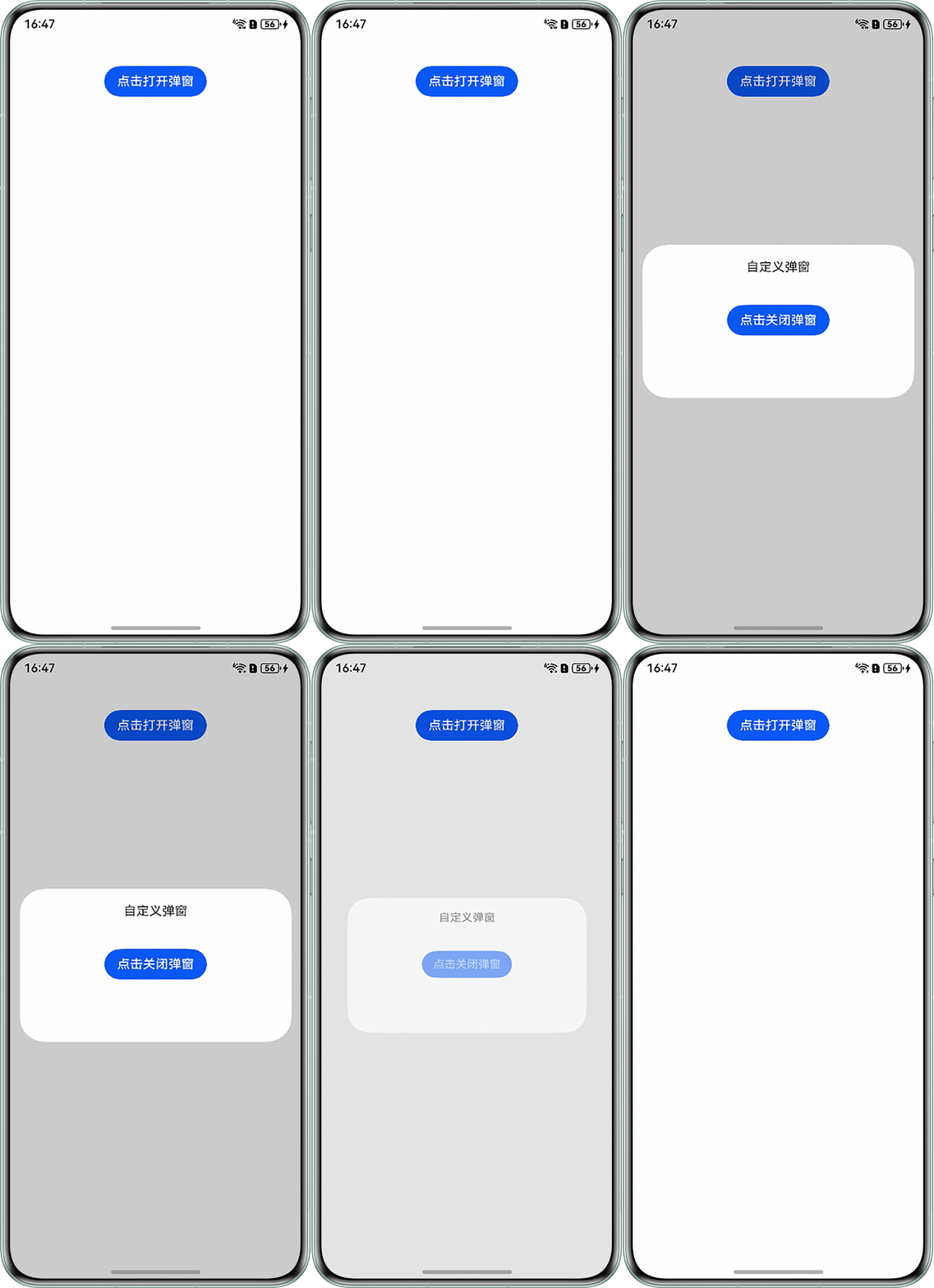
- 方案三:通过自定义弹窗(CustomDialog)封装成自定义组件的方式:
- 封装弹窗控制方法Dialog.ets,使用@watch监听外部传入的变量变化,通过CustomDialogController控制弹窗的显示隐藏,代码如下:
import { CustomDialogView } from './CustomDialogView'; @Component export struct Dialog { // 监听外部传入的visible变量,visible值发生变化时触发onChange回调函数 @Watch('onChange') @Link visible: boolean; onCancel?: () => void; onConfirm?: () => void; // 通过CustomDialogController的builder参数绑定弹窗组件CustomDialogView private controller = new CustomDialogController({ builder: CustomDialogView({ visible: $visible, onCancel: this.onCancel, onConfirm: this.onConfirm, }), autoCancel: false, alignment: DialogAlignment.Center, }); // 当visible的值变化时触发回调 onChange(): void { if (this.visible) { this.controller.open(); } else { this.controller.close(); } } // 二次封装的Dialog组件主要通过控制器控制弹窗,不需要任何界面 build() { } } - 封装弹窗视图页面CustomDialogView.ets,作用于弹窗中作为展示页面,代码如下:
@CustomDialog export struct CustomDialogView { @Link visible: boolean; controller: CustomDialogController; // 弹窗交互事件参数,点击确认和取消按钮时的回调函数 onCancel?: () => void; onConfirm?: () => void; build() { Column() { Text('自定义弹窗') .margin({ top: 20, bottom: 40 }); Button('点击关闭弹窗').onClick(() => { // 重置弹窗显隐参数 this.visible = false; // 关闭弹窗 this.controller.close(); }); } .width('100%') .height(200) .backgroundColor(Color.White); } } - 使用弹窗页面CustomDialog.ets,通过给引入的Dialog组件传入visible控制弹窗的弹出,代码如下:
import { Dialog } from './Dialog';


@Entry
@Component
export struct CustomDialog {
  // 外部定义visible变量作为弹窗组件入参,控制弹窗显隐
  @State visible: boolean = false;


  build() {
    Column({ space: 20 }) {
      Button('点击打开弹窗')
      // 点击修改visible变量后,visible的值可以被Dialog组件监听并响应
        .onClick(() => this.visible = !this.visible)
        .margin({ top: 40 });
      // 通过双向绑定visible变量,实现外部控制弹窗
      Dialog({
        visible: $visible,
      });
    }
    .width('100%');
  }
}
运行效果图如下:
- 封装弹窗控制方法Dialog.ets,使用@watch监听外部传入的变量变化,通过CustomDialogController控制弹窗的显示隐藏,代码如下: