问题现象
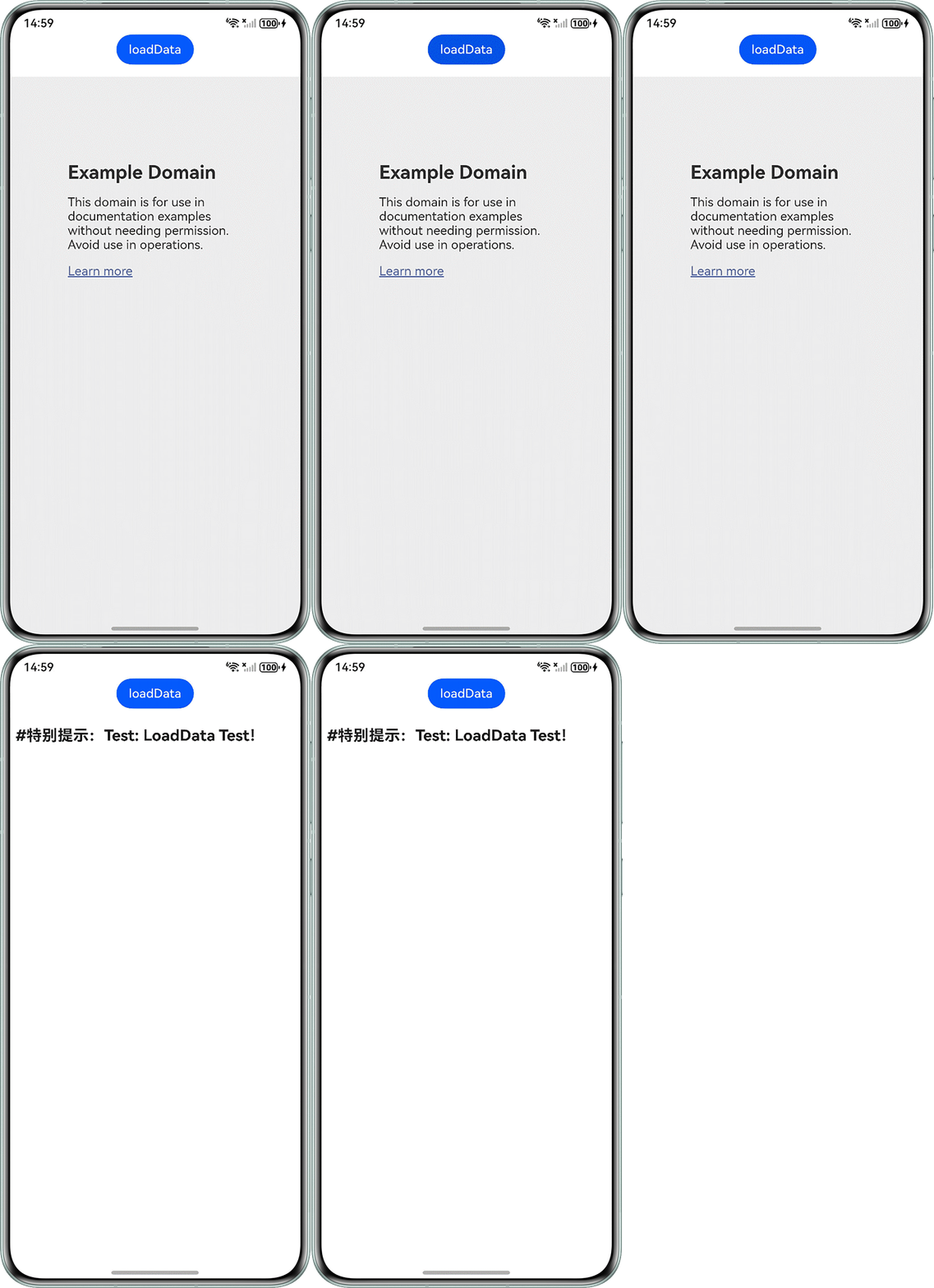
在Web组件中使用loadData方式加载富文本失败。问题效果如下图,开始是下方展示example网页,点击loadData按钮后无法展示富文本内容。

问题代码如下:
import { webview } from '@kit.ArkWeb';
import { BusinessError } from '@kit.BasicServicesKit';

@Entry
@Component
struct WebComponent {
  controller: webview.WebviewController = new webview.WebviewController();

  build() {
    Column() {
      Button('loadData')
        .onClick(() => {
          try {
            // 点击按钮时,通过loadData,加载HTML格式的文本数据
           this.controller.loadData(
              '<body>\n' +
                '<div">\n' +
                '<p><strong>' +
                '<span style="font-size: 20px; color: rgb(34, 34, 34)">' +
                '<meta name="viewport" content="width=device-width, initial-scale=1.0">' +
                '#特别提示:Test: LoadData Test!' +
                '</mark>' +
                '</span>' +
                '</strong>\n' +
                '</p>\n' +
                '</div>\n' +
                '</body>',
              'text/html',
              'UTF-8',
            );
          } catch (error) {
            console.error(`ErrorCode: ${(error as BusinessError).code},  Message: ${(error as BusinessError).message}`);
          }
        });
      Web({ src: 'www.example.com', controller: this.controller })
        .margin({ top: 16 })
        .domStorageAccess(true)
        .fileAccess(false)
        .geolocationAccess(false);
    };
  }
}
背景知识
- loadData:加载指定数据,数据为base64格式或者URL编码后的一段字符串。
- encodeURIComponent:encodeURIComponent函数是JavaScript标准内置对象,通过将特定字符的每个实例替换成代表字符的UTF-8编码的一个、两个、三个或四个转义序列来编码URI(只有由两个“代理”字符组成的字符会被编码为四个转义序列)。
使用loadData的方式加载HTML文本数据,文本为非base64格式(即URL格式),HTML文本中有“#”字符,“#”字符在标准URL中用于标识文档片段标识符(即页面内的锚点),当Web组件解析URL时,“#”后的内容会被视为页面内的锚点位置,而非数据的一部分,所以“#”号存在,导致HTML文本未能正常显示。
解决方案有2种方式:
- 方式一:若HTML中的富文本中带有“#”等特殊字符,可以通过将baseUrl和historyUrl两个参数的值设置为"空格"方式解决。
import { webview } from '@kit.ArkWeb'; import { BusinessError } from '@kit.BasicServicesKit'; @Entry @Component struct WebComponent { controller: webview.WebviewController = new webview.WebviewController(); build() { Column() { Button('loadData') .onClick(() => { try { // 点击按钮时,通过loadData,加载HTML格式的文本数据 this.controller.loadData( '<body>\n' + '<div">\n' + '<p><strong>' + '<span style="font-size: 20px; color: rgb(34, 34, 34)">' + '<meta name="viewport" content="width=device-width, initial-scale=1.0">' + '#特别提示:Test: LoadData Test!' + '</mark>' + '</span>' + '</strong>\n' + '</p>\n' + '</div>\n' + '</body>', 'text/html', 'UTF-8', ' ', // baseUrl设置为空格 ' ' // historyUrl设置为空格 ); } catch (error) { console.error(`ErrorCode: ${(error as BusinessError).code}, Message: ${(error as BusinessError).message}`); } }); Web({ src: 'www.example.com', controller: this.controller }) .margin({ top: 16 }) .domStorageAccess(true) .fileAccess(false) .geolocationAccess(false); }; } } - 方式二:将HTML文本使用encodeURIComponent进行编码转义,编码转义之后再进行加载。
import { webview } from '@kit.ArkWeb';
import { BusinessError } from '@kit.BasicServicesKit';

@Entry
@Component
struct WebComponent1 {
  controller: webview.WebviewController = new webview.WebviewController();

  build() {
    Column() {
      Button('loadData')
        .onClick(() => {
          let htmlStr = '<body>\n' +
            '<div">\n' +
            '<p><strong>' +
            '<span style="font-size: 20px; color: rgb(34, 34, 34)">' +
            '<meta name="viewport" content="width=device-width, initial-scale=1.0">' +
            '#特别提示:Test: LoadData Test!' +
            '</mark>' +
            '</span>' +
            '</strong>\n' +
            '</p>\n' +
            '</div>\n' +
            '</body>';
          // 对html进行编码转义
          let encodeHtml = encodeURIComponent(htmlStr);
          try {
            // 点击按钮时,通过loadData,加载HTML格式的文本数据
            this.controller.loadData(
              encodeHtml,
              'text/html',
              'UTF-8',
            );
          } catch (error) {
            console.error(`ErrorCode: ${(error as BusinessError).code},  Message: ${(error as BusinessError).message}`);
          }
        });
      Web({ src: 'www.example.com', controller: this.controller })
        .margin({ top: 16 })
        .domStorageAccess(true)
        .fileAccess(false)
        .geolocationAccess(false);
    };
  }
}
整改后效果图如下: