问题现象
AlertDialog设置了backgroundColor,但是背景色仅可以看见很浅的颜色。
问题代码如下:
@Entry
@Component
struct Index {
  build() {
    Button('点击')
      .onClick((event: ClickEvent) => {
        const uiContext: UIContext = this.getUIContext();
        uiContext.showAlertDialog(
          {
            title: 'title',
            message: 'text11',
            borderColor: Color.Green,
            autoCancel: true,
            alignment: DialogAlignment.Bottom,
            offset: { dx: 0, dy: -20 },
            gridCount: 3,
            backgroundColor: 'rgba(10,89,247,0.4)',
            confirm: {
              value: 'button',
              action: () => {
                console.info('Button-clicking callback')
              }
            },
            cancel: () => {
              console.info('Closed callbacks')
            }
          }
        )

      })
      .margin({ left: 30, top: 16 })
  }
}
问题效果预览:
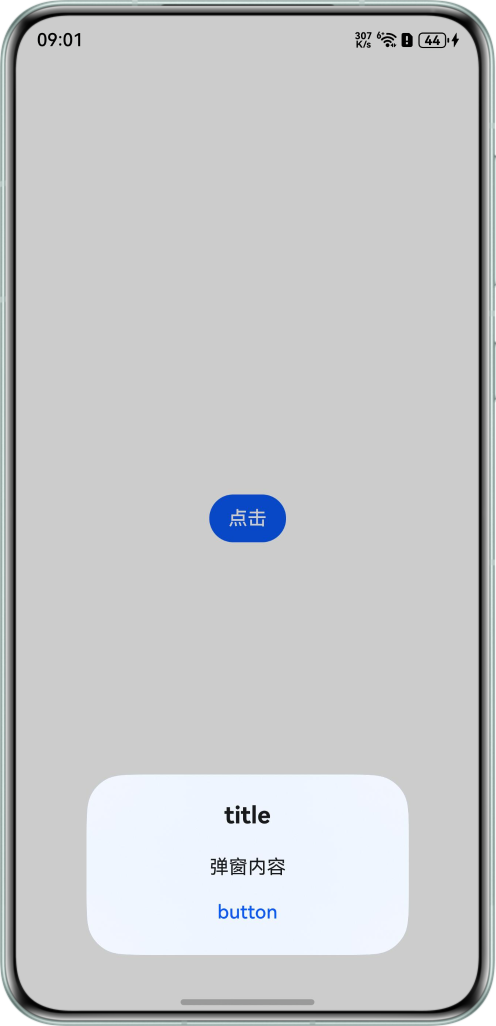

背景知识
警告弹窗(AlertDialog)是一种对话框组件,用来在应用中弹出提示、确认、输入等交互式对话框。AlertDialogParam对象中的属性backgroundColor与backgroundBlurStyle分别控制弹窗背板颜色与弹窗背板模糊材质。
解决方案
backgroundColor会与弹窗默认的模糊属性backgroundBlurStyle叠加产生效果,出现背景色被其它颜色覆盖从而导致的仅可以看见很浅的颜色,可将backgroundBlurStyle设置为BlurStyle.NONE,即可取消模糊,示例代码如下:
@Entry
@Component
struct AlertDialogBackgroundColor {
  build() {
    Column() {
      Button('点击')
        .onClick(() => {
          const uiContext: UIContext = this.getUIContext();
          uiContext.showAlertDialog(
            {
              // 弹窗标题
              title: 'title',
              // 弹窗内容
              message: '弹窗内容',
              autoCancel: true,
              alignment: DialogAlignment.Bottom,
              // 设置偏移量
              offset: { dx: 0, dy: -20 },
              gridCount: 3,
              // 设置背景色
              backgroundColor: 'rgba(10,89,247,0.4)',
              // 关闭背景虚化,backgroundBlurStyle为非NONE值时,则不要设置backgroundColor,否则颜色显示将不符合预期效果。
              backgroundBlurStyle: BlurStyle.NONE,
              confirm: {
                value: 'button',
                action: () => {
                  console.info('Button-clicking callback');
                }
              },
              cancel: () => {
                console.info('Closed callbacks');
              }
            }
          );
        });
    }
    .width('100%')
    .height('100%')
    .alignItems(HorizontalAlign.Center)
    .justifyContent(FlexAlign.Center);
  }
}