问题现象
通过UIPickerComponent动态渲染实现如下多级联动场景:
- 场景一:如何使用UIPickerComponent实现三级联动选择省市区?
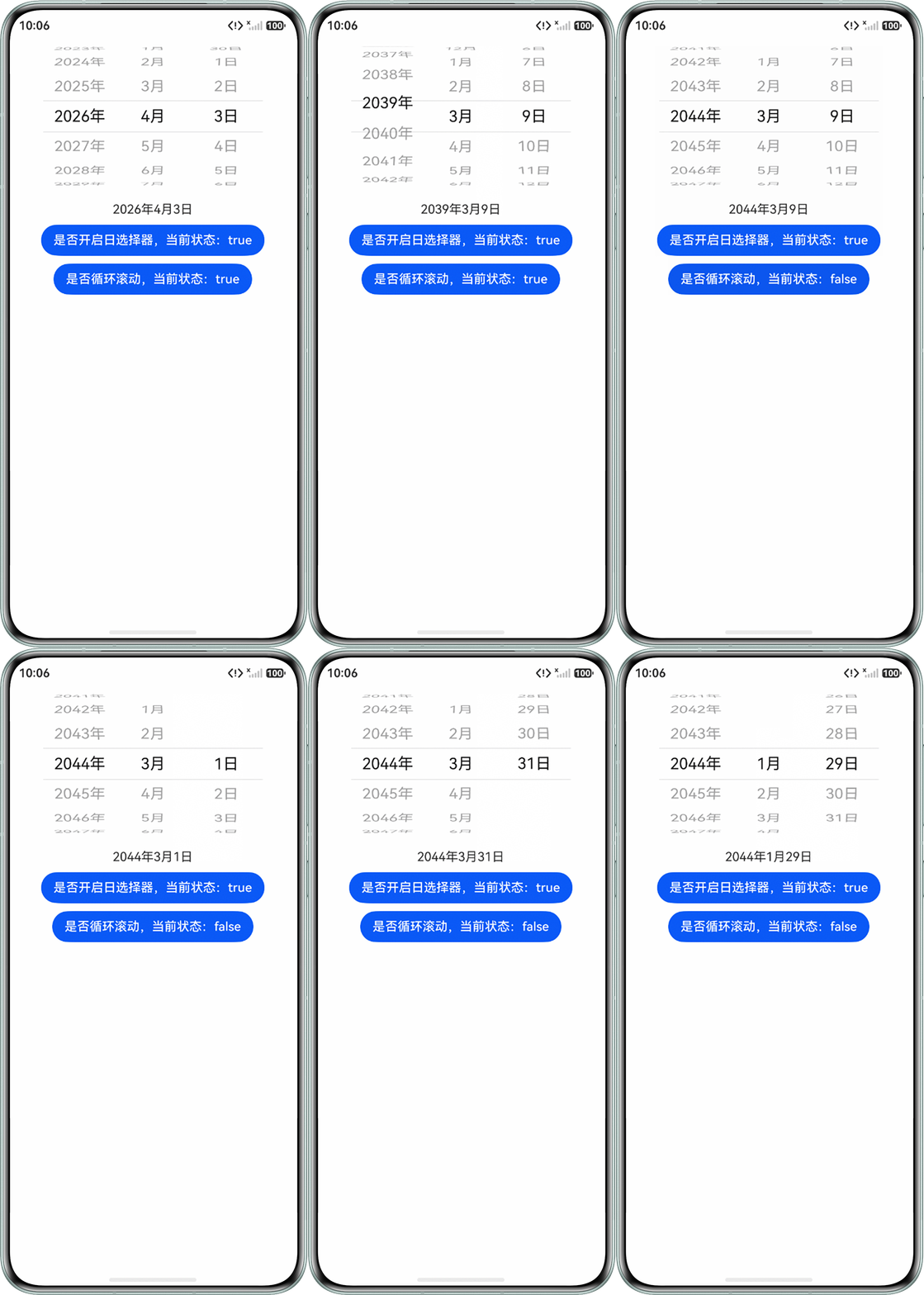
- 场景二:如何使用UIPickerComponent实现日期选择器的效果,当选择器选中的日期变化时会打印日期?
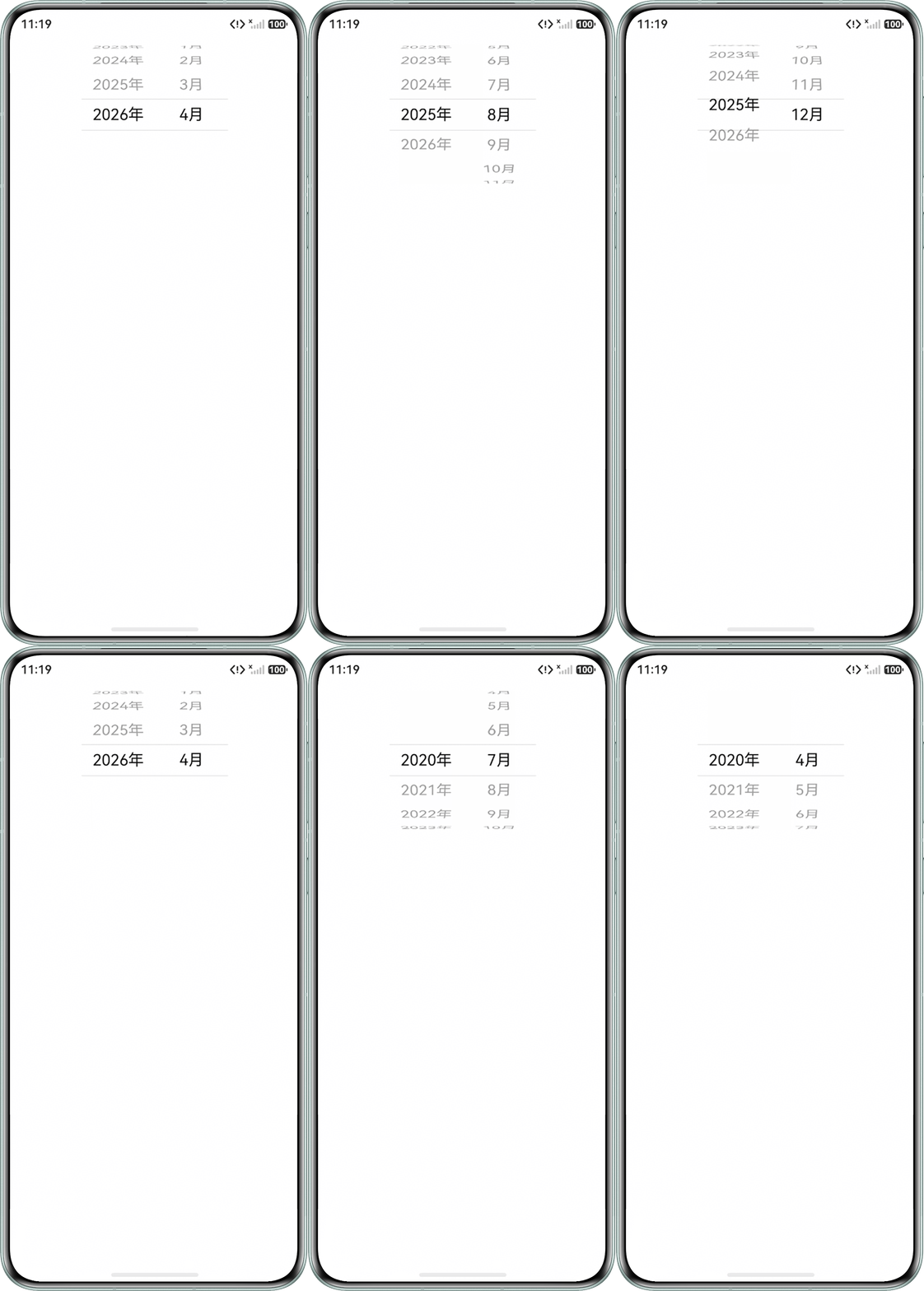
- 场景三:如何使用UIPickerComponent实现年月选择器限制范围,第一年只显示开始月及以后的月,最后一年只显示结束月及之前的月?
背景知识
- UIPickerComponent是从API version 22开始支持的容器,是用于实现用户选择操作的组件。它支持从一组有限的选项中让用户进行单选。支持多个子组件。当多个UIPickerComponent一起使用可应用于时间选择、日期选择、地区选择、状态选择等多种场景。
- UIPickerComponent支持子组件类型:Text、Image、Row和SymbolGlyph。
- UIPickerComponent支持渲染控制类型:if/else和ForEach。
- UIPickerComponent组件onChange方法只需要有选项一半以上进入区域就可以选中,且动画结束较快。相较于其他选择器,不会出现回调延迟问题。
解决方案
- 场景一:首先创建省市区会用到的数据,通过3个UIPickerComponent组件分别用于选择省市区。当省变动时更新市的数据列,市变动时更新区的数据列。可参考自定义地区选择器。
- 场景二:创建3个UIPickerComponent组件分别表示年、月、日的选择器。由于日的数量和年/月有关,当年/月出现变化时在onChange方法中根据年/月的值设置日的数据列表,实现日期联动。如果年/月变化导致日超出当月时,设置为当月最后一天。通过Watch装饰器监听日期信息是否变化,发生变化将其打印。可参考如下代码:
@Entry
@Component
struct UIPickerComponentExample1 {
  yearList: number[] = []; // 年选择器数据
  monthList: number[] = []; // 月选择器数据
  dayList31: number[] = []; // 31日数据
  @State dayList: number[] = []; // 日选择器数据(会根据年月进行设置)
  @State yearIndex: number = 0; // 年选择器索引
  @State monthIndex: number = 0; // 月选择器索引
  @State dayIndex: number = 0; // 日选择器索引
  @State showDay: boolean = true; // 是否展示日
  @State @Watch('dateChange') dateText: string = ''; // 选中的日期信息
  @State isLoop: boolean = true; // 是否循环滚动

  // 日期值变化时触发
  dateChange() {
    console.info(this.dateText); // 打印选择器日期
  }

  // 当年月发生改变时修改日选择器数据
  updateDayList() {
    let month = this.monthList[this.monthIndex];
    let year = this.yearList[this.yearIndex];
    let list: number[] = [];
    if (month === 1 || month === 3 || month === 5 || month === 7 || month === 8 || month === 10 || month === 12) {
      list = this.dayList31; // 大月时选择器数据
    } else if (month === 4 || month === 6 || month === 9 || month === 11) {
      list = this.dayList31.slice(0, 30); // 小月时选择器数据
    } else if ((year % 4 === 0) && (year % 100 !== 0) || (year % 400 === 0)) {
      list = this.dayList31.slice(0, 29); // 闰年2月选择器数据
    } else {
      list = this.dayList31.slice(0, 28); // 平年2月选择器数据
    }
    this.dayIndex = (this.dayIndex <= list.length - 1) ? this.dayIndex : (list.length - 1); // 日超出当月时,设置为当月最后一天
    this.dayList = list; // 修改选择器日选择器数据
  }

  // 初始化年月日列表
  setList() {
    for (let year = 1900; year <= 2100; year++) {
      this.yearList.push(year);
    }
    for (let month = 1; month <= 12; month++) {
      this.monthList.push(month);
    }
    for (let day = 1; day <= 31; day++) {
      this.dayList31.push(day);
    }
  }

  // 初始化日期
  setDate(date: Date) {
    this.yearIndex = this.yearList.findIndex((year) => {
      return year === date.getFullYear();
    });
    this.monthIndex = this.monthList.findIndex((month) => {
      return month === date.getMonth() + 1;
    });
    this.dayIndex = this.dayList31.findIndex((day) => {
      return day === date.getDate();
    });
  }

  aboutToAppear(): void {
    this.setList(); // 初始化年月日的列表数据
    this.setDate(new Date()); // 初始化选择器日期为当天日期
    this.updateDayList(); // 更新当月的日列表
    this.dateText = `${this.yearList[this.yearIndex]}年${this.monthList[this.monthIndex]}月` +
      (this.showDay ? `${this.dayList[this.dayIndex]}日` : ``);
  }

  build() {
    Column({ space: 10 }) {
      Row() {
        UIPickerComponent({ selectedIndex: this.yearIndex }) {
          ForEach(this.yearList, (year: number) => {
            Text(`${year}年`);
          });
        }
        .onChange((selectIndex) => {
          this.yearIndex = selectIndex;
          this.updateDayList();
          this.dateText = `${this.yearList[this.yearIndex]}年${this.monthList[this.monthIndex]}月` +
            (this.showDay ? `${this.dayList[this.dayIndex]}日` : ``);
        })
        .selectionIndicator({ type: PickerIndicatorType.DIVIDER })
        .width('25%')
        .canLoop(this.isLoop); // 是否循环

        UIPickerComponent({ selectedIndex: this.monthIndex }) {
          ForEach(this.monthList, (month: number) => {
            Text(`${month}月`);
          });
        }
        .onChange((selectIndex) => {
          this.monthIndex = selectIndex;
          this.updateDayList();
          this.dateText = `${this.yearList[this.yearIndex]}年${this.monthList[this.monthIndex]}月` +
            (this.showDay ? `${this.dayList[this.dayIndex]}日` : ``);
        })
        .selectionIndicator({ type: PickerIndicatorType.DIVIDER })
        .width('25%')
        .canLoop(this.isLoop); // 是否循环

        if (this.showDay) { // 是否展示日选择器
          UIPickerComponent({ selectedIndex: this.dayIndex }) {
            ForEach(this.dayList, (day: number) => {
              Text(`${day}日`);
            });
          }
          .onChange((selectIndex) => {
            this.dayIndex = selectIndex;
            this.dateText = `${this.yearList[this.yearIndex]}年${this.monthList[this.monthIndex]}月` +
              (this.showDay ? `${this.dayList[this.dayIndex]}日` : ``);
          })
          .selectionIndicator({ type: PickerIndicatorType.DIVIDER })
          .width('25%')
          .canLoop(this.isLoop); // 是否循环
        }
      };

      Text(this.dateText);
      Button(`是否开启日选择器,当前状态:${this.showDay}`).onClick(() => {
        this.showDay = !this.showDay;
        this.dateText = `${this.yearList[this.yearIndex]}年${this.monthList[this.monthIndex]}月` +
          (this.showDay ? `${this.dayList[this.dayIndex]}日` : ``);
      });
      Button(`是否循环滚动,当前状态:${this.isLoop}`).onClick(() => {
        this.isLoop = !this.isLoop;
      });
    }
    .height('100%')
    .width('100%');
  }
}
运行效果图如下:
- 场景三:该场景主要在于根据当前选中的年动态渲染展示的月。当前年为第一年或者最后一年时通过slice截取需要展示的月份,如第一年设置为4月-12月,最后一年设置为1月-4月,中间的其他年设置为1-12月,通过ForEach渲染月选择器的数据列。可参考如下代码:
@Entry
@Component
struct UIPickerComponentExample2 {
  startYear: number = 2020; // 选择器开始年
  startMonth: number = 4; // 选择器第一年的开始月
  endYear: number = new Date().getFullYear(); // 选择器结束年
  endMonth: number = new Date().getMonth() + 1; // 选择器最后一年的结束月
  yearList: number[] = []; // 年选择器数据
  monthList12: number[] = [1, 2, 3, 4, 5, 6, 7, 8, 9, 10, 11, 12];
  @State yearIndex: number = 0;
  @State monthList: number[] = []; // 月选择器数据
  @State monthIndex: number = 0;

  aboutToAppear(): void {
    for (let year = this.startYear; year <= this.endYear; year++) {
      this.yearList.push(year);
    }
    this.yearIndex = this.yearList.length - 1;
    this.monthList = this.monthList12.slice(0, this.endMonth);
    this.monthIndex = this.monthList.length - 1;
  }

  build() {
    Column() {
      Row() {
        UIPickerComponent({ selectedIndex: this.yearIndex }) {
          ForEach(this.yearList, (year: number) => {
            Text(`${year}年`);
          });
        }
        .onChange((selectIndex) => {
          this.monthIndex = 0; // 年变动时月索引设置为0
          if (selectIndex === 0) {
            this.monthList = this.monthList12.slice(this.startMonth - 1); // 第一年月列表
          } else if (selectIndex === this.yearList.length - 1) {
            this.monthList = this.monthList12.slice(0, this.endMonth); // 最后一年月列表
          } else {
            this.monthList = this.monthList12; // 正常的12个月
          }
        })
        .selectionIndicator({ type: PickerIndicatorType.DIVIDER })
        .width('25%')
        .canLoop(false);

        UIPickerComponent({ selectedIndex: this.monthIndex }) {
          ForEach(this.monthList, (month: number) => {
            Text(`${month}月`);
          });
        }
        .selectionIndicator({ type: PickerIndicatorType.DIVIDER })
        .width('25%')
        .canLoop(false)
        .onChange((selectIndex) => {
          this.monthIndex = selectIndex;
        });
      };
    }
    .width('100%')
    .height('100%');

  }
}
运行效果图如下: