问题现象
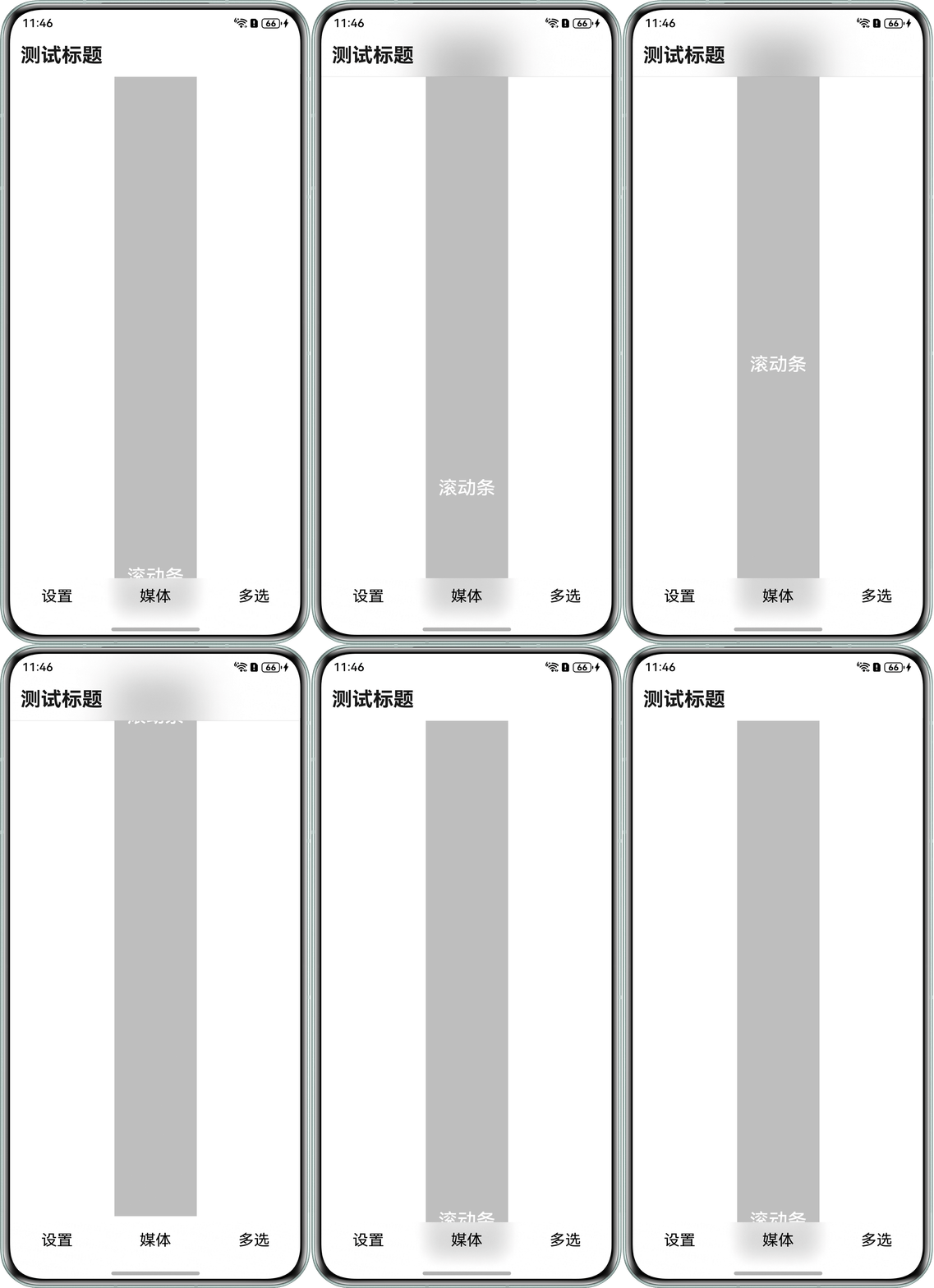
场景一:如何实现HdsNavigation内容区延伸到工具栏区域并设置模糊效果?
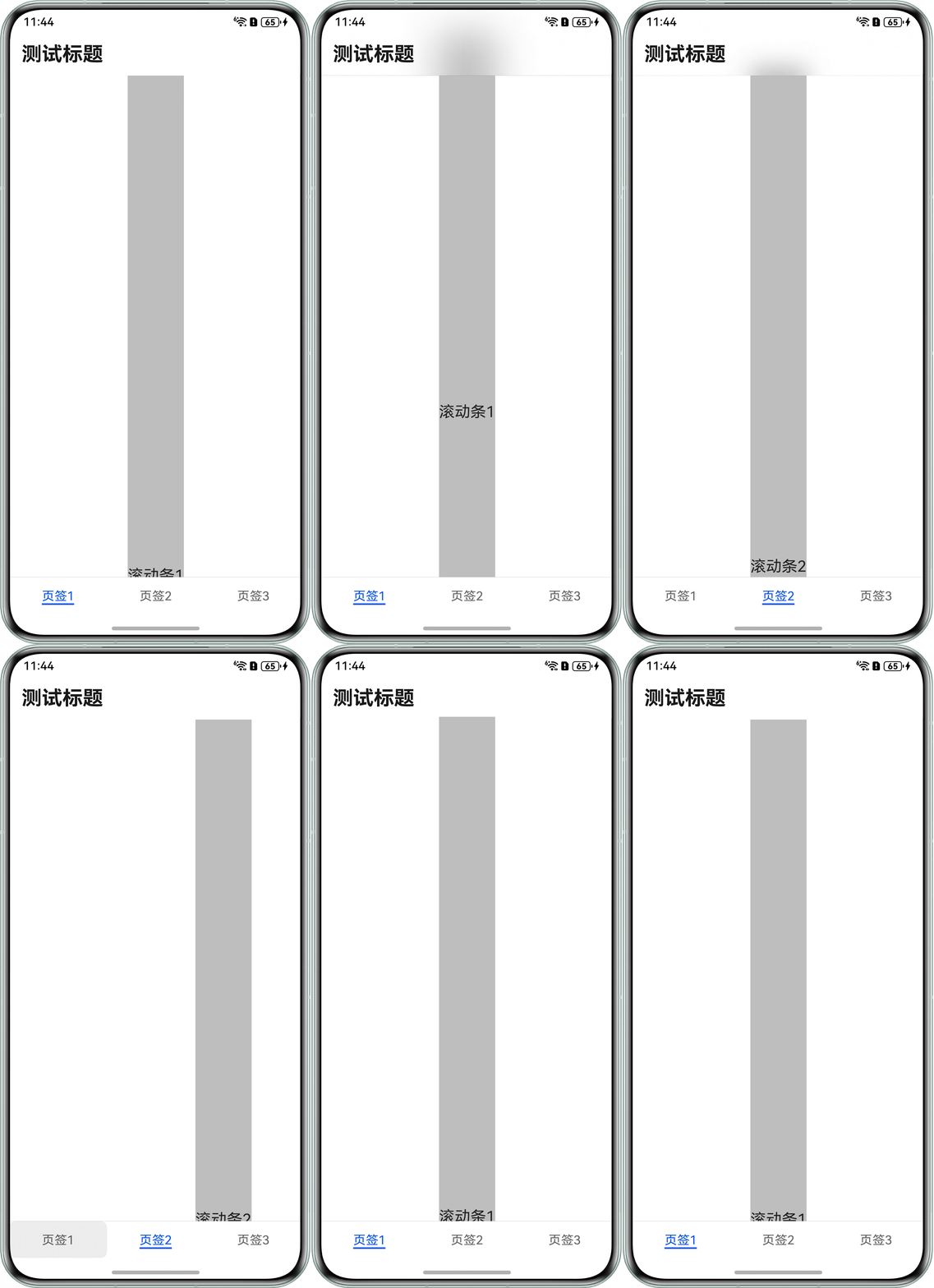
场景二:HdsNavigation嵌套HdsTabs出现滚动模糊效果丢失,问题代码如下所示:
import {
  BlurStrategy,
  HdsNavigation,
  HdsNavigationTitleMode,
  HdsTabs,
  ScrollEffectType
} from '@hms.hds.hdsBaseComponent';
import { LengthMetrics } from '@kit.ArkUI';

@Entry
@Component
struct Index {
  pageInfo: NavPathStack = new NavPathStack();
  scroller: Scroller = new Scroller();
  tabList: string[] = ['页签1', '页签2', '页签3'];
  @State currentIndex: number = 0;

  build() {
    HdsNavigation(this.pageInfo) {
      HdsTabs({ barPosition: BarPosition.End }) {
        ForEach(this.tabList, (item: string, index: number) => {
          TabContent() {
            Scroll(this.scroller) {
              Text(`滚动条${index + 1}`)
                .fontSize(20)
                .height(1320) // 使子组件的布局尺寸超过父组件的尺寸,内容可以滚动。
                .backgroundColor('#40000000');
            }
            .scrollBar(BarState.Off)
            .padding({ top: 56 })
            .width('100%')
            .height('100%');
          }
          .tabBar(item);
        });
      }
      .onChange((index: number) => {
        this.currentIndex = index;
      });
    }
    .bindToScrollable([this.scroller])
    .hideBackButton(true)
    .titleBar({
      style: {
        scrollEffectOpts: {
          enableScrollEffect: true,
          scrollEffectType: ScrollEffectType.COMMON_BLUR, // 设置模糊类型
          blurEffectiveStartOffset: LengthMetrics.vp(0), // 动态样式线性过渡的起始位置
          blurEffectiveEndOffset: LengthMetrics.vp(20) // 动态样式线性过渡的终点位置
        },
        blurStrategy: BlurStrategy.ADAPTIVE,
        originalStyle: { backgroundStyle: { backgroundColor: '#00ffffff' } },
        scrollEffectStyle: { backgroundStyle: { backgroundColor: '#00ffffff' } }
      },
      content: {
        title: {
          mainTitle: '测试标题'
        }
      }
    })
    .hideToolBar(true)
    .titleMode(HdsNavigationTitleMode.MINI);
  }
}
问题效果图如下所示:
场景三:如何为HdsNavigation的标题栏与HdsTabs的底部悬浮页签设置沉浸式光感材质效果(如颜色反射)?
背景知识
- HdsNavigation:路由导航的根视图容器,一般作为Page页面的根容器使用,其内部默认包含了标题栏、内容区和工具栏。
- bindToScrollable:绑定导航组件和可滚动容器组件,动态显隐标题区域,状态栏及底部自定义区域。
- titleBar:设置HdsNavigation组件titleBar区域样式以及内容。
- toolbarConfiguration:设置工具栏内容。
- HdsTabs:一般作为Page页面的根容器使用。
- onWillHide:TabContent即将隐藏时触发此回调。
- onAnimationStart:切换动画开始时触发该回调。
- Scroll:可滚动的容器组件,当子组件的布局尺寸超过父组件的尺寸时,内容可以滚动。
- Scroller:可滚动容器组件的控制器,可以将此组件绑定至容器组件,然后通过它控制容器组件的滚动。
解决方案
- 场景一:实现HdsNavigation内容区延伸到工具栏区域并设置模糊效果。
- titleBar的TitleBarStyleOptions存在scrollEffectOpts属性,可设置标题栏动态模糊效果。
- 工具栏区域的动态模糊效果,可将toolBar与内容区重叠,可通过设置toolbarConfiguration的barStyle属性为BarStyle.STACK,并设置toolBar为透明模糊材质。
参考代码如下所示:
import { BlurStrategy, HdsNavigation, HdsNavigationTitleMode, ScrollEffectType } from '@kit.UIDesignKit';
import { LengthMetrics } from '@kit.ArkUI';

@Entry
@Component
struct ExtensionToolBar {
  pageInfo: NavPathStack = new NavPathStack();
  toolBarList: string[] = ['设置', '媒体', '多选'];
  scroller: Scroller = new Scroller();

  @Builder
  toolBarBuilder() {
    Row() {
      ForEach(this.toolBarList, (item: string) => {
        Column() {
          Text(item)
            .fontSize(20)
            .fontWeight(FontWeight.Normal)
            .fontColor('#000000');
        };
      });
    }
    .width('100%')
    .height('100%')
    .justifyContent(FlexAlign.SpaceAround);
  }

  build() {
    HdsNavigation(this.pageInfo) {
      Column() {
        Scroll(this.scroller) {
          Column() {
            Text('滚动条')
              .padding(16)
              .fontSize(24)
              .fontWeight(FontWeight.Medium)
              .fontColor('#ffffff')
              .backgroundColor('#40000000')
              .height('1320'); // 使子组件的布局尺寸超过父组件的尺寸,内容可以滚动。
          }
          .justifyContent(FlexAlign.Center)
          .padding({ top: 56, bottom: 56 });
        }
        .height('100%')
        .width('100%')
        .scrollBar(BarState.Off);
      }
      .height('100%')
      .width('100%');
    }
    .bindToScrollable([this.scroller]) // 绑定导航组件和可滚动容器组件
    .height('100%')
    .width('100%')
    .hideBackButton(true)
    .titleBar({
      style: {
        scrollEffectOpts: {
          enableScrollEffect: true,
          scrollEffectType: ScrollEffectType.COMMON_BLUR, // 设置模糊类型
          blurEffectiveStartOffset: LengthMetrics.vp(0), // 动态样式线性过渡的起始位置
          blurEffectiveEndOffset: LengthMetrics.vp(20) // 动态样式线性过渡的终点位置
        },
        blurStrategy: BlurStrategy.ADAPTIVE,
        originalStyle: { backgroundStyle: { backgroundColor: '#00ffffff' } },
        scrollEffectStyle: { backgroundStyle: { backgroundColor: '#00ffffff' } }
      },
      content: {
        title: {
          mainTitle: '测试标题'
        }
      }
    })
    .titleMode(HdsNavigationTitleMode.MINI)
    .toolbarConfiguration(this.toolBarBuilder, {
      backgroundColor: '#00ffffff',
      backgroundBlurStyle: BlurStyle.Thin,
      backgroundBlurStyleOptions: {
        policy: BlurStyleActivePolicy.FOLLOWS_WINDOW_ACTIVE_STATE, // 模糊激活策略
        inactiveColor: '#00ffffff' // 模糊不生效时使用的背景色
      },
      hideItemValue: false,
      barStyle: BarStyle.STACK // 工具栏的布局样式采用层叠布局
    });
  }
}
效果图如下所示:
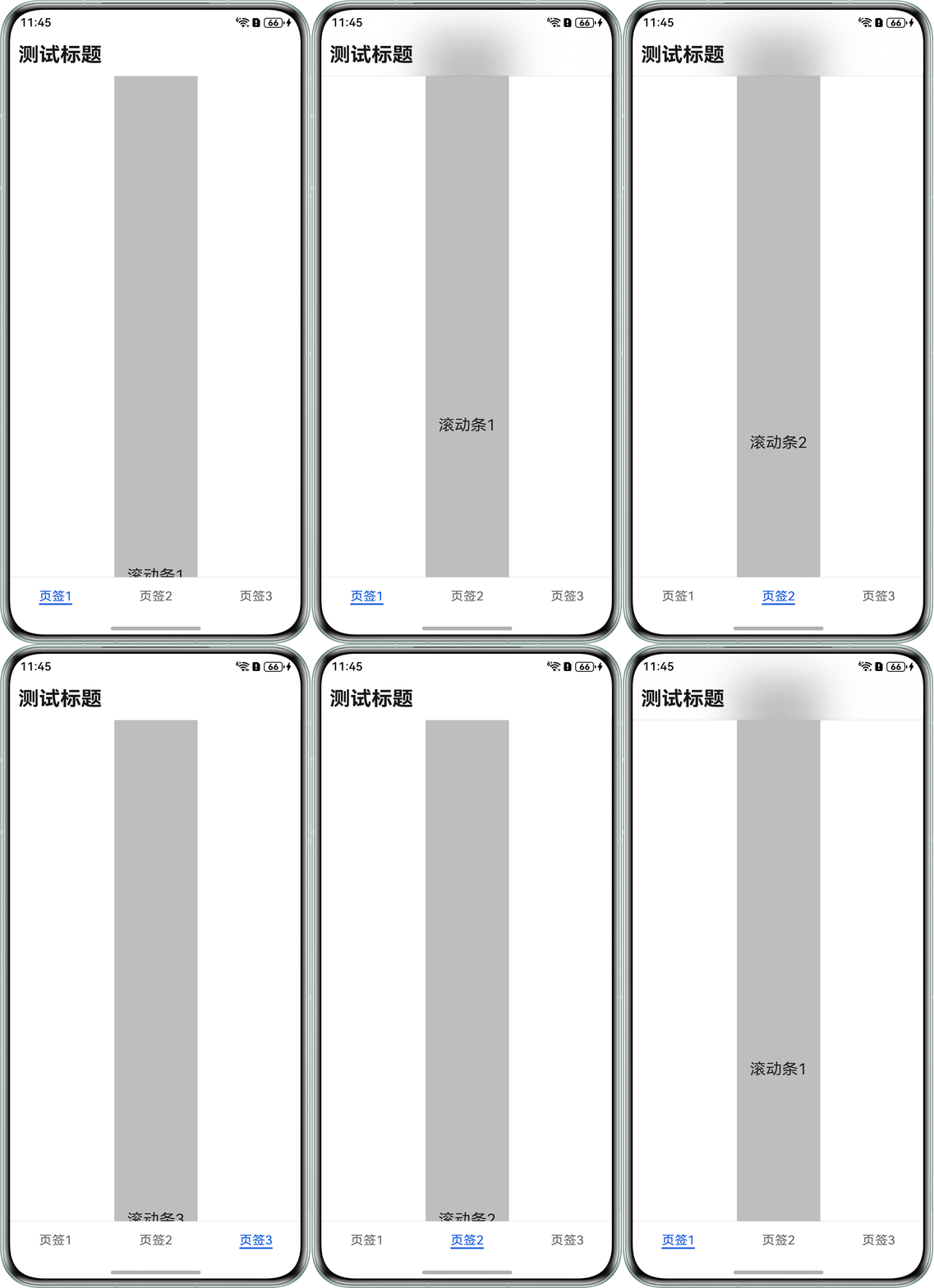
- 场景二:实现HdsNavigation嵌套HdsTabs滚动模糊效果正常显示。
- 每个Tab单独创建独立的Scroller,互不共用,避免彼此干扰。
- bindToScrollable仅动态绑定当前Tab的Scroller。
- 通过onWillHide记录对应Tab的滚动偏移量,通过onAnimationStart恢复对应Tab的滚动位置。
参考代码如下所示:
import {
  BlurStrategy,
  HdsNavigation,
  HdsNavigationTitleMode,
  HdsTabs,
  ScrollEffectType
} from '@hms.hds.hdsBaseComponent';
import { LengthMetrics } from '@kit.ArkUI';

class TabItem {
  id: number;
  name: string;
  scroller: Scroller;
  offsetY: number;

  constructor(id: number, name: string, scroller: Scroller, offsetY: number) {
    this.id = id;
    this.name = name;
    this.scroller = scroller;
    this.offsetY = offsetY;
  }
}

@Entry
@Component
struct Index {
  pageInfo: NavPathStack = new NavPathStack();
  scroller1: Scroller = new Scroller();
  scroller2: Scroller = new Scroller();
  scroller3: Scroller = new Scroller();
  tabList: TabItem[] = [
    new TabItem(0, '页签1', this.scroller1, 0),
    new TabItem(1, '页签2', this.scroller2, 0),
    new TabItem(2, '页签3', this.scroller3, 0)
  ];
  @State currentIndex: number = 0;

  // 只绑定当前显示的scroller
  getCurScroll() {
    return this.tabList[this.currentIndex].scroller;
  }

  build() {
    HdsNavigation(this.pageInfo) {
      HdsTabs({ barPosition: BarPosition.End }) {
        ForEach(this.tabList, (item: TabItem, index: number) => {
          TabContent() {
            Scroll(item.scroller) {
              Text(`滚动条${index + 1}`)
                .padding(16)
                .fontSize(20)
                .height(1320) // 使子组件的布局尺寸超过父组件的尺寸,内容可以滚动。
                .backgroundColor('#40000000');
            }
            .scrollBar(BarState.Off)
            .padding({ top: 56 })
            .width('100%')
            .height('100%');
          }
          .tabBar(item.name)
          // 保存滚动量
          .onWillHide(() => {
            const offset = item.scroller.currentOffset();
            item.offsetY = offset.yOffset;
          });
        });
      }
      // 回复滚动量
      .onAnimationStart((index: number, targetIndex: number) => {
        console.info(`Succeeded in getting info.Index:${index},targetIndex:${targetIndex}.`);
        this.currentIndex = targetIndex;
        this.tabList[this.currentIndex].scroller.scrollTo({
          xOffset: 0,
          yOffset: this.tabList[this.currentIndex].offsetY
        });
      });
    }
    // 只绑定当前页面的scroller,避免互相干扰
    .bindToScrollable([this.getCurScroll()])
    .hideBackButton(true)
    .titleBar({
      style: {
        scrollEffectOpts: {
          enableScrollEffect: true,
          scrollEffectType: ScrollEffectType.COMMON_BLUR, // 设置模糊类型
          blurEffectiveStartOffset: LengthMetrics.vp(0), // 动态样式线性过渡的起始位置
          blurEffectiveEndOffset: LengthMetrics.vp(20) // 动态样式线性过渡的终点位置
        },
        blurStrategy: BlurStrategy.ADAPTIVE,
        originalStyle: { backgroundStyle: { backgroundColor: '#00ffffff' } },
        scrollEffectStyle: { backgroundStyle: { backgroundColor: '#00ffffff' } }
      },
      content: {
        title: {
          mainTitle: '测试标题'
        }
      }
    })
    .hideToolBar(true)
    .titleMode(HdsNavigationTitleMode.MINI);
  }
}
效果图如下所示:
- 场景三:为HdsNavigation的标题栏与HdsTabs的底部悬浮页签设置沉浸式材质效果。
1.在aboutToAppear生命周期中,调用hdsMaterial.getSystemMaterialTypes()获取当前设备支持的材质类型。若设备不支持hdsMaterial.MaterialType.IMMERSIVE沉浸式材质,则降级使用hdsMaterial.MaterialLevel.SMOOTH效果以优化性能。
2.在HdsTabs组件的barFloatingStyle属性中,配置systemMaterialEffect,设置materialType为hdsMaterial.MaterialType.ADAPTIVE,并将materialLevel绑定为前序获取到的设备材质等级,为底部悬浮页签应用沉浸光感材质。
3.在HdsNavigation组件的titleBar属性中,配置style.systemMaterialEffect,使标题栏按钮区域同样呈现出材质效果。
参考代码如下所示:
import {
  HdsNavigation,
  HdsNavigationTitleMode,
  HdsTabs,
  HdsTabsController,
  HdsNavigationMenuContentOptions,
  ScrollEffectType,
  hdsMaterial
} from '@kit.UIDesignKit';
import { SymbolGlyphModifier } from '@kit.ArkUI';

@Entry
@Component
struct Index {
  private scrollerForScroll: Scroller = new Scroller();
  private controller: HdsTabsController = new HdsTabsController();
  @State customMaterialLevel: hdsMaterial.MaterialLevel = hdsMaterial.MaterialLevel.EXQUISITE;

  private menus: HdsNavigationMenuContentOptions = {
    value: [{
      content: {
        label: 'menu1',
        icon: $r('sys.symbol.square_and_pencil')
      }
    }, {
      content: {
        label: 'menu2',
        icon: $r('sys.symbol.star')
      }
    }, {
      content: {
        label: 'menu3',
        icon: $r('sys.symbol.more')
      }
    }]
  };

  aboutToAppear(): void {
    // 获取系统支持的材质类型,用于根据设备能力选择合适的材质等级
    let materialTypes: Array<hdsMaterial.MaterialType> = hdsMaterial.getSystemMaterialTypes();
    if (materialTypes.indexOf(hdsMaterial.MaterialType.IMMERSIVE) < 0) {
      // 当前设备不支持IMMERSIVE材质类型,则使用SMOOTH效果以优化性能,降低卡顿和发热风险
      this.customMaterialLevel = hdsMaterial.MaterialLevel.SMOOTH;
    }
  }

  build() {
    HdsNavigation() {
      HdsTabs({ controller: this.controller }) {
        ForEach(MENU_CONFIG, (item: MenuItem) => {
          TabContent() {
            Stack() {
              Scroll(this.scrollerForScroll) {
                Column() {
                  Row() {
                    Button('Button1').backgroundColor(Color.Green)
                    Button('Button2').backgroundColor(Color.Green)
                  }
                  // ...
                }
                .padding({ bottom: 90 })
                .height('100%')
                .justifyContent(FlexAlign.End)
              }
              .clipContent(ContentClipMode.SAFE_AREA)
              .height('100%')
            }
          }
          .tabBar(new BottomTabBarStyle({
            normal: item.symbolGlyph,
            selected: item.symbolGlyph1
          }, item.label))
        })
      }
      .barOverlap(true)
      .vertical(false)
      .barPosition(BarPosition.End)
      .barFloatingStyle({
        barBottomMargin: 28,
        systemMaterialEffect: {
          materialType: hdsMaterial.MaterialType.ADAPTIVE,
          materialLevel: this.customMaterialLevel // 底部悬浮页签自定义沉浸光感材质效果
        }
      })
    }
    .mode(NavigationMode.Stack)
    .titleBar({
      content: {
        title: {
          mainTitle: 'MainTitle',
        },
        menu: this.menus,
      },
      style: {
        scrollEffectOpts: {
          enableScrollEffect: false,
          scrollEffectType: ScrollEffectType.GRADIENT_BLUR,
        },
        systemMaterialEffect: {
          materialType: hdsMaterial.MaterialType.ADAPTIVE,
          materialLevel: this.customMaterialLevel // 标题栏按钮自定义沉浸光感材质效果
        },
      },
      avoidLayoutSafeArea: false,
      enableComponentSafeArea: false
    })
    .bindToScrollable([this.scrollerForScroll])
    .hideBackButton(false)
    .titleMode(HdsNavigationTitleMode.MINI)
    .ignoreLayoutSafeArea([LayoutSafeAreaType.SYSTEM], [LayoutSafeAreaEdge.TOP, LayoutSafeAreaEdge.BOTTOM])
  }
}

interface MenuItem {
  symbolGlyph: SymbolGlyphModifier;
  symbolGlyph1: SymbolGlyphModifier;
  label: string;
  defaultBgColor: ResourceColor;
  hoverBgColor: ResourceColor;
  pressBgColor: ResourceColor;
}

const MENU_CONFIG: MenuItem[] = [
  {
    symbolGlyph: new SymbolGlyphModifier($r('sys.symbol.alarm_fill_1')).renderingStrategy(SymbolRenderingStrategy.MULTIPLE_COLOR)
      .fontColor([$r('sys.color.ohos_id_color_bottom_tab_icon_off'),
        $r('sys.color.ohos_id_color_bottom_tab_icon_auxcolor_off02')]),
    symbolGlyph1: new SymbolGlyphModifier($r('sys.symbol.alarm_fill_1')).renderingStrategy(SymbolRenderingStrategy.MULTIPLE_COLOR)
      .fontColor([$r('sys.color.ohos_id_color_activated'), $r('sys.color.ohos_id_color_primary_contrary')]),
    label: '闹钟',
    defaultBgColor: Color.Transparent,
    hoverBgColor: $r('sys.color.ohos_id_color_hover'),
    pressBgColor: $r('sys.color.ohos_id_color_click_effect'),
  },
  {
    symbolGlyph: new SymbolGlyphModifier($r('sys.symbol.worldclock_fill_2')).renderingStrategy(SymbolRenderingStrategy.MULTIPLE_COLOR)
      .fontColor([$r('sys.color.ohos_id_color_bottom_tab_icon_off'),
        $r('sys.color.ohos_id_color_bottom_tab_icon_auxcolor_off02')]),
    symbolGlyph1: new SymbolGlyphModifier($r('sys.symbol.worldclock_fill_2')).renderingStrategy(SymbolRenderingStrategy.MULTIPLE_COLOR)
      .fontColor([$r('sys.color.ohos_id_color_activated'), $r('sys.color.ohos_id_color_primary_contrary')]),
    label: '时钟',
    defaultBgColor: Color.Transparent,
    hoverBgColor: $r('sys.color.ohos_id_color_hover'),
    pressBgColor: $r('sys.color.ohos_id_color_click_effect')
  },
  {
    symbolGlyph: new SymbolGlyphModifier($r('sys.symbol.stopwatch_2')).renderingStrategy(SymbolRenderingStrategy.MULTIPLE_COLOR)
      .fontColor([$r('sys.color.ohos_id_color_bottom_tab_icon_off'),
        $r('sys.color.ohos_id_color_bottom_tab_icon_auxcolor_off02')]),
    symbolGlyph1: new SymbolGlyphModifier($r('sys.symbol.stopwatch_2')).renderingStrategy(SymbolRenderingStrategy.MULTIPLE_COLOR)
      .fontColor([$r('sys.color.ohos_id_color_activated'), $r('sys.color.ohos_id_color_primary_contrary')]),
    label: '秒表',
    defaultBgColor: Color.Transparent,
    hoverBgColor: $r('sys.color.ohos_id_color_hover'),
    pressBgColor: $r('sys.color.ohos_id_color_click_effect')
  }
];