背景知识
- CustomDialog:用于创建自定义弹窗的核心组件,支持开发者根据业务需求灵活设计弹窗样式与交互逻辑。
- Grid:网格容器,由“行”和“列”分割的单元格所组成,通过指定“项目”所在的单元格做出各种各样的布局。
- emitter:提供了在同一进程不同线程间或同一线程内发送和处理事件的能力,支持持续订阅事件、单次订阅事件、取消订阅事件及发送事件到事件队列。
- @ohos.inputMethod (输入法框架):本模块主要面向普通前台应用(备忘录、信息、设置等系统应用与三方应用),提供对输入法(输入法应用)的控制、管理能力,包括显示/隐藏输入法软键盘、切换输入法、获取所有输入法列表等等。
- attach:自绘控件绑定输入法。
解决方案
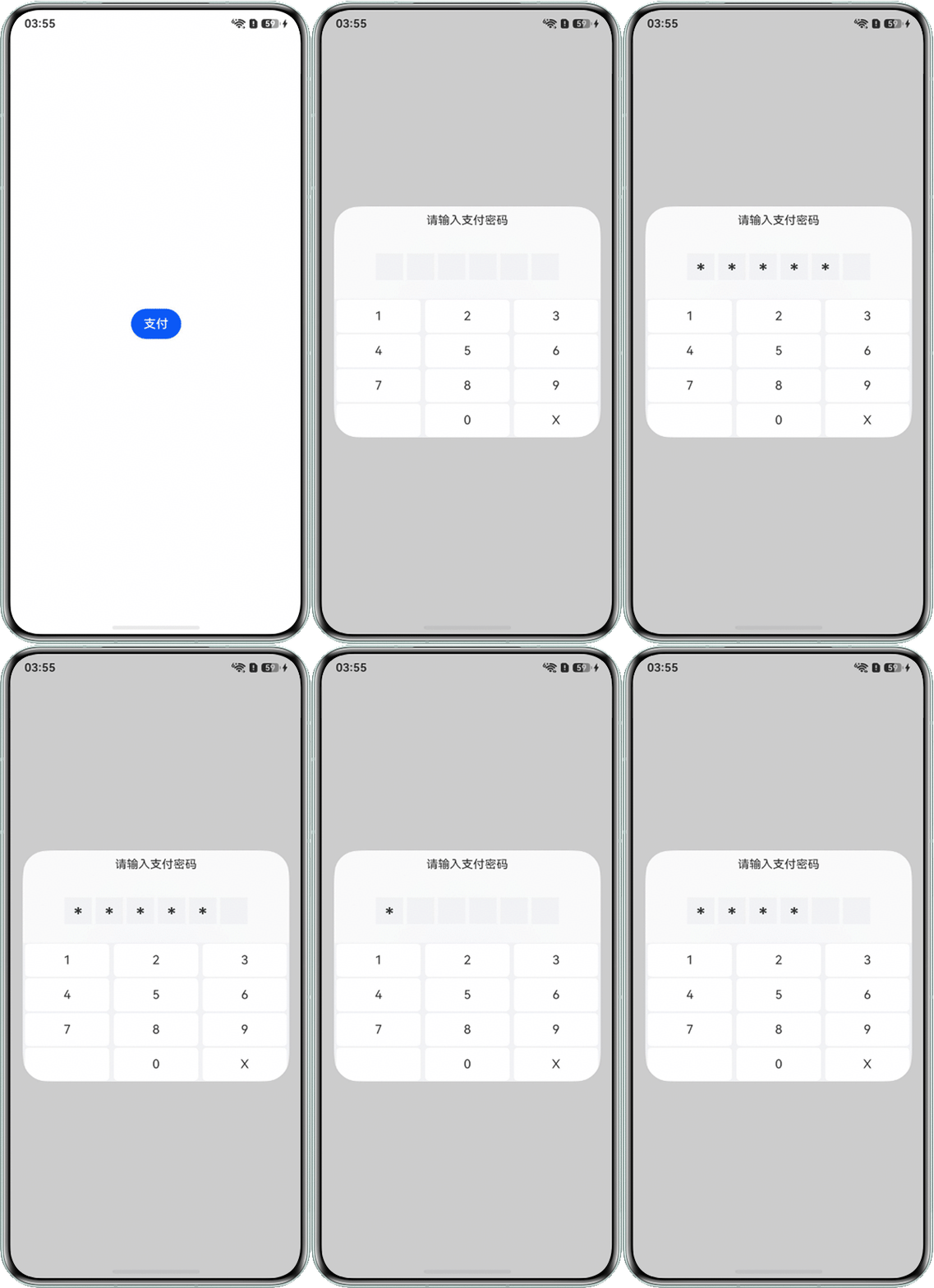
- 方案一:通过自定义弹窗实现密码输入框和自定义数字键盘,详细方案如下:
@CustomDialog
  //弹窗装饰器,自定义弹窗
struct CustomDialogExample {
  controller: CustomDialogController = new CustomDialogController({
    builder: CustomDialogExample({}),
  });
  services: Array<string> = ['1', '2', '3', '4', '5', '6', '7', '8', '9', ' ', '0', 'X'];
  numbers: Array<number> = [1, 2, 3, 4, 5, 6];
  @State Inputs: Array<string> = [];

  build() { //设置弹窗内容
    Column() {
      Text('请输入支付密码')
        .fontSize(15)
        .margin({ top: 10, bottom: 10 });
      Row({ space: 5 }) {
        ForEach(this.numbers, (item: number) => {
          Text(this.Inputs.length >= item ? '*' : '')
            .width(35)
            .height(35)
            .fontSize(25)
            .fontWeight(500)
            .backgroundColor('#f1f3f5')
            .textAlign(TextAlign.Center)
            .padding({ top: 8 });
        });
      }
      .width('100%')
      .height('10%')
      .justifyContent(FlexAlign.Center);
      Grid() {
        ForEach(this.services, (service: string) => {
          GridItem() {
            Text(service)
              .height('95%')
              .backgroundColor(Color.White)
              .textAlign(TextAlign.Center)
              .borderRadius(5)
              .width('95%');
          }
          .backgroundColor('#f1f3f5')
          .onClick(() => {
            if (service != 'X' && service != ' ') {
              this.Inputs.push(service);
              if (this.Inputs.length == 6) {
                this.controller.close();
              }
            }
            if (service == 'X') {
              this.Inputs.pop();
            }
          });
        });
      }
      .width('100%')
      .height('60%')
      .rowsTemplate('1fr 1fr 1fr 1fr')
      .columnsTemplate('1fr 1fr 1fr');
    }
    .width('100%')
    .height('100%')
    .justifyContent(FlexAlign.SpaceBetween);
  }
}

@Entry
@Component
struct Index {
  dialogController: CustomDialogController = new CustomDialogController({
    //弹窗构造器,与装饰器相呼应
    builder: CustomDialogExample(),
    height: '40%'
  });

  build() {
    Column() {
      Button('支付')
        .onClick(() => {
          this.dialogController.open();
        });
    }
    .width('100%')
    .height('100%')
    .justifyContent(FlexAlign.SpaceAround);
  }
}
效果预览:
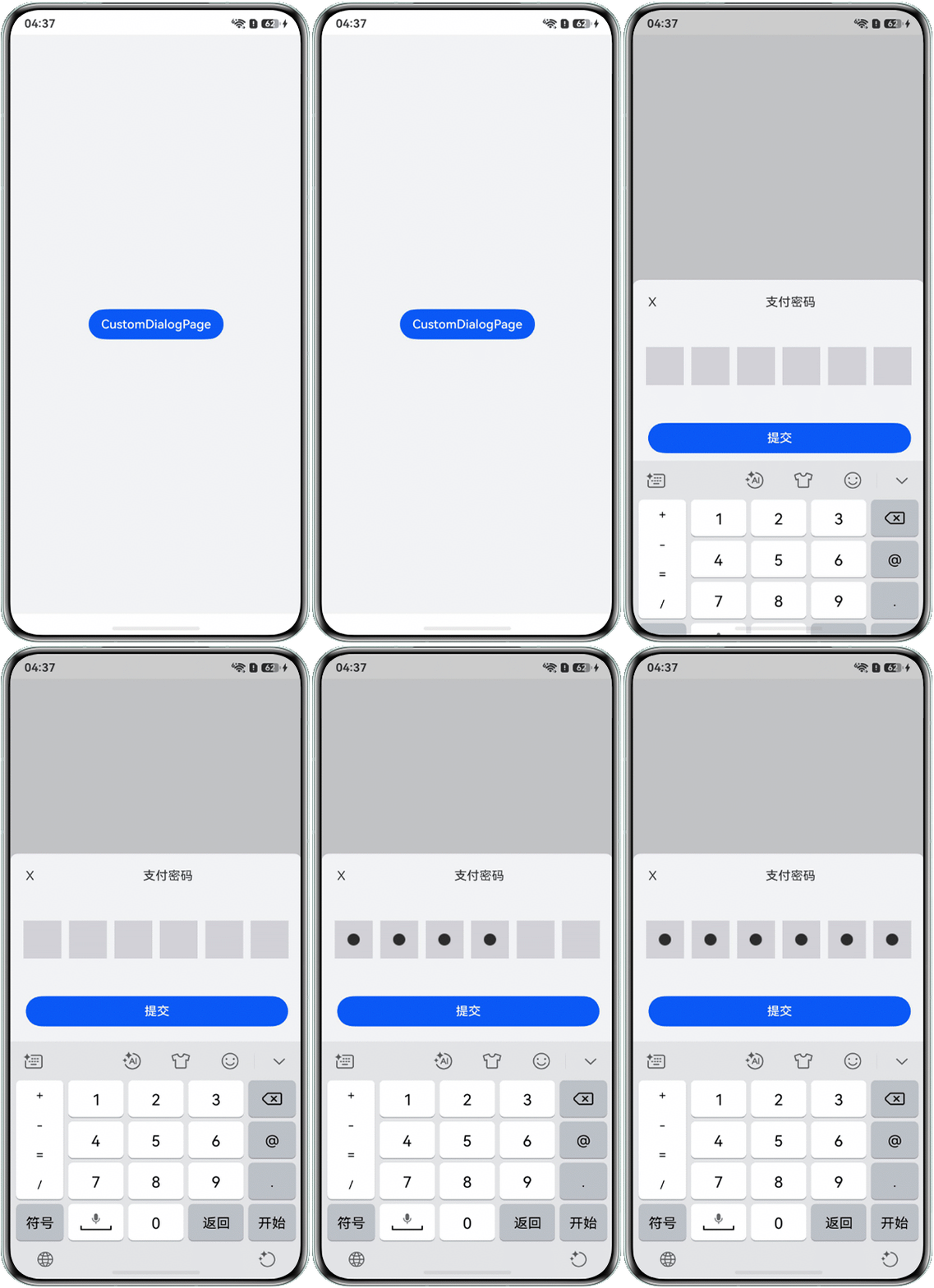
- 方案二:通过自定义弹窗实现密码输入弹窗的主体页面,并通过输入法框架提供的attach方法给自定义密码输入框绑定软键盘。
- 创建@CustomDialog组件,用来承载密码输入弹窗的主体页面。
@CustomDialog @Component export struct CustomEditDialogWidget { controller?: CustomDialogController; textInputConString = () => { }; inputType: InputType = InputType.Normal; build() { Column() { Flex({ direction: FlexDirection.Row, justifyContent: FlexAlign.SpaceBetween }) { Text('X') .onClick(() => { if (this.controller) { this.controller.close(); } }) .margin({ left: 20 }); Text('支付密码'); Text(''); } .margin({ top: 20 }) .width('100%'); VerifyCodeViewComponent() .margin({ top: 25, bottom: 25 }); Button('提交') .margin({ left: 20, right: 20, bottom: 20 }) .width('90%') .backgroundColor('#0a59f7'); } .justifyContent(FlexAlign.Center) .alignItems(HorizontalAlign.Start) .width('100%') .borderRadius({ topLeft: 10, topRight: 10, bottomLeft: 0, bottomRight: 0 }) .backgroundColor('#f1f3f5'); } } - 在@Entry下创建并加载弹窗。
@Entry @Component struct CustomDialogPage { private message: string = 'CustomDialogPage'; customDialogController: CustomDialogController = new CustomDialogController({ builder: CustomEditDialogWidget({ inputType: InputType.Password, textInputConString: () => { } }), alignment: DialogAlignment.Bottom, customStyle: true, cornerRadius: { bottomLeft: '0vp', bottomRight: '0vp' }, keyboardAvoidDistance: LengthMetrics.px(0) }); build() { Row() { Column() { Button(this.message).onClick(() => { this.customDialogController.open(); }); } .width('100%'); } .backgroundColor('#f1f3f5') .height('100%'); } } - 验证码场景要完全禁止对输入验证码的选中、复制等功能,因此可以使用Text组件完成。
/** * 知识点:部分验证码场景要完全禁止对输入验证码的选中、复制等功能,因此可以使用Text组件完成 */ @Builder buildVerifyCodeComponent() { Flex({ direction: FlexDirection.Row, alignItems: ItemAlign.Center, justifyContent: FlexAlign.SpaceBetween }) { ForEach(this.codeIndexArray, (item: number) => { Row() { // 实际使用时可替换为需要的图标 Image($r('app.media.dot')) .visibility(this.hideText[item] ? Visibility.Visible : Visibility.Hidden); } .verifyCodeUnitStyle(); }, (item: number) => item.toString()); } .id(this.verifyID) /** * 知识点:当可视面积变化时进行绑定注册与解绑 */ .onBlur(() => { this.off(); }) .backgroundColor(Color.Transparent) .height(50) .margin({ left: $r('sys.float.ohos_id_card_margin_start'), right: $r('sys.float.ohos_id_card_margin_start') }) .defaultFocus(true) .onClick(() => { // 知识点:点击本组件时弹出输入法,因为这里使用的是Text组件,因此需要重新attach,而不能直接使用showSoftKeyboard this.attachAndListen(); }); } - 通过attach绑定输入法。
/** * 知识点:绑定输入法 */ async attach() { await this.inputController.attach(true, this.textConfig); } - 订阅输入法代插入、向左删除事件,从而获得键盘输入内容。
/**
 *  知识点:订阅输入法代插入、向左删除事件,从而获得键盘输入内容
 */
listen() {
  if (this.isListen) {
    return;
  }
  this.inputController.on('insertText', (text: string) => {
    if (this.codeText.length >= this.verifyCodeLength || isNaN(Number(text)) || text === ' ') {
      return;
    }
    this.codeText += text;
    this.hideText += '*';
    if (this.codeText.length === this.verifyCodeLength) {
    }
  });
  this.inputController.on('deleteLeft', () => {
    this.codeText = this.codeText.substring(0, this.codeText.length - 1);
    this.hideText = this.hideText.substring(0, this.hideText.length - 1);
  });
  this.isListen = true;
}
完整示例参考如下:
- CustomDialogPage.ets,创建并初始化自定义弹窗,用来承载密码输入弹窗的主体页面。
import { LengthMetrics } from '@kit.ArkUI'; import { VerifyCodeViewComponent } from './VerifyCodeView'; @Entry @Component struct CustomDialogPage { private message: string = 'CustomDialogPage'; customDialogController: CustomDialogController = new CustomDialogController({ builder: CustomEditDialogWidget({ inputType: InputType.Password, textInputConString: () => { } }), alignment: DialogAlignment.Bottom, customStyle: true, cornerRadius: { bottomLeft: '0vp', bottomRight: '0vp' }, keyboardAvoidDistance: LengthMetrics.px(0) }); build() { Row() { Column() { Button(this.message).onClick(() => { this.customDialogController.open(); }); } .width('100%'); } .backgroundColor('#f1f3f5') .height('100%'); } } @CustomDialog @Component export struct CustomEditDialogWidget { controller?: CustomDialogController; textInputConString = () => { }; inputType: InputType = InputType.Normal; build() { Column() { Flex({ direction: FlexDirection.Row, justifyContent: FlexAlign.SpaceBetween }) { Text('X') .onClick(() => { if (this.controller) { this.controller.close(); } }) .margin({ left: 20 }); Text('支付密码'); Text(''); } .margin({ top: 20 }) .width('100%'); VerifyCodeViewComponent() .margin({ top: 25, bottom: 25 }); Button('提交') .margin({ left: 20, right: 20, bottom: 20 }) .width('90%') .backgroundColor('#0a59f7'); } .justifyContent(FlexAlign.Center) .alignItems(HorizontalAlign.Start) .width('100%') .borderRadius({ topLeft: 10, topRight: 10, bottomLeft: 0, bottomRight: 0 }) .backgroundColor('#f1f3f5'); } } - VerifyCodeView.ets,在该页面使用Text组件代替输入框,并给页面绑定输入法。
import { inputMethod } from '@kit.IMEKit';
import { emitter } from '@kit.BasicServicesKit';

@Extend(Row)
function verifyCodeUnitStyle() {
  .width(60)
  .height('100%')
  .backgroundColor('#d1d1d6')
  .margin({
    left: 5,
    right: 5
  });
}

@Component
struct VerifyCodeComponentWithoutCursor {
  private codeText: string = '';
  @State hideText: string = '';
  private readonly verifyID: string = 'verifyCodeComponent';
  // 创建输入法框架的控制器
  private inputController: inputMethod.InputMethodController = inputMethod.getController();
  // 监听键盘弹出收起状态
  private isKeyboardShow: boolean = false;
  private verifyCodeLength: number = 6;
  private isListen: boolean = false;
  private textConfig: inputMethod.TextConfig = {
    inputAttribute: {
      textInputType: inputMethod.TextInputType.NUMBER,
      enterKeyType: inputMethod.EnterKeyType.GO
    },
  };
  private codeIndexArray: Array<number> = Array.from([0, 1, 2, 3, 4, 5]);

  aboutToAppear(): void {
    // 注册返回监听,包括点击手机返回键返回与侧滑返回
    this.listenBackPress();
    this.attachAndListen();
  }

  async attachAndListen(): Promise<void> {
    focusControl.requestFocus(this.verifyID);
    await this.inputController.attach(true, this.textConfig);
    this.listen();
    this.isKeyboardShow = true;
  }

  listenBackPress() {
    let innerEvent: emitter.InnerEvent = {
      eventId: 5
    };
    // 收到eventId为5的事件后执行回调函数
    emitter.on(innerEvent, () => {
      if (this.isKeyboardShow) {
        // 退出文本编辑状态
        this.inputController.hideTextInput();
        this.isKeyboardShow = false;
      } else {
      }
    });
  }

  aboutToDisappear(): void {
    this.off();
    // 关闭事件监听
    emitter.off(5);
  }
  /**
   *  知识点:绑定输入法
   */
  async attach() {
    await this.inputController.attach(true, this.textConfig);
  }
  /**
   * 知识点:解绑
   */
  off(): void {
    this.inputController.off('insertText');
    this.inputController.off('deleteLeft');
    this.isListen = false;
    // 退出文本编辑状态
    this.inputController.hideTextInput();
    this.isKeyboardShow = false;
  }
  /**
   *  知识点:订阅输入法代插入、向左删除事件,从而获得键盘输入内容
   */
  listen() {
    if (this.isListen) {
      return;
    }
    this.inputController.on('insertText', (text: string) => {
      if (this.codeText.length >= this.verifyCodeLength || isNaN(Number(text)) || text === ' ') {
        return;
      }
      this.codeText += text;
      this.hideText += '*';
      if (this.codeText.length === this.verifyCodeLength) {
      }
    });
    this.inputController.on('deleteLeft', () => {
      this.codeText = this.codeText.substring(0, this.codeText.length - 1);
      this.hideText = this.hideText.substring(0, this.hideText.length - 1);
    });
    this.isListen = true;
  }
  /**
   * 知识点:部分验证码场景要完全禁止对输入验证码的选中、复制等功能,因此可以使用Text组件完成
   */
  @Builder
  buildVerifyCodeComponent() {
    Flex({ direction: FlexDirection.Row, alignItems: ItemAlign.Center, justifyContent: FlexAlign.SpaceBetween }) {
      ForEach(this.codeIndexArray, (item: number) => {
        Row() {
          // 实际使用时可替换为需要的图标
          Image($r('app.media.dot'))
            .visibility(this.hideText[item] ? Visibility.Visible : Visibility.Hidden);
        }
        .verifyCodeUnitStyle();
      }, (item: number) => item.toString());
    }
    .id(this.verifyID)
    /**
     * 知识点:当可视面积变化时进行绑定注册与解绑
     */
    .onBlur(() => {
      this.off();
    })
    .backgroundColor(Color.Transparent)
    .height(50)
    .margin({ left: $r('sys.float.ohos_id_card_margin_start'), right: $r('sys.float.ohos_id_card_margin_start') })
    .defaultFocus(true)
    .onClick(() => {
      //  知识点:点击本组件时弹出输入法,因为这里使用的是Text组件,因此需要重新attach,而不能直接使用showSoftKeyboard
      this.attachAndListen();
    });
  }
  build() {
    Row() {
      this.buildVerifyCodeComponent();
    };
  }
}
/**
 * 验证码组件:禁用选中、复制、光标
 */
@Component
export struct VerifyCodeViewComponent {
  build() {
    Column() {
      VerifyCodeComponentWithoutCursor();
    }
    .height(100)
    .width('100%')
    .justifyContent(FlexAlign.Center);
  }
}
效果预览:
- 创建@CustomDialog组件,用来承载密码输入弹窗的主体页面。