问题现象
一个页面同时设置多个Grid组件时,多个Grid之间会互相响应拖拽事件导致拖拽异常,即使另一个Grid设置不支持编辑,也会响应另一个Grid拖拽事件。
@Entry
@Component
struct GridTestPage {
  @State numbers: string[] = []
  @State numbers1: string[] = []
  scroller: Scroller = new Scroller()
  scroller1: Scroller = new Scroller()
  @State text: string = 'drag'

  @Builder
  pixelMapBuilder() { // 拖拽过程样式
    Column() {
      Text(this.text)
        .fontSize(16)
        .backgroundColor(0xF9CF93)
        .width(80)
        .height(80)
        .textAlign(TextAlign.Center)
    }
  }

  aboutToAppear() {
    for (let i = 1; i <= 15; i++) {
      this.numbers.push(i + '')
      this.numbers1.push(i + 'a')
    }
  }

  changeIndex(index1: number, index2: number) { // 交换数组位置
    let temp: string;
    temp = this.numbers[index1];
    this.numbers[index1] = this.numbers[index2];
    this.numbers[index2] = temp;
  }

  build() {
    Column({ space: 5 }) {
      Grid(this.scroller) {
        ForEach(this.numbers, (day: string) => {
          GridItem() {
            Text(day)
              .fontSize(16)
              .backgroundColor(0xF9CF93)
              .width(80)
              .height(80)
              .textAlign(TextAlign.Center)
          }
        })
      }
      .columnsTemplate('1fr 1fr 1fr')
      .columnsGap(10)
      .rowsGap(10)
      .width('90%')
      .backgroundColor(0xFAEEE0)
      .height(300)
      .editMode(true) // 设置Grid是否进入编辑模式,进入编辑模式可以拖拽Grid组件内部GridItem
      .supportAnimation(true)
      .onItemDragStart((event: ItemDragInfo, itemIndex: number) => { // 第一次拖拽此事件绑定的组件时,触发回调。
        this.text = this.numbers[itemIndex]
        return this.pixelMapBuilder() // 设置拖拽过程中显示的图片。
      })
      .onItemDrop((event: ItemDragInfo, itemIndex: number, insertIndex: number,
        isSuccess: boolean) => { // 绑定此事件的组件可作为拖拽释放目标,当在本组件范围内停止拖拽行为时,触发回调。
        // isSuccess=false时,说明drop的位置在grid外部;insertIndex>length时,说明有新增元素的事件发生
        if (!isSuccess || insertIndex >= this.numbers.length) {
          return
        }
        this.changeIndex(itemIndex, insertIndex)
      })

      Grid(this.scroller1) {
        ForEach(this.numbers1, (day: string) => {
          GridItem() {
            Text(day)
              .fontSize(16)
              .backgroundColor(0xF9CF93)
              .width(80)
              .height(80)
              .textAlign(TextAlign.Center)
          }
        })
      }
      .columnsTemplate('1fr 1fr 1fr')
      .columnsGap(10)
      .rowsGap(10)
      .width('90%')
      .backgroundColor(0xFAEEE0)
      .height(300)
      .editMode(false) // 设置Grid是否进入编辑模式,进入编辑模式可以拖拽Grid组件内部GridItem
      .supportAnimation(true)
      .margin({ top: 30 })
      .onItemDragStart((event: ItemDragInfo, itemIndex: number) => { // 第一次拖拽此事件绑定的组件时,触发回调。

      })
      .onItemDrop((event: ItemDragInfo, itemIndex: number, insertIndex: number,
        isSuccess: boolean) => { // 绑定此事件的组件可作为拖拽释放目标,当在本组件范围内停止拖拽行为时,触发回调。

      })
    }.width('100%').margin({ top: 5 })
  }
}
问题效果预览:
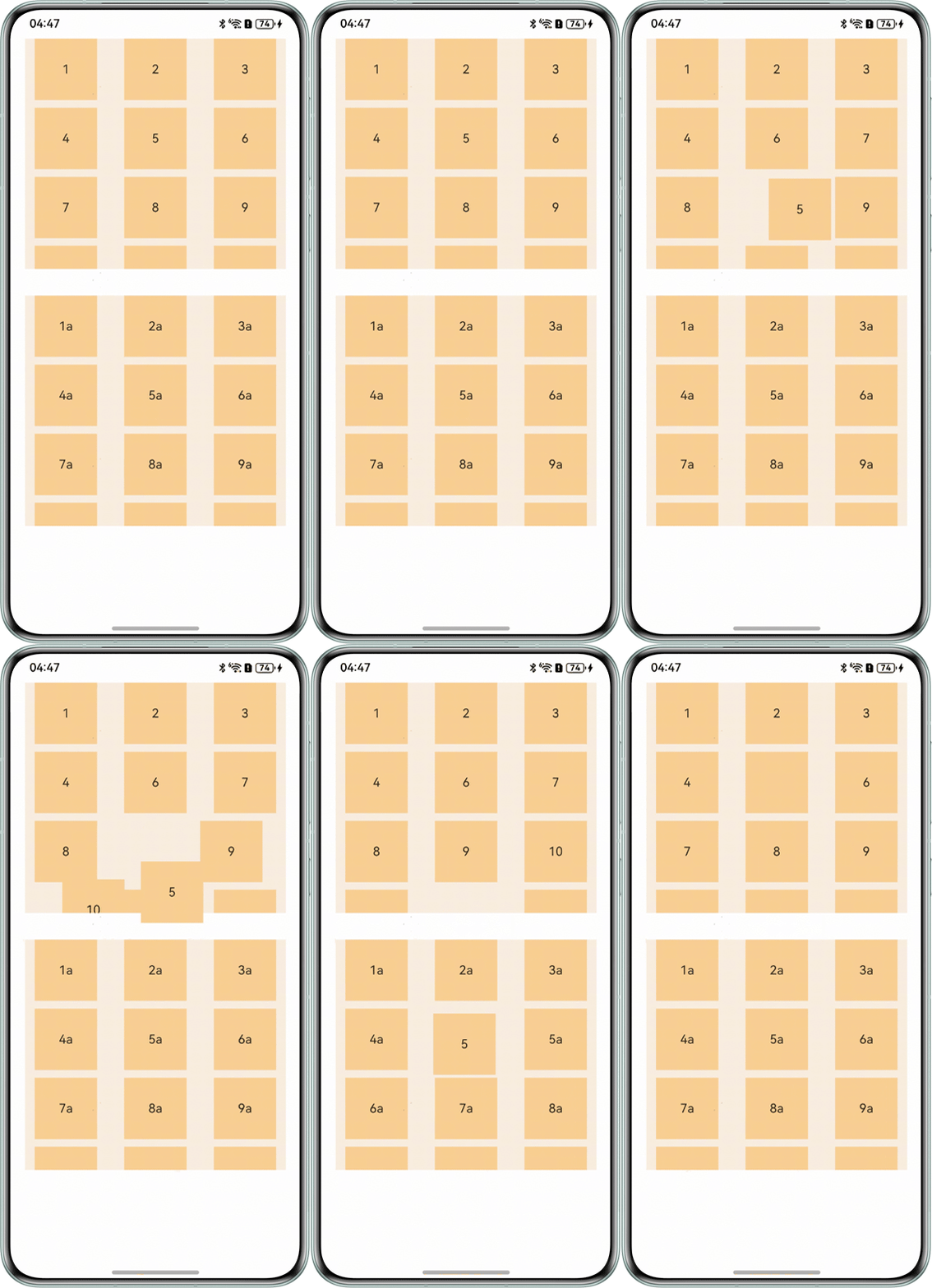
拖拽第一个Grid组件的第5个GridItem到第二Grid组件区域,数据没有交换成功的同时第一个组件的5消失不见。
背景知识
Grid组件是一种网格容器,由“行”和“列”分割的单元格所组成,通过指定“项目”所在的单元格做出各种各样的布局。在实现以上功能之前需要先了解基本的Grid组件事件以及官方基础参考示例: 示例5(Grid拖拽场景)。
- Grid组件的编辑模式是editMode属性控制,当该属性参数为true时代表Grid组件进入编辑状态,可以进行拖动,参数为false时,不可进行编辑拖拽。
- Grid组件数据位置的交换原理是生成Grid的源数组的元素位置交换,并通过监测源数组的变化刷新UI的过程。多个Grid存在多个源数组,多个滚动控制器。目前多个Grid放置在一个页面上,一个Grid组件的Item拖拽到其它Grid组件上时,第一个Grid组件的this.changeIndex(itemIndex, insertIndex)事件的insertIndex参数无法获取到,导致Grid拖拽位置交换异常。
解决方案
- 原理阐述:以两个Grid组件不可交换数据为例:
- 通过设置判定变量,当某一个组件的onItemDragStart事件触发时,设置变量指向该Grid组件。设置判定变量:
@State whoIsStart: number = -1; // 两个Grid的onItemDragStart触发时分别赋值为0和1
- 重新构造changeIndex()位置交换函数,并设置if-else判定语句,判定是否是该Grid组件的onItemDragDrop事件,从而判定是否交换位置。修改函数判定条件并新增交换函数:
方式一:构造两个交换数组分别对指定的Grid组件进行数据交换。
changeIndex(index1: number, index2: number) {
  let temp: string = 'changeIndex';
  if (this.whoIsStart === 0 && index2 !== -1) {
    temp = this.numbers[index1];
  }
  console.info(`temp:${temp}`);
  this.whoIsStart = -1;
}

// 交换数组位置。
changeIndex1(index1: number, index2: number) {
  let temp: string = 'changeIndex1';
  if (this.whoIsStart === 1 && index2 !== -1) {
    temp = this.numbers1[index1];
  }
  console.info(`temp:${temp}`);
  this.whoIsStart = -1;
}
方式二:设置一个交换函数内部判定是否属于同一个Grid的数据来源。
changeIndex(index1: number, index2: number) {
  let numberArr: Array<string> = this.whoIsStart === 0 ? this.numbers : this.numbers1;
  let temp: string;
  temp = numberArr[index1] + "";
  if (this.whoIsStart === 0 && index2 !== -1) {
    this.numbers[index1] = numberArr[index2];
    this.numbers[index2] = temp;
  } else if (this.whoIsStart === 1 && index2 !== -1) {
    this.numbers1[index1] = numberArr[index2];
    this.numbers1[index2] = temp;
  }
  this.changeData = [];
  this.text = "";
  this.whoIsStart = -1;
}
- 分别调用changeIndex()函数。完整示例代码如下:
// 交换数组位置。
@Entry
@Component
struct ChangeIndexOne {
  @State whoIsStart: number = -1;
  @State numbers: string[] = [];
  @State numbers1: string[] = [];

  changeIndex(index1: number, index2: number) {
    let temp: string = 'changeIndex';
    if (this.whoIsStart === 0 && index2 !== -1) {
      temp = this.numbers[index1];
    }
    console.info(`temp:${temp}`);
    this.whoIsStart = -1;
  }

  // 交换数组位置。
  changeIndex1(index1: number, index2: number) {
    let temp: string = 'changeIndex1';
    if (this.whoIsStart === 1 && index2 !== -1) {
      temp = this.numbers1[index1];
    }
    console.info(`temp:${temp}`);
    this.whoIsStart = -1;
  }

  build() {
    Column() {
      Grid() {
      }
      .onItemDrop((event: ItemDragInfo, itemIndex: number, insertIndex: number, isSuccess: boolean) => {
        if (!isSuccess || insertIndex >= this.numbers.length) {
          return;
        }
        // 判定是否是同一个Grid在交换数据,不是同一个执行返回。
        if (this.whoIsStart !== 0) {
          return;
        }
        this.changeIndex(itemIndex, insertIndex);
        console.info(`event:${event},itemIndex:${itemIndex},isSuccess:${isSuccess}`);
      });

      Grid() {
      }
      .onItemDrop((event: ItemDragInfo, itemIndex: number, insertIndex: number, isSuccess: boolean) => {
        if (!isSuccess || insertIndex >= this.numbers.length) {
          return;
        }
        // 判定是否是同一个Grid在交换数据,不是同一个执行返回。
        if (this.whoIsStart !== 0) {
          return;
        }
        this.changeIndex1(itemIndex, insertIndex);
        console.info(`event:${event},itemIndex:${itemIndex},isSuccess:${isSuccess}`);
      });
    };
  }
}
- 通过设置判定变量,当某一个组件的onItemDragStart事件触发时,设置变量指向该Grid组件。设置判定变量:
- 场景一:多个Grid之间不可交换数据(便捷生活页面,城市服务、手机服务等只能组内交换数据)。
- 若采用上述方式一和上述方式二,当Grid组件过多时,会存在交换函数过多,或判定条件过多的问题。所以对于多个Grid的情况可以对每一个Grid信息进行封装。
@ObservedV2
class GridInfo {
  @Trace numbers: string[] = [];
  @Trace scroller: Scroller;

  constructor(numbers: string[]) {
    this.numbers = numbers;
    this.scroller = new Scroller();
  }
}

由于封装为类之后,涉及深层次的嵌套。此处可以采用ObservedV2或Observed监控对象,当对象属性发生改变时可以刷新UI。
- 创建一个Grid信息对象的数组,通过ForEach循环渲染Grid组件。此时将ForEach渲染的索引赋值给原理阐述中声明的whoIsStart判定变量可判定是哪一个Grid在进行数据交换。完整示例代码如下:
@ObservedV2
class GridInfo {
  @Trace numbers: string[] = [];
  @Trace scroller: Scroller;

  constructor(numbers: string[]) {
    this.numbers = numbers;
    this.scroller = new Scroller();
  }
}

@Entry
@Component
struct GridTestPageOne {
  @State whoIsStart: number = 0;
  @State numbers: string[] = [];
  @State numbersArr: Array<GridInfo> = [];
  @State text: string = 'drag';

  // 拖拽过程样式。
  @Builder
  pixelMapBuilder() {
    Column() {
      Text(this.text)
        .fontSize(16)
        .backgroundColor(0xF9CF93)
        .width(30)
        .height(30)
        .textAlign(TextAlign.Center);
    };
  }

  aboutToAppear() {
    // 第一个Grid数据。
    for (let i = 1; i <= 9; i++) {
      this.numbers.push(i + '');
    }
    this.numbersArr.push(new GridInfo(this.numbers));
    this.numbers = []; // 置空。
    // 第二个Grid数据。
    for (let i = 1; i <= 9; i++) {
      this.numbers.push(i + 'a');
    }
    this.numbersArr.push(new GridInfo(this.numbers));
    this.numbers = []; // 置空。
    // 第三个Grid数据。
    for (let i = 1; i <= 9; i++) {
      this.numbers.push(i + 'b');
    }
    this.numbersArr.push(new GridInfo(this.numbers));
  }

  changeIndex(index1: number, index2: number) {
    // 由于执行函数前已经判定过this.whoIsStart,所以不需要再次判定this.whoIsStart超出数组索引范围。
    if (index2 !== -1) {
      let temp: string = this.numbersArr[this.whoIsStart].numbers[index1];
      this.numbersArr[this.whoIsStart].numbers[index1] = this.numbersArr[this.whoIsStart].numbers[index2];
      this.numbersArr[this.whoIsStart].numbers[index2] = temp;
    }
    this.text = '';
    this.whoIsStart = -1; // 交换完成后重新赋值为-1等待下次数据交换。
  }

  build() {
    Column({ space: 5 }) {
      ForEach(this.numbersArr, (item: GridInfo, indexGrid: number) => {
        Grid(item.scroller) {
          ForEach(item.numbers, (day: string) => {
            GridItem() {
              Text(day)
                .fontSize(16)
                .backgroundColor(0xF9CF93)
                .width(60)
                .height(60)
                .textAlign(TextAlign.Center);
            };
          });
        }
        .columnsTemplate('1fr 1fr 1fr')
        .columnsGap(10)
        .rowsGap(10)
        .width(250)
        .backgroundColor(0xFAEEE0)
        .height(250)
        .editMode(true) // 设置Grid是否进入编辑模式,进入编辑模式可以拖拽Grid组件内部GridItem。
        .onItemDragStart((event: ItemDragInfo, itemIndex: number) => {
          console.info(`event:${event}`);
          this.text = item.numbers[itemIndex];
          this.whoIsStart = indexGrid; // 拖动时将第几个Grid组件在进行拖动,赋值给判定变量。
          return this.pixelMapBuilder(); // 设置拖拽过程中显示的图片。
        })
        .onItemDragMove(() => {
        })
        .onItemDrop((event: ItemDragInfo, itemIndex: number, insertIndex: number, isSuccess: boolean) => {
          if (!isSuccess || insertIndex >= item.numbers.length) {
            return;
          }
          // 判定是不是同一个Grid不可进行数据交换。
          if (this.whoIsStart !== indexGrid) {
            return;
          }
          this.changeIndex(itemIndex, insertIndex); // 同一个Grid执行数据交换。
          console.info(`event:${event},itemIndex:${itemIndex}`);
        });
      });
    }.width('100%').margin({ top: 5 });
  }
}
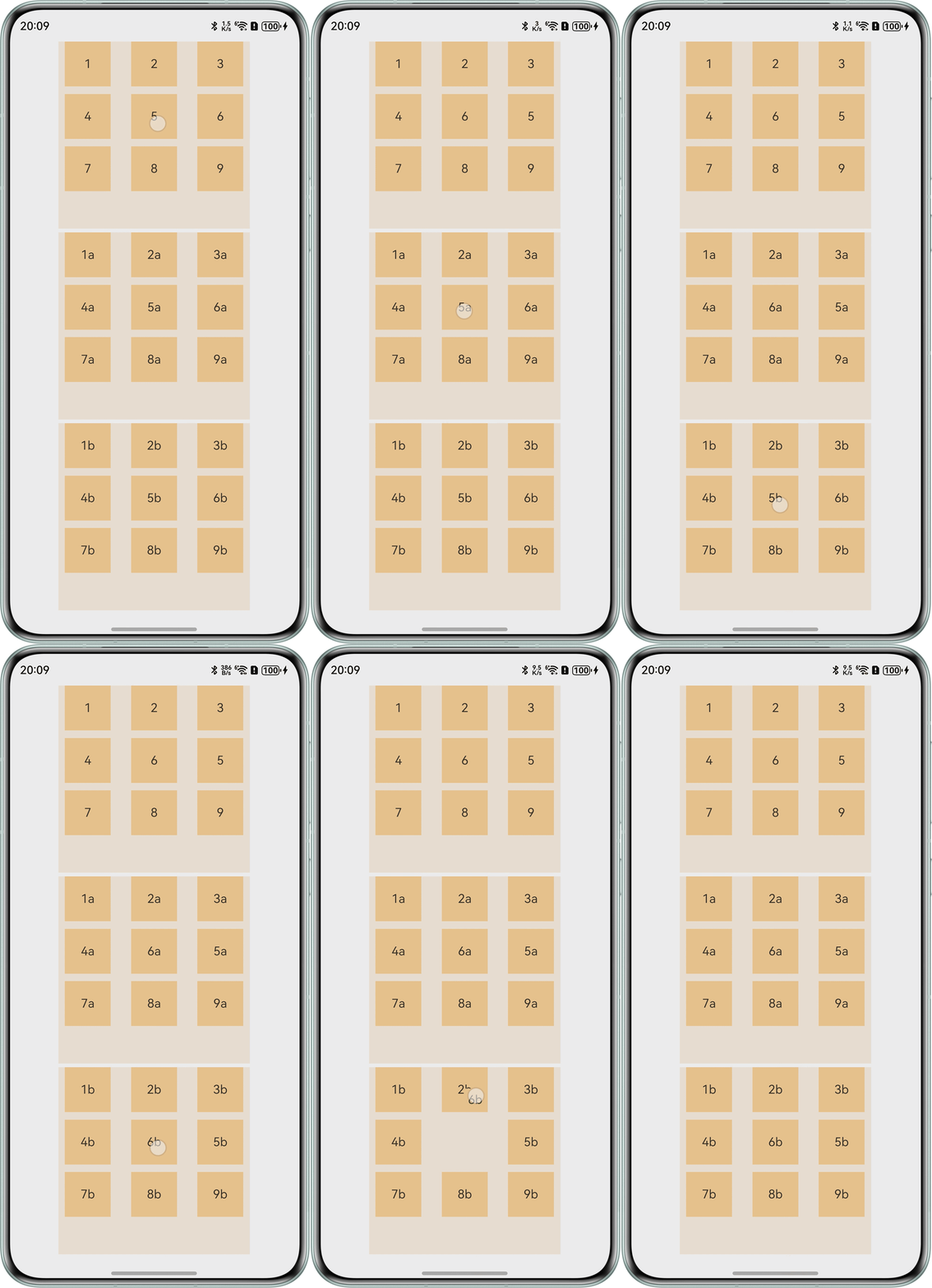
效果预览:
- 若采用上述方式一和上述方式二,当Grid组件过多时,会存在交换函数过多,或判定条件过多的问题。所以对于多个Grid的情况可以对每一个Grid信息进行封装。
- 场景二:多个Grid既可以内部交换数据又可以外部互相交换数据(桌面分组图标交换等)。
- 在场景一的基础上引入changeData变量存储不同Grid间需要交换的数据,同时引入whoIsEnd变量判断哪一个Grid作为结束插入。
@State changeData: Array<number> = []; // 存储需要交换的数据。
@State whoIsStart: number = -1; // 两个Grid的onItemDragStart触发时分别赋值为0和1
- 修改changeIndex函数,并将changeData储存的数据作为入参,将不同的Grid数据进行交换。完整示例代码如下:
@ObservedV2
class GridInfo1 {
  @Trace numbers: string[] = [];
  @Trace scroller: Scroller;

  constructor(numbers: string[]) {
    this.numbers = numbers;
    this.scroller = new Scroller();
  }
}

@Entry
@Component
struct GridTestPageTwo {
  @State changeData: Array<number> = []; // 存储需要交换的数据。
  @State whoIsStart: number = -1; // 两个Grid的onItemDragStart触发时分别赋值为0和1
  @State whoIsEnd: number = -1;
  @State numbers: string[] = [];
  @State numbersArr: Array<GridInfo1> = [];
  @State text: string = 'drag';

  // 拖拽过程样式
  @Builder
  pixelMapBuilder() {
    Column() {
      Text(this.text)
        .fontSize(16)
        .backgroundColor(0xF9CF93)
        .width(30)
        .height(30)
        .textAlign(TextAlign.Center);
    };
  }

  aboutToAppear() {
    // 第一个Grid数据。
    for (let i = 1; i <= 9; i++) {
      this.numbers.push(i + '');
    }
    this.numbersArr.push(new GridInfo1(this.numbers));
    this.numbers = []; // 置空。
    // 第二个Grid数据。
    for (let i = 1; i <= 9; i++) {
      this.numbers.push(i + 'a');
    }
    this.numbersArr.push(new GridInfo1(this.numbers));
    this.numbers = []; // 置空。
    // 第三个Grid数据。
    for (let i = 1; i <= 9; i++) {
      this.numbers.push(i + 'b');
    }
    this.numbersArr.push(new GridInfo1(this.numbers));
  }

  changeIndex(index1: number, index2: number) {
    // 由于执行函数前已经判定过this.whoIsStart,无需再次判定this.whoIsStart超出数组索引范围。
    if (index2 !== -1 && this.whoIsStart !== -1 && this.whoIsEnd !== -1) {
      let temp: string = this.numbersArr[this.whoIsStart].numbers[index1];
      this.numbersArr[this.whoIsStart].numbers[index1] = this.numbersArr[this.whoIsEnd].numbers[index2];
      this.numbersArr[this.whoIsEnd].numbers[index2] = temp;
    }
    this.text = '';
    this.changeData = []; // 存储置空。
    this.whoIsStart = -1; // 交换完成后重新赋值为-1等待下次数据交换。
    this.whoIsEnd = -1; // 交换完成后重新赋值为-1等待下次数据交换。
  }

  build() {
    Column({ space: 5 }) {
      ForEach(this.numbersArr, (item: GridInfo1, indexGrid: number) => {
        Grid(item.scroller) {
          ForEach(item.numbers, (day: string) => {
            GridItem() {
              Text(day)
                .fontSize(16)
                .backgroundColor(0xF9CF93)
                .width(60)
                .height(60)
                .textAlign(TextAlign.Center);
            };
          });
        }
        .columnsTemplate('1fr 1fr 1fr')
        .columnsGap(10)
        .rowsGap(10)
        .width(250)
        .backgroundColor(0xFAEEE0)
        .height(250)
        .editMode(true) // 设置Grid是否进入编辑模式,进入编辑模式可以拖拽Grid组件内部GridItem。
        .onItemDragStart((event: ItemDragInfo, itemIndex: number) => {
          console.info(`event:${event}`);
          this.text = item.numbers[itemIndex];
          this.whoIsStart = indexGrid; // 拖动时将第几个Grid组件在进行拖动,赋值给判定变量。
          this.changeData[0] = itemIndex;
          return this.pixelMapBuilder();
        })
        .onItemDragMove(() => {
        })
        .onItemDrop((event: ItemDragInfo, itemIndex: number, insertIndex: number, isSuccess: boolean) => {
          if (!isSuccess || insertIndex >= item.numbers.length) {
            return;
          }
          if (insertIndex === -1) {
            return;
          }
          this.whoIsEnd = indexGrid; // 插入时将第几个Grid组件在进行插入,赋值给判定变量。
          this.changeData[1] = insertIndex;
          this.changeIndex(this.changeData[0], this.changeData[1]); // 不同Grid执行数据交换。
          console.info(`event:${event},itemIndex:${itemIndex}`);
        });
      });
    }.width('100%').margin({ top: 5 });
  }
}
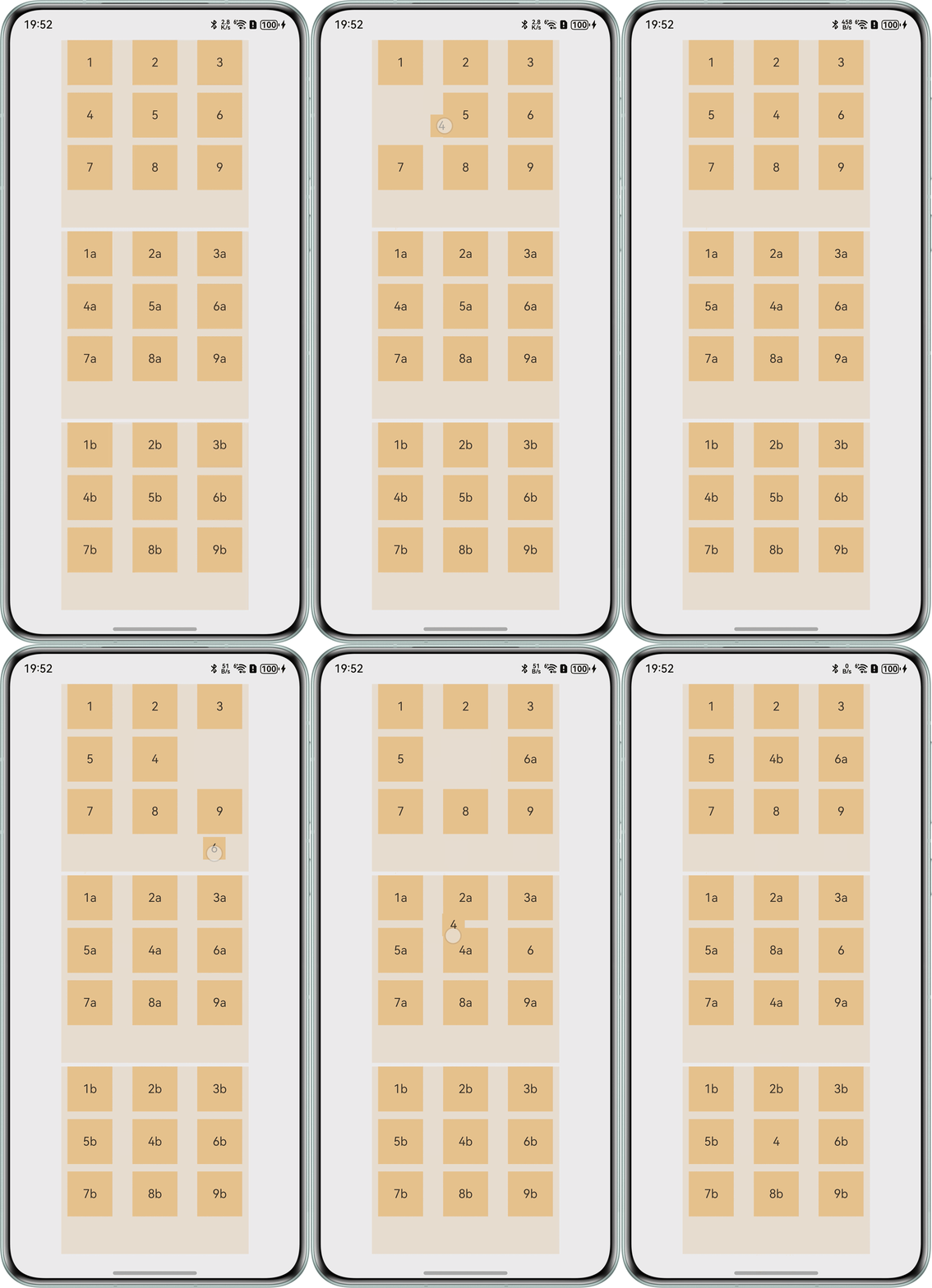
效果预览:
- 在场景一的基础上引入changeData变量存储不同Grid间需要交换的数据,同时引入whoIsEnd变量判断哪一个Grid作为结束插入。