问题现象
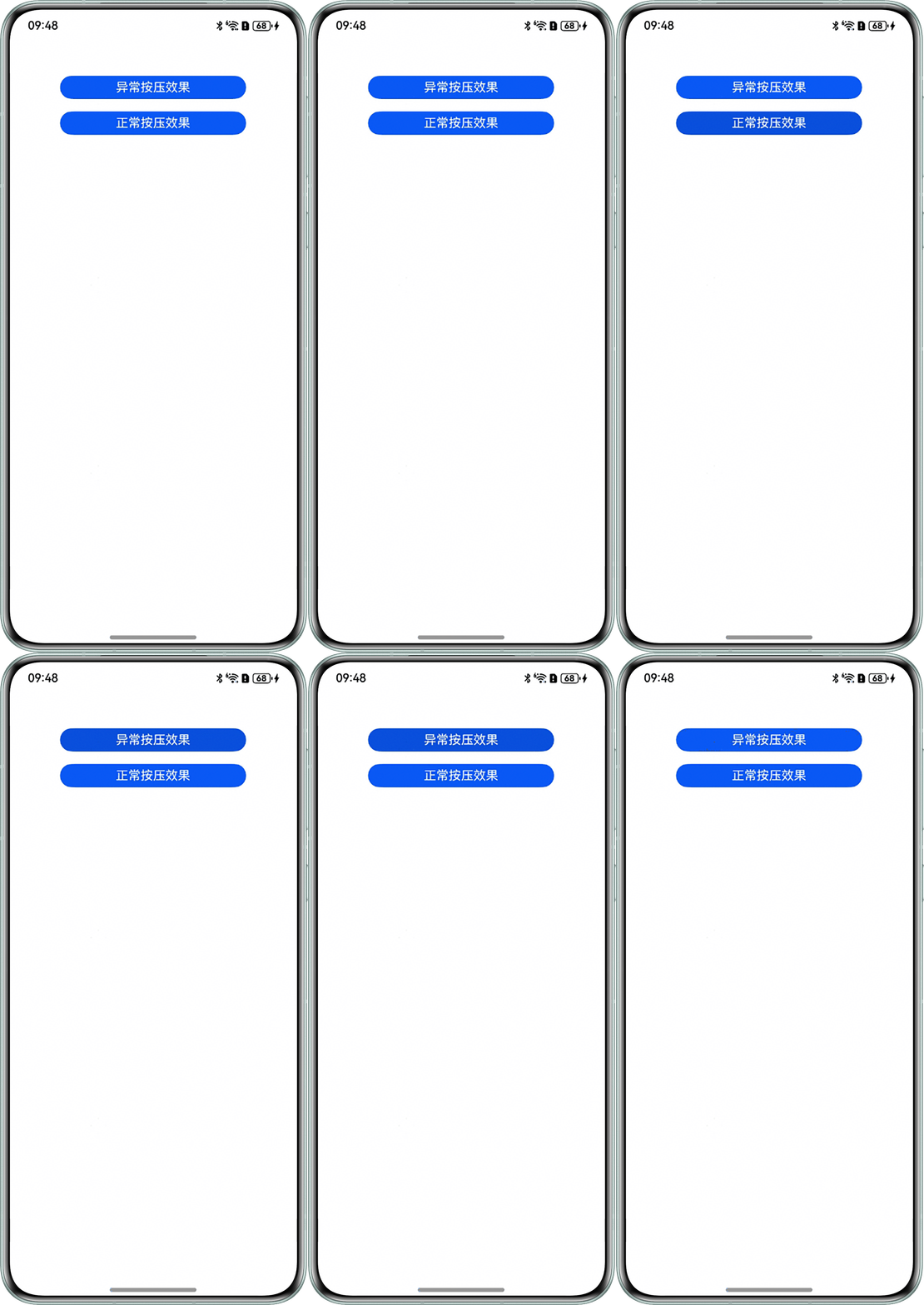
在一个Grid容器中的GridItem内部放置一个Text组件,并设置pressed状态的stateStyles,用户手指按下后,组件的按压效果并不会立即出现,而是会延迟一小段时间(几百毫秒)后才生效。
相比之下,将同一个设置了stateStyles的组件放置在Grid容器外部时,其按压效果是即时响应的,没有延迟。
问题代码示例参考如下:
@Entry
@Component
struct GridExample {
  @Styles
  pressedStyles(): void {
    .backgroundColor('#0950DE');
  }

  build() {
    Column() {
      Grid() {
        GridItem() {
          Text('异常按压效果')
            .width(240)
            .height(30)
            .fontColor(Color.White)
            .borderRadius(32)
            .backgroundColor('#0A59F7')
            .textAlign(TextAlign.Center)
            .stateStyles({ pressed: this.pressedStyles });
        };

      }
      .height(30)
      .columnsTemplate('1fr');

      Blank().height(16);

      Text('正常按压效果')
        .width(240)
        .height(30)
        .fontColor(Color.White)
        .borderRadius(32)
        .backgroundColor('#0A59F7')
        .textAlign(TextAlign.Center)
        .stateStyles({ pressed: this.pressedStyles });

    }.width('100%').margin({ top: 50 });
  }
}
问题效果预览:

背景知识
- stateStyles多态样式为组件的pressed、disabled、focused等状态设置不同样式,当组件进入相应状态时,框架会自动应用这些样式。
- Grid是二维网格布局容器,GridItem是Grid的子组件,代表网格中的一个单元。组件内部已绑定手势实现跟手滚动等功能。
- 多层级手势事件指父子组件嵌套时,父子组件均绑定了手势或事件。在该场景下,手势或者事件的响应受到多个因素的影响,相互之间发生传递和竞争,容易出现预期外的响应。触摸事件(onTouch事件)是所有手势组成的基础。
问题定位
- Grid作为一个功能丰富的容器,组件内部已绑定手势实现跟手滚动等功能,当手指按下GridItem内的Text组件时,Grid容器先判断是否需要滚动,导致按压操作延后。
- 对于Grid外部的Text组件,其父容器Column没有复杂的滚动手势识别逻辑,因此,按压事件可以被直接识别到,没有延迟。
分析结论
Grid的内置滑动手势比按压手势更快响应,导致延迟,从而导致子组件的按压样式响应变慢,可以改用基础手势触摸事件(onTouch事件)代替。
优先级比较:onTouch基础手势>Grid内置滑动手势>stateStyles多态样式手势。
修改建议
使用更底层的onTouch事件可以解决这个延迟。
@Entry
@Component
struct GridPressExample {
  // 添加一个状态变量,用来追踪Grid中组件的按压状态
  @State isGridItemPressed: boolean = false;

  @Styles
  pressedStyles(): void {
    .backgroundColor('#0950DE');
  }

  build() {
    Column() {
      Grid() {
        GridItem() {
          Text('异常按压效果')
            .width(240)
            .height(30)
            .fontColor(Color.White)
            .borderRadius(32)
            .backgroundColor(this.isGridItemPressed ? '#0950DE' : '#0A59F7')
            .textAlign(TextAlign.Center)
            // 添加onTouch事件,实现即时响应
            .onTouch((event: TouchEvent) => {
              if (event.type === TouchType.Down) {
                this.isGridItemPressed = true;
              }

              if (event.type === TouchType.Up) {
                this.isGridItemPressed = false;
              }
            });
        };

      }
      .height(30)
      .columnsTemplate('1fr');

      Blank().height(16);

      Text('正常按压效果')
        .width(240)
        .height(30)
        .fontColor(Color.White)
        .borderRadius(32)
        .backgroundColor('#0A59F7')
        .textAlign(TextAlign.Center)
        .stateStyles({ pressed: this.pressedStyles });

    }.width('100%').margin({ top: 50 });
  }
}