问题现象
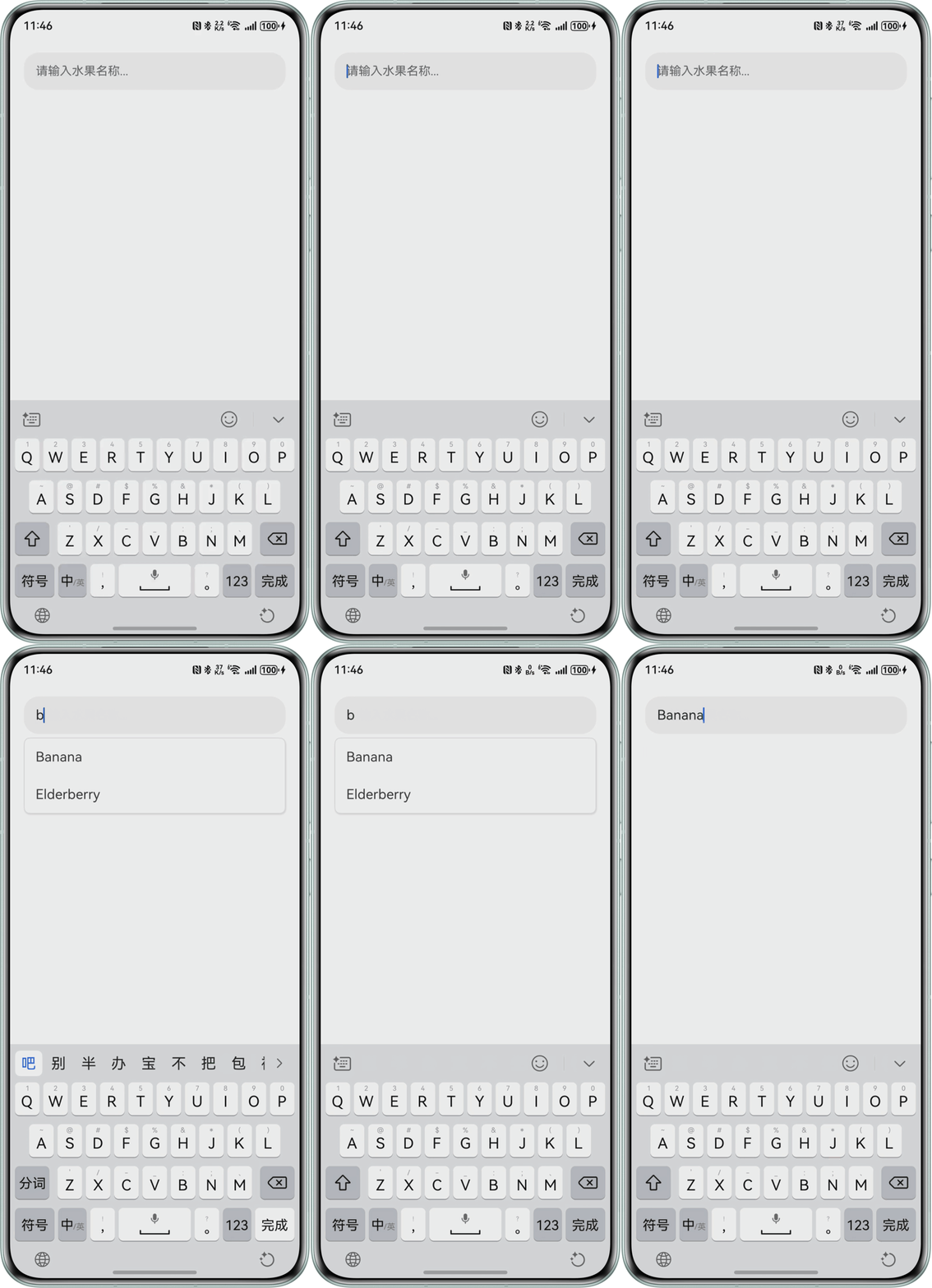
HarmonyOS如何实现输入关键字,下拉框有提示项内容,点击自动完成填充的功能?
效果预览
背景知识
- TextInput是单行文本输入框组件,可以通过TextInput输入关键字,下拉框有提示项内容的,点击自动完成填充的功能。
- 当输入内容发生变化时,触发onChange回调。
解决方案
- 通过onChange监听输入框变化,筛选预设值。
- 通过TextInputController将选中的值赋给输入框,关闭下拉列表,将光标移动到文本末尾。
@Entry
@Component
struct AutoComplete {
  @State private showSuggestions: boolean = false;
  private allSuggestions: string[] = ['Apple', 'Banana', 'Cherry', 'Lemon'];
  @State private filteredSuggestions: string[] = [];
  private isProgrammaticChange: boolean = false;
  private controller: TextInputController = new TextInputController();

  build() {
    Column() {
      TextInput({ placeholder: '请输入水果名称...', controller: this.controller })
        .width('90%')
        .height(50)
        .fontSize(18)
        .margin({ top: 20 })
        .onChange((value: string) => {
          // 非手动填充直接返回,避免下拉列表多次展示
          if (this.isProgrammaticChange) {
            this.isProgrammaticChange = false;
            return;
          }
          // 手动输入文字数量超过0,则筛选相应值
          if (value.length > 0) {
            this.filteredSuggestions = this.allSuggestions.filter(item =>
            item.toLowerCase().includes(value.toLowerCase())
            );
            this.showSuggestions = this.filteredSuggestions.length > 0;
          } else {
            this.showSuggestions = false;
          }
        })
      // 下拉展示框
      if (this.showSuggestions) {
        List() {
          ForEach(this.filteredSuggestions, (item: string) => {
            ListItem() {
              Text(item)
                .width('100%')
                .height(50)
                .fontSize(18)
                .textAlign(TextAlign.Start)
                .padding({ left: 15 })
            }
            .onClick(() => {
              this.isProgrammaticChange = true;
              this.controller.deleteText();
              this.controller.addText(item);
              this.showSuggestions = false;
              this.controller.caretPosition(item.length);
            })
          }, (item: string) => item)
        }
        .width('90%')
        .border({ width: 1, color: '#e0e0e0' })
        .borderRadius(8)
        .shadow({
          radius: 6,
          color: '#20000000',
          offsetX: 2,
          offsetY: 4
        })
        .margin({ top: 5 })
      }
    }
    .width('100%')
    .alignItems(HorizontalAlign.Center)
    .onClick(() => {
      this.showSuggestions = false;
    })
  }
}
总结
在处理onChange回调中的用户输入时,应仅在需要程序控制文本内容或光标位置的情况下使用TextInputController。同时,必须通过一个标志位来区分程序的直接设置与用户的输入操作,以防止因状态更新引发不必要的onChange回调循环。