问题现象
使用透明子窗口完全覆盖主窗口,如何实现子窗口不拦截操作主窗口页面的事件,具体表现有如下场景:
- 场景一:子窗口不响应任何事件,操作主窗口如同没有子窗口覆盖一样。
- 场景二:子窗口仅响应侧滑事件,第一次侧滑关闭透明子窗,第二次侧滑主窗返回桌面。
背景知识
- createSubWindow创建该WindowStage实例下的子窗口。
- destroyWindow销毁当前窗口,支持系统窗口及应用子窗口,全局悬浮窗和模态窗。
- setWindowTouchable设置窗口是否为可触状态,true表示可触;false表示不可触。
- setWindowFocusable设置窗口是否具有获得焦点的能力,true表示支持;false表示不支持。
- setWindowBackgroundColor设置窗口的背景色。Stage模型下,该接口需要在loadContent()或setUIContent()调用生效后使用。
- resize基于窗口左上角顶点改变当前窗口大小,调用成功即返回,该接口返回后无法立即获取最终生效结果,如需立即获取,建议使用接口resizeAsync。
解决方案
使用createSubWindow创建子窗口,使用setWindowBackgroundColor设置子窗口透明背景色,并resize子窗口大小使其完全覆盖主窗口。
- 场景一:使子窗口不响应任何事件,须使用setWindowTouchable设置子窗口不可触,并使用setWindowFocusable设置子窗口不获焦,即可透传事件给主窗口。
- 在EntryAbility下的onWindowStageCreate方法中使用AppStorage存储windowStage实例,用于创建子窗口。
onWindowStageCreate(windowStage: window.WindowStage): void { // Main window is created, set main page for this ability hilog.info(DOMAIN, 'testTag', '%{public}s', 'Ability onWindowStageCreate'); // 需要加载哪个页面,此处需要改成对应页面名 windowStage.loadContent('pages/PageOne', (err) => { if (err.code) { hilog.error(DOMAIN, 'testTag', 'Failed to load the content. Cause: %{public}s', JSON.stringify(err)); return; } hilog.info(DOMAIN, 'testTag', 'Succeeded in loading the content.'); }); // 存储windowStage实例 AppStorage.setOrCreate('windowStage', windowStage); } - PageOne.ets:创建透明子窗口,设置子窗口不可触、不可获焦,达到透传事件给子窗口的效果。
import { display, window } from '@kit.ArkUI'; @Entry @Component struct PageOne { @State message: string = 'Hello World'; onPageShow(): void { this.createFloatWindow(); } // 自定义创建悬浮子窗方法 createFloatWindow() { // 获取windowStage实例 let windowStage = AppStorage.get('windowStage') as window.WindowStage; // 创建悬浮子窗 windowStage.createSubWindow('floatWindow', (err, win) => { if (err.code) { console.error('Failed to create the floatWindow. Cause: ' + JSON.stringify(err)); return; } console.info('Succeeded in creating the floatWindow. Data: ' + JSON.stringify(win)); // 设置悬浮子窗位置 win.moveWindowTo(0, 0, (err) => { if (err.code) { console.error('Failed to move the window. Cause:' + JSON.stringify(err)); return; } console.info('Succeeded in moving the window.'); }); // 设置悬浮子窗大小 win.resize(display.getDefaultDisplaySync().width, display.getDefaultDisplaySync().height, (err) => { if (err.code) { console.error('Failed to change the window size. Cause:' + JSON.stringify(err)); return; } }); // 为悬浮子窗加载页面内容,这里可以设置在main_pages.json中配置的页面 win.setUIContent('pages/SubWindow', (err: BusinessError) => { if (err.code) { console.error('Failed to load the content. Cause:' + JSON.stringify(err)); return; } win.setWindowBackgroundColor('#00000000'); // 显示悬浮子窗。 win.showWindow((err: BusinessError) => { if (err.code) { console.error('Failed to show the window. Cause: ' + JSON.stringify(err)); return; } console.info('Succeeded in showing the window.'); }); }); // 设置子窗不可触摸 win.setWindowTouchable(false); // 设置子窗不获焦 win.setWindowFocusable(false); }); } build() { RelativeContainer() { Text(this.message) .id('HelloWorld') .fontSize($r('app.float.page_text_font_size')) .fontWeight(FontWeight.Bold) .alignRules({ center: { anchor: '__container__', align: 100 }, middle: { anchor: '__container__', align: HorizontalAlign.Center } }) .onClick(() => { this.message = 'Welcome'; }); } .height('100%') .width('100%'); } } - SubWindow.ets:子窗口页面内容。
@Entry
@Component
struct Index {
  build() {
    RelativeContainer() {
      Text('这是透明子窗口')
        .id('HelloWorld')
        .fontSize(30)
        .fontWeight(FontWeight.Bold)
        .fontColor(Color.Gray)
        .alignRules({
          center: { anchor: '__container__', align: VerticalAlign.Center },
          middle: { anchor: '__container__', align: HorizontalAlign.Center }
        });
    }
    .height('100%')
    .width('100%');
  }
}
效果预览:
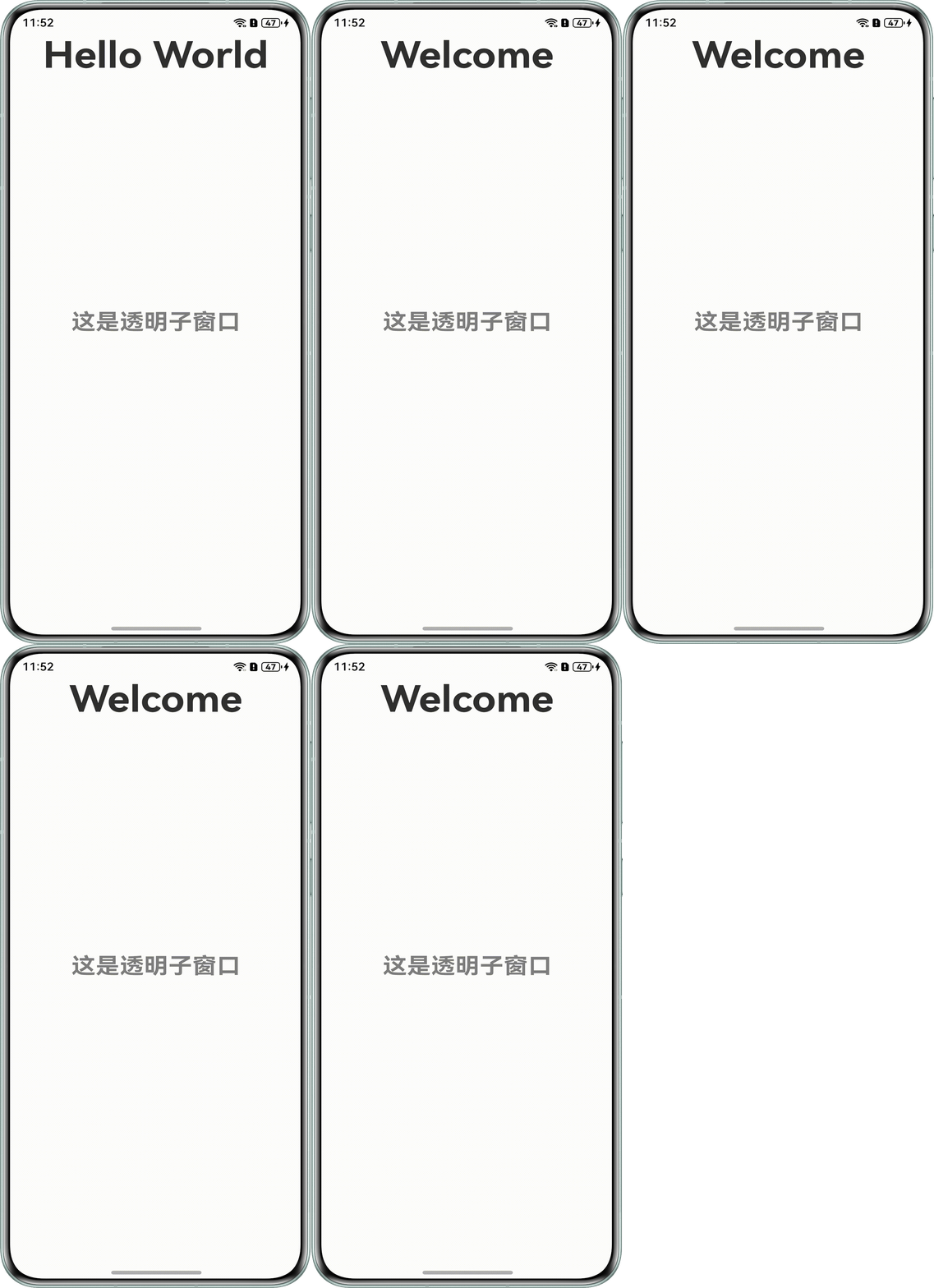
- 在EntryAbility下的onWindowStageCreate方法中使用AppStorage存储windowStage实例,用于创建子窗口。
- 场景二:实现子窗口仅响应侧滑事件,需要在主页面重写onBackPress方法,实现子窗口的销毁。
- 在EntryAbility下的onWindowStageCreate方法中使用AppStorage存储windowStage实例,用于创建子窗口。参考场景一步骤一,加载PageTwo页面。
- PageTwo.ets:创建透明子窗口,设置子窗口不可触、不可获焦并重写onBackPress,达到第一次侧滑时关闭子窗口的效果。
import { display, window } from '@kit.ArkUI'; @Entry @Component struct PageTwo { @State message: string = 'Hello World'; private isShow: boolean = false; // 重写侧滑事件,使子窗口响应侧滑关闭 onBackPress(): boolean | void { if (this.isShow) { this.closeSubWindow(); this.isShow = false; return true; } else { return false; } } onPageShow(): void { this.createFloatWindow(); this.isShow = true; } // 关闭子窗口 closeSubWindow() { window.findWindow('mySubWindow').destroyWindow((err) => { if (err.code) { console.error('Failed to destroy the subWindow. Cause: ' + JSON.stringify(err)); return; } console.info('Succeeded in destroying the subWindow.'); }); } // 自定义创建悬浮子窗方法 createFloatWindow() { // 获取windowStage实例 let windowStage = AppStorage.get('windowStage') as window.WindowStage; // 创建悬浮子窗 windowStage.createSubWindow('mySubWindow', (err, win) => { if (err.code) { console.error('Failed to create the mySubWindow. Cause: ' + JSON.stringify(err)); return; } console.info('Succeeded in creating the mySubWindow. Data: ' + JSON.stringify(win)); // 设置悬浮子窗位置 win.moveWindowTo(0, 0, (err) => { if (err.code) { console.error('Failed to move the window. Cause:' + JSON.stringify(err)); return; } console.info('Succeeded in moving the window.'); }); // 设置悬浮子窗大小 win.resize(display.getDefaultDisplaySync().width, display.getDefaultDisplaySync().height, (err) => { if (err.code) { console.error('Failed to change the window size. Cause:' + JSON.stringify(err)); return; } }); // 为悬浮子窗加载页面内容,这里可以设置在main_pages.json中配置的页面 win.setUIContent('pages/SubWindow', (err: BusinessError) => { if (err.code) { console.error('Failed to load the content. Cause:' + JSON.stringify(err)); return; } // 设置子窗口透明 win.setWindowBackgroundColor('#00000000'); // 显示悬浮子窗。 win.showWindow((err: BusinessError) => { if (err.code) { console.error('Failed to show the window. Cause: ' + JSON.stringify(err)); return; } console.info('Succeeded in showing the window.'); }); }); // 设置子窗不可触摸 win.setWindowTouchable(false); // 设置子窗不获焦 win.setWindowFocusable(false); }); } build() { RelativeContainer() { Text(this.message) .id('HelloWorld') .fontSize($r('app.float.page_text_font_size')) .fontWeight(FontWeight.Bold) .alignRules({ center: { anchor: '__container__', align: 100 }, middle: { anchor: '__container__', align: HorizontalAlign.Center } }) .onClick(() => { this.message = 'Welcome'; }); } .height('100%') .width('100%'); } } - SubWindow.ets:子窗口页面内容。
@Entry
@Component
struct Index {
  build() {
    RelativeContainer() {
      Text('这是透明子窗口')
        .id('HelloWorld')
        .fontSize(30)
        .fontWeight(FontWeight.Bold)
        .fontColor(Color.Gray)
        .alignRules({
          center: { anchor: '__container__', align: VerticalAlign.Center },
          middle: { anchor: '__container__', align: HorizontalAlign.Center }
        });
    }
    .height('100%')
    .width('100%');
  }
}
效果预览:

常见FAQ
Q:PC上创建子窗口为什么主窗会触发windowStageEvent监听的获焦和失焦事件?
A:应用创建子窗口使得主窗口生命周期变化、窗口属性刷新可见性变化及应用调用setWindowFocusable接口的时序有变化,从而导致主窗的失焦获焦变化。
Q:创建子窗口后,如果不主动点击主窗口需要手势返回两次才能返回到上一页面,如何做到子窗口不拦截侧滑事件?
A:windowStage.getMainWindow获取主窗口window实例,window.findWindow获取子窗口window实例,通过window.shiftAppWindowFocus将焦点从子窗口转移到主窗口上,即可一次操作主窗口返回上一页。
Q:如何感知窗口获焦失焦的原因?
A:切换焦点是系统行为,应用不需要感知。窗口获焦除了鼠标点击、Alt+Tab切换、任务栏缩略切换、四指滑动切换外,还包括窗口调showWindow接口、命令行或dock栏等启动应用以及系统调用请求焦点的接口。