解决方案
XPath是W3C标准,节点是从[1]开始。UiViewer提供的path下标是从[0]开始。两者不等同,不同的API使用的路径也是不同的。如图点击选中框位置。
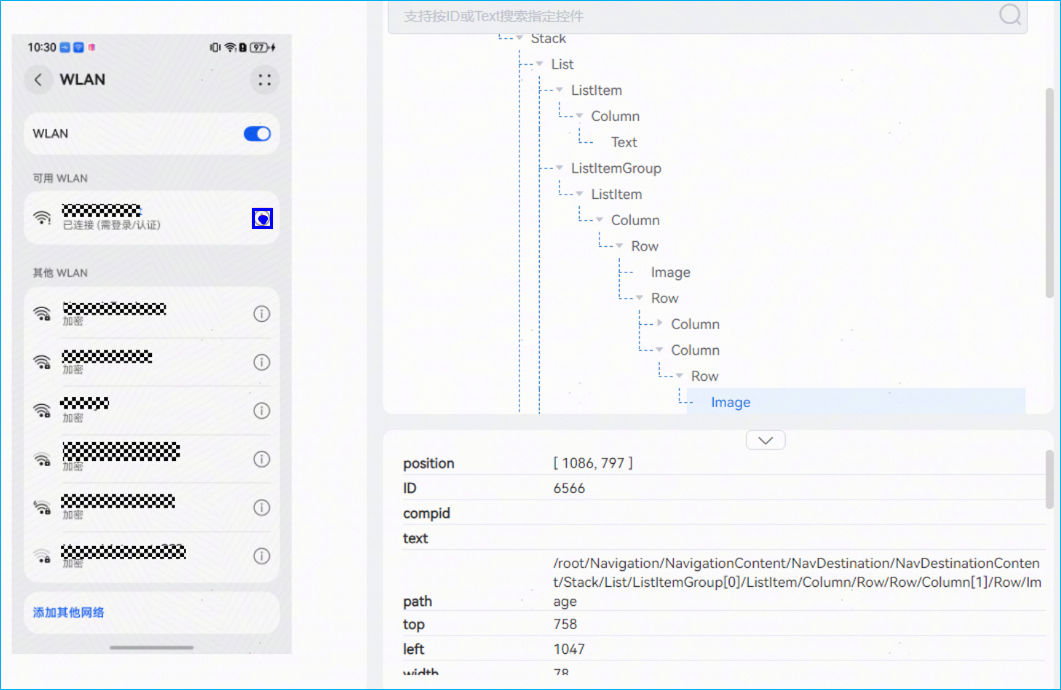
- XPath语法定位控件。
使用BY.xpath匹配器可以支持通过XPath语法来查找控件。注意XPath不能和其他匹配器一起使用。
# -*- coding: utf-8 -*- from devicetest.core.test_case import TestCase, Step, CheckPoint from hypium import BY, UiDriver class TC_001(TestCase): def __init__(self, configs): self.TAG = self.__class__.__name__ super().__init__(self.TAG, configs) self.driver = UiDriver(self.device1) self.driver_width, self.driver_height = self.driver.get_display_size() def setup(self): Step('1.回到桌面') self.driver.swipe_to_home() def process(self): Step('2.启动设置应用') self.driver.start_app("com.huawei.hmos.settings") # 点击设置页面WLAN self.driver.touch(BY.text("WLAN")) comp = self.driver.find_component( BY.xpath("//*[@text='可用 WLAN']/ancestor::List/ListItemGroup/ListItem[1]//Text/following::Image")) comp.click() def teardown(self): Step('3.关闭设置应用') self.driver.stop_app("com.huawei.hmos.settings") - UiViewer提供的path路径定位控件。
UiViewer提供的path路径定位控件可以在不同的API中使用,API参数path为UiViewer查看的路径。

# -*- coding: utf-8 -*-
from devicetest.core.test_case import TestCase, Step, CheckPoint
from hypium import BY, UiDriver

class TC_002(TestCase):

    def __init__(self, configs):
        self.TAG = self.__class__.__name__
        super().__init__(self.TAG, configs)
        self.driver = UiDriver(self.device1)
        self.driver_width, self.driver_height = self.driver.get_display_size()

    def setup(self):
        Step('1.回到桌面')
        self.driver.swipe_to_home()

    def process(self):
        Step('2.启动设置应用')
        self.driver.start_app("com.huawei.hmos.settings")
        # 点击设置页面WLAN
        self.driver.touch(BY.text("WLAN"))
        comp = self.driver.UiTree.find_component_by_path(
            "/root/Navigation/NavigationContent/NavDestination/NavDestinationContent\
            /Stack/List/ListItemGroup[0]/ListItem/Column/Row/Row/Column[1]/Row/Image")
        self.driver.touch(comp.center)

    def teardown(self):
        Step('3.关闭设置应用')
        self.driver.stop_app("com.huawei.hmos.settings")

