问题现象
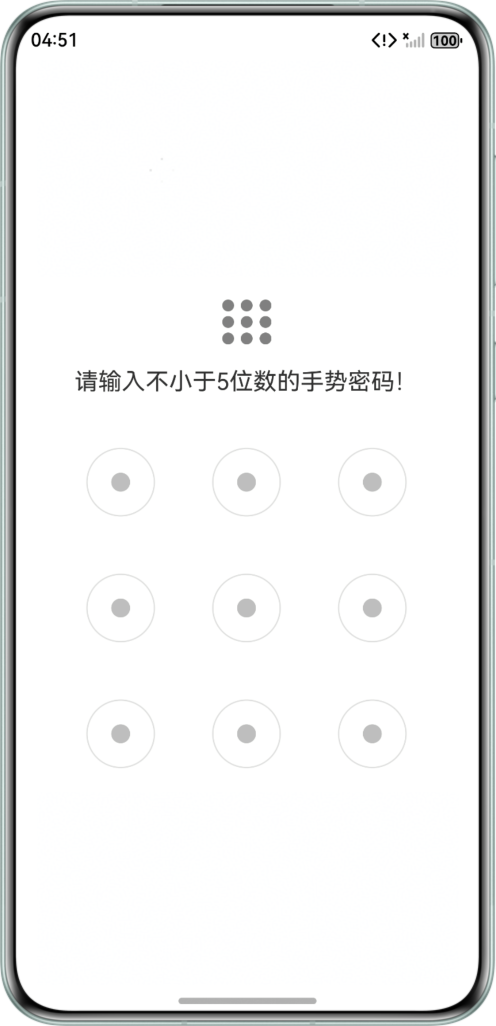
在开发PatternLock功能时,为了增强用户体验,通常会在图形界面的上方展示一个九宫格的缩略图,这个缩略图能够反映用户绘制的手势密码路径。本文将介绍如何使用小九宫格展示PatternLock控件的解锁轨迹。
问题效果预览:

背景知识
- PatternLock是一种图案密码锁组件,以九宫格图案的方式输入密码,常用于密码验证场景。密码输入选中宫格圆点时触发onDotConnect回调,密码输入结束时触发onPatternComplete回调。
- Grid组件为网格容器,通过指定项目所在的单元格做出各种各样的布局,其中容器内各条目对应一个GridItem组件。
解决方案
- 在PatternLock手势路径经过的地方使用current存储。
// 最高层
PatternLock(this.patternLockController)
  .activateCircleStyle({
    color: '#331D9CDF',
    radius: { value: 30, unit: LengthUnit.VP },
    enableWaveEffect: true
  })
  .sideLength(320)
  .circleRadius(8)
  .pathStrokeWidth(5)
  .regularColor('#ffbebebe')
  .activeColor('#FF1D9CDF')
  .selectedColor('#FF1D9CDF')
  .pathColor('#cc05a9f7')
  .onDotConnect((index: number) => {
    console.info(`${index}查看手势路径`);
    this.current.push(index);
  })
- 定义小九宫格时,判断当前的位置是否在current中来确认展示对应的样式。
// 手势路径:小九宫格
Grid() {
  ForEach(this.circularItems, (item: string, index) => {
    GridItem() {
      Row() {
      }
      .width(10)
      .height(10)
      .backgroundColor(this.current.includes(index) ? Color.Black : Color.Grey) // 根据当前选中的点进行改色
      .borderRadius(10);
    };
  }, (item: string) => item);
}
.width('11%')
.columnsTemplate('1fr 1fr 1fr')
.maxCount(3)
.columnsGap(6)
.rowsGap(4);
完整示例参考如下:
import { LengthUnit } from '@kit.ArkUI';

@Entry
@Component
struct PatternLockExample {
  @State passwords: Number[] = [];
  @State message: string = '请输入不小于5位数的手势密码!';
  @State circularItems: number[] = [0, 1, 2, 3, 4, 5, 6, 7, 8];
  @State current: number[] = []; // 当前手势密码所选点
  private patternLockController: PatternLockController = new PatternLockController();

  build() {
    Column() {
      // 手势路径:小九宫格
      Grid() {
        ForEach(this.circularItems, (item: string, index) => {
          GridItem() {
            Row() {
            }
            .width(10)
            .height(10)
            .backgroundColor(this.current.includes(index) ? Color.Black : Color.Grey) // 根据当前选中的点进行改色
            .borderRadius(10);
          };
        }, (item: string) => item);
      }
      .width('11%')
      .columnsTemplate('1fr 1fr 1fr')
      .maxCount(3)
      .columnsGap(6)
      .rowsGap(4);


      Text(this.message).textAlign(TextAlign.Center).margin(20).fontSize(20);
      Stack() {
        // 最底层
        PatternLock(this.patternLockController)
          .activateCircleStyle({
            color: '#661D9CDF',
            radius: { value: 30, unit: LengthUnit.VP },
            enableWaveEffect: true
          })
          .sideLength(320)
          .circleRadius(30)
          .pathStrokeWidth(5)
          .regularColor('#ffe0e0e0') // 设置未选择时颜色
          .activeColor('#661D9CDF') // 设置经过还未离开时颜色
          .selectedColor('#661D9CDF'); // 设置已选择后颜色
        // 中间层
        PatternLock(this.patternLockController)
          .activateCircleStyle({
            color: '#B3FFFFFF',
            radius: { value: 30, unit: LengthUnit.VP },
            enableWaveEffect: true
          })
          .sideLength(320)
          .circleRadius(28)
          .pathStrokeWidth(5)
          .regularColor(Color.White)
          .activeColor('#B3FFFFFF')
          .selectedColor('#B3FFFFFF')
          .pathColor('#cc05a9f7');
        // 最高层
        PatternLock(this.patternLockController)
          .activateCircleStyle({
            color: '#331D9CDF',
            radius: { value: 30, unit: LengthUnit.VP },
            enableWaveEffect: true
          })
          .sideLength(320)
          .circleRadius(8)
          .pathStrokeWidth(5)
          .regularColor('#ffbebebe')
          .activeColor('#FF1D9CDF')
          .selectedColor('#FF1D9CDF')
          .pathColor('#cc05a9f7')
          .onDotConnect((index: number) => {
            console.info(`${index}查看手势路径`);
            this.current.push(index);
          })

          .onPatternComplete((input: Array<number>) => {
            // 输入的密码长度小于5时,提示重新输入
            if (input.length < 5) {
              this.current = [];
              this.message = '密码需要超过五位';
              return;
            }
            // 判断密码长度是否大于0
            if (this.passwords.length > 0) {
              // 判断两次输入的密码是否相同,相同则提示密码设置成功,否则提示重新输入
              if (this.passwords.toString() === input.toString()) {
                this.current = [];
                this.passwords = input;
                this.message = '设置密码成功: ' + this.passwords.toString();
                this.patternLockController.setChallengeResult(PatternLockChallengeResult.CORRECT);
              } else {
                this.current = [];
                this.message = '密码不一致,请重新输入。';
                this.patternLockController.setChallengeResult(PatternLockChallengeResult.WRONG);
              }
            } else {
              // 提示第二次输入密码
              this.passwords = input;
              this.message = '请再次输入';
              this.current = [];
            }
          });
      };

      Button('重置').margin(30).onClick(() => {
        // 重置密码锁
        this.patternLockController.reset();
        this.passwords = [];
        this.message = '请输入不小于5位数的手势密码!';
      });
    }
    .width('100%')
    .height('100%')
    .justifyContent(FlexAlign.Center);
  }
}