问题现象
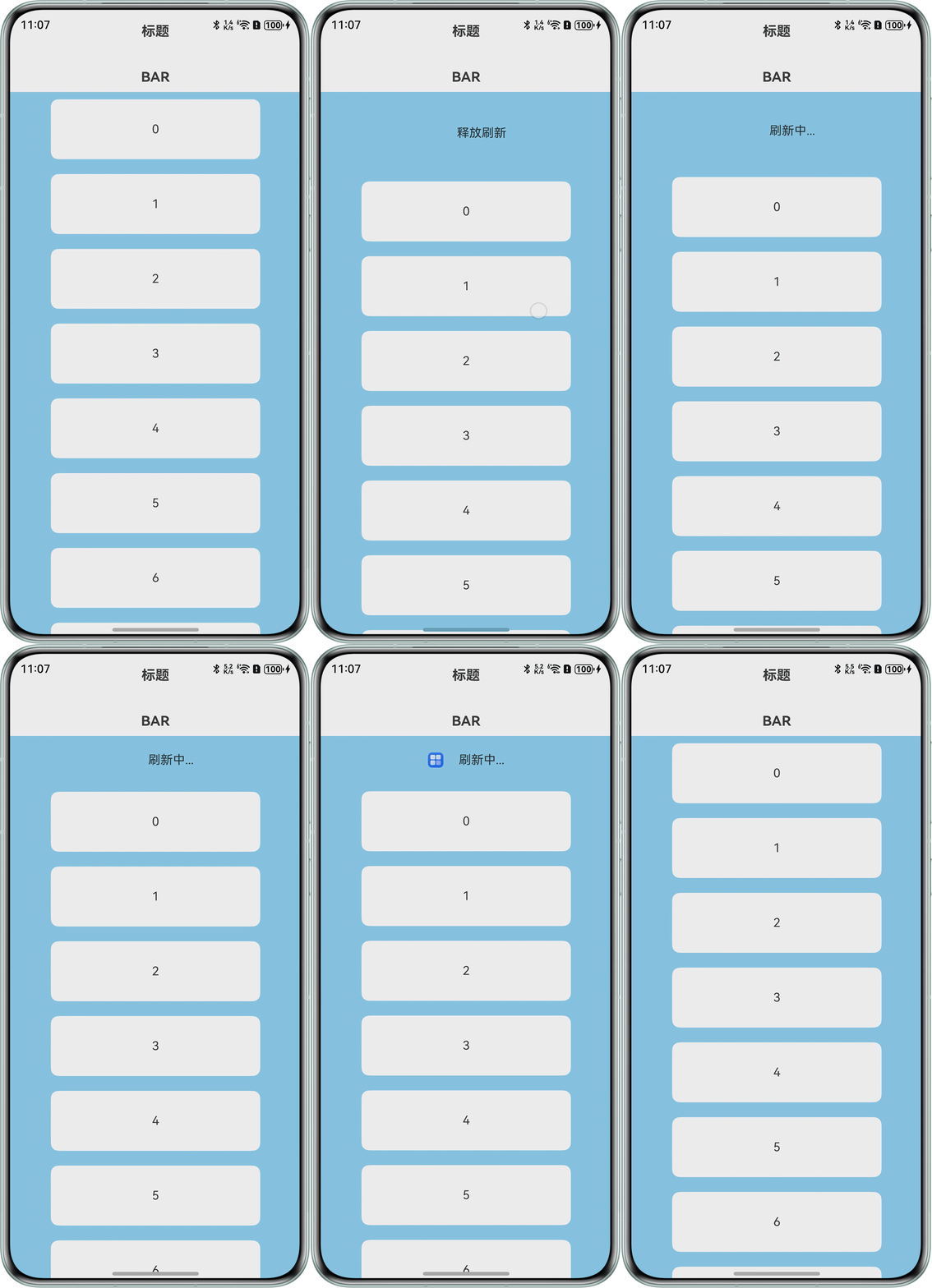
使用Refresh组件实现下拉刷新动画,具体的刷新动画为:进入刷新状态时,自定义刷新区域的图标会不断旋转直至刷新时间结束。当不设置阻尼效果属性pullDownRatio时,自定义展示区域的动画可以正常展示,设置阻尼效果后,动画异常。
问题效果预览:
不设置阻尼效果动画正常:
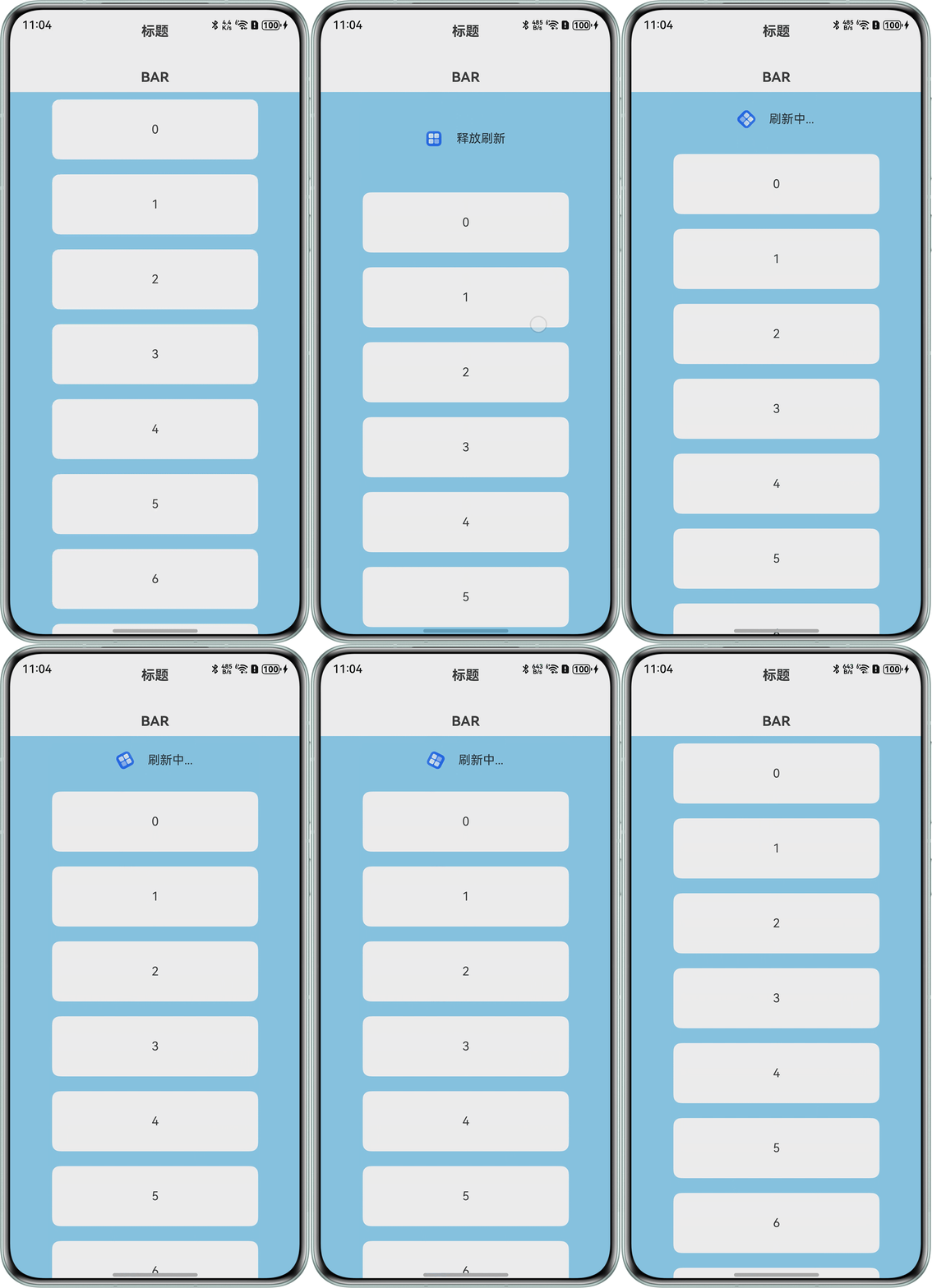
设置阻尼效果动画异常:
问题代码示例参考如下:
/**
 * 下拉刷新文案
 */
const PULL_REFRESH = '下拉刷新';
const RELEASE_REFRESH = '释放刷新';
const PULL_REFRESHING = '刷新中...';
const PULL_REFRESH_SUCCESS = '';

@Entry
@Component
struct MainTab {
  @Builder
  barBars() {
    Text('BAR').margin({ top: 20, bottom: 20 }).fontSize(18).fontWeight('bold');
  }

  @Builder
  barContents() {
    Tabs() {
      TabContent() {
        RefreshExample();
      };
    }
    .layoutWeight(1)
    .width('100%')
    .barHeight(0)
    .barMode(BarMode.Scrollable)
    .barOverlap(false)
    .fadingEdge(false);
  }

  build() {
    Column() {
      TopSvBar({
        bars: this.barBars,
        content: this.barContents
      });
    }.width('100%').height('100%');
  }
}


@Component
struct TopSvBar {
  @BuilderParam bars: () => void = this.barContents;
  @BuilderParam content: () => void = this.barContents;

  @Builder
  barContents() {
  }

  build() {

    Column() {
      Text('标题').margin({ top: 20, bottom: 20 }).fontSize(18).fontWeight('bold');

      Column() {
        this.bars();
      }.height(50);

      Column() {
        this.content();
      }.layoutWeight(1);
    };
  }
}


@Component
struct RefreshExample {
  @State isRefreshing: boolean = false;
  @State refreshString: string = '下拉刷新';
  @State maxRefreshingHeight: number = 200.0;
  @State ratio: number = 1;
  @State arr: String[] = ['0', '1', '2', '3', '4', '5', '6', '7', '8', '9', '10'];
  @State angle: number = 0;
  @State colors: [ResourceColor | LinearGradient, number][] = []; // 组件进度条颜色配置

  // 设置进度条颜色
  setColors(percentage: number) {
    this.colors = [['#FF585E70', percentage], ['#ffffff', 1 - percentage]];
  }

  @State @Watch('valueChange') currentValue: number = 0; // 当前值

  // 计算当前值占总的百分比
  getPercentage(): number {
    return Math.min(this.currentValue / 100, 1);
  }

  // 当前值改变监听
  valueChange() {
    this.setColors(this.getPercentage());
  }

  @Builder
  customRefreshComponent() {
    Row() {
      Image($r('app.media.startIcon'))
        .rotate({ angle: this.angle })
        .width(20)
        .height(20);
      Text(this.refreshString).fontSize(16).margin({ left: 20 });
    }
    .alignItems(VerticalAlign.Center)
    .width('100%')
    .justifyContent(FlexAlign.Center)
    .constraintSize({ minHeight: 32 });
  }

  build() {
    Column() {
      Refresh({ friction: 62, refreshing: $$this.isRefreshing, builder: this.customRefreshComponent() }) {
        List() {
          ForEach(this.arr, (item: string) => {
            ListItem() {
              Text('' + item)
                .width('70%')
                .height(80)
                .fontSize(16)
                .margin(10)
                .textAlign(TextAlign.Center)
                .borderRadius(10)
                .backgroundColor(0xFFFFFF);
            };

          }, (item: string) => item);
        }
        .onScrollIndex((first: number) => {
          console.info(first.toString());
        })
        .width('100%')
        .height('100%')
        .alignListItem(ListItemAlign.Center)
        .scrollBar(BarState.Off);
      }
      .pullDownRatio(this.ratio)
      .backgroundColor(0x89CFF0)
      .pullToRefresh(true)
      .refreshOffset(64)
      .onOffsetChange((offset: number) => {
        this.currentValue = (offset / this.maxRefreshingHeight) * 100;
        // 越接近最大距离,下拉跟手系数越小
        this.ratio = 1 - Math.pow((offset / this.maxRefreshingHeight), 3);
      })
      .onStateChange((refreshStatus: RefreshStatus) => {
        if (refreshStatus === 1) {
          this.refreshString = PULL_REFRESH;
        } else if (refreshStatus === 2) {
          this.refreshString = RELEASE_REFRESH;
        } else if (refreshStatus === 3) {
          this.refreshString = PULL_REFRESHING;
          this.getUIContext().animateTo({ curve: Curve.Linear, iterations: -1, duration: 1000 }, () => {
            this.angle = 360;
          });
        } else if (refreshStatus === 4) {
          this.refreshString = PULL_REFRESH_SUCCESS;
        }
      })
      .onRefreshing(() => {
        setTimeout(() => {
          this.isRefreshing = false;
          this.angle = 0;
        }, 5000);
        console.info('onRefreshing test');
      });
    };
  }
}

背景知识
- Refresh是用于下拉刷新并显示动效的容器组件,入参RefreshOptions包含参数builder或refreshingContent,二者都是用于设置自定义刷新区域的显示内容,不可同时使用。builder参数的类型为CustomBuilder,结合@Builder自定义构建函数使用,refreshingContent参数的类型为ComponentContent,有关使用规格参考BuilderNode。这两个参数在Refresh中的使用可参考示例3(自定义刷新区域显示内容-builder)和示例4(自定义刷新区域显示内容-refreshingContent)。
- ComponentContent是组件内容的实体封装,其对象支持在非UI组件中创建与传递。使用时需要创建对应节点所需的UI上下文UIContext和WrappedBuilder封装的builder函数。
问题定位
问题代码中Refresh组件使用了builder参数作为自定义刷新区域显示内容,并添加了阻尼效果属性pullDownRatio,从而导致了用于刷新动画的自定义组件被销毁重建,表现为动画中断并伴有闪烁效果。
分析结论
builder参数依赖的@Builder自定义构建函数是一种轻量的UI元素复用机制,而refreshingContent参数依赖于ComponentContent,ComponentContent在@Builder自定义构建函数的基础上增加了对@Builder自定义构建函数的封装机制wrapBuilder,并引入了UIContext,最终实现了对组件内容的实体封装。从API version 12开始,建议使用refreshingContent参数替代builder参数自定义刷新区域显示内容,以避免刷新过程中因自定义组件销毁重建造成的动画中断问题。
修改建议
参考Refresh示例4(自定义刷新区域显示内容-refreshingContent),使用wrapBuilder封装builder后,结合UI上下文UIContext得到的refreshingContent参数替代原来的builder参数即可。
- 定义ComponentContent<Object>类型的contentNode。
- 在aboutToAppear()中获取UI上下文,并使用wrapBuilder封装Refresh的自定义刷新区域显示内容builder,二者一同封装到contentNode中。
- Refresh调用contentNode作为refreshingContent参数。
import { ComponentContent } from '@ohos.arkui.node';

const PULL_REFRESHING = '刷新中...';

@Entry
@Component
struct MainTab {
  @Builder
  barBars() {
    Text('BAR').margin({ top: 20, bottom: 20 }).fontSize(18).fontWeight('bold');
  }

  @Builder
  barContents() {
    Tabs() {
      TabContent() {
        RefreshExample();
      };
    }
    .layoutWeight(1)
    .width('100%')
    .barHeight(0)
    .barMode(BarMode.Scrollable)
    .barOverlap(false)
    .fadingEdge(false);
  }

  build() {
    Column() {
      TopSvBar({
        bars: this.barBars,
        content: this.barContents
      });
    }.width('100%').height('100%');
  }
}

@Component
struct TopSvBar {
  @BuilderParam bars: () => void = this.barContents;
  @BuilderParam content: () => void = this.barContents;

  @Builder
  barContents() {
  }

  build() {
    Column() {
      Text('标题').margin({ top: 20, bottom: 20 }).fontSize(18).fontWeight('bold');
      Column() {
        this.bars();
      }.height(50);

      Column() {
        this.content();
      }.layoutWeight(1);
    };
  }
}

class Params {
  angle: number = 0;

  constructor(angle: number) {
    this.angle = angle;
  }
}


@Builder
function customRefreshingContent(params: Params) {
  Row() {
    Image($r('app.media.startIcon'))
      .rotate({ angle: params.angle })
      .width(20)
      .height(20);
    Text('刷新中').fontSize(16).margin({ left: 20 });
  }
  .alignItems(VerticalAlign.Center)
  .width('100%')
  .justifyContent(FlexAlign.Center)
  .constraintSize({ minHeight: 32 });
}


@Component
struct RefreshExample {
  @State isRefreshing: boolean = false;
  @State refreshString: string = '下拉刷新';
  private contentNode?: ComponentContent<Object> = undefined;
  private params: Params = new Params(0);
  maxRefreshingHeight: number = 200.0;
  @State ratio: number = 1;
  @State arr: String[] = ['0', '1', '2', '3', '4', '5', '6', '7', '8', '9', '10'];
  colors: [ResourceColor | LinearGradient, number][] = []; // 组件进度条颜色配置


  // 设置进度条颜色
  setColors(percentage: number) {
    this.colors = [['#FF585E70', percentage], ['#ffffff', 1 - percentage]];
  }

  @State @Watch('valueChange') currentValue: number = 0; // 当前值

  // 计算当前值占总的百分比
  getPercentage(): number {
    return Math.min(this.currentValue / 100, 1);
  }

  // 当前值改变监听
  valueChange() {
    this.setColors(this.getPercentage());
  }

  aboutToAppear(): void {
    let uiContext = this.getUIContext();
    this.contentNode = new ComponentContent(uiContext, wrapBuilder(customRefreshingContent), this.params);
  }

  build() {
    Column() {
      Refresh({ refreshing: $$this.isRefreshing, refreshingContent: this.contentNode }) {
        List() {
          ForEach(this.arr, (item: string) => {
            ListItem() {
              Text('' + item)
                .width('70%')
                .height(80)
                .fontSize(16)
                .margin(10)
                .textAlign(TextAlign.Center)
                .borderRadius(10)
                .backgroundColor(0xFFFFFF);
            };
          }, (item: string) => item);
        }
        .onScrollIndex((first: number) => {
          console.info(first.toString());
        })
        .width('100%')
        .height('100%')
        .alignListItem(ListItemAlign.Center)
        .scrollBar(BarState.Off);
      }
      .pullDownRatio(this.ratio)
      .backgroundColor(0x89CFF0)
      .pullToRefresh(true)
      .refreshOffset(64)
      .onOffsetChange((offset: number) => {
        // 越接近最大距离,下拉跟手系数越小
        this.ratio = 1 - Math.pow((offset / this.maxRefreshingHeight), 3);
      })
      .onStateChange((refreshStatus: RefreshStatus) => {
        if (refreshStatus === 3) {
          this.refreshString = PULL_REFRESHING;
          this.getUIContext().animateTo({ curve: Curve.Linear, iterations: 5, duration: 1000 }, () => {
            this.params.angle = 360;
            // 更新自定义组件内容
            this.contentNode?.update(this.params);
          });
        }
      })
      .onRefreshing(() => {
        setTimeout(() => {
          this.isRefreshing = false;
          this.contentNode?.update(this.params.angle = 0);
        }, 5000);
        console.info('onRefreshing test');
      });
    };
  }
}