背景知识
- Flex是以弹性方式布局子组件的容器组件,能够高效地排列、对齐子元素并分配剩余空间。
- FlexOptions对象用于设置子组件的排列对齐方式,主轴的方向FlexDirection、换行方式FlexWrap。主轴长度可设置为width('auto')使Flex自适应子组件布局。
- MeasureUtils提供文本宽度、高度等相关计算。使用UIContext中的getMeasureUtils方法能够获取MeasureUtils实例。此实例中measureText方法可以计算单行文本显示时的宽度。
解决方案
使用场景 | 场景特点 | 推荐方案 | 技术要点 |
|---|---|---|---|
基础网格布局 | 简单列表,子元素宽度不固定,需要自行换行 | 基础布局 | FlexWrap: Wrap |
单行自适应问题 | 需要单行时自适应,多行时换行 | 精确控制 | 动态设置FlexWrap |
阈值控制换行 | 特定元素需要智能换行 | 智能决策 | 剩余空间计算 + 阈值判断 |
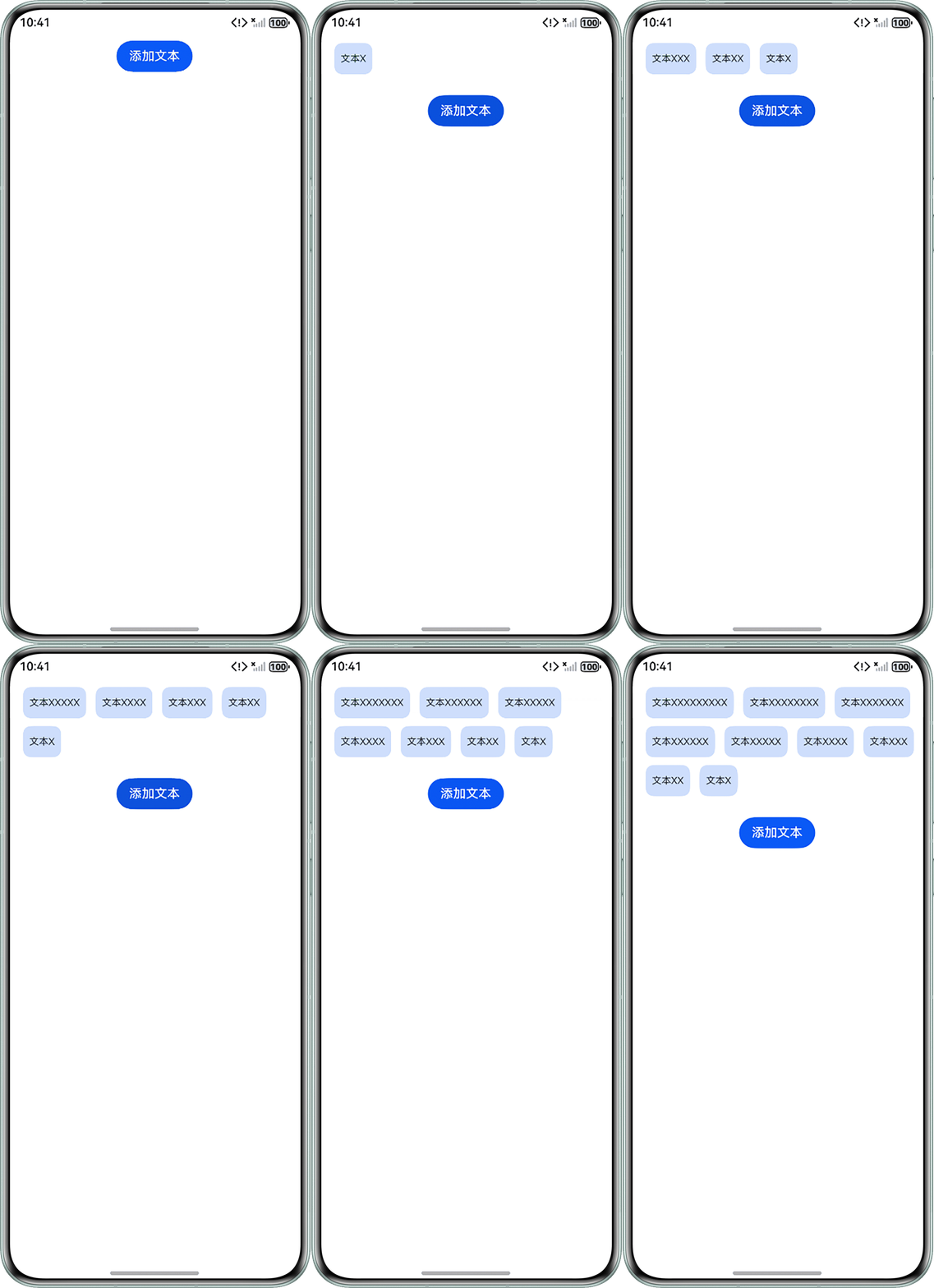
- 基础网格布局。使用弹性布局(Flex)可以实现子元素不固定的网格布局,只需按实际需求设置以下参数即可:
- FlexDirection.Row(默认值):主轴为水平方向,子元素从起始端沿着水平方向开始排布。
- FlexWrap.Wrap:允许换行,每一行子元素按照主轴方向排列。
代码示例如下:@Entry @Component struct FlexPage { // 模拟图标数据(宽度不一致) @State iconLabels: string[] = []; private xCount: number = 0; // 计数器 build() { Column() { // 核心Flex容器(自动换行) Flex({ direction: FlexDirection.Row, wrap: FlexWrap.Wrap }) { ForEach(this.iconLabels, (label: string) => { Text(label) .height(40) .padding(8) .fontSize(12) .textAlign(TextAlign.Center) .backgroundColor('#330A59F7') .borderRadius(10) .margin({ left: '12vp', bottom: '10vp' }); }); } .width('100%') .padding(10); Button('添加文本') .margin(7) .onClick(() => { const newItems: string[] = []; this.xCount++; const xString = 'X'.repeat(this.xCount); const newText = `文本${xString}`; newItems.push(newText); this.iconLabels = [...newItems, ...this.iconLabels]; }); } .width('100%') .height('100%'); } }运行效果图如下:
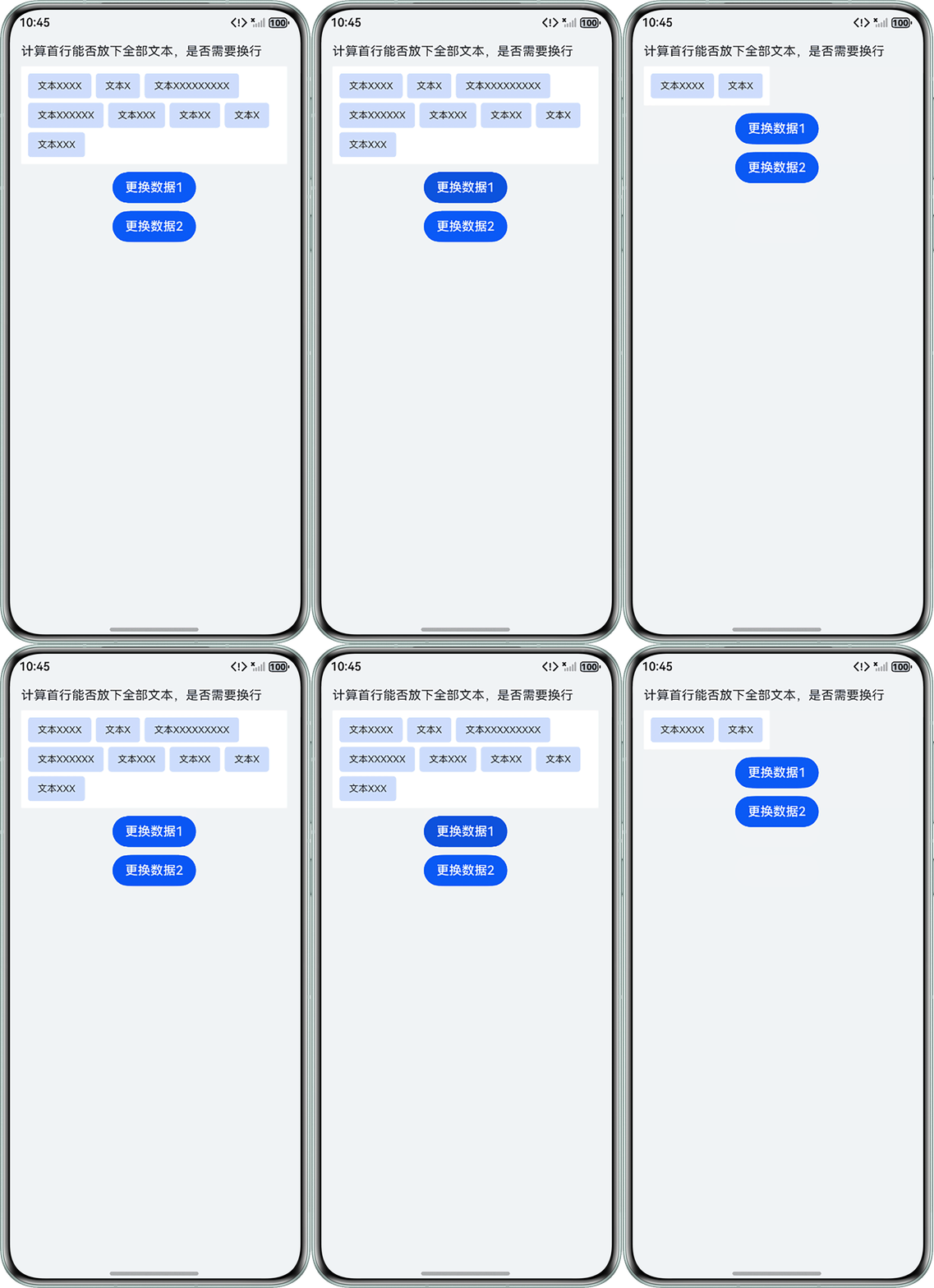
- 单行自适应问题。当Flex子组件较多,需要使用换行参数(将wrap设置为FlexWrap.Wrap)时,主轴长度auto的自适应布局会失效,默认撑满父容器。所以要解决问题可以控制Flex组件的换行规则:当内容不超过一行时设置为FlexWrap.NoWrap,超过一行设置为FlexWrap.Wrap。
- 步骤1:根据当前布局计算出Flex组件中一行可用的最大宽度。通过measureText得到文本占用的宽度,从而计算文本框占用的宽度。
- 步骤2:当全部文本框占用的宽度加起来未超过一行就将Flex设置为FlexWrap.NoWrap;如果前几个文本框累计宽度超过一行,则无需计算后续文本框,直接将Flex设置为FlexWrap.Wrap。
代码示例如下:
import { MeasureUtils, UIContext, window } from '@kit.ArkUI';

@Entry
@Component
struct FlexPageSample {
  @State textList: string[] = ['文本XXX', '文本XXXXX', '文本XXXXXX', '文本XXXXXXX', '文本XX', '文本X'];
  @State isWarp: boolean = false;
  flexWidth: number = 0;
  uiContext: UIContext = this.getUIContext();
  measureUtils: MeasureUtils = this.getUIContext().getMeasureUtils();

  aboutToAppear(): void {
    window.getLastWindow(this.getUIContext().getHostContext(), (err, data) => {
      data.setWindowLayoutFullScreen(true); // 设置沉浸式布局
      let properties = data.getWindowProperties(); // 获取当前窗口的属性
      let windowWidth = properties.windowRect.width; // 获取当前窗口宽度
      this.flexWidth = windowWidth - this.uiContext.vp2px(20 * 2); // 计算Flex组件的最大宽度,单位px
      this.setFlexWrap(this.textList);
    });
  }

  // 设置是否换行
  setFlexWrap(textList: string[]) {
    this.isWarp = false; // 默认不换行
    let lineWidth = this.flexWidth - this.uiContext.px2vp(6 * 2); // Flex组件一行的最大宽度,单位px
    let countWidth = 0; // 文本框占用的的宽度
    textList.forEach((item) => {
      if (this.isWarp === false) {
        // 计算文本的宽度
        let textWidth = this.measureUtils.measureText({
          textContent: item,
          fontSize: 12 // 文本字体大小
        });
        // 累计文本框占用宽度,文本宽度+2*文本框左右内边距+2*文本框左右外边距
        countWidth = countWidth + textWidth + this.uiContext.vp2px(2 * 12 + 2 * 3);
        // 超过每行最大宽度,设置为换行
        if (countWidth >= lineWidth) {
          this.isWarp = true;
        }
      }
    });
  }

  build() {
    Column({ space: 10 }) {
      Column({ space: 10 }) {
        Text(`计算首行能否放下全部文本,是否需要换行`);
        Flex({
          justifyContent: FlexAlign.Start,
          wrap: this.isWarp ? FlexWrap.Wrap : FlexWrap.NoWrap, // 根据状态变量设置是否换行
          direction: FlexDirection.Row
        }) {
          ForEach(this.textList, (item: string) => {
            Text(item)
              .fontSize(12)
              .maxLines(1)
              .backgroundColor('#330A59F7')
              .borderRadius(4)
              .textOverflow({ overflow: TextOverflow.Ellipsis })
              .ellipsisMode(EllipsisMode.END)
              .margin(3) // 文本框外边距3
              .padding({ left: 12, right: 12 }) // 文本框左右内边距12
              .height(32);
          });
        }
        .padding(6) // Flex组件内边距6
        .backgroundColor('#ffffff')
        .width('auto');
      }.width('100%')
      .alignItems(HorizontalAlign.Start);

      Button('更换数据1')
        .onClick(() => {
          this.textList = ['文本XXXX', '文本X'];
          this.setFlexWrap(this.textList);
        });
      Button('更换数据2')
        .onClick(() => {
          this.textList = ['文本XXXX', '文本X', '文本XXXXXXXXX', '文本XXXXXX', '文本XXX', '文本XX', '文本X', '文本XXX'];
          this.setFlexWrap(this.textList);
        });
    }
    .padding({
      top: 50,
      left: 20,
      right: 20,
      bottom: 20
    }) // 左右内边距20
    .height('100%')
    .width('100%')
    .backgroundColor('#f1f3f5');
  }
}
运行效果图如下:
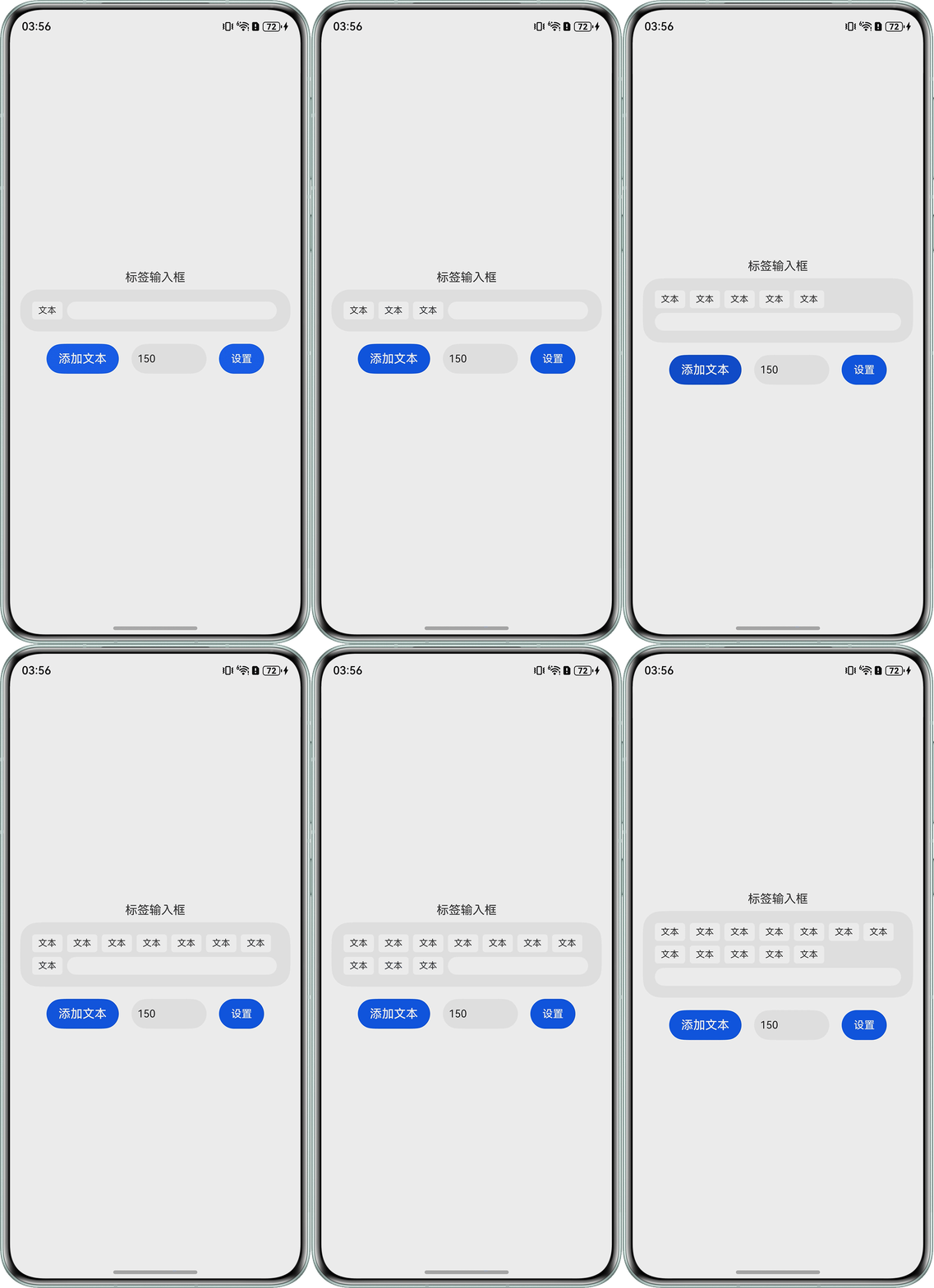
- 阈值控制换行。
在Flex布局中,若前面的子元素(如文本框)与最后一个子元素(输入框)的类型不一致,最后一个子元素在特定条件下需要换行。为了实现智能的响应式布局,可以通过精确计算前方所有元素的实际占用宽度,判断容器的剩余空间是否足以容纳该输入框,从而决定其是否换行。
- 步骤1:计算标签占用宽度和剩余空间:
- 步骤2:根据剩余空间决定输入框的布局方式,以150vp为阈值:
- 剩余空间大于150vp:输入框在当前行显示,宽度等于剩余空间。
- 剩余空间小于等于150vp:输入框换行到下一行,宽度占满整行。
代码示例如下:
import { LengthMetrics, MeasureUtils, UIContext, window } from '@kit.ArkUI';

@Component
export struct InputTag {
  @Link value: string[];
  @State inputVal: string = '';
  // input组件的宽度
  @Link remainingSpaceVp: number;
  // 父组件传递的计算函数
  private onTagsChanged?: () => void;
  @Link lineWidth: number; // 改为@Link修饰符
  flexWidth: number = 0;

  aboutToAppear() {
    // 初始计算
    if (this.onTagsChanged) {
      this.onTagsChanged();
    }
  }

  build() {
    Column() {
      Text('标签输入框').margin(7);
      Row() {
        Flex({
          wrap: FlexWrap.Wrap,
          space: { main: LengthMetrics.vp(6), cross: LengthMetrics.vp(6) }
        }) {
          // 渲染已有tag
          ForEach(this.value, (tag: string) => {
            Text(tag)
              .fontSize(12)
              .height(24)
              .backgroundColor('rgba(255, 255, 255, 1)')
              .borderRadius(4)
              .padding({ left: 8, right: 8 });
          });
          // 根据剩余空间决定输入框的布局方式
          TextInput({ text: this.inputVal })
          // 剩余空间大于lineWidth占用剩余空间,小于lineWidth占用一整行
            .width((this.remainingSpaceVp >= this.lineWidth) ? this.remainingSpaceVp - 30 : '100%')
            .height(24)
            .padding({ left: 5, right: 0 })
            .backgroundColor('rgba(255, 255, 255, 1)')
            .caretColor(0.5);
        }
        .width('100%');
      }
      .width('100%')
      .constraintSize({ minHeight: 32 })
      .borderRadius(24)
      .backgroundColor('rgba(0, 0, 0, 0.05)')
      .padding(16)
      .clip(true);
    };
  }
}

@Entry
@Component
struct InputTagPage {
  // 容器宽度相关
  private containerWidth: number = 0;
  flexWidth: number = 0;
  private uiContext: UIContext = this.getUIContext();
  private measureUtils: MeasureUtils = this.uiContext.getMeasureUtils();
  @State value: string[] = ['文本'];
  @State remainingSpaceVp: number = 0;
  @State lineWidth: number = 150; // 添加状态变量
  @State customLineWidth: string = '150'; // 用于输入框的状态

  aboutToAppear(): void {
    // 获取窗口宽度
    window.getLastWindow(this.getUIContext().getHostContext(), (err, data) => {
      data.setWindowLayoutFullScreen(true);
      let properties = data.getWindowProperties();
      let windowWidth = properties.windowRect.width;
      // 计算Flex容器的实际宽度
      this.flexWidth = windowWidth - this.uiContext.vp2px(14 * 2) - this.uiContext.vp2px(5 * 2);
      this.containerWidth = this.flexWidth;
      // 初始计算
      this.calculateLayout();
    });
  }

  aboutToUpdate() {
    this.calculateLayout();
  }

  // 动态计算标签占用宽度和剩余空间
  calculateLayout() {
    const tagSpacing = 6; // tag之间的间距
    const tagPadding = 8 * 2; // tag左右padding各8vp
    let currentLineWidth = 0;
    // 计算当前行已使用的宽度
    for (let i = 0; i < this.value.length; i++) {
      const tag = this.value[i];
      // 测量文本宽度
      const textWidth = this.measureUtils.measureText({
        textContent: tag,
        fontSize: 12
      });
      // 计算tag总宽度:文本宽度+padding+可能的间距
      const tagTotalWidth = textWidth + this.uiContext.vp2px(tagPadding);
      if (currentLineWidth === 0) {
        // 第一个元素,不加间距
        currentLineWidth = tagTotalWidth;
      } else {
        // 检查当前行是否能放下这个tag
        if (currentLineWidth + this.uiContext.vp2px(tagSpacing) + tagTotalWidth <= this.containerWidth) {
          // 能放下,添加到当前行
          currentLineWidth += this.uiContext.vp2px(tagSpacing) + tagTotalWidth;
        } else {
          // 放不下,开始新的一行
          currentLineWidth = tagTotalWidth;
          this.containerWidth = this.flexWidth;
        }
      }
    }
    // 计算剩余空间(转换为vp单位)
    this.remainingSpaceVp = this.uiContext.px2vp(this.containerWidth - currentLineWidth);
  }

  // 更新lineWidth的函数
  updateLineWidth() {
    const width = parseInt(this.customLineWidth);
    if (!isNaN(width) && width > 0) {
      this.lineWidth = width;
      this.calculateLayout();
    }
  }

  build() {
    Column() {
      InputTag({
        value: $value,
        remainingSpaceVp: this.remainingSpaceVp,
        lineWidth: $lineWidth, // 传递lineWidth参数
        flexWidth: this.flexWidth
      });

      Row({ space: 10 }) {
        Button('添加文本')
          .margin(7)
          .onClick(() => {
            const newItems: string[] = [];
            newItems.push(`文本`);
            this.value = [...newItems, ...this.value];
            this.calculateLayout();
          });

        // 添加避让长度输入框
        TextInput({ text: this.customLineWidth, placeholder: '避让长度' })
          .width(100)
          .height(40)
          .borderRadius(24)
          .padding(8)
          .fontSize(14)
          .backgroundColor('rgba(0, 0, 0, 0.05)')
          .onChange((value: string) => {
            this.customLineWidth = value;
          })
          .onSubmit(() => {
            this.updateLineWidth();
          });

        Button('设置')
          .margin(7)
          .width(60)
          .onClick(() => {
            this.value = ['文本'];
            this.updateLineWidth();
          });
      }
      .width('100%')
      .justifyContent(FlexAlign.Center)
      .margin({ top: 10 });
    }
    .padding({ left: 14, right: 14 })
    .width('100%')
    .height('100%')
    .justifyContent(FlexAlign.Center);
  }
}
运行效果图如下: