背景知识
- HTTP协议为表单数据传输主要提供了两种表单传输场景:简单字符串键值对表单数据传输和多表单混合数据传输。
- 键值对以等号连接,多个参数以&符号分隔,表单数据直接附加在URL地址栏中,随请求头一同发送,请求体为空,或者请求体采用application/x-www-form-urlencoded格式的编码发送表单数据。
- 采用multipart/form-data格式的数据编码,表单数据位于HTTP请求体中,不暴露在URL中,在敏感信息传输、混合数据传输、大数据传输等场景广泛使用。
- rcp模块为上述两种数据编码方式提供了多种接口
- URLOrString:作为HTTP/HTTPS地址的入参,包括URL类型和string类型,URL可通过append接口将表单数据拼接到请求地址中传输。
- Form:HTTP简单的表格数据,通过POST方法将表单数据以application/x-www-form-urlencoded编码方式上传表单数据。
- MultipartForm:HTTP多部分表格数据传输。
解决方案
开发准备,申请获取网络权限:ohos.permission.INTERNET。
场景一:简单字符串表单数据传输
- 方案1:使用URL对参数进行拼接,实现表单数据传输。
- 新建URLParams类。
let paramsObject = new url.URLParams();
- 添加表单参数。
paramsObject.append('fod', '3'); // 开发者自行设置参数 paramsObject.append('fed', '4'); // 开发者自行设置参数 - 将表单参数与基地址合成完整URL。
let urlWithParam = url.URL.parseURL('/get?' + paramsObject.toString(), baseUrl); - 新建会话发送表单数据。
let session = rcp.createSession();
session.get(urlWithParam).then((response) => {
  console.info(`urlWithParamGetData Succeeded in getting the response ${response}`);
}).catch((err: BusinessError) => {
  console.error(`err: err code is ${err.code}, err message is ${JSON.stringify(err)}`);
});
运行日志如下:
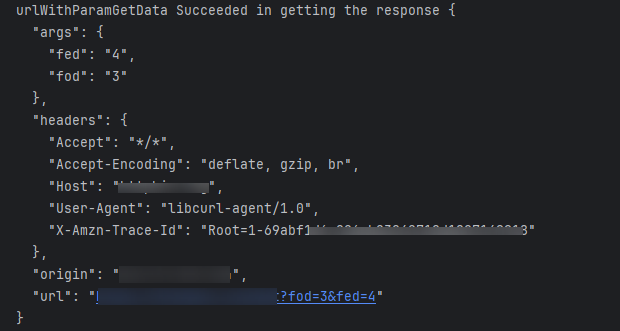
- 新建URLParams类。
- 方案2:使用rcp模块中的Form类型数据传输表单数据。
- 使用参数新建Form类。
const simpleForm = new rcp.Form({ 'key1': 'value1', 'key2': ['valueList0', 'valueList1'], }); // 开发者自行设置参数 - 指定表单数据的传输顺序,部分服务端校验传输参数的顺序,顺序不对可能导致传输失败。
simpleForm.keys = ['key2', 'key1']; // 开发者自行设置参数顺序
- 新建会话发送表单数据多部分表单数据。
const session = rcp.createSession();
session.post('xxx.xxx.xxx', simpleForm).then((response) => { // 开发者自行设置请求地址
  console.info(`Succeeded in getting the response ${response}`);
}).catch((err: BusinessError) => {
  console.error(`err: err code is ${err.code}, err message is ${JSON.stringify(err)}`);
});
运行日志如下,如果用户不在请求头设置数据大小,rcp模块会自动计算:
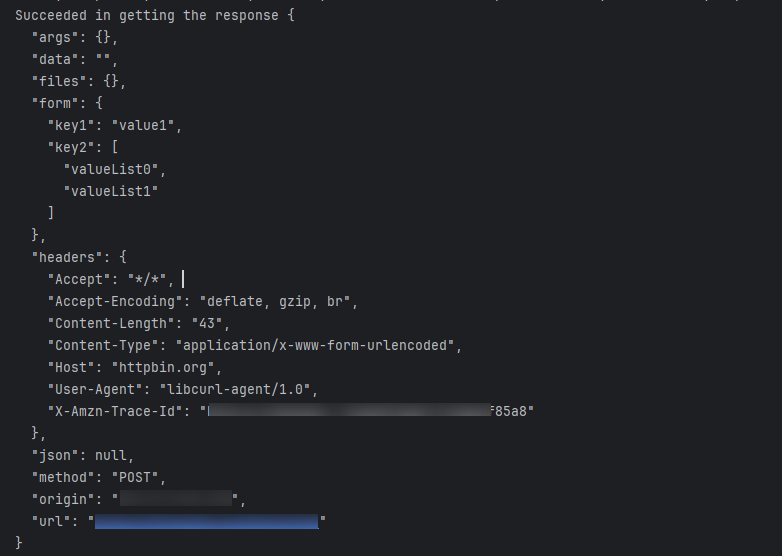
- 使用参数新建Form类。
场景二:复杂混合表单数据传输
- 使用picker组件选择图片文件并将文件复制到沙箱路径,rcp模块的MultipartForm传输只支持沙箱路径下的文件路径、读取的文件buffer数据和读取文件数据的回调函数作为入参,不支持文件流和文件操作符作为入参。
let sandBoxFileName = await copyFileToSandBox(sandboxDir);
- 构建传输文件的表单数据。详细说明见rcp如何实现文件上传。
let multiFormFieldValue = this.buildMultipartFormFieldValue(remoteFileName, sandBoxFileName, 'image/jpeg');
- 将字符串参数与文件数据合并为多部分表单数据。
let multiForm = new rcp.MultipartForm({ 'key1': 'value1', 'key2': multiFormFieldValue, 'key3': multiFormFieldValue }); // 开发者自行设置参数 - 设置keys顺序用于指定多部分表单各部分传输顺序,不设置系统会随机生成传输顺序。
multiForm.keys = ['key3', 'key1', 'key2']; // 开发者自行设置参数顺序
- 自定义表单分隔符,如果不设置,系统使用随机字符串生成分隔符。
multiForm.boundary = '--MULTIPARTFORM BEGIN AND END BOUNDARY'; // 开发者自行设置分隔符
运行日志如下:

完整示例代码如下:
import { ItemRestriction, SegmentButton, SegmentButtonOptions, SegmentButtonTextItem } from '@kit.ArkUI';
import { photoAccessHelper } from '@kit.MediaLibraryKit';
import fileIo from '@ohos.file.fs';
import { rcp } from '@kit.RemoteCommunicationKit';
import { url } from '@kit.ArkTS';

async function getFileAssetsFromType(): Promise<string> {
  let photoPicker = new photoAccessHelper.PhotoViewPicker();
  const photoSelectOptions = new photoAccessHelper.PhotoSelectOptions(); // 创建图片-音频类型文件-预览的图库选项实例
  // 选择媒体文件类型和选择媒体文件的最大数目
  photoSelectOptions.MIMEType = photoAccessHelper.PhotoViewMIMETypes.IMAGE_TYPE; // 选择媒体文件类型为Image
  photoSelectOptions.maxSelectNumber = 1; // 选择媒体文件的最大数目
  photoSelectOptions.isEditSupported = true;
  photoSelectOptions.isOriginalSupported = true;
  let photoSelectResult: photoAccessHelper.PhotoSelectResult = await photoPicker.select(photoSelectOptions);
  let uris: Array<string> = photoSelectResult.photoUris;
  if (uris.length === 0) {
    console.info('getFileAssetsFromType 没有图片选中');
  }
  return uris[0];
}

async function copyFileToSandBox(sandboxDir: string): Promise<string> {
  let uri: string = await getFileAssetsFromType();
  if (uri.length === 0) {
    console.info('copyFileToSandBox 没有图片选中');
    return '';
  }
  const fileName = uri.split('/').pop() || 'default.jpg'; // 提取文件名
  console.info('沙箱路径:' + sandboxDir);
  console.info('选择图片文件名称:' + fileName);
  console.info('uris文件路径:' + uri);
  let sandboxFilename = `${sandboxDir}/${fileName}`; // 也可以直接使用沙箱路径字符串如:/data/storage/el2/base/files
  console.info('沙箱路径图片文件名:' + sandboxFilename);
  const srcFile = fileIo.openSync(uri, fileIo.OpenMode.READ_ONLY); // 复制文件到沙箱
  try {
    fileIo.copyFileSync(srcFile.fd, sandboxFilename);
  } catch (error) {
    console.error('copy file error');
  }
  fileIo.closeSync(srcFile);
  return sandboxFilename;
}

@Component
struct SimpleFormData {
  urlWithParamMsg: string = 'url携带参数';
  formDataMsg: string = 'requestContent传输表单';

  urlWithParamGetData() {
    let baseUrl: string = 'xxx.xxx.xxx'; // 开发者自行设置请求地址
    let paramsObject = new url.URLParams();
    paramsObject.append('fod', '3'); // 开发者自行设置参数
    paramsObject.append('fed', '4'); // 开发者自行设置参数
    console.info('param: ' + paramsObject.toString());
    let urlWithParam = url.URL.parseURL('/get?' + paramsObject.toString(), baseUrl);
    console.info('url: ' + urlWithParam.toString());
    let session = rcp.createSession();
    session.get(urlWithParam).then((response) => {
      console.info(`urlWithParamGetData Succeeded in getting the response ${response}`);
    }).catch((err: BusinessError) => {
      console.error(`err: err code is ${err.code}, err message is ${JSON.stringify(err)}`);
    });
  }

  formDataTrans() {
    const simpleForm = new rcp.Form({
      'key1': 'value1',
      'key2': ['valueList0', 'valueList1'],
    }); // 开发者自行设置参数
    simpleForm.keys = ['key2', 'key1']; // 开发者自行设置参数顺序
    const session = rcp.createSession();
    session.post('xxx.xxx.xxx', simpleForm).then((response) => { // 开发者自行设置请求地址
      console.info(`Succeeded in getting the response ${response}`);
    }).catch((err: BusinessError) => {
      console.error(`err: err code is ${err.code}, err message is ${JSON.stringify(err)}`);
    });
  }

  build() {
    Column() {
      Button(this.urlWithParamMsg)
        .onClick(() => {
          this.urlWithParamGetData();
        })
        .margin(16)
        .width('100%');
      Button(this.formDataMsg)
        .onClick(() => {
          this.formDataTrans();
        })
        .margin(16)
        .width('100%');
    }
    .width('100%')
    .height('100%');
  }
}

@Component
struct MultiPartFormData {
  hybridDataMsg: string = '多部分表单传输混合数据';
  sandboxDir: string = '';

  aboutToAppear(): void {
    this.sandboxDir = this.getUIContext().getHostContext()!.filesDir;
  }

  buildMultipartFormFieldValue(fileName: string | undefined,
    pathOrContent: rcp.Path | rcp.FileContent | rcp.GetDataCallback,
    contentType: string | undefined): rcp.MultipartFormFieldValue {
    let result: rcp.MultipartFormFieldValue = {
      remoteFileName: fileName,
      contentType: contentType,
      contentOrPath: pathOrContent
    };
    return result;
  }

  uploadMultiPartFormFileForCommon(multiForm: rcp.MultipartForm) {
    let req = new rcp.Request('xxx.xxx.xxx'); // 需开发者自行配置请求地址
    req.content = multiForm;
    req.method = 'POST';
    try {
      const session = rcp.createSession();
      session.fetch(req).then((resp: rcp.Response) => {
        console.info(`Response succeeded: ${JSON.stringify(resp)}`);
        session.close();
      }).catch((err: BusinessError) => {
        // 请求错误处理。
        console.error(`Response err: Code is ${JSON.stringify(err.code)}, message is ${JSON.stringify(err)}`);
        session.close();
      });
    } catch (err) {
      // 创建会话错误处理。
      console.error(`createSession err: Code is ${JSON.stringify(err.code)}, message is ${JSON.stringify(err)}`);
    }
  }

  async uploadFormSandBoxFileWithParam(sandboxDir: string) {
    let remoteFileName: string = 'test.jpg';
    let sandBoxFileName = await copyFileToSandBox(sandboxDir);
    let multiFormFieldValue = this.buildMultipartFormFieldValue(remoteFileName, sandBoxFileName, 'image/jpeg');
    let multiForm = new rcp.MultipartForm({
      'key1': 'value1',
      'key2': multiFormFieldValue,
      'key3': multiFormFieldValue
    }); // 开发者自行设置参数
    multiForm.keys = ['key3', 'key1', 'key2']; // 开发者自行设置参数顺序
    multiForm.boundary = '--MULTIPARTFORM BEGIN AND END BOUNDARY'; // 开发者自行设置分隔符
    this.uploadMultiPartFormFileForCommon(multiForm);
  }

  build() {
    Column() {
      Button(this.hybridDataMsg)
        .onClick(() => {
          this.uploadFormSandBoxFileWithParam(this.sandboxDir);
        })
        .margin(16)
        .width('100%');
    }
    .width('100%')
    .height('100%');
  }
}

@Entry
@Component
struct FormDataTransfer {
  fontColor: string = '#182431';
  selectedFontColor: string = '#0A59F7';
  @State currentIndex: number = 0;
  @State selectedIndex: number = 0;
  @State tabSelectedIndexes: number[] = [0]; // SegmentButton默认选项
  @State tabOptions: SegmentButtonOptions = SegmentButtonOptions.tab({
    buttons: [{ text: '简单表单传输' }, { text: '多部分表单传输' },] as ItemRestriction<SegmentButtonTextItem>,
    backgroundColor: '#0d000000',
    selectedBackgroundColor: $r('sys.color.white'),
    fontWeight: 400,
    selectedFontWeight: 500,
    textPadding: 6
  });
  private controller: TabsController = new TabsController();

  @Builder
  tabBuilder(index: number, name: string) {
    Column() {
      Text(name)
        .fontColor(this.selectedIndex === index ? this.selectedFontColor : this.fontColor)
        .fontSize(16)
        .fontWeight(this.selectedIndex === index ? 500 : 400)
        .lineHeight(22)
        .margin({ top: 17, bottom: 7 });
      Divider()
        .strokeWidth(2)
        .color('#007DFF')
        .opacity(this.selectedIndex === index ? 1 : 0);
    }.width('100%');
  }

  build() {
    Column() {
      SegmentButton({
        options: this.tabOptions,
        selectedIndexes: $tabSelectedIndexes,
        onItemClicked: (index) => {
          this.getUIContext().animateTo({ duration: 400 }, () => {
            this.currentIndex = index;
            this.controller.changeIndex(index);
          });
        }
      })
        .borderRadius(20)
        .margin({
          bottom: 16
        })
        .width('100%')
        .height(40);

      Tabs({ barPosition: BarPosition.Start, index: this.currentIndex, controller: this.controller }) {
        TabContent() {
          SimpleFormData();
        }.tabBar(this.tabBuilder(0, '简单表单传输'));

        TabContent() {
          MultiPartFormData();
        }.tabBar(this.tabBuilder(1, '多部分表单传输'));

      }
      .vertical(false)
      .barMode(BarMode.Fixed)
      .barWidth(360)
      .barHeight(0)
      .onChange((index: number) => {
        // currentIndex控制TabContent显示页签
        this.currentIndex = index;
        this.selectedIndex = index;
      })
      .onAnimationStart((index: number, targetIndex: number, event: TabsAnimationEvent) => {
        if (index === targetIndex) {
          return;
        }
        console.info(`event currentOffset ${event.currentOffset}`);
        // selectedIndex控制自定义TabBar内Image和Text颜色切换
        this.selectedIndex = targetIndex;
      })
      .width('100%')
      .height('100%');
    }
    .width('100%')
    .padding({
      left: 16,
      right: 16,
      top: 12
    });
  }
}