问题现象
使用SoundPool快速下发音频会导致音频播放时破音,问题代码片段如下:
Button() {
  Text("1")
    .fontSize(20)
    .fontColor(Color.White)
}
.type(ButtonType.Capsule)
.backgroundColor(Color.Pink)
.width("80%")
.height(50)
.margin(10)
.onClick(() => {
  this.soundPool.PlaySoundPool_1()
})
背景知识
SoundPool(音频池):提供了短音频的加载、播放等功能。当应用开发时,经常需要使用一些急促简短的音效(如点击键盘、系统通知音效等),此时建议调用SoundPool,实现一次加载,多次低时延播放。
问题定位
在查看PCM文件时,发现客户端下发的两段音频数据存在重叠。
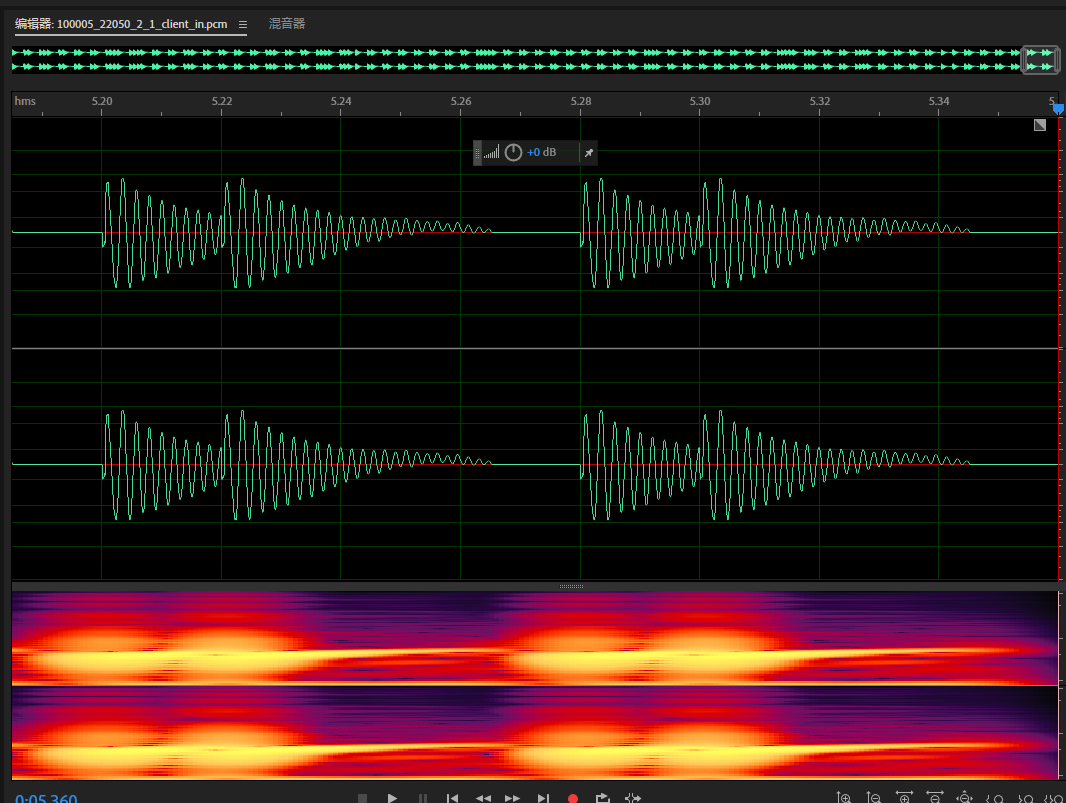
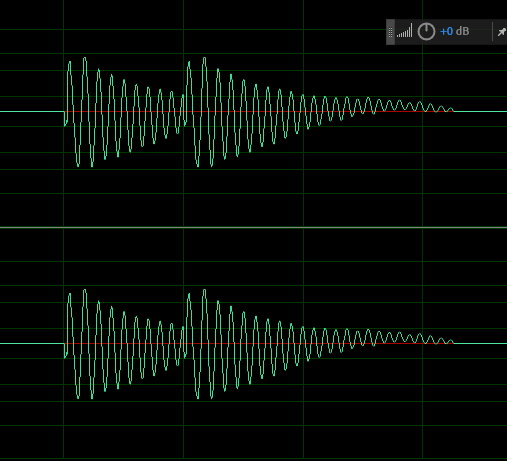
具体表现为:Demo中音频源的正常播放时间为45毫秒,但在播放到第20毫秒时,接收到新的音频片段播放请求,导致当前音频未播放完即被中断,新音频随即开始播放,从而产生破音现象。
分析结论
音频框架会对每一段音频进行淡入淡出处理,如果连续不断地将数据发送到框架中,框架只会对第一帧音频执行淡入效果,并在最后一帧执行淡出效果,而中间的所有帧不会处理。这样一来,音频播放时就会出现断续或失真的现象。
修改建议
针对连续快速下发两次音频时出现的pop音问题,已知底层音频处理采用了淡入淡出效果,并且音频播放限于单一路流的原则。基于此现状,提出以下优化方案以提升用户体验和系统稳定性:
- 集成防抖逻辑以平滑音频下发频率:
实施策略应考虑将两次连续的音频下发合并在一次指令中,以此避免短时间内对音频下发操作的频繁调用,进而缓解系统资源压力。建议根据应用实际下发音频数据的长度来调整下发频率间隔,适当延长这一间隔有助于优化音频处理过程。一种可行的技术方案是在下发逻辑中添加防抖(debounce)逻辑控制,保证频次适中。
// 防抖 在一段时间内函数被多次触发,防抖让函数在一段时间后最终只执行一次
export function debounce(func: (event: ClickEvent) => void, delay?: number) {
  let timer: number;
  return (event: ClickEvent) => {
    clearTimeout(timer);
    timer = setTimeout(() => {
      func(event);
    }, delay ? delay : 1000);
  };
}
- 运用播放完成回调机制:引入SoundPool播放完成回调功能,即在上一路流的播放彻底完成后,再执行下一次音频数据的下发动作。该机制能够确保各音频指令按序无误地执行,避免因未等前一音频播放结束就下发新音频而导致的音质问题。
// 加载完成回调
async loadCallback() {
  this.soundPool?.on('loadComplete', (soundId_: number) => {
    console.info(`loadComplete,soundId:${soundId_}`);
  });
}

// 播放完成回调
async finishPlayCallback() {
  this.soundPool?.on('playFinished', () => {
    console.info('receive play finished message');
  });
}
完整示例参考如下:
import { audio } from '@kit.AudioKit';
import { media } from '@kit.MediaKit';
import { BusinessError } from '@kit.BasicServicesKit';
import { common } from '@kit.AbilityKit';

// 防抖 在一段时间内函数被多次触发,防抖让函数在一段时间后最终只执行一次
export function debounce(func: (event: ClickEvent) => void, delay?: number) {
  let timer: number;
  return (event: ClickEvent) => {
    clearTimeout(timer);
    timer = setTimeout(() => {
      func(event);
    }, delay ? delay : 1000);
  };
}
@Entry
@Component
struct Index {
  private soundPool:media.SoundPool|undefined = undefined;
  private soundId_1: number = 1;
  private context = this.getUIContext().getHostContext() as common.UIAbilityContext;
  private audioRendererInfo:audio.AudioRendererInfo = {
    usage: audio.StreamUsage.STREAM_USAGE_MUSIC,
    rendererFlags: 1
  };
  // 加载完成回调
  async loadCallback() {
    this.soundPool?.on('loadComplete', (soundId_: number) => {
      console.info(`loadComplete,soundId:${soundId_}`);
    });
  }

  // 播放完成回调
  async finishPlayCallback() {
    this.soundPool?.on('playFinished', () => {
      console.info('receive play finished message');
    });
  }
  // 错误类型回调
  async setErrorCallback() {
    this.soundPool?.on('error', (error: BusinessError) => {
      console.error(`error happened,message is :${error.message}`);
    });
  }

  // 加载琴键音效
  async InitSoundPool() {
    this.soundPool = await media.createSoundPool(3, this.audioRendererInfo);
    this.loadCallback();
    this.setErrorCallback();
    if (this.context !== undefined) {
      let fileDescriptor = this.context.resourceManager.getRawFdSync('1_DO.mp3');
      this.soundId_1 = await this.soundPool.load(fileDescriptor.fd, fileDescriptor.offset, fileDescriptor.length);
    }
  }

  // 播放钢琴键音效DO
  async PlaySoundPool_1() {
    this.soundPool?.play(this.soundId_1).then(() => {
      this.finishPlayCallback();
      console.info('play success');
    }, (err: BusinessError) => {
      console.error('soundpool play failed and catch error is ' + err.message);
    });
  }

  build() {
    Column() {
      Button() {
        Text('Loading')
          .fontSize(20)
          .fontColor(Color.White)
      }
      .type(ButtonType.Capsule)
      .backgroundColor(Color.Pink)
      .width('80%')
      .height(50)
      .margin(10)
      .onClick(() => {
        this.InitSoundPool();
      })

      Button() {
        Text('1')
          .fontSize(20)
          .fontColor(Color.White)
      }
      .type(ButtonType.Capsule)
      .backgroundColor(Color.Pink)
      .width('80%')
      .height(50)
      .margin(10)
      .onClick(() => {
        debounce((event) => {
          this.PlaySoundPool_1();
          console.info(`event:${event}`);
        }, 40);
        this.PlaySoundPool_1();
      })
    }
  }
}
