问题现象
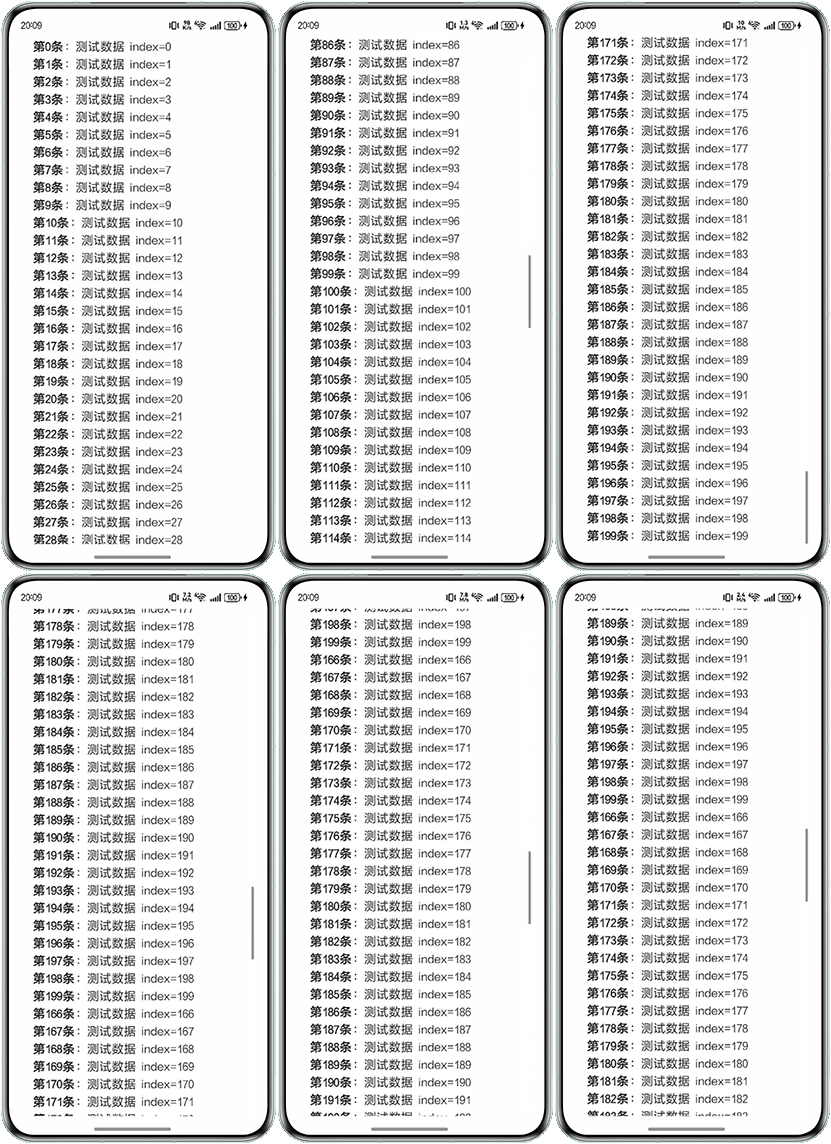
使用Repeat懒加载N个带样式的Text组件,当列表向下滑动到底部后,向上滑动,渲染的内容出现错误如何解决。问题代码如下:
import { LengthMetrics } from '@kit.ArkUI';


@Entry
@ComponentV2
struct Index {
  textBlockList: string[] = [];
  styledStringList: MutableStyledString[] = [];
  controllerList: TextController[] = [];


  aboutToAppear(): void {
    for (let i = 0; i < 200; i++) {
      let str: string = `第${i}条:测试数据 index=${i}`;
      let styledString = new MutableStyledString(str);
      let startStringMatch = str.match(/^第.+?条/); // 匹配第x条,加粗
      if (startStringMatch) {
        styledString.setStyle({
          start: 0,
          length: startStringMatch[0].length,
          styledKey: StyledStringKey.FONT,
          styledValue: new TextStyle({ fontWeight: 'bold' })
        });
      }
      styledString.setStyle({
        start: 0,
        length: str.length,
        styledKey: StyledStringKey.PARAGRAPH_STYLE,
        styledValue: new ParagraphStyle({ textIndent: new LengthMetrics(36) })
      });
      let controller = new TextController();
      this.textBlockList.push(str);
      this.styledStringList.push(styledString);
      controller.setStyledString(styledString);
      this.controllerList.push(controller);
    }
  }


  build() {
    Column() {
      List() {
        Repeat<string>(this.textBlockList)
          .each((obj: RepeatItem<string>) => {
            ListItem() {
              Text(obj.item, { controller: this.controllerList[obj.index] })
                .width('90%')
                .fontSize(18)
                .copyOption(CopyOptions.LocalDevice)
                .lineHeight(26)
                .height('auto');
            }
            .onAppear(() => {
              console.info(`加载了index=${obj.index}`);
            });
          })
          .virtualScroll({ totalCount: this.textBlockList.length });
      }
      .cachedCount(2);
    };
  }
} 
背景知识
- Repeat:可复用的循环渲染。基于数组类型数据来进行循环渲染,一般与容器组件配合使用。
- Text:显示一段文本的组件。文本在组件区域显示效果与字体资源相关,默认字体排印可见字体排印视觉指引。
- TextController:Text组件的控制器。可以通过setStyledString接口触发绑定或更新属性字符串。多次调用setStyledString,会用新的入参覆盖已绑定的属性字符串,而不是叠加新的入参。属性字符串通过controller绑定时,需要等待布局完成后,绑定生效。
问题定位
根据问题现象按照如下步骤进行定位:
- 判断是否是复用和懒加载引起的问题,将Repeat改成ForEach发现显示正常,怀疑问题是在懒加载处理过程中引入。
- 观察问题现象,首次渲染时Text文本样式都正常,但当组件滑出可视区域外时,再往回滑动渲染的样式和文字出现问题。怀疑是组件复用过程中,复用的Text绑定的还是原有的样式,样式修改未生效。
分析结论
首次渲染时TextController和Text进行了绑定,组件复用时需要使用setStyledString接口更新属性字符串,只替换TextOptions中的controller实际并没有生效。而定位过程中使用ForEach正常,是因为ForEach会全量渲染,首次渲染就将全量的TextController和Text进行了绑定,之后不存在修改TextController引起的更新未生效问题。
修改建议
建议在Text组件的onAppear回调函数中进行更新,确保每次渲染都能使用正确的属性字符串。
完整代码如下:
import { LengthMetrics } from '@kit.ArkUI';


@Entry
@ComponentV2
struct TextOrder {
  textBlockList: string[] = [];
  styledStringList: MutableStyledString[] = [];
  controllerList: TextController[] = [];


  aboutToAppear(): void {
    // 创建测试数据
    for (let i = 0; i < 200; i++) {
      let str: string = `第${i}条:测试数据 index=${i}`;
      let styledString = new MutableStyledString(str);
      let startStringMatch = str.match(/^第.+?条/); // 匹配第x条,加粗
      // 使用正则表达式匹配文本开头的"第x条"部分
      if (startStringMatch) {
        styledString.setStyle({
          start: 0,
          length: startStringMatch[0].length,
          styledKey: StyledStringKey.FONT,
          styledValue: new TextStyle({ fontWeight: 'bold' })
        });
      }
      // 为整段文本设置段落样式
      styledString.setStyle({
        start: 0,
        length: str.length,
        styledKey: StyledStringKey.PARAGRAPH_STYLE,
        styledValue: new ParagraphStyle({ textIndent: new LengthMetrics(36) })
      });
      // 创建文本控制器
      let controller = new TextController();
      // 将数据添加到对应的数组中
      this.textBlockList.push(str);
      this.styledStringList.push(styledString);
      this.controllerList.push(controller);
    }
  }


  build() {
    Column() {
      List() {
        Repeat<string>(this.textBlockList)
          .each((obj: RepeatItem<string>) => {
            ListItem() {
              Text(obj.item, { controller: this.controllerList[obj.index] })
                .width('90%')
                .fontSize(18)
                .copyOption(CopyOptions.LocalDevice)
                .lineHeight(26)
                .height('auto')
                // 当文本组件出现时,为其设置样式
                .onAppear(() => {
                  this.controllerList[obj.index].setStyledString(this.styledStringList[obj.index]);
                });
            }
            .onAppear(() => {
              console.info(`加载了index=${obj.index}`);
            });
          })
          .virtualScroll({ totalCount: this.textBlockList.length });
      }
      .cachedCount(2);
    };
  }
}
常见FAQ
Q:使用Repeat渲染列表,是否有动态预加载的功能?
A:可以考虑使用Repeat的virtualScroll模式。Repeat根据容器组件的显示区域和预加载区域加载子组件。当容器滑动/数组改变时,Repeat会根据父容器组件的布局过程重新计算显示区域和预加载区域范围,并管理列表子组件节点的创建与销毁。
Q:在Repeat渲染列表时,如何判断virtualScroll模式下,懒加载是否生效?
A:可以在Repeat所渲染的列表项中添加onAppear事件进行监听。通过在onAppear中打印日志,并对比日志输出数量与列表总条目数,即可判断懒加载是否实际生效。