问题现象
半模态弹窗可以通过参数height设置高度,通过参数detents设置不同高度挡位。如何根据实际场景需求设置半模态高度?
场景 | 场景说明 |
|---|---|
场景一:设置高度、挡位列表和非手势切换挡位 | 设置弹窗打开时的高度;配置多个挡位高度;通过代码切换当前挡位。 |
场景二:同时实现自适应高度和自定义限高 | 弹窗高度设为自适应内容,同时自定义最大高度。 |
场景三:最小挡位不可下拉 | 在最小挡位高度时,禁止继续下拉弹窗。 |
背景知识
- bindSheet提供转场以及模态页面,提升用户体验。SheetOptions中的height,detents和detentSelection分别支持设置当前高度、挡位列表和非手势切换挡位。
- 滑动手势事件可以自定义半模态的上下滑动效果。
解决方案
- 场景一:设置高度、挡位列表和非手势切换挡位。
该场景为参数设置问题,height决定半模态弹窗的高度,可以用于设置弹窗打开时的高度;detents控制的是半模态弹窗的挡位高度,是滑动松手后的停靠高度。当设置多个挡位高度后,可以通过滑动半模态弹窗的方式停靠在不同挡位高度,高度和挡位高度的设置可参考官网文档示例1(不同高度的半模态弹窗)和示例2(设置三个不同高度的挡位)。
非手势切换挡位(以代码的方式切换)通过detentSelection参数控制。
实现思路:如果希望通过代码的方式调整当前挡位,可以通过detentSelection控制半模态弹窗的当前挡位高度,当detentSelection的值为状态变量时,可以通过改变该状态变量的方式修改当前挡位高度。
示例代码如下:
@Entry
@Component
struct BindSheetSetting {
  @State isShow: boolean = false;
  // 控制当前挡位
  @State sheetSize: number = SheetSize.MEDIUM;

  @Builder
  customBuilder() {
    Column({ space: 20 }) {
      Blank()
        .height(20);
      Button('MEDIUM')
        .onClick(() => {
          // 设置挡位为屏幕高度一半
          this.sheetSize = SheetSize.MEDIUM;
        });
      Button('LARGE')
        .onClick(() => {
          // 设置挡位为几乎屏幕高度
          this.sheetSize = SheetSize.LARGE;
        });
      Button('200')
        .onClick(() => {
          // 设置挡位为固定数值
          this.sheetSize = 200;
        });
    };
  }

  build() {
    Stack() {
      Button('bindSheet')
        .bindSheet($$this.isShow, this.customBuilder(), {
          detents: [SheetSize.MEDIUM, SheetSize.LARGE, 200], // 设置挡位列表
          detentSelection: this.sheetSize, // 当前展示的挡位
        })
        .onClick(() => {
          // 点击触发半模态状态变更
          this.isShow = !this.isShow;
        });
    }
    .height('100%')
    .width('100%');
  }
}
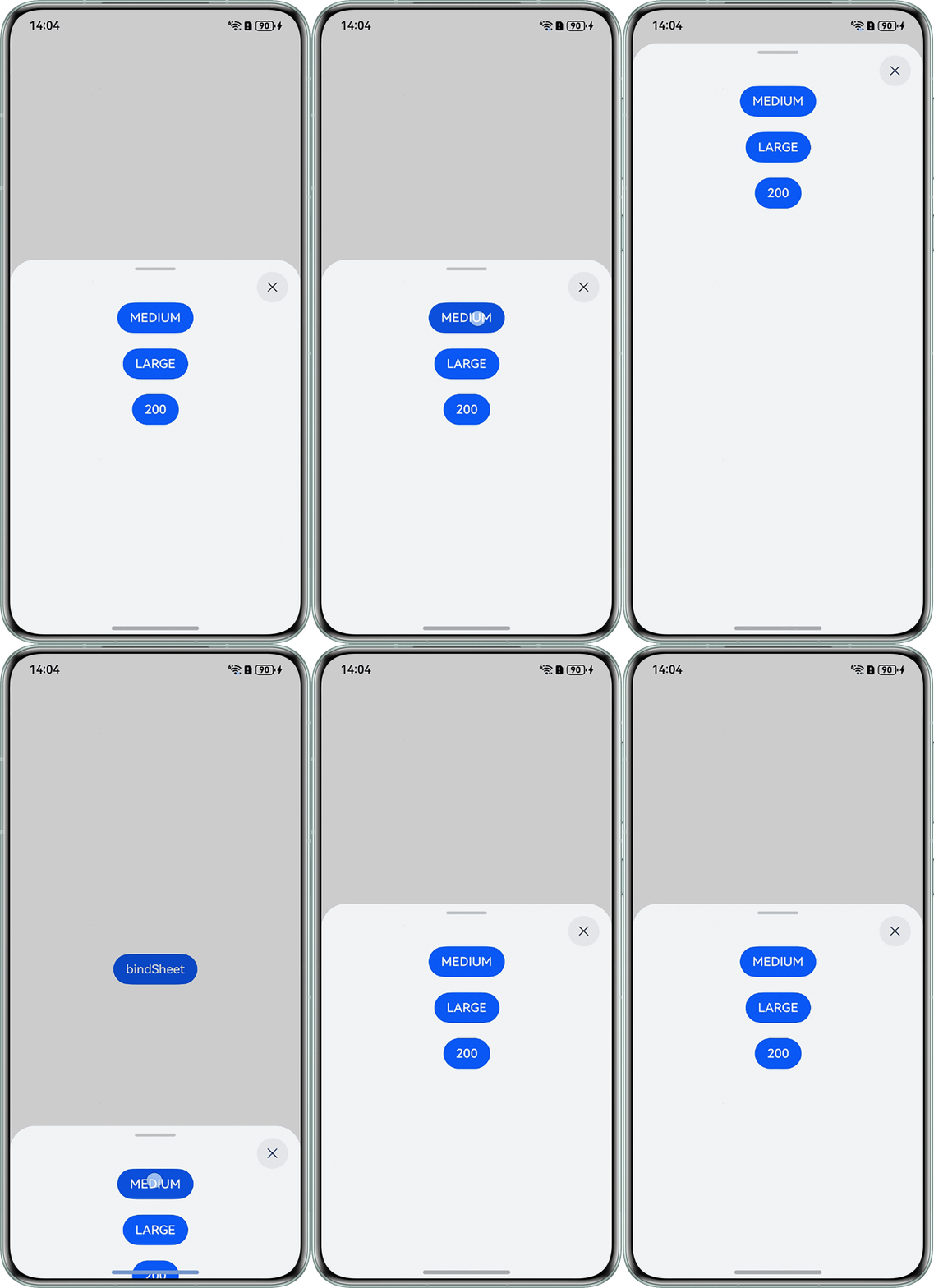
效果图如下:
- 场景二:同时实现自适应高度和自定义限高。
直接设置半模态弹窗的height参数为SheetSize.FIT_CONTENT时,半模态弹窗可以根据内容自适应高度,但此时半模态弹窗的最大高度也会被系统设为一个固定值。如果希望既可以实现自适应高度,又可以自定义限高,需要监听半模态内容的高度并配置给height参数。
实现思路:根据半模态页面内容的高度计算在窗口高度中的占比,同时定义一个最大高度,当计算高度大于最大高度时,显示最大高度。
示例代码如下:
import { window } from '@kit.ArkUI';

@Entry
@Component
struct SheetDemo {
  @State sheetHeight: string = '80%';
  @State windowHeight: number = 0;
  @State isShowSheet: boolean = false;
  private items: number[] = [0, 1, 2, 3, 4, 5, 6, 7, 8, 9];
  private itemHeight: number = 80;
  private spaceHeight: number = 10;
  private maxHeightPercent: number = 80;

  @Builder
  SheetBuilder() {
    Column() {
      List({ space: this.spaceHeight }) {
        ForEach(this.items, (item: number) => {
          ListItem() {
            Text(String(item)).fontSize(16).fontWeight(FontWeight.Bold);
          }.width('90%').height(this.itemHeight).backgroundColor('#5291FF').borderRadius(10);
        });
      }.alignListItem(ListItemAlign.Center).margin({ top: '10vp' }).width('100%');
    }
    .width('90%')
    .height('100%');
  }

  // 根据List内容去设置高度,同时要求最大高度小于80%
  build() {
    Column() {
      Button('Open Sheet').width('90%').height('80vp')
        .onClick(() => {
          this.isShowSheet = !this.isShowSheet;
          // 计算List组件内元素在窗口中的高度占比
          let height: number =
            ((this.itemHeight + this.spaceHeight) * this.items.length + this.spaceHeight) / this.windowHeight * 100;
          this.sheetHeight = `${Math.min(this.maxHeightPercent, height)}%`;
        })
        .bindSheet($$this.isShowSheet, this.SheetBuilder(), {
          height: this.sheetHeight, // this.sheetHeight为string类型的百分比
          showClose: false,
          preferType: SheetType.BOTTOM,
        });
    }.width('100%').height('100%')
    .justifyContent(FlexAlign.Center);
  }

  onPageShow(): void {
    let windowClass: window.Window | undefined = undefined;
    window.getLastWindow(this.getUIContext().getHostContext()).then((data) => {
      windowClass = data;
      try {
        let properties = windowClass.getWindowProperties();
        let rect = properties.windowRect;
        // rect.width:窗口宽度;rect.height:窗口高度。单位px。
        this.windowHeight = this.getUIContext().px2vp(rect.height);
      } catch (exception) {
        console.error(`Failed to obtain the window properties. Cause code: ${exception.code}, message: ${exception.message}`);
      }
    });
  }
}
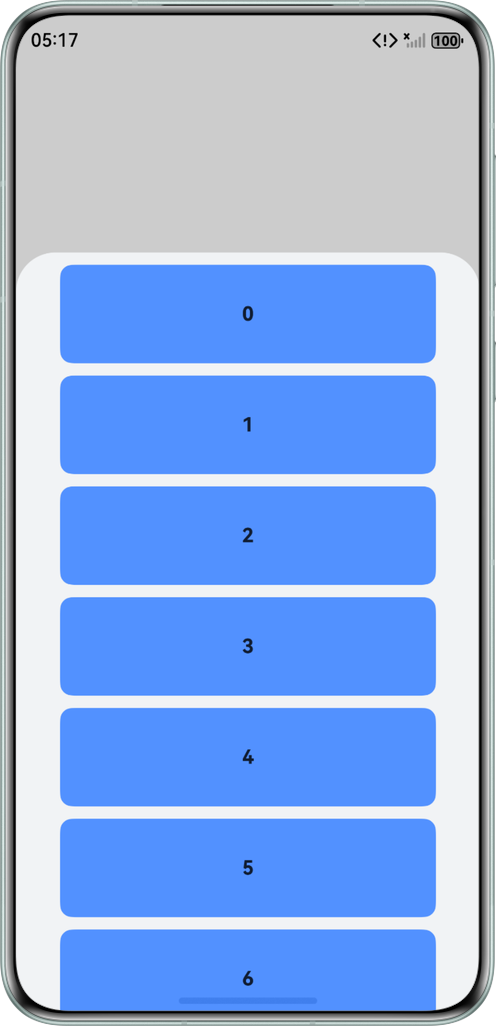
列表高度超过最大高度时,效果如图:
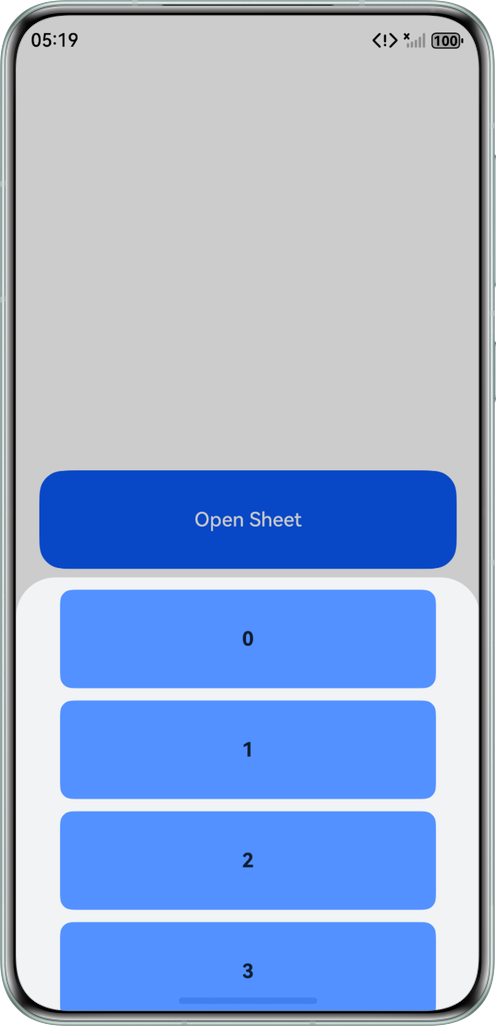
列表高度小于最大高度时,效果如图:
- 场景三:最小挡位不可下拉。
半模态弹窗在默认情况下,即使已经停靠在最小挡位高度,也能通过滑动弹窗继续下拉,松手后系统会依据下拉速度和距离,关闭半模态弹窗或者是回弹到最小挡位高度。如果希望最小挡位时完全禁止下拉,可以使用滑动手势事件来自定义半模态的上下滑动效果。
实现思路:在onActionUpdate中检查是否在合法高度区间,若在BOTTOM挡位且进行下滑则直接禁止下拉,如果在TOP挡位且进行上滑同样直接禁止上滑。否则实时更新sheetHeight以改变半模态的高度。onActionEnd(即松手时)中根据当前高度自动停靠到对应挡位,并记录本次结束高度用于下次滑动。
示例代码如下:
@Entry
@Component
struct SheetTransitionExample {
  @State isShow: boolean = true;
  @State @Watch('watchHeight') sheetHeight: number = 500;
  @State @Watch('watchFlag') sheetFlag: SheetState = SheetState.MID;
  @State changeValue: string = '';
  @State submitValue: string = '';
  controller: SearchController = new SearchController();
  @State positionY: number = 500;

  @Builder
  myBuilder() {
    Column() {
      Search({ value: this.changeValue, placeholder: '搜地点、公交、地铁、城市', controller: this.controller })
        .width('95%')
        .height(40)
        .backgroundColor('#F5F5F5')
        .placeholderColor(Color.Grey)
        .placeholderFont({ size: 14, weight: 400 })
        .textFont({ size: 14, weight: 400 })
        .onSubmit((value: string) => {
          this.submitValue = value;
        })
        .onChange((value: string) => {
          this.changeValue = value;
        })
        .margin(20);
      // 使用if判断渲染刷新组件,半模态状态为TOP+MID时的组件
      if (this.sheetFlag === SheetState.MID || this.sheetFlag === SheetState.TOP) {
        Column() {
          Row() {
            Text('驾车');
            Text('公交地铁');
            Text('步行');
            Text('打车');
            Text('行程规划');
          }
          .justifyContent(FlexAlign.SpaceBetween)
          .width('95%');
        }
        .justifyContent(FlexAlign.Center)
        .height(50)
        .width('90%')
        .margin(20)
        .borderRadius(8)
        .borderWidth(1);

        Column() {
          Row() {
            Text('常用地点');
            Text('设置');
          }
          .justifyContent(FlexAlign.SpaceBetween)
          .alignItems(VerticalAlign.Top)
          .width('95%')
          .margin(20);

          Row() {
            Column() {
              Text('回家');
              Text('点击设置');
            };

            Column() {
              Text('去公司');
              Text('点击设置');
            };
          }
          .justifyContent(FlexAlign.SpaceBetween)
          .width('95%')
          .height(150);
        }
        .width('90%')
        .borderRadius(8)
        .borderWidth(1);

        Text('test test test ')
          .fontSize(40)
          .margin(40);
      }
      // 使用if判断渲染刷新组件,半模态状态为TOP时的组件
      if (this.sheetFlag === SheetState.TOP) {
        Column() {
          Image($r('app.media.background'))
            .height(300)
            .objectFit(ImageFit.Contain);
        }
        .transition(TransitionEffect.OPACITY.animation({ duration: 100 })); // 内容出现、消失的transition动效
      }

    }
    .gesture(
      // direction只涉及竖直方向上的移动,distance值设为1,使滑动更灵敏,避免造成事件错乱。
      PanGesture({ direction: PanDirection.Vertical, distance: 1 })
        .onActionStart(() => {
          console.info('Pan start');
        })
        .onActionUpdate((event: GestureEvent) => {
          // 手势事件偏移量Y,单位为vp,用于PanGesture手势触发场景,从上向下滑动offsetY为正,反之为负。
          console.info(`onActionUpdate offsetY: ${event.offsetY}`);
          // 当滑动时间没持续发生时,半模态高度只能在100-790之间移动
          if (this.sheetHeight >= 100 && this.sheetHeight <= 790) {
            // 当半模态高度为100,再往下滑动时直接返回
            if (this.sheetHeight === 100 && event.offsetY > 0) {
              return;
            }
            // 当半模态高度为790,再往上滑动时直接返回
            if (this.sheetHeight === 790 && event.offsetY < 0) {
              return;
            }
            // 手指持续滑动拖动半模态页面高度时,实时刷新半模态高度sheetHeight
            this.sheetHeight = this.positionY + (-event.offsetY);
          }

        })
        .onActionEnd((event: GestureEvent) => {
          // 快速上滑时
          if (event.offsetY < -10 && event.offsetY > -200) {
            if (this.sheetFlag === SheetState.MID) {
              this.getUIContext().animateTo({
                duration: 300,
                curve: Curve.Friction,
                onFinish: () => {
                  this.sheetFlag = SheetState.TOP;
                }
              }, () => {
                this.sheetHeight = 790;
              });
            } else if (this.sheetFlag === SheetState.BOTTOM) {
              this.getUIContext().animateTo({
                duration: 300,
                curve: Curve.Friction,
                onFinish: () => {
                  this.sheetFlag = SheetState.MID;
                }
              }, () => {
                this.sheetHeight = 500;
              });
            }
          }
          // 快速上滑时
          if (event.offsetY > 10 && event.offsetY < 200) {
            if (this.sheetFlag === SheetState.TOP) {
              this.getUIContext().animateTo({
                duration: 300,
                curve: Curve.Friction,
                onFinish: () => {
                  this.sheetFlag = SheetState.MID;
                }
              }, () => {
                this.sheetHeight = 500;
              });
            } else if (this.sheetFlag === SheetState.MID) {
              this.getUIContext().animateTo({
                duration: 300,
                curve: Curve.Friction,
                onFinish: () => {
                  this.sheetFlag = SheetState.BOTTOM;
                }
              }, () => {
                this.sheetHeight = 100;
              });
            }
          }
          // 拖动手势结束时,半模态靠近哪个状态,就归到哪个状态
          if (this.sheetHeight <= 790 && this.sheetHeight >= 650) {
            this.getUIContext().animateTo({
              duration: 300,
              curve: Curve.Friction,
              onFinish: () => {
                this.sheetFlag = SheetState.TOP;
              }
            }, () => {
              this.sheetHeight = 790;
            });
          } else if (this.sheetHeight < 650 && this.sheetHeight >= 300) {
            this.getUIContext().animateTo({
              duration: 300,
              curve: Curve.Friction,
              onFinish: () => {
                this.sheetFlag = SheetState.MID;
              }
            }, () => {
              this.sheetHeight = 500;
            });
          } else if (this.sheetHeight < 300 && this.sheetHeight >= 100) {
            this.getUIContext().animateTo({
              duration: 300,
              curve: Curve.Friction,
              onFinish: () => {
                this.sheetFlag = SheetState.BOTTOM;
              }
            }, () => {
              this.sheetHeight = 100;
            });
          }
          // 上面onActionUpdate中半模态高度为最低或最高时,也能进入上、下滑判断,会导致高度为99或791,所以在onActionEnd中重新赋值,保障最高最低高度;
          if (this.sheetHeight < 100) {
            this.sheetHeight = 100;
            this.sheetFlag = SheetState.BOTTOM;
          } else if (this.sheetHeight > 790) {
            this.sheetHeight = 790;
            this.sheetFlag = SheetState.TOP;
          }
          // 记录这次滑动结束后的值,也是下次滑动开始的值
          this.positionY = this.sheetHeight;
          console.info('Pan end');
        })
    )
    .width('100%')
    .height('100%');
  }

  watchFlag() {
    console.info(`watchFlag is: ${this.sheetFlag}`);
  }

  watchHeight() {
    console.info(`watchHeight is: ${this.sheetHeight}`);
  }

  build() {
    Column() {
      Button('transition modal 1')
        .onClick(() => {
          this.isShow = true;
        })
        .fontSize(20)
        .margin(10)
        .bindSheet($$this.isShow, this.myBuilder(), {
          height: this.sheetHeight,
          showClose: false,
        });
    }
    .justifyContent(FlexAlign.Center)
    .width('100%')
    .height('100%');
  }
}

// 半模态状态:高中低
enum SheetState {
  TOP,
  MID,
  BOTTOM,
}
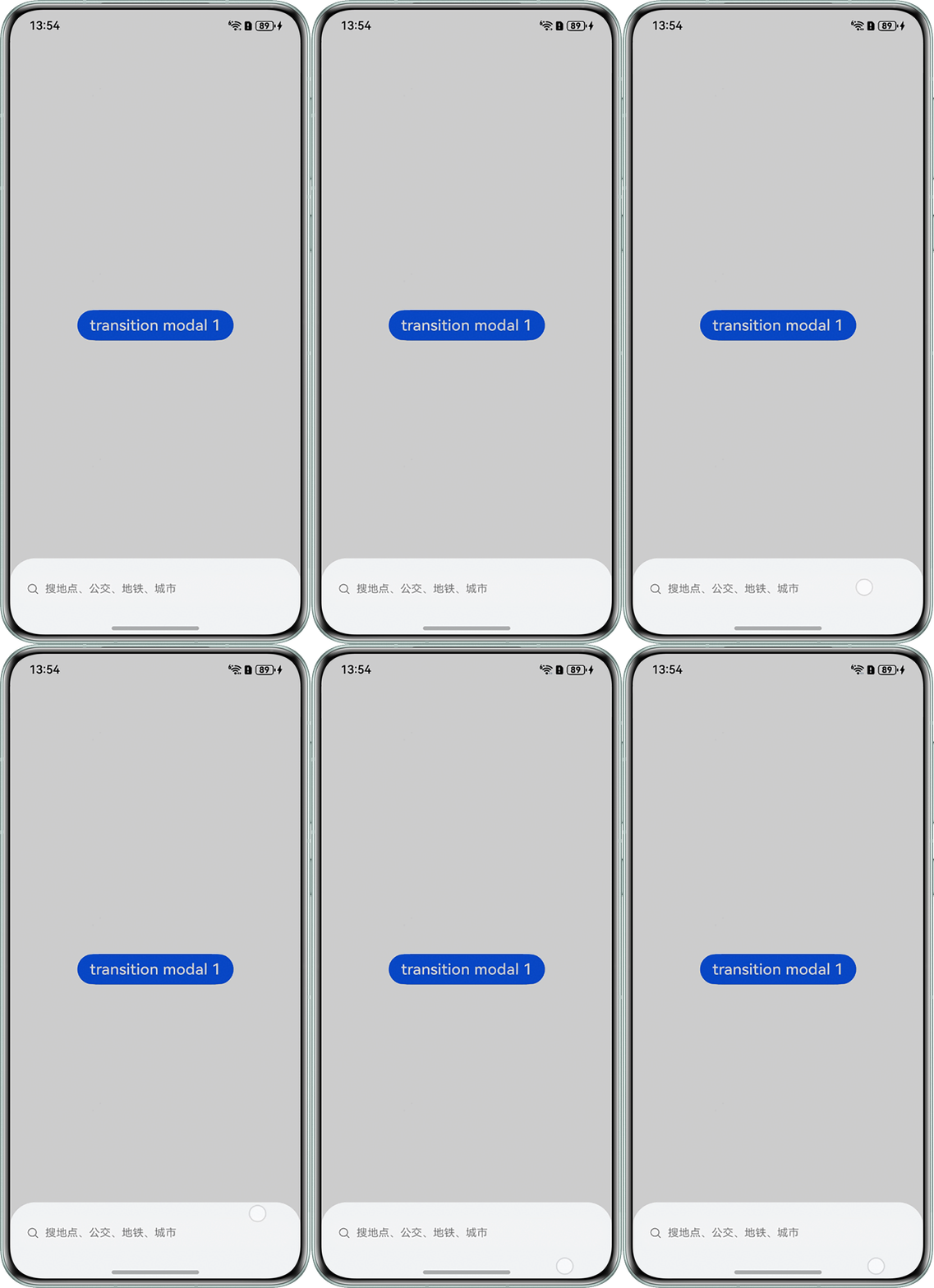
效果图如下: